
201271050130-滕江南-《面向对象程序设计(java)》第十五周学习总结
201271050130-滕江南-《面向对象程序设计(java)》第十五周学习总结
博文正文开头格式:(2分)
|
项目 |
内容 |
|
这个作业属于哪个课程 |
https://www.cnblogs.com/nwnu-daizh/ |
|
这个作业的要求在哪里 |
https://www.cnblogs.com/nwnu-daizh/p/11435127.html |
|
作业学习目标 |
(1) 掌握菜单组件用途及常用API; (2) 掌握对话框组件用途及常用API; (3) 学习设计简单应用程序的GUI。 |
随笔博文正文内容包括:
第一部分:总结菜单、对话框两类组件用途及常用API(30分)
1、菜单
首先创建一个菜单栏 菜单栏是一个可以添加到容器组件任何位置 的组件。通常放置在框架的顶部。 JMenuBarmenuBar=new JMenuBar();
(1)调用框架的setJMenuBar方法可将一个菜单栏对 象添加到框架上 frame.setJMenuBar(menuBar);
(2)创建菜单对象,并将菜单对象添加到菜单栏中 JMenueditMenu=new Jmenu("Edit"); menuBar.add(editMenu);
(3)向菜单对象添加一个菜单项。向菜单对象添加一个菜单项。 JMenItempasteItem=new JMenItem(); editMenu.add(pasteItem);
(4)向菜单对象添加分隔符行。 editMenu.addSeperator(); 向菜单对象项添加子菜单。 JMenuoptionsMenu=new Jmenu(“option”); editMenu.add(optionsMenu);
2、对话框
选项对话框 创建对话框 数据选择 文件对话框 颜色选择器
(1)对话框是一种大小不能变化、不能有菜单的容器窗口; 对话框不能作为一个应用程序的主框架,而必须包含在其 他的容器中。
(2)选项对话框:JOptionPane提供的对话框是模式对话框。当模 式对话框显示时,它不允许用户输入到程序的 其他的窗口。使用JOptionPane,可以创建和自 定义问题、信息、警告和错误等几种类型的对 话框。
(3)数据交换:输入对话框含有供用户输入文本的文本框、一个确认和取 消按钮,是有模式对话框。当输入对话框可见时,要求用户 输入一个字符串。
(4)文件对话框:专门用于对文件(或目录)进行浏览和选择的对 话框,常用的构造方法: – JFileChooser():根据用户的缺省目录创建文件对话框 – JFileChooser(File currentDirectory):根据File型参数 currentDirectory指定的目录创建文件对话框
(5)颜色对话框: javax.swing包中的JColorChooser类的静态方 法: public static Color showDialog(Component component, String title, Color initialColor)创建一个颜色对话框
(6)参数component指定对话框所依赖的组件,title 指定对话框的标题;initialColor 指定对话框返回 的初始颜色,即对话框消失后,返回的默认值。 颜色对话框可根据用户在颜色对话框中选择的颜 色返回一个颜色对象.
第二部分:实验部分
实验1:
测试程序1
在elipse IDE中调试运行教材512页程序12-8,结合运行结果理解程序;
package menu;

import java.awt.*;

import javax.swing.*;

/**

 * @version 1.25 2018-04-10

 * @author Cay Horstmann

 */

public class MenuTest

{

   public static void main(String[] args)

   {

      EventQueue.invokeLater(() -> {

         MenuFrame frame = new MenuFrame();

         frame.setTitle("MenuTest");

         frame.setDefaultCloseOperation(JFrame.EXIT_ON_CLOSE);

         frame.setVisible(true);

      });

   }

}
package menu;

import java.awt.event.*;

import javax.swing.*;

/**

 * A frame with a sample menu bar.

 */

public class MenuFrame extends JFrame

{

   private static final int DEFAULT_WIDTH = 300;

   private static final int DEFAULT_HEIGHT = 200;

   private Action saveAction;

   private Action saveAsAction;

   private JCheckBoxMenuItem readonlyItem;

   private JPopupMenu popup;

   /**

    * A sample action that prints the action name to System.out.

    */

   class TestAction extends AbstractAction

   {

      public TestAction(String name)

      {

         super(name);

      }

      public void actionPerformed(ActionEvent event)

      {

         System.out.println(getValue(Action.NAME) + " selected.");

      }

   }

   public MenuFrame()

   {

      setSize(DEFAULT_WIDTH, DEFAULT_HEIGHT);

      JMenu fileMenu = new JMenu("File");

      fileMenu.add(new TestAction("New"));

      JMenuItem openItem = fileMenu.add(new TestAction("Open"));

      openItem.setAccelerator(KeyStroke.getKeyStroke("ctrl O"));

      fileMenu.addSeparator();

      saveAction = new TestAction("Save");

      JMenuItem saveItem = fileMenu.add(saveAction);

      saveItem.setAccelerator(KeyStroke.getKeyStroke("ctrl S"))

      saveAsAction = new TestAction("Save As");

      fileMenu.add(saveAsAction);

      fileMenu.addSeparator();

      fileMenu.add(new AbstractAction("Exit")

         {

            public void actionPerformed(ActionEvent event)

            {

               System.exit(0);

            }

         });

      readonlyItem = new JCheckBoxMenuItem("Read-only");

      readonlyItem.addActionListener(new ActionListener()

         {

            public void actionPerformed(ActionEvent event)

            {

               boolean saveOk = !readonlyItem.isSelected();

               saveAction.setEnabled(saveOk);

               saveAsAction.setEnabled(saveOk);

            }

         });

      ButtonGroup group = new ButtonGroup();

      JRadioButtonMenuItem insertItem = new JRadioButtonMenuItem("Insert");

      insertItem.setSelected(true);

      JRadioButtonMenuItem overtypeItem = new JRadioButtonMenuItem("Overtype")

      group.add(insertItem);

      group.add(overtypeItem);

      TestAction cutAction = new TestAction("Cut");

      cutAction.putValue(Action.SMALL_ICON, new ImageIcon("cut.gif"));

      TestAction copyAction = new TestAction("Copy");

      copyAction.putValue(Action.SMALL_ICON, new ImageIcon("copy.gif"));

      TestAction pasteAction = new TestAction("Paste");

      pasteAction.putValue(Action.SMALL_ICON, new ImageIcon("paste.gif"));

      JMenu editMenu = new JMenu("Edit");

      editMenu.add(cutAction);

      editMenu.add(copyAction);

      editMenu.add(pasteAction);

      JMenu optionMenu = new JMenu("Options");

      optionMenu.add(readonlyItem);

      optionMenu.addSeparator();

      optionMenu.add(insertItem);

      optionMenu.add(overtypeItem);

      editMenu.addSeparator();

      editMenu.add(optionMenu);

      JMenu helpMenu = new JMenu("Help");

      helpMenu.setMnemonic('H');

      JMenuItem indexItem = new JMenuItem("Index");

      indexItem.setMnemonic('I');

      helpMenu.add(indexItem);

      TestAction aboutAction = new TestAction("About");

      aboutAction.putValue(Action.MNEMONIC_KEY, new Integer('A'));

      helpMenu.add(aboutAction);

      JMenuBar menuBar = new JMenuBar();

      setJMenuBar(menuBar);

      menuBar.add(fileMenu);

      menuBar.add(editMenu);

      menuBar.add(helpMenu);

      popup = new JPopupMenu();

      popup.add(cutAction);

      popup.add(copyAction);

      popup.add(pasteAction);

      JPanel panel = new JPanel();

      panel.setComponentPopupMenu(popup);

      add(panel);

   }

}
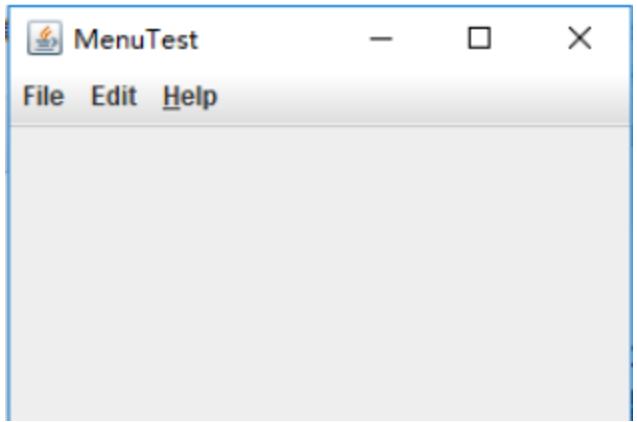
运行结果如下:
测试程序2
在elipse IDE中调试运行教材517页程序12-9,结合运行结果理解程序;
package toolBar;

import java.awt.*;

import javax.swing.*;

/**

 * @version 1.14 2015-06-12

 * @author Cay Horstmann

 */

public class ToolBarTest

{

   public static void main(String[] args)

   {

      EventQueue.invokeLater(() -> {

         ToolBarFrame frame = new ToolBarFrame();

         frame.setTitle("ToolBarTest");

         frame.setDefaultCloseOperation(JFrame.EXIT_ON_CLOSE);

         frame.setVisible(true);

      });

   }

}
package toolBar;

import java.awt.*;

import java.awt.event.*;

import javax.swing.*;

/**

 * 带有工具栏和菜单的框架,用于颜色变化。

 */

public class ToolBarFrame extends JFrame

{

   private static final int DEFAULT_WIDTH = ;

   private static final int DEFAULT_HEIGHT = ;

   private JPanel panel;

   public ToolBarFrame()

   {

      setSize(DEFAULT_WIDTH, DEFAULT_HEIGHT);

      // 添加颜色变化面板

      panel = new JPanel();

      add(panel, BorderLayout.CENTER);

      // 设置动作

      Action blueAction = new ColorAction("Blue", new ImageIcon("blue-ball.gif"), Color.BLUE);

      Action yellowAction = new ColorAction("Yellow", new ImageIcon("yellow-ball.gif"),

            Color.YELLOW);

      Action redAction = new ColorAction("Red", new ImageIcon("red-ball.gif"), Color.RED);

      Action exitAction = new AbstractAction("Exit", new ImageIcon("exit.gif"))

         {

            public void actionPerformed(ActionEvent event)

            {

               System.exit();

            }

         };

      exitAction.putValue(Action.SHORT_DESCRIPTION, "Exit");

      // 填充工具栏

      JToolBar bar = new JToolBar();

      bar.add(blueAction);

      bar.add(yellowAction);

      bar.add(redAction);

      bar.addSeparator();

      bar.add(exitAction);

      add(bar, BorderLayout.NORTH);

      // 填充菜单

      JMenu menu = new JMenu("Color");

      menu.add(yellowAction);

      menu.add(blueAction);

      menu.add(redAction);

      menu.add(exitAction);

      JMenuBar menuBar = new JMenuBar();

      menuBar.add(menu);

      setJMenuBar(menuBar);

   }

   /**

    * 颜色动作将帧的背景设置为给定的颜色。

    */

   class ColorAction extends AbstractAction

   {

      public ColorAction(String name, Icon icon, Color c)

      {

         putValue(Action.NAME, name);

         putValue(Action.SMALL_ICON, icon);

         putValue(Action.SHORT_DESCRIPTION, name + " background");

         putValue("Color", c);

      }

      public void actionPerformed(ActionEvent event)

      {

         Color c = (Color) getValue("Color");

         panel.setBackground(c);

      }

   }

}
运行情况如下:

测试程序3
在elipse IDE中调试运行教材544页程序12-15、12-16,结合运行结果理解程序;
package optionDialog;

import java.awt.*;

import javax.swing.*;

/**

 * @version 1.34 2015-06-12

 * @author Cay Horstmann

 */

public class OptionDialogTest

{

   public static void main(String[] args)

   {

      EventQueue.invokeLater(() -> {

         JFrame frame = new OptionDialogFrame();

         frame.setTitle("OptionDialogTest");

         frame.setDefaultCloseOperation(JFrame.EXIT_ON_CLOSE);

         frame.setVisible(true);

      });

   }

}
package optionDialog;
import javax.swing.*;
/**
* A panel with radio buttons inside a titled border.
*/
public class ButtonPanel extends JPanel
{
private ButtonGroup group;/**
* Constructs a button panel.
* @param title the title shown in the border
* @param options an array of radio button labels
*/
public ButtonPanel(String title, String... options)
{
setBorder(BorderFactory.createTitledBorder(BorderFactory.createEtchedBorder(), title));
setLayout(new BoxLayout(this, BoxLayout.Y_AXIS));
group = new ButtonGroup();// make one radio button for each option
for (String option : options)
{
JRadioButton b = new JRadioButton(option);
b.setActionCommand(option);
add(b);
group.add(b);
b.setSelected(option == options[0]);
}
}/**
* Gets the currently selected option.
* @return the label of the currently selected radio button.
*/
public String getSelection()
{
return group.getSelection().getActionCommand();
}
}package optionDialog; import java.awt.*;
import java.awt.event.*;
import java.awt.geom.*;
import java.util.*;
import javax.swing.*; /**
* A frame that contains settings for selecting various option dialogs.
*/
public class OptionDialogFrame extends JFrame
{
private ButtonPanel typePanel;
private ButtonPanel messagePanel;
private ButtonPanel messageTypePanel;
private ButtonPanel optionTypePanel;
private ButtonPanel optionsPanel;
private ButtonPanel inputPanel;
private String messageString = "Message";
private Icon messageIcon = new ImageIcon("blue-ball.gif");
private Object messageObject = new Date();
private Component messageComponent = new SampleComponent(); public OptionDialogFrame()
{
JPanel gridPanel = new JPanel();
gridPanel.setLayout(new GridLayout(, )); typePanel = new ButtonPanel("Type", "Message", "Confirm", "Option", "Input");
messageTypePanel = new ButtonPanel("Message Type", "ERROR_MESSAGE", "INFORMATION_MESSAGE",
"WARNING_MESSAGE", "QUESTION_MESSAGE", "PLAIN_MESSAGE");
messagePanel = new ButtonPanel("Message", "String", "Icon", "Component", "Other",
"Object[]");
optionTypePanel = new ButtonPanel("Confirm", "DEFAULT_OPTION", "YES_NO_OPTION",
"YES_NO_CANCEL_OPTION", "OK_CANCEL_OPTION");
optionsPanel = new ButtonPanel("Option", "String[]", "Icon[]", "Object[]");
inputPanel = new ButtonPanel("Input", "Text field", "Combo box"); gridPanel.add(typePanel);
gridPanel.add(messageTypePanel);
gridPanel.add(messagePanel);
gridPanel.add(optionTypePanel);
gridPanel.add(optionsPanel);
gridPanel.add(inputPanel); // add a panel with a Show button JPanel showPanel = new JPanel();
JButton showButton = new JButton("Show");
showButton.addActionListener(new ShowAction());
showPanel.add(showButton); add(gridPanel, BorderLayout.CENTER);
add(showPanel, BorderLayout.SOUTH);
pack();
} /**
* Gets the currently selected message.
* @return a string, icon, component, or object array, depending on the Message panel selection
*/
public Object getMessage()
{
String s = messagePanel.getSelection();
if (s.equals("String")) return messageString;
else if (s.equals("Icon")) return messageIcon;
else if (s.equals("Component")) return messageComponent;
else if (s.equals("Object[]")) return new Object[] { messageString, messageIcon,
messageComponent, messageObject };
else if (s.equals("Other")) return messageObject;
else return null;
} /**
* Gets the currently selected options.
* @return an array of strings, icons, or objects, depending on the Option panel selection
*/
public Object[] getOptions()
{
String s = optionsPanel.getSelection();
if (s.equals("String[]")) return new String[] { "Yellow", "Blue", "Red" };
else if (s.equals("Icon[]")) return new Icon[] { new ImageIcon("yellow-ball.gif"),
new ImageIcon("blue-ball.gif"), new ImageIcon("red-ball.gif") };
else if (s.equals("Object[]")) return new Object[] { messageString, messageIcon,
messageComponent, messageObject };
else return null;
} /**
* Gets the selected message or option type
* @param panel the Message Type or Confirm panel
* @return the selected XXX_MESSAGE or XXX_OPTION constant from the JOptionPane class
*/
public int getType(ButtonPanel panel)
{
String s = panel.getSelection();
try
{
return JOptionPane.class.getField(s).getInt(null);
}
catch (Exception e)
{
return -;
}
} /**
* The action listener for the Show button shows a Confirm, Input, Message, or Option dialog
* depending on the Type panel selection.
*/
private class ShowAction implements ActionListener
{
public void actionPerformed(ActionEvent event)
{
if (typePanel.getSelection().equals("Confirm")) JOptionPane.showConfirmDialog(
OptionDialogFrame.this, getMessage(), "Title", getType(optionTypePanel),
getType(messageTypePanel));
else if (typePanel.getSelection().equals("Input"))
{
if (inputPanel.getSelection().equals("Text field")) JOptionPane.showInputDialog(
OptionDialogFrame.this, getMessage(), "Title", getType(messageTypePanel));
else JOptionPane.showInputDialog(OptionDialogFrame.this, getMessage(), "Title",
getType(messageTypePanel), null, new String[] { "Yellow", "Blue", "Red" },
"Blue");
}
else if (typePanel.getSelection().equals("Message")) JOptionPane.showMessageDialog(
OptionDialogFrame.this, getMessage(), "Title", getType(messageTypePanel));
else if (typePanel.getSelection().equals("Option")) JOptionPane.showOptionDialog(
OptionDialogFrame.this, getMessage(), "Title", getType(optionTypePanel),
getType(messageTypePanel), null, getOptions(), getOptions()[]);
}
}
} /**
* A component with a painted surface
*/ class SampleComponent extends JComponent
{
public void paintComponent(Graphics g)
{
Graphics2D g2 = (Graphics2D) g;
Rectangle2D rect = new Rectangle2D.Double(, , getWidth() - , getHeight() - );
g2.setPaint(Color.YELLOW);
g2.fill(rect);
g2.setPaint(Color.BLUE);
g2.draw(rect);
} public Dimension getPreferredSize()
{
return new Dimension(, );
}
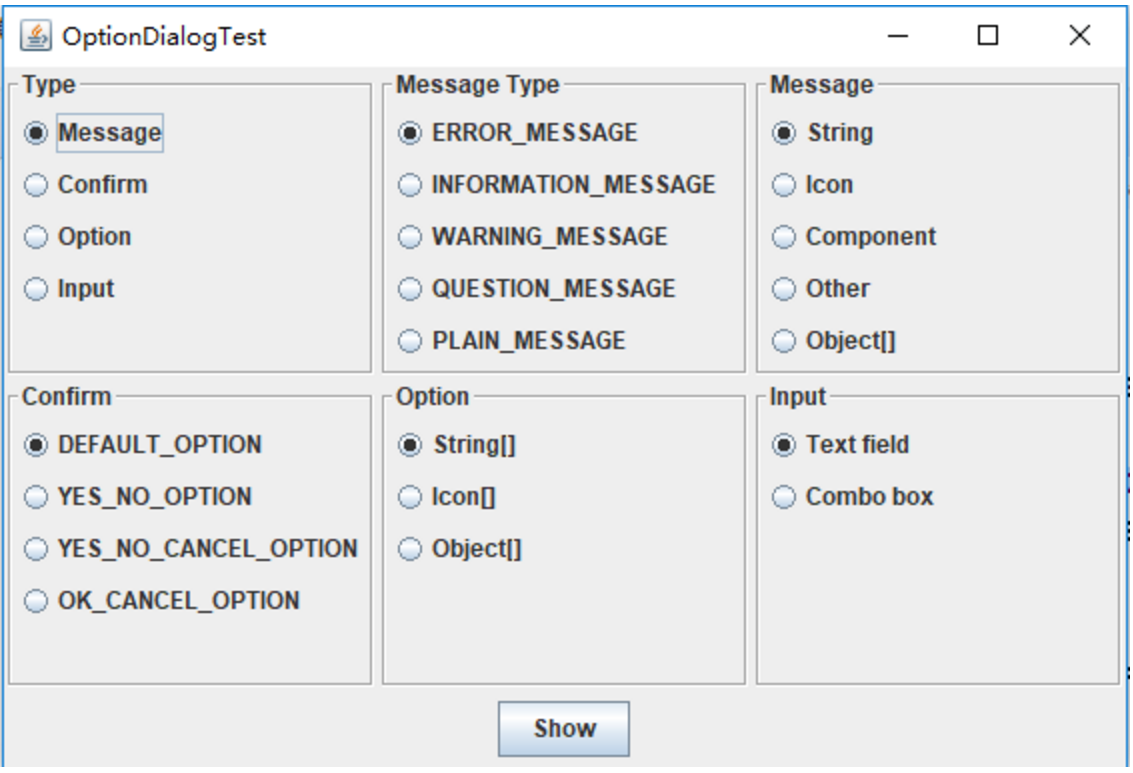
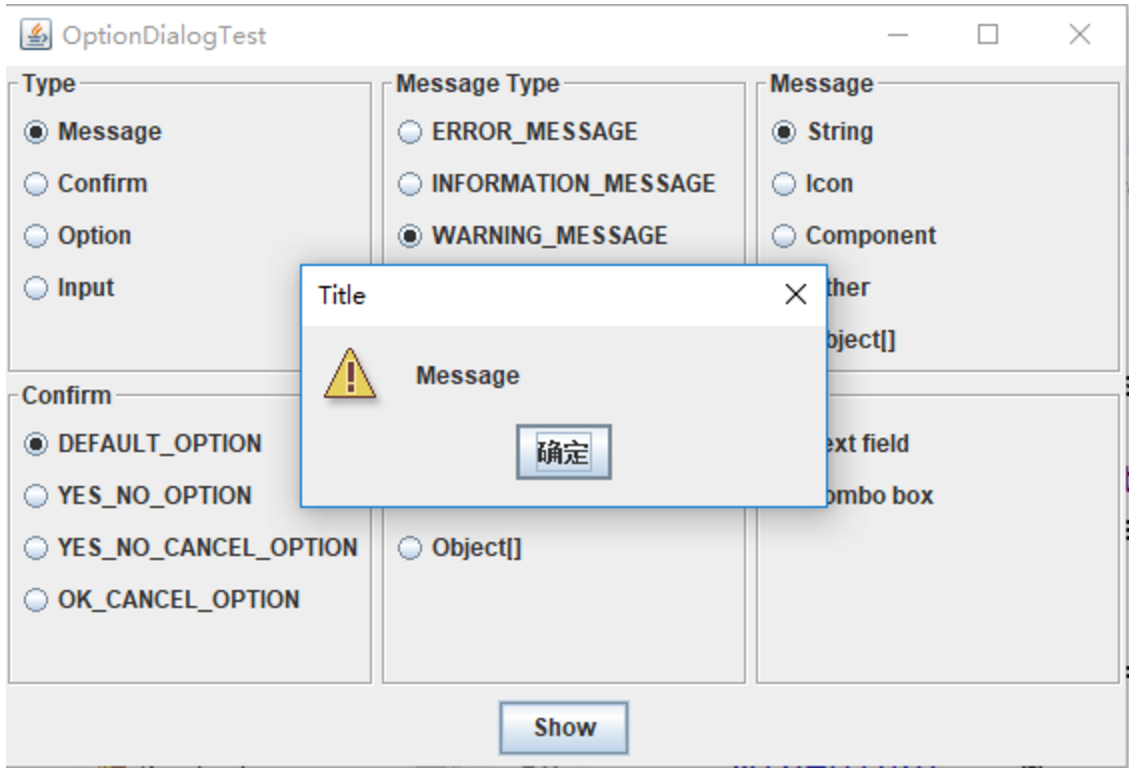
}运行结果如下:
测试程序4
在elipse IDE中调试运行教材552页程序12-17、12-18,结合运行结果理解程序;
package dialog;

import java.awt.*;

import javax.swing.*;

/**

 * @version 1.34 2012-06-12

 * @author Cay Horstmann

 */

public class DialogTest

{

   public static void main(String[] args)

   {

      EventQueue.invokeLater(() -> {

         JFrame frame = new DialogFrame();

         frame.setTitle("DialogTest");

         frame.setDefaultCloseOperation(JFrame.EXIT_ON_CLOSE);

         frame.setVisible(true);

      });

   }

}
package dialog; import javax.swing.JFrame;
import javax.swing.JMenu;
import javax.swing.JMenuBar;
import javax.swing.JMenuItem; /**
* A frame with a menu whose File->About action shows a dialog.
*/
public class DialogFrame extends JFrame
{
private static final int DEFAULT_WIDTH = ;
private static final int DEFAULT_HEIGHT = ;
private AboutDialog dialog; public DialogFrame()
{
setSize(DEFAULT_WIDTH, DEFAULT_HEIGHT); // Construct a File menu. JMenuBar menuBar = new JMenuBar();
setJMenuBar(menuBar);
JMenu fileMenu = new JMenu("File");
menuBar.add(fileMenu); // Add About and Exit menu items. // The About item shows the About dialog. JMenuItem aboutItem = new JMenuItem("About");
aboutItem.addActionListener(event -> {
if (dialog == null) // first time
dialog = new AboutDialog(DialogFrame.this);
dialog.setVisible(true); // pop up dialog
});
fileMenu.add(aboutItem); // The Exit item exits the program. JMenuItem exitItem = new JMenuItem("Exit");
exitItem.addActionListener(event -> System.exit());
fileMenu.add(exitItem);
}
}package dialog; import java.awt.BorderLayout; import javax.swing.JButton;
import javax.swing.JDialog;
import javax.swing.JFrame;
import javax.swing.JLabel;
import javax.swing.JPanel; /**
* A sample modal dialog that displays a message and waits for the user to click the OK button.
*/
public class AboutDialog extends JDialog
{
public AboutDialog(JFrame owner)
{
super(owner, "About DialogTest", true); // add HTML label to center add(
new JLabel(
"<html><h1><i>Core Java</i></h1><hr>By Cay Horstmann</html>"),
BorderLayout.CENTER); // OK button closes the dialog JButton ok = new JButton("OK");
ok.addActionListener(event -> setVisible(false)); // add OK button to southern border JPanel panel = new JPanel();
panel.add(ok);
add(panel, BorderLayout.SOUTH); pack();
}
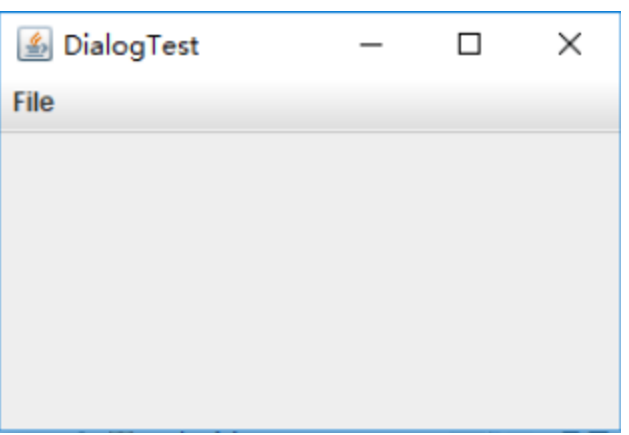
}运行结果如下:
实验1:
测试程序5
在elipse IDE中调试运行教材556页程序12-19、12-20,结合运行结果理解程序;
package dataExchange;

import java.awt.*;

import java.awt.event.*;

import javax.swing.*;

/**

 * A frame with a menu whose File->Connect action shows a password dialog.

 */

public class DataExchangeFrame extends JFrame

{

   public static final int TEXT_ROWS = ;

   public static final int TEXT_COLUMNS = ;

   private PasswordChooser dialog = null;

   private JTextArea textArea;

   public DataExchangeFrame()

   {

      // 建构档案选单

      JMenuBar mbar = new JMenuBar();

      setJMenuBar(mbar);

      JMenu fileMenu = new JMenu("File");

      mbar.add(fileMenu);

      //添加连接和退出菜单项

      JMenuItem connectItem = new JMenuItem("Connect");

      connectItem.addActionListener(new ConnectAction());

      fileMenu.add(connectItem);

      // 退出项退出程序

      JMenuItem exitItem = new JMenuItem("Exit");

      exitItem.addActionListener(event -> System.exit());

      fileMenu.add(exitItem);

      textArea = new JTextArea(TEXT_ROWS, TEXT_COLUMNS);

      add(new JScrollPane(textArea), BorderLayout.CENTER);

      pack();

   }

   /**

    * The Connect action pops up the password dialog.

    */

   private class ConnectAction implements ActionListener

   {

      public void actionPerformed(ActionEvent event)

      {

         // 如果第一次,构造对话框

         if (dialog == null) dialog = new PasswordChooser();

         //设定预设值

         dialog.setUser(new User("yourname", null));

         //弹出对话框

         if (dialog.showDialog(DataExchangeFrame.this, "Connect"))

         {

            // 如果接受,则检索用户输入

            User u = dialog.getUser();

            textArea.append("user name = " + u.getName() + ", password = "

                  + (new String(u.getPassword())) + "\n");

         }

      }

   }

}
package dataExchange; import java.awt.*;
import javax.swing.*; /**
* @version 1.34 2015-06-12
* @author Cay Horstmann
*/
public class DataExchangeTest
{
public static void main(String[] args)
{
EventQueue.invokeLater(() -> {
JFrame frame = new DataExchangeFrame();
frame.setTitle("DataExchangeTest");
frame.setDefaultCloseOperation(JFrame.EXIT_ON_CLOSE);
frame.setVisible(true);
});
}
}package dataExchange; import java.awt.BorderLayout;
import java.awt.Component;
import java.awt.Frame;
import java.awt.GridLayout; import javax.swing.JButton;
import javax.swing.JDialog;
import javax.swing.JLabel;
import javax.swing.JPanel;
import javax.swing.JPasswordField;
import javax.swing.JTextField;
import javax.swing.SwingUtilities; /**
* A password chooser that is shown inside a dialog
*/
public class PasswordChooser extends JPanel
{
private JTextField username;
private JPasswordField password;
private JButton okButton;
private boolean ok;
private JDialog dialog; public PasswordChooser()
{
setLayout(new BorderLayout()); // 构造带有用户名和密码字段的面板 JPanel panel = new JPanel();
panel.setLayout(new GridLayout(, ));
panel.add(new JLabel("User name:"));
panel.add(username = new JTextField(""));
panel.add(new JLabel("Password:"));
panel.add(password = new JPasswordField(""));
add(panel, BorderLayout.CENTER); //创建“确定”并取消终止对话框的按钮 okButton = new JButton("Ok");
okButton.addActionListener(event -> {
ok = true;
dialog.setVisible(false);
}); JButton cancelButton = new JButton("Cancel");
cancelButton.addActionListener(event -> dialog.setVisible(false)); // 添加按钮到南部边界 JPanel buttonPanel = new JPanel();
buttonPanel.add(okButton);
buttonPanel.add(cancelButton);
add(buttonPanel, BorderLayout.SOUTH);
} /**
* Sets the dialog defaults.
* @param u the default user information
*/
public void setUser(User u)
{
username.setText(u.getName());
} /**
* Gets the dialog entries.
* @return a User object whose state represents the dialog entries
*/
public User getUser()
{
return new User(username.getText(), password.getPassword());
} /**
* Show the chooser panel in a dialog
* @param parent a component in the owner frame or null
* @param title the dialog window title
*/
public boolean showDialog(Component parent, String title)
{
ok = false; // 找到所有者框架
Frame owner = null;
if (parent instanceof Frame)
owner = (Frame) parent;
else
owner = (Frame) SwingUtilities.getAncestorOfClass(Frame.class, parent); // 如果第一次,或者所有者已经改变,请创建新的对话框 if (dialog == null || dialog.getOwner() != owner)
{
dialog = new JDialog(owner, true);
dialog.add(this);
dialog.getRootPane().setDefaultButton(okButton);
dialog.pack();
} // 设定标题及显示对话框 dialog.setTitle(title);
dialog.setVisible(true);
return ok;
}
}package dataExchange; /**
* A user has a name and password. For security reasons, the password is stored as a char[], not a
* String.
*/
public class User
{
private String name;
private char[] password; public User(String aName, char[] aPassword)
{
name = aName;
password = aPassword;
} public String getName()
{
return name;
} public char[] getPassword()
{
return password;
} public void setName(String aName)
{
name = aName;
} public void setPassword(char[] aPassword)
{
password = aPassword;
}
}运行结果如下:
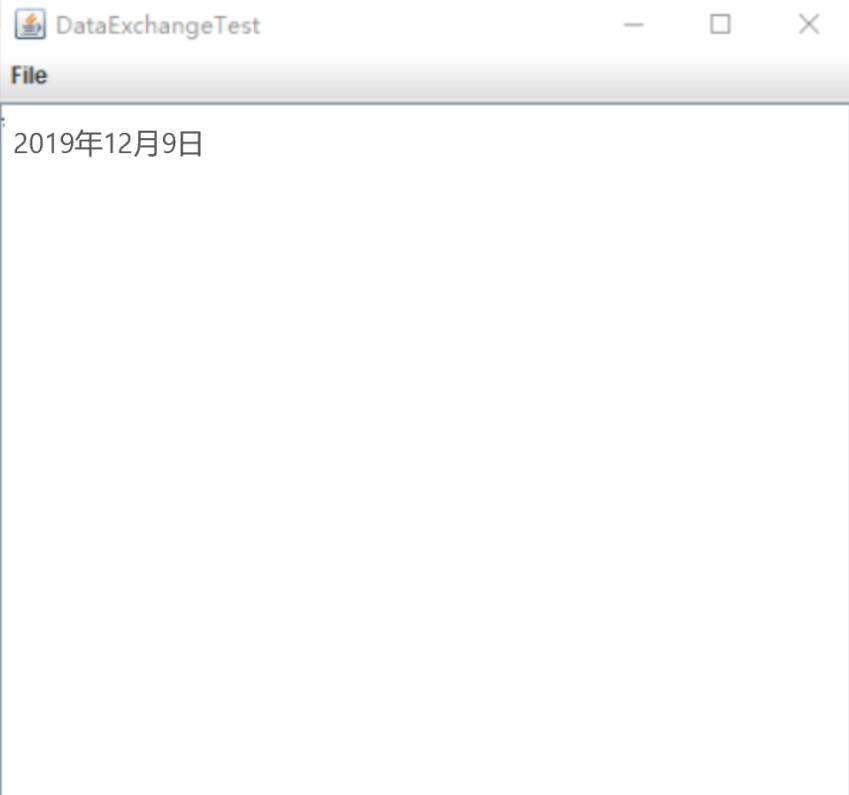
测试程序6
在elipse IDE中调试运行教材556页程序12-21、12-22、12-23,结合程序运行结果理解程序;
package fileChooser;

import java.awt.*;

import javax.swing.*;

/**

 * @version 1.25 2015-06-12

 * @author Cay Horstmann

 */

public class FileChooserTest

{

   public static void main(String[] args)

   {

      EventQueue.invokeLater(() -> {

         JFrame frame = new ImageViewerFrame();

         frame.setTitle("FileChooserTest");

         frame.setDefaultCloseOperation(JFrame.EXIT_ON_CLOSE);

         frame.setVisible(true);

      });

   }

}
package fileChooser; import java.io.*;
import javax.swing.*;
import javax.swing.filechooser.*;
import javax.swing.filechooser.FileFilter; /**
* A file view that displays an icon for all files that match a file filter.
*/
public class FileIconView extends FileView
{
private FileFilter filter;
private Icon icon; /**
* Constructs a FileIconView.
* @param aFilter a file filter--all files that this filter accepts will be shown
* with the icon.
* @param anIcon--the icon shown with all accepted files.
*/
public FileIconView(FileFilter aFilter, Icon anIcon)
{
filter = aFilter;
icon = anIcon;
} public Icon getIcon(File f)
{
if (!f.isDirectory() && filter.accept(f)) return icon;
else return null;
}
}package fileChooser; import java.awt.*;
import java.io.*; import javax.swing.*; /**
* A file chooser accessory that previews images.
*/
public class ImagePreviewer extends JLabel
{
/**
* Constructs an ImagePreviewer.
* @param chooser the file chooser whose property changes trigger an image
* change in this previewer
*/
public ImagePreviewer(JFileChooser chooser)
{
setPreferredSize(new Dimension(, ));
setBorder(BorderFactory.createEtchedBorder()); chooser.addPropertyChangeListener(event -> {
if (event.getPropertyName() == JFileChooser.SELECTED_FILE_CHANGED_PROPERTY)
{
//用户选择了一个新文件
File f = (File) event.getNewValue();
if (f == null)
{
setIcon(null);
return;
} //将影像读取成图示
ImageIcon icon = new ImageIcon(f.getPath()); // 如果图标太大,无法安装,请缩放
if (icon.getIconWidth() > getWidth())
icon = new ImageIcon(icon.getImage().getScaledInstance(
getWidth(), -, Image.SCALE_DEFAULT)); setIcon(icon);
}
});
}
}package fileChooser; import java.io.*; import javax.swing.*;
import javax.swing.filechooser.*;
import javax.swing.filechooser.FileFilter; /**
* A frame that has a menu for loading an image and a display area for the
* loaded image.
*/
public class ImageViewerFrame extends JFrame
{
private static final int DEFAULT_WIDTH = ;
private static final int DEFAULT_HEIGHT = ;
private JLabel label;
private JFileChooser chooser; public ImageViewerFrame()
{
setSize(DEFAULT_WIDTH, DEFAULT_HEIGHT); // 设置菜单栏
JMenuBar menuBar = new JMenuBar();
setJMenuBar(menuBar); JMenu menu = new JMenu("File");
menuBar.add(menu); JMenuItem openItem = new JMenuItem("Open");
menu.add(openItem);
openItem.addActionListener(event -> {
chooser.setCurrentDirectory(new File(".")); // 显示文件选择器对话框
int result = chooser.showOpenDialog(ImageViewerFrame.this); // 如果图像文件被接受,将其设置为标签的图标
if (result == JFileChooser.APPROVE_OPTION)
{
String name = chooser.getSelectedFile().getPath();
label.setIcon(new ImageIcon(name));
pack();
}
}); JMenuItem exitItem = new JMenuItem("Exit");
menu.add(exitItem);
exitItem.addActionListener(event -> System.exit()); //使用标签显示影像
label = new JLabel();
add(label); // 设置文件选择器
chooser = new JFileChooser(); //接受所有以之结尾的影像档案。JPG。杰伯图形交换格式
FileFilter filter = new FileNameExtensionFilter(
"Image files", "jpg", "jpeg", "gif");
chooser.setFileFilter(filter); chooser.setAccessory(new ImagePreviewer(chooser)); chooser.setFileView(new FileIconView(filter, new ImageIcon("palette.gif")));
}
}运行结果如下:
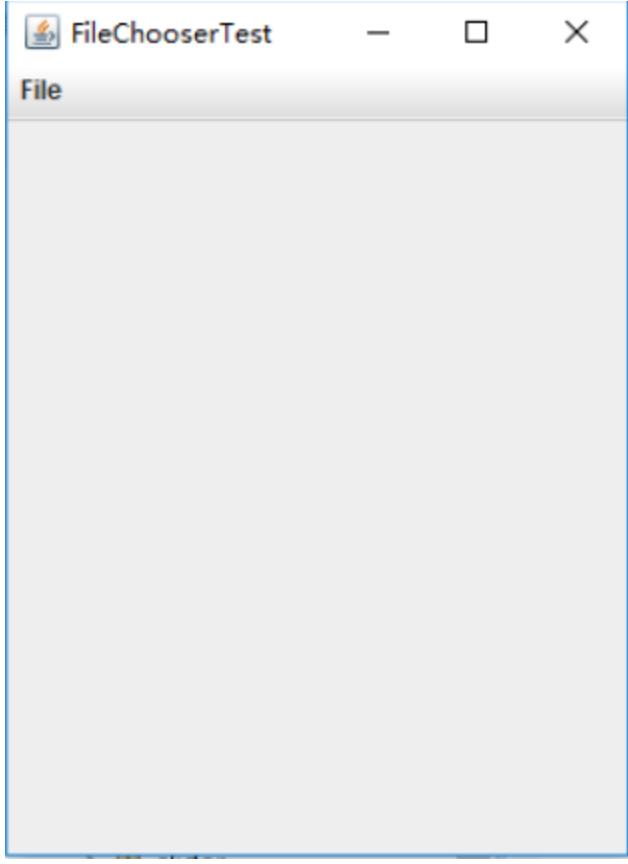
测试程序7
在elipse IDE中调试运行教材570页程序12-24,结合运行结果理解程序;
package colorChooser;

import javax.swing.*;

/**

 * A frame with a color chooser panel

 */

public class ColorChooserFrame extends JFrame

{

   private static final int DEFAULT_WIDTH = ;

   private static final int DEFAULT_HEIGHT = ;

   public ColorChooserFrame()

   {

      setSize(DEFAULT_WIDTH, DEFAULT_HEIGHT);

      // 添加颜色选择器面板到框架

      ColorChooserPanel panel = new ColorChooserPanel();

      add(panel);

   }

}
package colorChooser; import java.awt.Color;
import java.awt.Frame;
import java.awt.event.ActionEvent;
import java.awt.event.ActionListener; import javax.swing.JButton;
import javax.swing.JColorChooser;
import javax.swing.JDialog;
import javax.swing.JPanel; /**
* A panel with buttons to pop up three types of color choosers
*/
public class ColorChooserPanel extends JPanel
{
public ColorChooserPanel()
{
JButton modalButton = new JButton("Modal");
modalButton.addActionListener(new ModalListener());
add(modalButton); JButton modelessButton = new JButton("Modeless");
modelessButton.addActionListener(new ModelessListener());
add(modelessButton); JButton immediateButton = new JButton("Immediate");
immediateButton.addActionListener(new ImmediateListener());
add(immediateButton);
} /**
* This listener pops up a modal color chooser
*/
private class ModalListener implements ActionListener
{
public void actionPerformed(ActionEvent event)
{
Color defaultColor = getBackground();
Color selected = JColorChooser.showDialog(ColorChooserPanel.this, "Set background",
defaultColor);
if (selected != null) setBackground(selected);
}
} /**
* This listener pops up a modeless color chooser. The panel color is changed when the user
* clicks the OK button.
*/
private class ModelessListener implements ActionListener
{
private JDialog dialog;
private JColorChooser chooser; public ModelessListener()
{
chooser = new JColorChooser();
dialog = JColorChooser.createDialog(ColorChooserPanel.this, "Background Color",
false /* not modal */, chooser,
event -> setBackground(chooser.getColor()),
null /* no Cancel button listener */);
} public void actionPerformed(ActionEvent event)
{
chooser.setColor(getBackground());
dialog.setVisible(true);
}
} /**
* This listener pops up a modeless color chooser. The panel color is changed immediately when
* the user picks a new color.
*/
private class ImmediateListener implements ActionListener
{
private JDialog dialog;
private JColorChooser chooser; public ImmediateListener()
{
chooser = new JColorChooser();
chooser.getSelectionModel().addChangeListener(
event -> setBackground(chooser.getColor())); dialog = new JDialog((Frame) null, false /* not modal */);
dialog.add(chooser);
dialog.pack();
} public void actionPerformed(ActionEvent event)
{
chooser.setColor(getBackground());
dialog.setVisible(true);
}
}
}package colorChooser; import java.awt.*;
import javax.swing.*; /**
* @version 1.04 2015-06-12
* @author Cay Horstmann
*/
public class ColorChooserTest
{
public static void main(String[] args)
{
EventQueue.invokeLater(() -> {
JFrame frame = new ColorChooserFrame();
frame.setTitle("ColorChooserTest");
frame.setDefaultCloseOperation(JFrame.EXIT_ON_CLOSE);
frame.setVisible(true);
});
}运行结果如下:
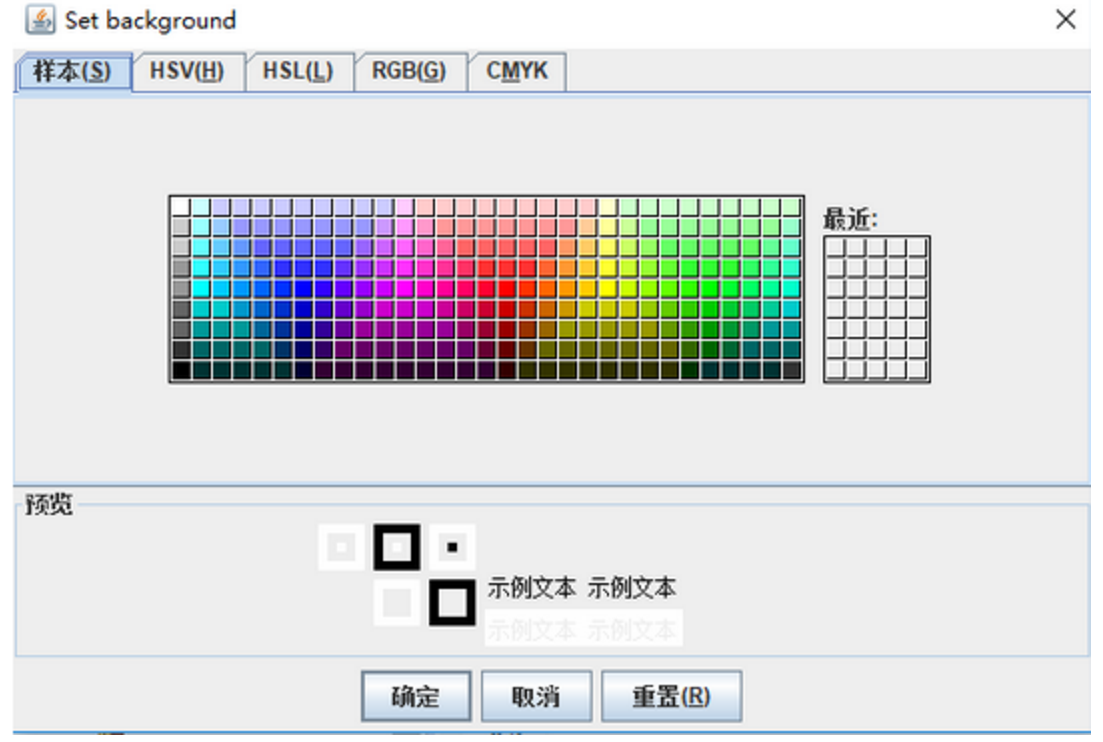
实验总结:(16分)
本周学习了菜单和对话框,按照要求完成了实验的程序测试。之前不知道有整理好的代码可以直接导入,都是自己敲代码进行验证,时间花费得比较多,而且有些程序也没有实现。个人也产生了懈怠情绪,导致部分作业复制粘贴。经过老师的教育,也深刻认真的反省了自己 的错误。我以后会认真完成作业,不懂就问,脚踏实地。
201271050130-滕江南-《面向对象程序设计(java)》第十五周学习总结的更多相关文章
- 201571030332 扎西平措 《面向对象程序设计Java》第八周学习总结
<面向对象程序设计Java>第八周学习总结 项目 内容 这个作业属于哪个课程 https://www.cnblogs.com/nwnu-daizh/ 这个作业的要求在哪里 https: ...
- 201771010118马昕璐《面向对象程序设计java》第八周学习总结
第一部分:理论知识学习部分 1.接口 在Java程序设计语言中,接口不是类,而是对类的一组需求描述,由常量和一组抽象方法组成.Java为了克服单继承的缺点,Java使用了接口,一个类可以实现一个或多个 ...
- 201771010134杨其菊《面向对象程序设计java》第八周学习总结
第八周学习总结 第一部分:理论知识 一.接口.lambda和内部类: Comparator与comparable接口: 1.comparable接口的方法是compareTo,只有一个参数:comp ...
- 201771010134杨其菊《面向对象程序设计java》第七周学习总结
第七周学习总结 第一部分:理论知识 1.继承是面向对象程序设计(Object Oriented Programming-OOP)中软件重用的关键技术.继承机制使用已经定义的类作为基础建立新的类定义,新 ...
- 201871010126 王亚涛《面向对象程序设计 JAVA》 第十三周学习总结
内容 这个作业属于哪个课程 https://www.cnblogs.com/nwnu-daizh/ 这个作业的要求在哪里 https://www.cnblogs.com/nwnu-daizh/p/ ...
- 201777010217-金云馨《面向对象程序设计Java》第八周学习总结
项目 内容 这个作业属于哪个课程 https://www.cnblogs.com/nwnu-daizh/ 这个作业的要求在哪里 https://www.cnblogs.com/nwnu-daizh/p ...
- 201871010126 王亚涛 《面向对象程序设计 (Java)》第十七周学习总结
内容 这个作业属于哪个课程 https://www.cnblogs.com/nwnu-daizh/ 这个作业的要求在哪里 https://www.cnblogs.com/nwnu-daizh/p/12 ...
- 马凯军201771010116《面向对象程序设计Java》第八周学习总结
一,理论知识学习部分 6.1.1 接口概念 两种含义:一,Java接口,Java语言中存在的结构,有特定的语法和结构:二,一个类所具有的方法的特征集合,是一种逻辑上的抽象.前者叫做“Java接口”,后 ...
- 周强201771010141《面向对象程序设计Java》第八周学习总结
一.理论知识学习部分 Java为了克服单继承的缺点,Java使用了接口,一个类可以实现一个或多个接口. 接口体中包含常量定义和方法定义,接口中只进行方法的声明,不提供方法的实现. 类似建立类的继承关系 ...
随机推荐
- [Go] go连接influxdb的库
开启了influxdb后,会监听8086端口下载客户端代码git clone https://github.com/influxdata/influxdb1-client.git $GOPATH/sr ...
- lambda的一個小用法
lambda主要是對流的掌握,當然可以連著寫很多,但是不太容易閲讀 public static void main(String[] args) throws IOException { Path d ...
- CentOS 7 配置SVN 笔记
一.通过yum 安装软件 yum install subversion -y 配置nfs 用来做版本库(略过) 格式 : NFS共享的目录 NFS客户端地址1(参数1,参数2,...) 客户端地址2( ...
- AcWing 29. 删除链表中重复的节点
题目地址 https://www.acwing.com/problem/content/description/27/ 来源:剑指Offer 题目描述在一个排序的链表中,存在重复的结点,请删除该链表中 ...
- NOIP 2012 文化之旅
洛谷 P1078 文化之旅 洛谷传送门 JDOJ 1788: [NOIP2012]文化之旅 T4 JDOJ传送门 Description Input Output Sample Input Input ...
- LG1344 「USACO4.4」Pollutant Control 最小割
问题描述 LG1344 题解 我太菜了,我一开始竟然没有看出这是个最小割裸题... 两个询问. 第一个询问,直接跑最小割就好了. 第二个询问,建图的时候边权建 \(1\) ,代表割掉这条边需要 \(1 ...
- npm install 提示 `gyp: No Xcode or CLT version detected!` MacOS 10.15
https://github.com/nodejs/node-gyp/issues/569 https://github.com/nodejs/node-gyp/issues/1927 解决链接:ht ...
- Python:程序练习题(二)
Python:程序练习题(二) 2.1温度转换程序. 代码如下: t=input("请输入带符号的温度值(如:32C):") if t[-1] in ["C", ...
- 划词标注1——使用svg绘制换行文本并自动识别库中字典数据
业务需求 给出一段文本,自动识别出文本中包含的关键字信息,关键字是库里已知的数据,根据类型的不同显示出不同的颜色 业务分析 1)采用css:文本识别出来后,根据识别出的文本更改对应文本的dom,通过更 ...
- 记录使用echarts的graph类型绘制流程图全过程(二)- 多层关系和圆形图片的设置
本文主要记录在使用echarts的graph类型绘制流程图时候遇到的2个问题:对于圆形图片的剪切和多层关系的设置 图片的设置 如果用echarts默认的symbol参数来显示图片,会显示图片的原始状态 ...