
mybatis-generator生成数据对象
mybatis-generator生成数据对象
步骤一:在pom文件中添加build的插件
  <build>

        <finalName>doudou</finalName>

        <plugins>

            <plugin>

                <groupId>org.mybatis.generator</groupId>

                <artifactId>mybatis-generator-maven-plugin</artifactId>

                <version>1.3.2</version>

                <configuration>

                    <verbose>true</verbose>

                    <overwrite>true</overwrite>

                </configuration>

            </plugin>

        </plugins>

    </build>
步骤二:刷新pom文件,编写generatorConfig.xml
<?xml version="1.0" encoding="UTF-8"?>

<!DOCTYPE generatorConfiguration

        PUBLIC "-//mybatis.org//DTD MyBatis Generator Configuration 1.0//EN"

        "http://mybatis.org/dtd/mybatis-generator-config_1_0.dtd">

<generatorConfiguration>

    <!--导入属性配置-->

    <properties resource="application.properties"></properties>

    <!--指定特定数据库的jdbc驱动jar包的位置-->

    <classPathEntry location="${db.driverLocation}"/>

    <context id="default" targetRuntime="MyBatis3">

        <!-- optional,旨在创建class时,对注释进行控制 -->

        <commentGenerator>

            <property name="suppressDate" value="true"/>

            <property name="suppressAllComments" value="true"/>

        </commentGenerator>

        <!--jdbc的数据库连接 -->

        <jdbcConnection

                driverClass="${spring.datasource.driver-class-name}"

                connectionURL="${spring.datasource.url}"

                userId="${spring.datasource.username}"

                password="${spring.datasource.password}">

        </jdbcConnection>

        <!-- 非必需,类型处理器,在数据库类型和java类型之间的转换控制-->

        <javaTypeResolver>

            <property name="forceBigDecimals" value="false"/>

        </javaTypeResolver>

        <!-- Model模型生成器,用来生成含有主键key的类,记录类 以及查询Example类

            targetPackage     指定生成的model生成所在的包名

            targetProject     指定在该项目下所在的路径

        -->

        <!--<javaModelGenerator targetPackage="com.mmall.pojo" targetProject=".\src\main\java">-->

        <javaModelGenerator targetPackage="com.csylh.pojo" targetProject="F:\\didid\\doudou\\doudou-videos-pojo\\src\\main\\java">

            <!-- 是否允许子包,即targetPackage.schemaName.tableName -->

            <property name="enableSubPackages" value="false"/>

            <!-- 是否对model添加 构造函数 -->

            <property name="constructorBased" value="true"/>

            <!-- 是否对类CHAR类型的列的数据进行trim操作 -->

            <property name="trimStrings" value="true"/>

            <!-- 建立的Model对象是否 不可改变  即生成的Model对象不会有 setter方法,只有构造方法 -->

            <property name="immutable" value="false"/>

        </javaModelGenerator>

        <!--mapper映射文件生成所在的目录 为每一个数据库的表生成对应的SqlMap文件 -->

        <!--<sqlMapGenerator targetPackage="mappers" targetProject=".\src\main\resources">-->

        <sqlMapGenerator targetPackage="mappers" targetProject="F:\\didid\\doudou\\doudou-videos-controller\\src\\main\\resources">

            <property name="enableSubPackages" value="false"/>

        </sqlMapGenerator>

        <!-- 客户端代码,生成易于使用的针对Model对象和XML配置文件 的代码

                type="ANNOTATEDMAPPER",生成Java Model 和基于注解的Mapper对象

                type="MIXEDMAPPER",生成基于注解的Java Model 和相应的Mapper对象

                type="XMLMAPPER",生成SQLMap XML文件和独立的Mapper接口

        -->

        <!-- targetPackage:mapper接口dao生成的位置 -->

        <!--<javaClientGenerator type="XMLMAPPER" targetPackage="com.mmall.dao" targetProject=".\src\main\java">-->

        <javaClientGenerator type="XMLMAPPER" targetPackage="com.csylh.dao" targetProject="F:\\didid\\doudou\\doudou-videos-mapper\\src\\main\\java">

            <!-- enableSubPackages:是否让schema作为包的后缀 -->

            <property name="enableSubPackages" value="false" />

        </javaClientGenerator>

        <table tableName="bgm" domainObjectName="Bgm" enableCountByExample="false" enableUpdateByExample="false" enableDeleteByExample="false" enableSelectByExample="false" selectByExampleQueryId="false"></table>

        <table tableName="comments" domainObjectName="Comments" enableCountByExample="false" enableUpdateByExample="false" enableDeleteByExample="false" enableSelectByExample="false" selectByExampleQueryId="false"></table>

        <table tableName="search_records" domainObjectName="SearchRecords" enableCountByExample="false" enableUpdateByExample="false" enableDeleteByExample="false" enableSelectByExample="false" selectByExampleQueryId="false"></table>

        <table tableName="users" domainObjectName="Users" enableCountByExample="false" enableUpdateByExample="false" enableDeleteByExample="false" enableSelectByExample="false" selectByExampleQueryId="false"></table>

        <table tableName="users_fans" domainObjectName="UsersFans" enableCountByExample="false" enableUpdateByExample="false" enableDeleteByExample="false" enableSelectByExample="false" selectByExampleQueryId="false"></table>

        <table tableName="users_like_videos" domainObjectName="UsersLikeVideos" enableCountByExample="false" enableUpdateByExample="false" enableDeleteByExample="false" enableSelectByExample="false" selectByExampleQueryId="false"></table>

        <table tableName="users_report" domainObjectName="UsersReport" enableCountByExample="false" enableUpdateByExample="false" enableDeleteByExample="false" enableSelectByExample="false" selectByExampleQueryId="false"></table>

        <table tableName="videos" domainObjectName="Videos" enableCountByExample="false" enableUpdateByExample="false" enableDeleteByExample="false" enableSelectByExample="false" selectByExampleQueryId="false"></table>

    </context>

</generatorConfiguration>
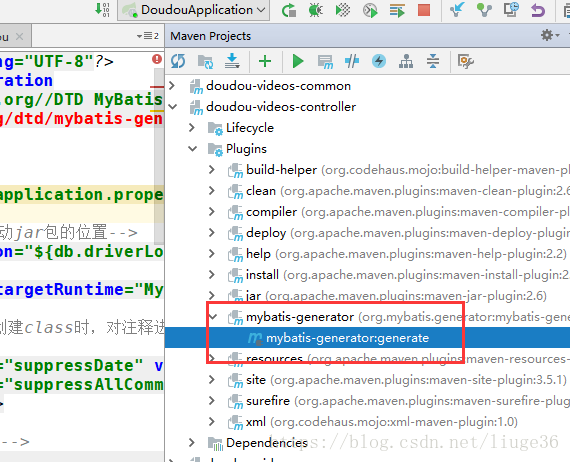
步骤三:点击生成数据
mybatis-generator生成数据对象的更多相关文章
- 【记录】Mybatis Generator生成数据对象Date/TimeStamp 查询时间格式化
Mybatis Generator是很好的工具帮助我们生成表映射关联代码,最近博主遇到一个问题,找了很久才解决, 就是用Mybatis Generator生成实体类的时候,Date 时间无法格式化输出 ...
- mybatis Generator生成代码及使用方式
本文原创,转载请注明:http://www.cnblogs.com/fengzheng/p/5889312.html 为什么要有mybatis mybatis 是一个 Java 的 ORM 框架,OR ...
- Mybaitis-generator生成数据对象和时间的优化
1.本章涉及到知识点,Mybaitis-generator生成数据对象和时间,xml的引用*.properties 外部文件(在这之前必须导入了mybaitis的核心架包) A.在pom.xml的案例 ...
- MyBatis Generator 生成的example 使用 and or 简单混合查询
MyBatis Generator 生成的example 使用 and or 简单混合查询 参考博客:https://www.cnblogs.com/kangping/p/6001519.html 简 ...
- MyBatis Generator生成DAO——序列化
MyBatis Generator生成DAO 的时候,生成的类都是没有序列化的. 还以为要手工加入(開始是手工加入的),今天遇到分页的问题,才发现生成的时候能够加入插件. 既然分页能够有插件.序列化是 ...
- Maven下用MyBatis Generator生成文件
使用Maven命令用MyBatis Generator生成MyBatis的文件步骤如下: 1.在mop文件内添加plugin <build> <finalName>KenShr ...
- 利用org.mybatis.generator生成实体类
springboot+maven+mybatis+mysql 利用org.mybatis.generator生成实体类 1.添加pom依赖: 2.编写generatorConfig.xml文件 ( ...
- Mybatis Generator生成工具配置文件详解
<?xml version="1.0" encoding="UTF-8"?> <!DOCTYPE generatorConfiguration ...
- mybatis generator生成文件大小写问题
mybatis generator插件中,如果 mysql数据表中的字段是用下划线划分的(个人一般都是喜欢这么创建表的字段,如:company_name),那么生成的Vo中会自动对应为companyN ...
随机推荐
- Python-demo(photo)
import osimport urllib import requests#import wximport time from fake_useragent import UserAgentfrom ...
- Sqoop数据迁移工具的使用
文章作者:foochane 原文链接:https://foochane.cn/article/2019063001.html Sqoop数据迁移工具的使用 sqoop简单介绍 sqoop数据到HDF ...
- unity编辑器扩展_06(给选项添加快捷键,控制菜单是否启用)
代码: [MenuItem("Tools/Delete ", true, 1)] static bool DeleteVadidate() { if (S ...
- macbook 安装redis流程及问题总结
Mac安装redis流程和总结 一.redis安装流程: 1.进入redis官网-->点击download-->选择稳定版本(stable)-->点击Download即可. 2.将下 ...
- Agentless监控实践中的预警指标采集
很多公司已经开发了监控解决方案,解决了指标收集.展示.预警发送等一系列问题. 本文介绍的监控解决方案由高性能时序数据库InfluxDB.时序分析监控工具Grafana及Agentless自动化工具An ...
- Java 线程池 ThreadPoolExecutor 的那些事儿
线程池基础知识 ThreadPoolExecutor : 一个线程池 Executors : 线程池工厂,通过该类可以取得一个拥有特定功能的线程池 ThreadPoolExecutor类实现了Exec ...
- CF989C A Mist of Florescence 构造 思维好题 第八题
A Mist of Florescence time limit per test 1 second memory limit per test 256 megabytes input standar ...
- (一)分布式数据库tidb-简介
因为数据磁盘问题,最近进行了更换库,所以决定写关于这方面的专题的博客,博客信息参考的官方文档. 一.分布式数据库使用背景 随着互联网的飞速发展,业务量可能在短短的时间内爆发式地增长,对应的数据量可能快 ...
- 【LeetCode】334#递增的三元子序列
题目描述 给定一个未排序的数组,判断这个数组中是否存在长度为 3 的递增子序列. 数学表达式如下: 如果存在这样的 i, j, k, 且满足 0 ≤ i < j < k ≤ n-1, 使得 ...
- Caused by: java.net.UnknownHostException
项目中使用某一组件,启动失败Caused by: java.net.UnknownHostException: xxxCentOS6.3: xxxCentOS6.3 解析不到xxxCentOS6.3. ...