
jsp+servlet分页查询
分页查询
减少服务器内存开销
提高用户体验
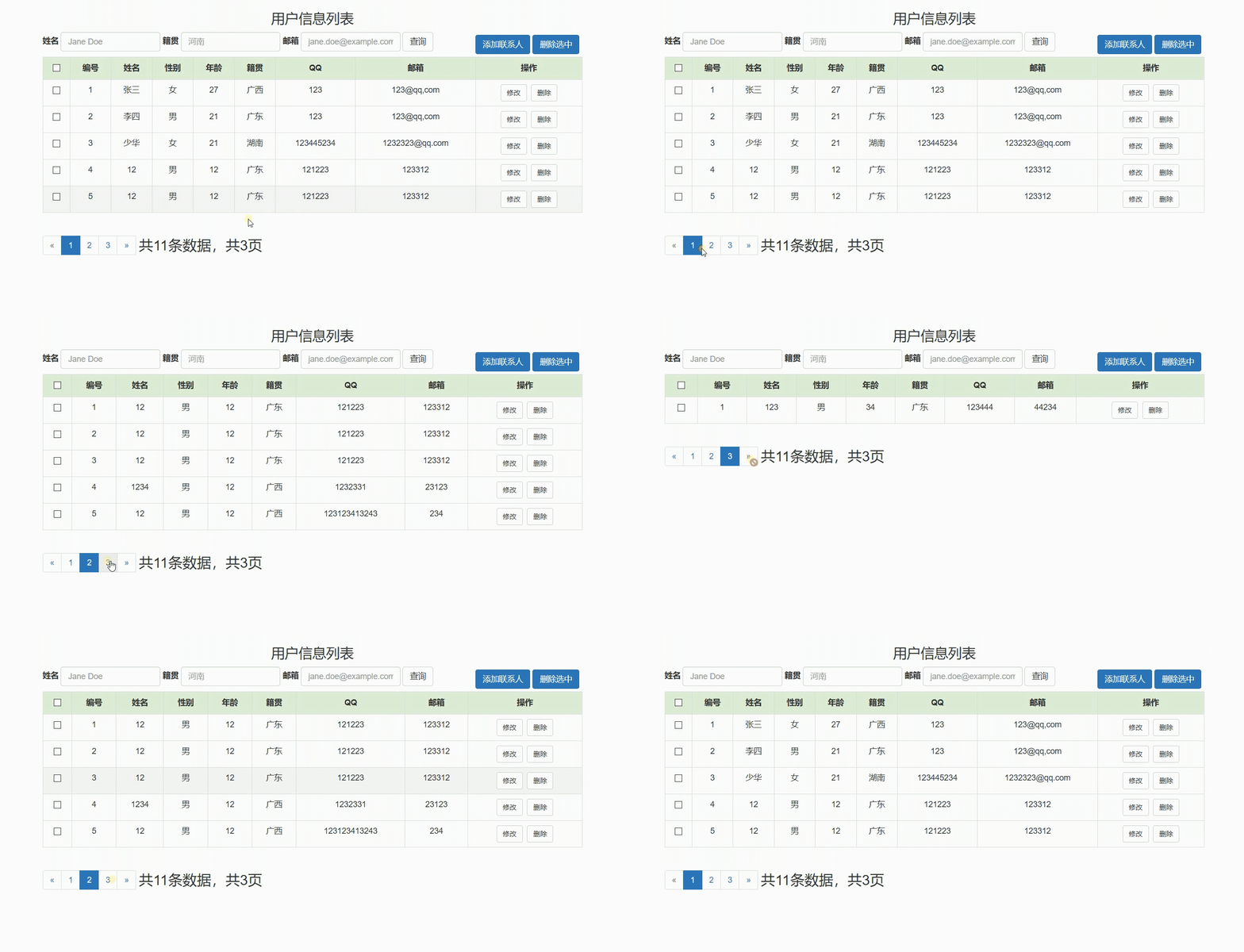
效果图
思绪图
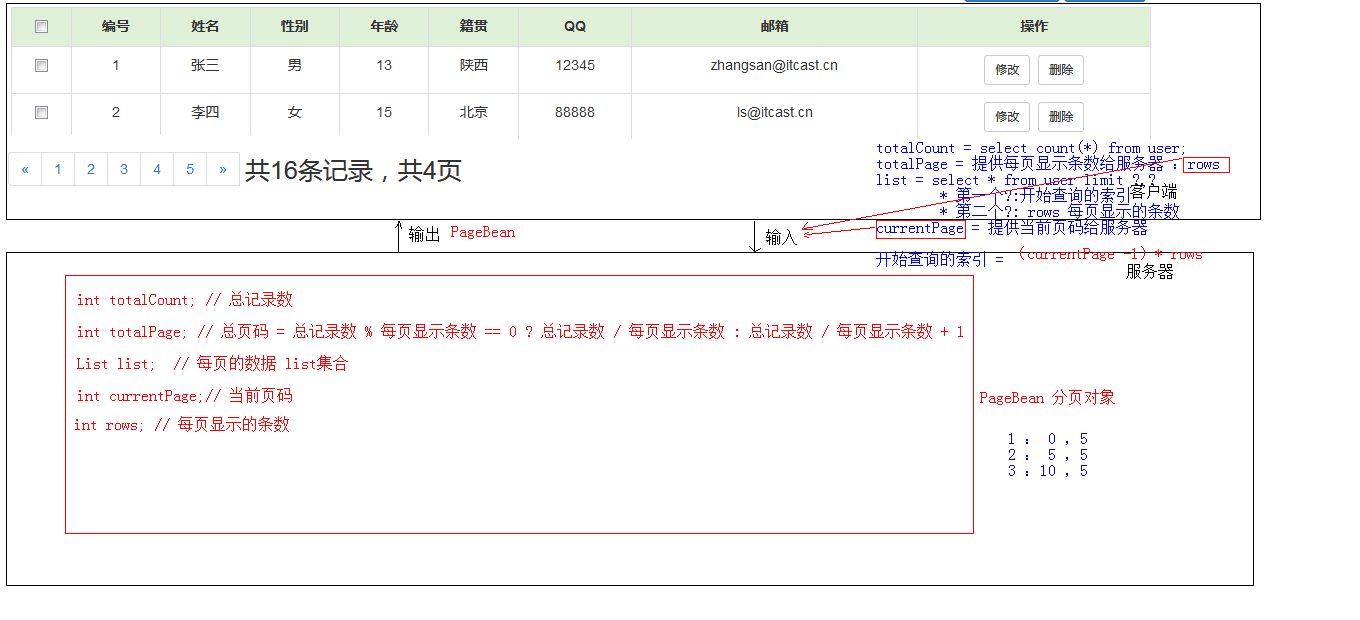
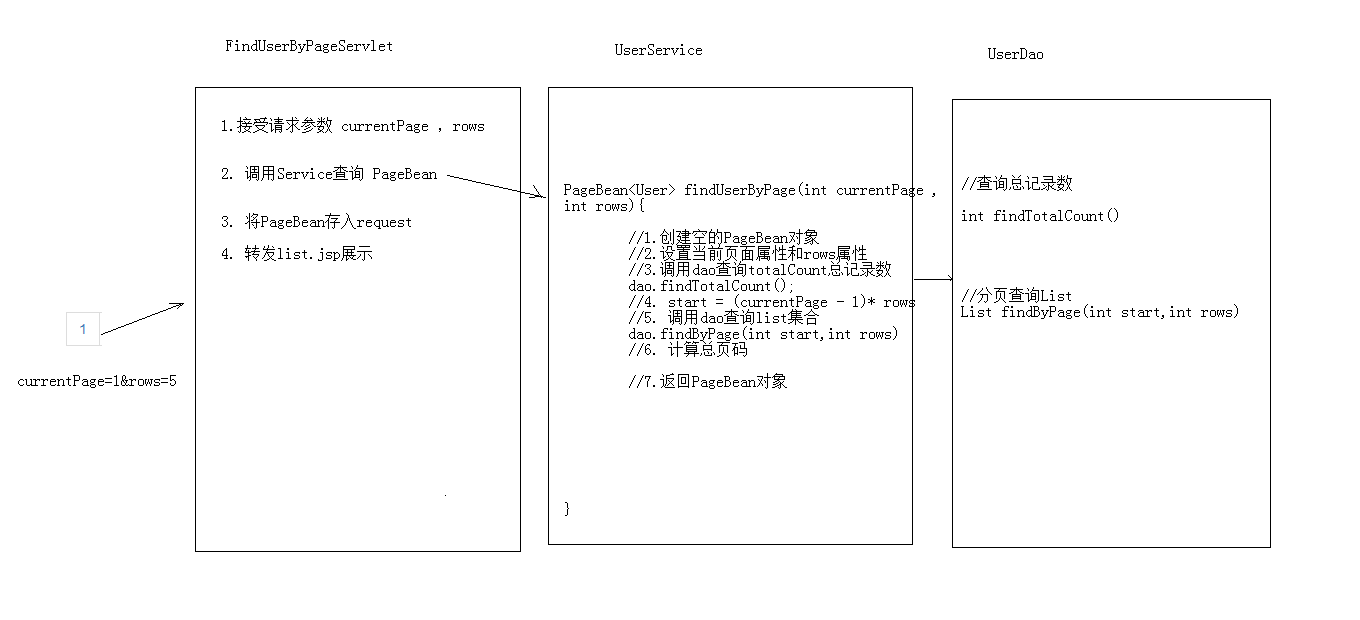
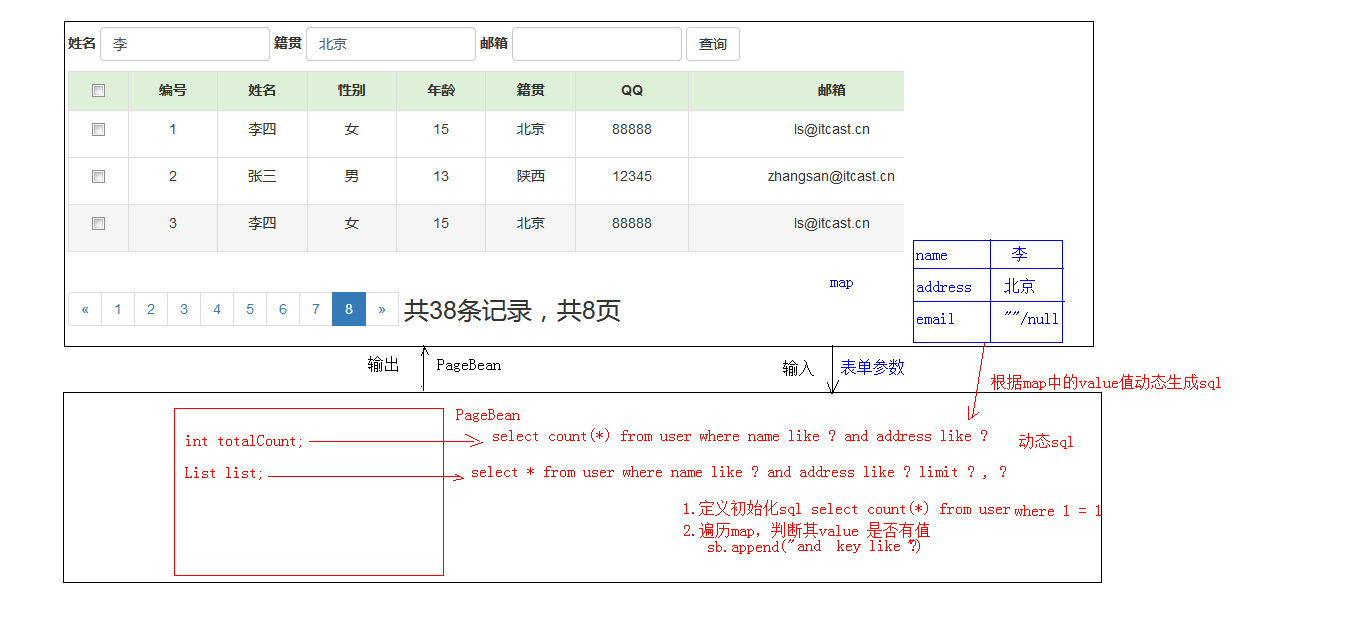
分页显示Bean文件代码
package cn.ytmj.findlist.domain;

import java.util.List;

/**

 * @author rui

 * @create 2019-08-17 23:34

 * 分页对象

 * 使用泛型为多种页面提供服务

 */

public class PageBean<T> {

    private int totalCount;  //总记录数

    private int  totalPage; // 总页数

    private List<T> list;   //每页的数据list集合

    private int currentPage; //当前页码

    private int rows; //每页显示的条数

    public PageBean(){}

    public int getTotalCount() {

        return totalCount;

    }

    public void setTotalCount(int totalCount) {

        this.totalCount = totalCount;

    }

    public int getTotalPage() {

        return totalPage;

    }

    public void setTotalPage(int totalPage) {

        this.totalPage = totalPage;

    }

    public List<T> getList() {

        return list;

    }

    public void setList(List<T> list) {

        this.list = list;

    }

    public int getCurrentPage() {

        return currentPage;

    }

    public void setCurrentPage(int currentPage) {

        this.currentPage = currentPage;

    }

    public int getRows() {

        return rows;

    }

    public void setRows(int rows) {

        this.rows = rows;

    }

    @Override

    public String toString() {

        return "PageBean{" +

                "totalCount=" + totalCount +

                ", totalPage=" + totalPage +

                ", list=" + list +

                ", currentPage=" + currentPage +

                ", rows=" + rows +

                '}';

    }

}
FindUserByPageServlet代码
@WebServlet("/findUserByPageServlet")

public class FindUserByPageServlet extends HttpServlet {

    protected void doPost(HttpServletRequest request, HttpServletResponse response) throws ServletException, IOException {

        //获取数据

        String currentPage = request.getParameter("currentPage");

        String rows = request.getParameter("rows");

        if(null==currentPage||"".equals(currentPage)){

            currentPage="1";

        }

        if(null==rows||"".equals(rows)){

            rows="5";

        }

        //调用service

        UserService userService = new UserServiceImpl();

        PageBean<User> pageBean = userService.findUserByPage(Integer.parseInt(currentPage), Integer.parseInt(rows));

        request.setAttribute("pageBean", pageBean);

        //转发

        request.getRequestDispatcher("/list.jsp").forward(request, response);

    }

    protected void doGet(HttpServletRequest request, HttpServletResponse response) throws ServletException, IOException {

        this.doPost(request, response);

    }

}

}
service
PageBean<User> findUserByPage(int currentPage, int rows);
serviceimpl
   public class UserServiceImpl implements UserService {

    UserDao userDao = new UserDaoImpl();

   @Override

    public PageBean<User> findUserByPage(int currentPage, int rows) {

        PageBean<User> pageBean = new PageBean<>();

        if (currentPage <= 0) {

            currentPage = 1;

        }

        int totalCount = userDao.findTotalCount();

        //计算总页数

        int totalPage = totalCount % ows == 0 ? totalCount / rows : totalCount / rows + 1;

        pageBean.setTotalPage(totalPage);

        if (currentPage > totalPage) {

            currentPage = totalPage;

        }

        List<User> list = userDao.findUserByPage(currentPage, rows);

        pageBean.setTotalCount(totalCount);

        pageBean.setCurrentPage(currentPage);

        pageBean.setRows(rows);

        pageBean.setList(list);

        return pageBean;

    }

}
dao
	//查询当前页面的所有数据

    List<User> findUserByPage(int currentPage, int rows);

	//总条数

    int findTotalCount();
daoimpl
通过JDBCUtils获取DataSource
package cn.ytmj.findlist.util;

import com.alibaba.druid.pool.DruidDataSourceFactory;

import javax.sql.DataSource;

import java.io.IOException;

import java.io.InputStream;

import java.sql.Connection;

import java.sql.SQLException;

import java.util.Properties;

/**

 * JDBC工具类 使用Durid连接池

 */

public class JDBCUtils {

    private static DataSource ds ;

    static {

        try {

            //1.加载配置文件

            Properties pro = new Properties();

            //使用ClassLoader加载配置文件,获取字节输入流

            InputStream is = JDBCUtils.class.getClassLoader().getResourceAsStream("druid.properties");

            pro.load(is);

            //2.初始化连接池对象

            ds = DruidDataSourceFactory.createDataSource(pro);

        } catch (IOException e) {

            e.printStackTrace();

        } catch (Exception e) {

            e.printStackTrace();

        }

    }

    /**

     * 获取连接池对象

     */

    public static DataSource getDataSource(){

        return ds;

    }

    /**

     * 获取连接Connection对象

     */

    public static Connection getConnection() throws SQLException {

        return  ds.getConnection();

    }

}
 public class UserDaoImpl implements UserDao {

    private JdbcTemplate jdbcTemplate = new JdbcTemplate(JDBCUtils.getDataSource());

    @Override

    public List<User> findUserByPage(int currentPage, int rows) {

        String sql = "select * from user limit ? , ? ";

        List<User> list = jdbcTemplate.query(sql, new BeanPropertyRowMapper<User>(User.class), (currentPage - 1) * rows, rows);

        return list;

    }

    @Override

    public int findTotalCount() {

        String sql = "select count(*) from user";

        int count = jdbcTemplate.queryForObject(sql,Integer.class);

        return count;

    }

 }
jsp页面分页显示相关代码
Bootstrap分页按钮模板(轻微修改),以备后用
<div style="float: left">
<nav>
<ul class="pagination">
<li>
<a href="#" aria-label="Previous">
<span aria-hidden="true">«</span>
</a>
</li>
<li class="active"><a href="#">1 <span class="sr-only"></span></a></li>
<li><a href="#">2</a></li>
<li><a href="#">3</a></li>
<li><a href="#">4</a></li>
<li><a href="#">5</a></li>
<li>
<a href="#" aria-label="Next">
<span aria-hidden="true">»</span>
</a>
</li>
<span style="font-size: 25px ;margin-left: 5px">共16条数据,共4页</span>
</ul>
</nav>
</div>
修改后jsp代码
<div style="float: left">
<nav>
<ul class="pagination">
<%-- 判断是否是第一页--%>
<c:if test="${pageBean.currentPage==1}">
<li class="disabled">
</c:if>
<c:if test="${pageBean.currentPage!=1}">
<li>
</c:if>
<a href="${pageContext.request.contextPath}/findUserByPageServlet?currentPage=${pageBean.currentPage-1}&rows=5"
aria-label="Previous">
<span aria-hidden="true">«</span>
</a>
</li>
<c:forEach var="i" varStatus="s" step="1" begin="1" end="${pageBean.totalPage}">
<c:if test="${pageBean.currentPage == i}">
<li class="active">
<a href="${pageContext.request.contextPath}/findUserByPageServlet?currentPage=${i}&rows=5"
name="li">${i}</a></li>
</c:if>
<c:if test="${pageBean.currentPage != i}">
<li>
<a href="${pageContext.request.contextPath}/findUserByPageServlet?currentPage=${i}&rows=5"
name="li">${i}</a></li>
</c:if>
</c:forEach>
<%-- 判断是否是最后页--%>
<c:if test="${pageBean.currentPage >= pageBean.totalPage}">
<li class="disabled">
</c:if>
<c:if test="${pageBean.currentPage!=pageBean.totalPage}">
<li>
</c:if>
<a href="${pageContext.request.contextPath}/findUserByPageServlet?currentPage=${pageBean.currentPage+1}&rows=5"
aria-label="Next">
<span aria-hidden="true">»</span>
</a>
</li>
<span style="font-size: 25px ;margin-left: 5px">共${pageBean.totalCount}条数据,共${pageBean.totalPage}页</span>
</ul>
</nav>
</div>
</div>
jsp+servlet实现登录,数据操作(分页查询,模糊查询等)githubhttps://github.com/PoetryAndYou/List-Operation
jsp+servlet分页查询的更多相关文章
- 用Hibernate和Struts2+jsp实现分页查询、修改删除
1.首先用get的方法传递一个页数过去 2.通过Struts2跳转到Action 3.通过request接受主页面index传过的页数,此时页数是1, 然后调用service层的方法获取DAO层分页查 ...
- Servlet分页查询
分页查询: 1.逻辑分页查询:用户第一次访问时就把全部数据访问出来,添加到一个大集合中,然后放到session中,进行转发.通过页码等的计算,把要显示的内容添加到一个小集合中,转发.遍历小集合以显示当 ...
- Java_Web三大框架之Hibernate+jsp+HQL分页查询
分页查询无处不在.使用Hibernate+jsp+HQL进行分页查询. 第一步:编写房屋实体类和House.hbm.xml映射. /* * 房屋实体类 */ public class House { ...
- Jsp/servlet分页五要素
分页5要素: * 1)pageIndex 当前页 * 2)startIndex 从第几条数据开始 * 3)countAll 总条目数 * 4)pageSize 每页大小 * 5)pageCount 总 ...
- JSP+Servlet+javabean+oracle实现页面多条件模糊查询
之前写过一篇JSP+Servlet+javabean+mysql实现页面多条件模糊查询 使用的是mysql进行的分页查询,mysql用limit控制,而oracle则是用rownum,今天第一次写or ...
- JSP+Servlet+javabean+mysql实现页面多条件模糊查询
需求: 一般列表页上面会有一个查询框,有各种的查询条件组合,一般都采用模糊查询方式 ,以下以自己做的实例来说明一下实现方法: 需要实现的界面原型:要满足条件: 1.单选分类,点GO按扭 2.单独输入标 ...
- 基于jsp+servlet图书管理系统之后台用户信息查询操作
上一篇的博客写的是插入操作,且附有源码和数据库,这篇博客写的是查询操作,附有从头至尾写的代码(详细的注释)和数据库! 此次查询操作的源码和数据库:http://download.csdn.net/de ...
- javabean+servlet+jsp实现分页
前端实现用ligerUI实现分页,感觉用框架确实简单,闲着无聊,模拟着liger的分页界面实现了一遍(只要是功能,样式什么无视) 这里用基础的三层架构+servlet+jsp实现,思路很简单,把所有分 ...
- Servlet+jsp的分页案例
查询的分页,在web中经常用到.一般,分页要维护的信息很多,我们把这些相关的信息,分装到一个类中,PageBean.具体如下: package cn.itcast.utils; import java ...
随机推荐
- 《java编程思想》P140-P160(第七章复部+第八章部分)
1.不用修饰符 修饰的方法或类,它们的修饰符是 默认修饰符,即 包访问权限(包内都可以用)(临时记的) 2. final数据: 对于基本类型,final使数值恒定不变,而对于对象引用,final使引用 ...
- Git推送到多个远程仓库
Git推送到多个远程仓库 Grey 原文地址 准备工作 在码云和Github上分别新建两个不包括任何文件的空仓库(若是两个已经有文件的仓库,请参见关联已经存在的项目) https://github.c ...
- Java中线程与堆栈的关系
栈是线程私有的,每个线程都是自己的栈,每个线程中的每个方法在执行的同时会创建一个栈帧用于存局部变量表.操作数栈.动态链接.方法返回地址等信息.每一个方法从调用到执行完毕的过程,就对应着一个栈帧在虚拟机 ...
- c#菜单动态合并
说明 在程序中经常使用弹出菜单,并且一个窗体中可以存在多个弹出菜单.开发过MDI窗体的读者可能都知道,当MDI子窗体最大化时,子窗体和主窗体的菜单能够自动的合并.这是如何实现的呢?本例实现了将两个弹出 ...
- ESP8266开发之旅 网络篇⑨ HttpClient——ESP8266HTTPClient库的使用
授人以鱼不如授人以渔,目的不是为了教会你具体项目开发,而是学会学习的能力.希望大家分享给你周边需要的朋友或者同学,说不定大神成长之路有博哥的奠基石... QQ技术互动交流群:ESP8266&3 ...
- SpringCloud - 概述
Spring Cloud 什么是Spring Cloud ? SpringCloud是基于SpringBoot提供的一套一站式微服务解决方案,包括服务注册与发现(Eureka), 配置中心(Sprin ...
- Python字典及相关操作(内含例题)
Python字典类型 今天将会介绍一种在python中十分常见的组合数据类型——字典 通过一些实例来理解字典中的常规操作 什么是字典类型? 列表中查找是通过整数的索引(元素在列表中的序号)来实现查找功 ...
- VS无法新建项目
问题描述:VS无法新建项目,确定Button呈灰色状态 原因:本机未安装Framework的环境,避免此类现象,在装VS之前,先安装好Framework,再安装VS. 解决方案: 1.点击图中< ...
- 如何在vue里引入Bootstrap
一.引入jquery 步骤: 1. 安装jquery $ npm install jquery --save-dev 2.在webpack.config.js 添加内容 + const webpack ...
- fenby C语言 P19
#include <stdio.h> int main(){ int i,j; for(i=1;i<=8;i++) { for(j=1;j<=i;j++) { printf(& ...