
react .net core 发布 Access-Control-Allow-Origin Cors
本案例用IIS部署
1. 在react上先publish: npm run build
生成了build文件,在此文件里添加web.config,注意httpProtocol是用来跨域的。
<?xml version="1.0" encoding="utf-8"?>
<configuration>
<system.webServer>
<httpProtocol>
<customHeaders>
<add name="Access-Control-Allow-Origin" value="*" />
<add name="Access-Control-Allow-Methods" value="GET,PUT,POST,DELETE,OPTIONS" />
<add name="Access-Control-Allow-Headers" value="Content-Type" />
</customHeaders>
</httpProtocol>
<rewrite>
<rules>
<rule name="ReactRouter Routes" stopProcessing="true">
<match url=".*" />
<conditions logicalGrouping="MatchAll">
<add input="{REQUEST_FILENAME}" matchType="IsFile" negate="true" />
<add input="{REQUEST_FILENAME}" matchType="IsDirectory" negate="true" />
<add input="{REQUEST_URI}" pattern="^/(docs)" negate="true" />
</conditions>
<action type="Rewrite" url="index.html" />
</rule>
</rules>
</rewrite>
</system.webServer>
</configuration>
该文件添加完毕以后,可以在IIS上部署起来,基本都是默认配置,配置完以后可以去HTTP Response Headers里查看一下web.config的内容有没有。
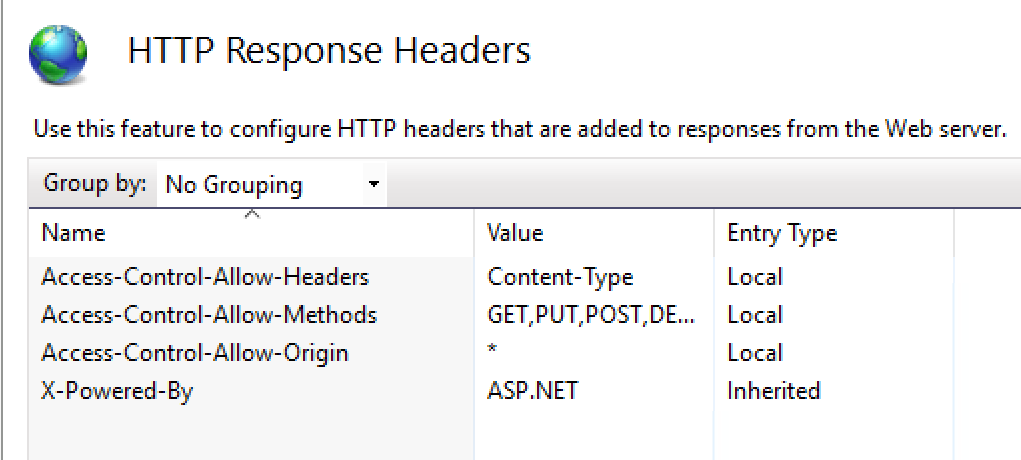
2. publish .net core项目,此操作也需要修改publish完以后生成的web.config,生成以后放入IIS新的站点里。
值得注意的是,.net core 的cors也需要这么做:

由于我们这次是API,所以controller这里这么用:
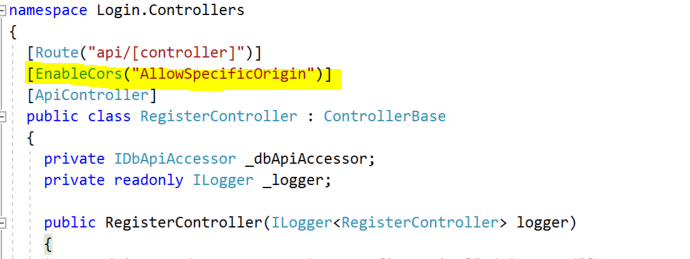
web.config里添加一下内容,我们没有额外添加Access-Control-Allow-origins是因为已经在code里用allowspecificorigon添加了。
<httpProtocol>
<customHeaders>
<add name="Access-Control-Allow-Headers" value="Content-Type" />
<add name="Access-Control-Allow-Methods" value="GET, POST, OPTIONS" />
</customHeaders>
</httpProtocol>
当然如果你需要部分跨域,可以在method这里加,我们因为全都需要,所以就在最开头加了。
希望对大家有帮助。
react .net core 发布 Access-Control-Allow-Origin Cors的更多相关文章
- Access control allow origin 简单请求和复杂请求
原文地址:http://blog.csdn.net/wangjun5159/article/details/49096445 错误信息: XMLHttpRequest cannot load http ...
- 解决js ajax跨越请求 Access control allow origin 异常
// 解决跨越请求的问题 response.setHeader("Access-Control-Allow-Origin", "*");
- .Net Core 处理跨域问题Response to preflight request doesn't pass access control check: No 'Access-Control-Allow-Origin' header is present on the requested resource
网页请求报错: Response to preflight request doesn't pass access control check: No 'Access-Control-Allow-Or ...
- Browser security standards via access control
A computing system is operable to contain a security module within an operating system. This securit ...
- Server-Side Access Control
Firefox 3.5 implements the W3C Access Control specification. As a result, Firefox 3.5 sends specifi ...
- [认证授权] 6.Permission Based Access Control
在前面5篇博客中介绍了OAuth2和OIDC(OpenId Connect),其作用是授权和认证.那么当我们得到OAuth2的Access Token或者OIDC的Id Token之后,我们的资源服务 ...
- Enhancing network controls in mandatory access control computing environments
A Mandatory Access Control (MAC) aware firewall includes an extended rule set for MAC attributes, su ...
- Response to preflight request doesn't pass access control check: No 'Access-Control-Allow-Origin' heade
XMLHttpRequest cannot load http://10.164.153.37:8050/WebService/WebService.asmx/wsGetStreetData. Res ...
- Windows Azure Virtual Network (10) 使用Azure Access Control List(ACL)设置客户端访问权限
<Windows Azure Platform 系列文章目录> 本文介绍的是国内由世纪互联运维的China Azure. 我们在创建完Windows Azure Virtual Machi ...
随机推荐
- web开发前端面试知识点目录整理
web开发前端面试知识点目录整理 基本功考察 关于Html 1. html语义化标签的理解; 结构化的理解; 能否写出简洁的html结构; SEO优化 2. h5中新增的属性; 如自定义属性data, ...
- SynchronousQueueDemo
1.ArrayDeque, (数组双端队列) 2.PriorityQueue, (优先级队列) 3.ConcurrentLinkedQueue, (基于链表的并发队列) 4.DelayQueue, ( ...
- java消息服务学习之JMS概念
JMS即Java消息服务(Java Message Service)应用程序接口是一个Java平台中关于面向消息中间件(MOM)的API,用于在两个应用程序之间,或分布式系统中发送消息,进行异步通信. ...
- vue 脚手架关于路由的一点理解
https://router.vuejs.org/zh/ 可以先翻翻文档看看介绍啊,一般我不怎么喜欢看文档,都是直接看人家案例,在回头看文档的,所以学习速度慢很多,希望我以后成为一个爱学习的妹子,比较 ...
- 6.JAVA基础复习——JAVA中文档注释与帮助文档的生成
java中的文档注释:用于说明该类的功能作用方便他人使用关键词前需要加@符 用于类的注释 @author name 作者 @version v1.0 版本 …… 用于函数的注释 @param para ...
- MySQL ERROR 1698 (28000): Access denied for user 'root'@'localhost'
今天在安装MySQL的过程中竟然没有让我输入密码,登录的时候也不需要密码就能进入,这让我很困惑. 进了数据库就设置密码,用了各种方式都不行. 虽然我这数据库没啥东西但也不能没有密码就裸奔啊,有点丢人是 ...
- 评价指标整理:Precision, Recall, F-score, TPR, FPR, TNR, FNR, AUC, Accuracy
针对二分类的结果,对模型进行评估,通常有以下几种方法: Precision.Recall.F-score(F1-measure)TPR.FPR.TNR.FNR.AUCAccuracy 真实结果 1 ...
- elasticsearch搭建并通过go-mysql-elasticsearch同步db数据达到搜索引擎的目的
logstash-input-jdbc/elasticsearch-jdbc缺点:删除记录没有办法同步,只能两边执行自己的删除命令,版本16年后未更新. go-mysql-elasticsearch缺 ...
- grep 以及find 命令
grep 以及find 命令 1. find 命令 Linux 下find 命令在目录结构中搜索文件,并执行指定的操作.Linux 下find 命令提供了相当多的查找条件,功能很强大.由于find 具 ...
- msql事务与引擎
事务介绍 简单来说,事务就是指逻辑上的一组SQL语句操作,组成这组操作的各个SQL语句,执行时要么全成功要么全失败. MySQL5.5支持事务的引擎:Innodb/ndb 一.事务四大特性 ...