
给web请求加遮罩动画
效果预览:
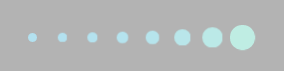
css:
/*#fountainG{

    position:relative;

    margin:10% auto;

    width:240px;

    height:29px

}*/

#fountainG{

    position:relative;

    filter:Alpha(opacity=30);

    -moz-opacity:0.3;

    -khtml-opacity:0.3;

    opacity:0.3;

    background-color:#000;

    width:100%;

    height:100%;

    z-index:;

    position:fixed;

    left:;

    top:;

    right:;

    bottom:;

    display:none;

    overflow:hidden;

}

.fountainG{

    position:absolute;

    top:45%;

    margin-left: 45%;

    background-color:#33cc99;

    width:29px;

    height:29px;

    -webkit-animation:bounce_fountainG 1.3s infinite normal;

    -moz-animation:bounce_fountainG 1.3s infinite normal;

    -o-animation:bounce_fountainG 1.3s infinite normal;

    -ms-animation:bounce_fountainG 1.3s infinite normal;

    animation:bounce_fountainG 1.3s infinite normal;

    -moz-transform:scale(.3);

    -webkit-transform:scale(.3);

    -ms-transform:scale(.3);

    -o-transform:scale(.3);

    transform:scale(.3);

    border-radius:19px;

}

#fountainG_1{

    left:;

    -moz-animation-delay:0.52s;

    -webkit-animation-delay:0.52s;

    -ms-animation-delay:0.52s;

    -o-animation-delay:0.52s;

    animation-delay:0.52s;

}

#fountainG_2{

    left:30px;

    -moz-animation-delay:0.65s;

    -webkit-animation-delay:0.65s;

    -ms-animation-delay:0.65s;

    -o-animation-delay:0.65s;

    animation-delay:0.65s;

}

#fountainG_3{

    left:60px;

    -moz-animation-delay:0.78s;

    -webkit-animation-delay:0.78s;

    -ms-animation-delay:0.78s;

    -o-animation-delay:0.78s;

    animation-delay:0.78s;

}

#fountainG_4{

    left:90px;

    -moz-animation-delay:0.91s;

    -webkit-animation-delay:0.91s;

    -ms-animation-delay:0.91s;

    -o-animation-delay:0.91s;

    animation-delay:0.91s;

}

#fountainG_5{

    left:120px;

    -moz-animation-delay:1.04s;

    -webkit-animation-delay:1.04s;

    -ms-animation-delay:1.04s;

    -o-animation-delay:1.04s;

    animation-delay:1.04s;

}

#fountainG_6{

    left:150px;

    -moz-animation-delay:1.17s;

    -webkit-animation-delay:1.17s;

    -ms-animation-delay:1.17s;

    -o-animation-delay:1.17s;

    animation-delay:1.17s;

}

#fountainG_7{

    left:180px;

    -moz-animation-delay:1.3s;

    -webkit-animation-delay:1.3s;

    -ms-animation-delay:1.3s;

    -o-animation-delay:1.3s;

    animation-delay:1.3s;

}

#fountainG_8{

    left:210px;

    -moz-animation-delay:1.43s;

    -webkit-animation-delay:1.43s;

    -ms-animation-delay:1.43s;

    -o-animation-delay:1.43s;

    animation-delay:1.43s;

}

@-moz-keyframes bounce_fountainG{

    0%{

        -moz-transform:scale(1);

        background-color:#33cc99;

    }

    100%{

        -moz-transform:scale(.3);

        background-color:#0099cc;

    }

}

@-webkit-keyframes bounce_fountainG{

    0%{

        -webkit-transform:scale(1);

        background-color:#33cc99;

    }

    100%{

        -webkit-transform:scale(.3);

        background-color:#0099cc;

    }

}

@-ms-keyframes bounce_fountainG{

    0%{

        -ms-transform:scale(1);

        background-color:#33cc99;

    }

    100%{

        -ms-transform:scale(.3);

        background-color:#0099cc;

    }

}

@-o-keyframes bounce_fountainG{

    0%{

        -o-transform:scale(1);

        background-color:#33cc99;

    }

    100%{

        -o-transform:scale(.3);

        background-color:#0099cc;

    }

}

@keyframes bounce_fountainG{

    0%{

        transform:scale(1);

        background-color:#33cc99;

    }

    100%{

        transform:scale(.3);

        background-color:#0099cc;

    }

}
html:
 <div id="fountainG">

      <div id="fountainG_1" class="fountainG">

      </div>

      <div id="fountainG_2" class="fountainG">

      </div>

      <div id="fountainG_3" class="fountainG">

      </div>

      <div id="fountainG_4" class="fountainG">

      </div>

      <div id="fountainG_5" class="fountainG">

      </div>

      <div id="fountainG_6" class="fountainG">

      </div>

      <div id="fountainG_7" class="fountainG">

      </div>

      <div id="fountainG_8" class="fountainG">

      </div>

  </div>
js:
//加载动画效果
function showLoad(){
    $('#fountainG').show();
}
//隐藏动画效果
function hiddenLoad(){
    $('#fountainG').hide();
}
function resultAjax(url, data) {

    var result;

    $.ajax({

        url:   $.contextPath() + url,

        type: 'get',

        async: true,  //注意这里

        cache: false,

        contentType: 'application/json',

        data: data,

        dataType: 'json',

        beforeSend: function (){

            //ajax刷新前加载load动画

            showLoad();

        },

        success: function(data) {

            //TODO

        },

        error: function(data) {

            commonAlert('出现了一点小问题','error');

        },

        complete:function () {

        //完成以后隐藏load动画

        hiddenLoad();

    }

});

    return result;

}
给web请求加遮罩动画的更多相关文章
- 三、js提交请求加载启动动画、请求完成成功回调、注销加载动画
1.通过Query post方式进行异步请求方法 jQuery.post(url, [data], [callback], [type]) 参数说明: url:发送请求地址 data:待发送 Key ...
- 转: web 页面加载速度优化实战-100% 的飞跃提升
前言 一个网站的加载速度有多重要? 反正我相信之前来 博主网站 的人至少有 50% 在加载完成前关闭了本站. 为啥捏? 看图 首页完整加载时间 8.18s,看来能进来看博主网站的人都是真爱呀,哈哈. ...
- 加载动画插件spin.js的使用随笔
背景: 在请求后台的“漫长”等待过程中,为了提升用户体验,需要一个类似 的加载动画效果,让用户明确现在处于请求过程中,而不是机子down掉或者网站死了 静态demo(未与后台交互): HTML代码如 ...
- web页面加载速度缓慢,如何优化?
参考博客: https://www.cnblogs.com/xp796/p/5236945.html https://www.cnblogs.com/MarcoHan/p/5295398.html - ...
- 为网格布局图片打造的超炫 CSS 加载动画
今天,我想与大家分享一些专门为网格布局的图像制作的很酷的 CSS 加载动画效果.您可以把这些效果用在你的作品集,博客或任何你想要的网页中.设置很简单.我们使用了下面这些工具库来实现这个效果: Norm ...
- 用css3制作旋转加载动画的几种方法
以WebKit为核心的浏览器,例如Safari和Chrome,对html5有着很好的支持,在移动平台中这两个浏览器对应的就是IOS和Android.最近在开发一个移动平台的web app,那么就有机会 ...
- Web请求响应简单整理
简单对Web请求响应如何处理进行的整理,难免有理解不到位,理解有偏差的地方,如有理解有误的地方,希望大牛批评指正. 1.Web开发的定义首先看看微软对Web开发的定义:Web开发是一个指代网页或网 ...
- JAVA Web.xml 加载顺序
web.xml加载过程(步骤): 1.启动WEB项目的时候,容器(如:Tomcat)会去读它的配置文件web.xml.读两个节点: <listener></listener> ...
- Java web.xml加载顺序
web.xml加载过程(步骤): 1.启动WEB项目的时候,容器(如:Tomcat)会去读它的配置文件web.xml.读两个节点: <listener></listener&g ...
随机推荐
- Cocos Creator 监听安卓屏幕下方返回键
addEscEvent = function(node){ cc.eventManager.addListener({ event: cc.EventListener.KEYBOARD, onKeyP ...
- C# string 常用功能的方法扩展
#region Usings using System; using System.Text; using System.Data; using System.Data.SqlClient; usin ...
- zuul 自定义路由规则
1,zuul的maven配置 <!--spring cloud 相关包--><parent> <groupId>org.springframework.boot&l ...
- python 开发练习之 监控
本节内容 为什么要做监控? 常用监控系统设计讨论 监控系统架构设计 监控表结构设计 为什么要做监控? –熟悉IT监控系统的设计原理 –开发一个简版的类Zabbix监控系统 –掌握自动化开发项目的程序设 ...
- Hive中常用的参数配置
-- 查看当前环境参数配置set -v;-- 重置配置为默认值reset; -- 调整map数-- input的文件大小,集群设置的文件块大小,hive中通过set dfs.block.size;命令 ...
- (Review cs231n) Spatial Localization and Detection(classification and localization)
重在图像的定位和检测的内容. 一张图片中只有一种给定类别标签的对象,定位则是图像中有对象框:再这些类中,每一个训练目标都有一个类和许多的图像内部对应类的位置选框. 猜想的仅是类标签,不如说它们是位置 ...
- socket的原理和实验
1.socket原理 根据连接启动的方式以及本地套接字要连接的目标,套接字之间的连接过程可以分为三个步骤:服务器监听,客户端请求,连接确认. (1)服务器监听:是服务器端套接字并不定位具体的客户端套接 ...
- Spring中的资源加载
大家也都知道JDK的类加载器:BootStrap ClassLoader.ExtenSion ClassLoader.Application ClassLoader:也使用了双亲委派模型,主要是为了防 ...
- 创建我的vue项目
vue-cli 全局安装 1.命令行执行:npm install --global vue-cli: ------也可以用这个命令下载新版本 2.安装完成以后 可以输入命令 :vue 回车,可以看到针 ...
- window.onload
window.onload事件 window.onload = function () { JS代码块} 当页面中的DOM节点(元素)都加载完的时候执行的JS代码