
springMVC 多文件上传前后台demo
只是个demo,需要数据校验,流程是通的
配置上传文件的解析器
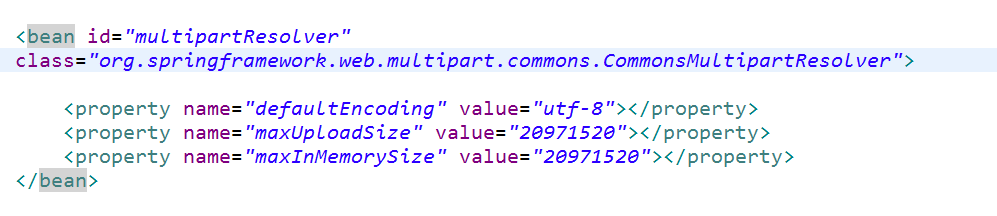
前端代码;
<%@ page language="java" contentType="text/html; charset=UTF-8"
pageEncoding="UTF-8"%>
<!DOCTYPE html>
<html>
<head>
<meta charset="UTF-8">
<title>文件上传</title>
<style>
.img{
width:150px;
height:90px;
}
</style>
</head>
<body>
<form enctype="multipart/form-data" return:false;>
<input type="text" name='goodsName'>
<input type="file" id="loadfile" class="imgInput" name="upfile" value="上传" multiple="multiple"/><br>
<!--<img src="" class="img">
<img src="" class="img img1">-->
<div id="imgCont"></div>
</form>
<button id="sub">提交</button>
<script type="text/javascript" src="js/jquery.min.js" ></script>
<script>
var curFiles=[];
$(function(){
$(".imgInput").change(function(){
console.log($(this));
// console.log(URL.createObjectURL($(this)[0].files.length));
console.log(this.files.length);
var files=this.files;
if(files && files.length){
Array.prototype.push.apply(curFiles,files);
}
console.log(curFiles);
var len=this.files.length;
var html="";
for(var i=0;i<len;i++){
html+='<img src="'+URL.createObjectURL($(this)[0].files[i])+'"'+
'class="img"><span class="delImg" index="'+i+'">删除</span>'
}
$("#imgCont").html(html);
demo();
});
})
function demo(){
$(".delImg").click(function(){
var index=$(this).attr('index');
delete curFiles[index];
console.log(curFiles);
$(this).prev().remove();
$(this).remove();
})
}
</script>
<script>
$(function(){
$("#sub").click(function(){
var data = new FormData($('#form')[0]);
for(var i=0;i<curFiles.length;i++){
data.append('files',curFiles[i]);
}
console.log('woshidata'+data);
$.ajax({
url:'morePic',
method:'post',
data:data,
processData:false,
contentType:false,
success:function(data){
}
});
});
})
</script>
<br>
</body>
</html>
后台代码
import javax.servlet.annotation.MultipartConfig;
import javax.servlet.http.HttpServletRequest;
import org.springframework.stereotype.Controller;
import org.springframework.web.bind.annotation.RequestMapping;
import org.springframework.web.bind.annotation.ResponseBody;
import org.springframework.web.multipart.MultipartFile;
@MultipartConfig
@Controller
public class TestController {
@ResponseBody
@RequestMapping("morePic")
public void morePic(MultipartFile[] files,HttpServletRequest request) {
int i=0;
for(MultipartFile file: files) {
i++;
String x=file.getOriginalFilename();
System.out.println(x);
}
System.out.println(i);
}
}
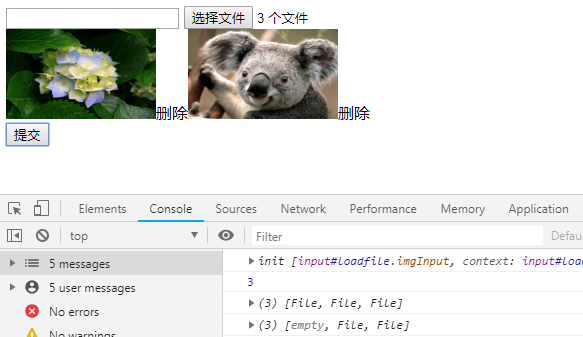
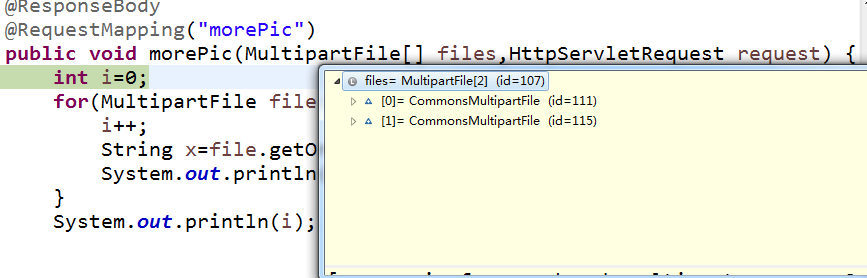
debug调试
可以看到前端选了三个文件,我删除后再提交后台就只接收到了两个文件,于是关于ajax提交图片上传就成功了
springMVC 多文件上传前后台demo的更多相关文章
- SpringMVC之文件上传异常处理
一般情况下,对上传的文件会进行大小的限制.如果超过指定大小时会抛出异常,一般会对异常进行捕获并友好的显示出来.以下用SpringMVC之文件上传进行完善. 首先配置CommonsMultipartRe ...
- SpringMVC+ajax文件上传实例教程
原文地址:https://blog.csdn.net/weixin_41092717/article/details/81080152 文件上传文件上传是项目开发中最常见的功能.为了能上传文件,必须将 ...
- springmvc图片文件上传接口
springmvc图片文件上传 用MultipartFile文件方式传输 Controller package com.controller; import java.awt.image.Buffer ...
- SpringMVC学习--文件上传
简介 文件上传是web开发中常见的需求之一,springMVC将文件上传进行了集成,可以方便快捷的进行开发. springmvc中对多部件类型解析 在 页面form中提交enctype="m ...
- Spring +SpringMVC 实现文件上传功能。。。
要实现Spring +SpringMVC 实现文件上传功能. 第一步:下载 第二步: 新建一个web项目导入Spring 和SpringMVC的jar包(在MyEclipse里有自动生成spring ...
- springmvc实现文件上传
springmvc实现文件上传 多数文件上传都是通过表单形式提交给后台服务器的,因此,要实现文件上传功能,就需要提供一个文件上传的表单,而该表单就要满足以下3个条件 (1)form表彰的method属 ...
- 【SpringMVC】文件上传Expected MultipartHttpServletRequest: is a MultipartResolver错误解决
本文转载自:https://blog.csdn.net/lzgs_4/article/details/50465617 使用SpringMVC实现文件上传时,后台使用了 MultipartFile类, ...
- 关于SpringMVC的文件上传
关于文件的上传,之前写过2篇文章,基于Struts2框架,下面给出文章链接: <关于Struts2的文件上传>:http://www.cnblogs.com/lichenwei/p/392 ...
- 一起学SpringMVC之文件上传
概述 在Web系统开发过程中,文件上传是普遍的功能,本文主要以一个简单的小例子,讲解SpringMVC中文件上传的使用方法,仅供学习分享使用,如有不足之处,还请指正. 文件上传依赖包 如下所示,文件上 ...
随机推荐
- 盒模型的垂直居中css
https://www.cnblogs.com/zhouhuan/p/vertical_center.html
- webpack优化
注:总结自吴浩麟---<webpack深入浅出>第四章--优化 1.缩小文件的搜索范围 1.1 优化loader:module.rules中,使用test,include,exclude尽 ...
- 重装了Devexpress后项目报Dll引用找不到问题解决办法
最近将我的开发环境从VS2015升级到VS2017,升级完后报如下错误,找不到Dev的引用,明明是重新装了dev为什么找不到呢? 经过查看dll引用地址,发现我的dev一开始是安装在C盘,dll引用路 ...
- J.U.C-volatile
禁止指令重排
- JS通用模块模式 UMD
历史 JS诞生之初面向简单页面开发, 没有模块的概念. 后来页面逐渐复杂, 人类构造到 IIFE 立即执行函数来模拟 模块: 之前也有雅虎的实践,使用命名空间 作为模块名. 最后衍生出 面向各种使用场 ...
- IntelliJ IDEA 2018最新版注册码激活方法
一.首先点击intellij idea 2018 二.选择激活码 三.输入以下激活码intellij idea 2018 最新版本 注册激活码 **************************** ...
- Python 面试总结
公司面试: 1,说说项目都用到了什么技术? 2,mysql索引的种类? 3,索引建多有什么不好? 4,mysql的引擎有什么? 5,redis是单线程还是多线程的? 6, redis的持久化机制? 7 ...
- jsonp和CORS跨域实现
一.jsonp,使用jquery封装的$.ajax,返回数据类型要设置为jsonp 示例: $.ajax({ type: 'get', contentType: "application/j ...
- 哇,快看,那里有React Native的坑
一.红黑屏,我的天呀,怎么办?睡一觉吧 第一次玩React Native,按着文档来,跑着跑着,咦,红黑屏了. 怎么办?不玩了?那先放着,过两天再来看看咯. 二.粗心大意,原来还有配置没配好 好了,已 ...
- 干掉windows无脑设定:“始终使用选择的程序打开这种文件”、“使用Web服务查找正确的程序”
先看几张图体会一下: 实在很佩服自己就那样默默忍受了很多很多年.其实这些东西在网上小小的一搜,5分钟就能搞定. 然而我们大家都在想,现在没时间,我还要做xxxx事呢,反正多点两下鼠标而已. 是啊,点两 ...