
Json----简单介绍
Json
先分享一个网站http://www.bejson.com/,这个是用来检测Json文件的错误的,Json文件一般不好查找错误.
看懂Json只需要四句话:
对象表示为键值对
数据由逗号分隔
花括号保存对象
方括号保存数组
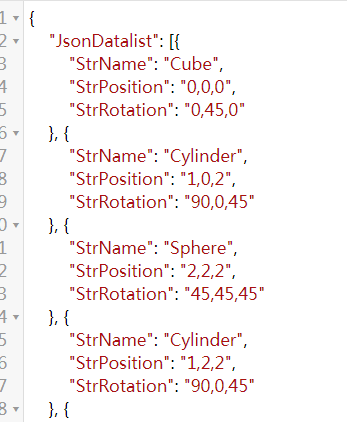


这就是Json文件.不在过多介绍,重点不在这里
基础:Json到对象和对象到Json
需要用到的API:
JsonMapper.ToJson();
JsonMapper.ToObject();
引用命名空间Using LitJson;
代码:
 using System.Collections;

 using System.Collections.Generic;

 using UnityEngine;

 using LitJson;

 public class JsonTest : MonoBehaviour {

     void Start()

     {

 //对象到Json

         MyIphone myPhone = new MyIphone

         {

             appNum = ,

             phoneState = true,

             appList = new List<string>() { "抖音", "BiliBili", "喜马拉雅听" }

         };

         string jsonIpone = JsonMapper.ToJson(myPhone);

       Debug.Log(jsonIpone);

 //Json转到对象

         string myIphoneJson = "{'appNum':25,'phoneState':false,'appList':['WeChat','Sina','QQ']}";

         MyIphone myIPhone = JsonMapper.ToObject<MyIphone>(myIphoneJson);

         Debug.Log("手机应用数量:"+myIPhone.appNum+"-手机开机状态"+myIPhone.phoneState);

         for (int i = ; i < myIPhone.appList.Count; i++)

         {

             Debug.Log(myIPhone.appList[i]);

         }

     }

 }

 public class MyIphone

 {

     public int appNum;

     public bool phoneState;

     public List<string> appList;

 }
进阶使用的:
代码二:
 using System.Collections;

 using System.Collections.Generic;

 using System.IO;

 using System.Text;

 using LitJson;

 using UnityEngine;

 public class DataNode// 该class用于json的时候不能有构造函数

 {

     public string CopyName;

     public string CopyPosition;

     public string CopyRotation;

 }

 public class DataCenter

 {

     public List<DataNode> List;

    public DataCenter()

     {

         List =new List<DataNode>();

     }

 }

 public class JsonConvert : MonoBehaviour {

     private string _txtPath;

     private string _jsonPath;

     void Start ()

     {

         _jsonPath = Application.streamingAssetsPath + "/CopyInfo.json";

         _txtPath = Application.streamingAssetsPath + "/CopyInfo.txt";

        // Json的解析是很快的 网络

         ReadTextToJson();

         ReadJsonFromJsonPath();

     }

     void ReadJsonFromJsonPath()

     {

       string jsondata =  File.ReadAllText(_jsonPath);

         List<DataNode> node = JsonMapper.ToObject<List<DataNode>>(jsondata);

         Debug.LogError(node.Count);

     }

     void ReadTextToJson()

     {

         DataCenter dc = new DataCenter();

         using (StreamReader reader = new StreamReader(_txtPath,Encoding.UTF8))

         {

             string tmpStr = string.Empty;

             while ( !string.IsNullOrEmpty(tmpStr = reader.ReadLine()))

             {

                 string[] infos = tmpStr.Split('_');

                 DataNode _node = new DataNode();

                 _node = infos();

                 dc.List.Add(_node);

             }

         }

         //数据读取完毕 开始写入json 传递的List<>

         string jsonData = JsonMapper.ToJson(dc.List);

         File.WriteAllText(_jsonPath,jsonData);

     }

 }
代码三:
 using System.Collections;

 using System.Collections.Generic;

 using System.IO;

 using System.Text;

 using UnityEngine;

 using  Excel;

 using OfficeOpenXml;

 using Excel.Core;

 using  System.Data;

 using OfficeOpenXml.Style;

 using UnityEditor;

 using  LitJson;

 class CopyInfo  //CopyInfo的构造

 {

     public string     CopyName;

     public Vector3 CopyPosition;

     public Quaternion CopyRotation;

     public CopyInfo(string name, Vector3 postion, Vector3 rotation)

     {

         CopyName = name;

         CopyPosition = postion;

        CopyRotation = Quaternion.Euler(rotation);

     }

 }

 class JsonNode//JsonNode的构造

 {

     public string StrName;

     public string StrPosition;

     public string StrRotation;

     public JsonNode(string name,string pos, string rot)

     {

         StrName = name;

         StrPosition = pos;

         StrRotation = rot;

     }

 }

 class MyJsonData  //MyJsonData的构造

 {

     public List<JsonNode> JsonDatalist;

     public MyJsonData()

     {

         JsonDatalist = new List<JsonNode>();

     }

 }

 public class CreateManager : MonoBehaviour

 {

     private List<GameObject> _copyList;

     private List<CopyInfo>   _copyInfoList;

     private MyJsonData _jsonData;

     private string _excelPath;

     private string _path;

     //1. 读文件

     //2. 解析文件信息

     //3. 实例化

         //4. 实例化6个

     //4.1 在3s中销毁一个并且添加一个

     #region  读取存储在unity的streamingAssets路径中的json

     void ReadJsonByJsonPath()

     {

         string path = Application.streamingAssetsPath + "/CopyInfo.json";//路径

         string readInfo =File.ReadAllText(path);//文件读取过程

         Debug.LogWarning(readInfo);

         //类型是JsonNode

         List<JsonNode> JsonDatalist = new List<JsonNode>();//因为没有new对象!!!

         JsonDatalist = JsonMapper.ToObject<List<JsonNode>>(readInfo);//重要代码

         Debug.LogError(JsonDatalist.Count);

     }

   #endregion

     void Start()

     {

         _path = Application.streamingAssetsPath + "/CopyInfo.txt";

         _excelPath = Application.streamingAssetsPath + "/CopyInfo.xlsx";

         _copyInfoList = new List<CopyInfo>();

         _copyList = new List<GameObject>();

         _jsonData = new MyJsonData();

         WriteJsonByList();

         ReadJsonByJsonPath();

     }

     #region

     private void WriteJsonByList( )

     {

         string jsonPath = Application.streamingAssetsPath

                           + "/CopyInfo.json";

         ////将一个list信息转换为json格式

         ////定义一个class 这个class是什么不重要  必须包含一个列表

          _jsonData = new MyJsonData();

         using (StreamReader reader  = new StreamReader(_path,Encoding.UTF8))

         {

             string tmp = string.Empty;

             while ( !  string.IsNullOrEmpty(tmp = reader.ReadLine()))

             {

                 string[] infos = tmp.Split('_');

                 _jsonData.JsonDatalist.Add(new JsonNode(infos[], infos[], infos[]));

             }

         }

         //jsondata  数据填充完成

         string writeData = JsonMapper.ToJson(_jsonData);//

         File.WriteAllText(jsonPath,writeData);

     }

     #endregion

     private void WriteExcel(string path, List<CopyInfo> list)

     {

         FileInfo excelInfo = new FileInfo(path);

         if (excelInfo.Exists)

         {

             excelInfo.Delete();

             excelInfo = new FileInfo(path);

         }

         //开始shiyong Excel

         using (ExcelPackage package = new ExcelPackage(excelInfo))

         {

             ExcelWorksheet sheet = package.Workbook.Worksheets.Add("TestInfo"); // 添加了一个工作表

             sheet.Cells[, ].Value = "CopyName";

             sheet.Cells[, ].Value = "CopyPosition";

             sheet.Cells[, ].Value = "CopyRotation";

             for (int i = ; i < _copyInfoList.Count; i++)

             {

                 sheet.Cells[ + i,  ].Value = _copyInfoList[i].CopyName;

                 sheet.Cells[ + i,  ].Value = _copyInfoList[i].CopyPosition;

                 sheet.Cells[ + i,  ].Value = _copyInfoList[i].CopyRotation;

             }

             sheet.Cells.Style.HorizontalAlignment = ExcelHorizontalAlignment.Center;

             sheet.Cells.Style.VerticalAlignment = ExcelVerticalAlignment.Center;

             sheet.Cells.Style.Font.Bold = true;

             sheet.Cells.Style.Font.Name = "宋体";

             sheet.Cells.Style.Font.Size = ;

             sheet.Cells.AutoFitColumns(, );

             package.Save();

         }

         AssetDatabase.Refresh();

     }

 }
Json----简单介绍的更多相关文章
- JSON简单介绍
//JSON是一种数据格式//JSON比较像php里面的关联数组,它里面存的内容也是key和value成对存在的 JSON写法格式 var js = { "one":"h ...
- JSON基础,简单介绍
JSON(JavaScript Object Notation(记号.标记)) 是一种轻量级的数据交换格式.它基于JavaScript(Standard ECMA-262 3rd Edition - ...
- iOS-iOS开发简单介绍
概览 终于到了真正接触IOS应用程序的时刻了,之前我们花了很多时间去讨论C语言.ObjC等知识,对于很多朋友而言开发IOS第一天就想直接看到成果,看到可以运行的IOS程序.但是这里我想强调一下,前面的 ...
- iOS开发拓展篇-XMPP简单介绍
iOS开发拓展篇-XMPP简单介绍 一.即时通讯简单介绍 1.简单说明 即时通讯技术(IM)支持用户在线实时交谈.如果要发送一条信息,用户需要打开一个小窗口,以便让用户及其朋友在其中输入信息并让交谈双 ...
- Linux curl使用简单介绍
在两台新搬迁的微信服务器上执行命令: curl -H "Content-Type: application/json" -d '{"partner_no":&q ...
- iOS开发——网络编程OC篇&(一)XMPP简单介绍与准备
XMPP简单介绍与准备 一.即时通讯简单介绍 1.简单说明 即时通讯技术(IM)支持用户在线实时交谈.如果要发送一条信息,用户需要打开一个小窗口,以便让用户及其朋友在其中输入信息并让交谈双方都看到交谈 ...
- Json.Net系列教程 1.Json.Net介绍及实例
原文 Json.Net系列教程 1.Json.Net介绍及实例 本系列教程假设读者已经对Json有一定的了解,关于Json在这里不多说.本系列教程希望能对读者开发涉及到Json的.Net项目有一定的帮 ...
- Django - Django框架 简单介绍
Django框架 简单介绍 本文地址: http://blog.csdn.net/caroline_wendy/article/details/29172271 1. 介绍 Django是一个开放源码 ...
- webpack入门篇--1.简单介绍
简单介绍: webpack是一个模块打包工具,给js准备的打包工具,可以把很多的模块打包成很少的文件 目标: 1.切分依赖数,分到不同代码块里,按需加载,懒加 载 2.任何静态资源都可以被视为一个模块 ...
- Protobuf的简单介绍、使用和分析
Protobuf的简单介绍.使用和分析 一.protobuf是什么? protobuf(Google Protocol Buffers)是Google提供一个具有高效的协议数据交换格式工具库( ...
随机推荐
- tensorflow--交叉熵
学而不思则罔,思而不学则怠. 最近在看<TensorFlow 实战Google深度学习框架第二版>这本书.从头开始学习深度学习,对于细节方面进行探究.相当于重新拾起来这门”手艺“. 这篇随 ...
- I - Beautiful People ZOJ - 2319 (二分法)
The most prestigious sports club in one city has exactly N members. Each of its members is strong an ...
- The import javax.servlet.jsp.JspException cannot be resolved
问题描述 重新更换了 Apache Tomcat 的版本,在 Eclipse 中项目报错信息:The import javax.servlet.jsp.JspException cannot be ...
- 修改MySQL的数据目录
环境:CentOS Linux release 7.1.1503 (Core) 1. 安装MYSQL wget http://dev.mysql.com/get/mysql-community-rel ...
- 强大而灵活的的Html解析器——Html Agility Pack
一.概述 Html Agility Pack 简称HAP,是一个强大而灵活的解析Html DOM的.Net类库. 二.官方链接 官网:http://html-agility-pack.net/ NuG ...
- java日期间相隔年月日计算
/** * 获取date1相距date2多少天, date2>date1 * @param date1 * @param date2 * @return ...
- 【Linux】日志分析工具grep sed sort
遇到一个问题,在查询日志时发现,服务器上打印的文件有很多个,每个都存储了一部分日志, 需要将日志按照时间排序,并显示所有日志. 原命令: grep -h searchContent */*log 搜 ...
- Filebeat+Kafka+Logstash+ElasticSearch+Kibana搭建完整版
1. 了解各个组件的作用 Filebeat是一个日志文件托运工具,在你的服务器上安装客户端后,filebeat会监控日志目录或者指定的日志文件,追踪读取这些文件(追踪文件的变化,不停的读) Kafka ...
- day20.序列化模块
参考云游道士:https://www.cnblogs.com/yyds/p/6563608.html 1.什么是序列化 序列化就是将字典,数字等数据类型转换为字符串数据类型 所说的序列就是字符串 2. ...
- SSM项目目录结构