
Json----简单介绍
Json
先分享一个网站http://www.bejson.com/,这个是用来检测Json文件的错误的,Json文件一般不好查找错误.
看懂Json只需要四句话:
对象表示为键值对
数据由逗号分隔
花括号保存对象
方括号保存数组
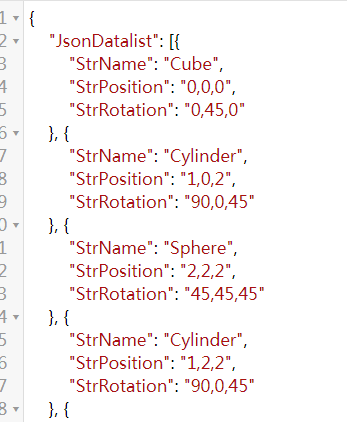


这就是Json文件.不在过多介绍,重点不在这里
基础:Json到对象和对象到Json
需要用到的API:
JsonMapper.ToJson();
JsonMapper.ToObject();
引用命名空间Using LitJson;
代码:
 using System.Collections;

 using System.Collections.Generic;

 using UnityEngine;

 using LitJson;

 public class JsonTest : MonoBehaviour {

     void Start()

     {

 //对象到Json

         MyIphone myPhone = new MyIphone

         {

             appNum = ,

             phoneState = true,

             appList = new List<string>() { "抖音", "BiliBili", "喜马拉雅听" }

         };

         string jsonIpone = JsonMapper.ToJson(myPhone);

       Debug.Log(jsonIpone);

 //Json转到对象

         string myIphoneJson = "{'appNum':25,'phoneState':false,'appList':['WeChat','Sina','QQ']}";

         MyIphone myIPhone = JsonMapper.ToObject<MyIphone>(myIphoneJson);

         Debug.Log("手机应用数量:"+myIPhone.appNum+"-手机开机状态"+myIPhone.phoneState);

         for (int i = ; i < myIPhone.appList.Count; i++)

         {

             Debug.Log(myIPhone.appList[i]);

         }

     }

 }

 public class MyIphone

 {

     public int appNum;

     public bool phoneState;

     public List<string> appList;

 }
进阶使用的:
代码二:
 using System.Collections;

 using System.Collections.Generic;

 using System.IO;

 using System.Text;

 using LitJson;

 using UnityEngine;

 public class DataNode// 该class用于json的时候不能有构造函数

 {

     public string CopyName;

     public string CopyPosition;

     public string CopyRotation;

 }

 public class DataCenter

 {

     public List<DataNode> List;

    public DataCenter()

     {

         List =new List<DataNode>();

     }

 }

 public class JsonConvert : MonoBehaviour {

     private string _txtPath;

     private string _jsonPath;

     void Start ()

     {

         _jsonPath = Application.streamingAssetsPath + "/CopyInfo.json";

         _txtPath = Application.streamingAssetsPath + "/CopyInfo.txt";

        // Json的解析是很快的 网络

         ReadTextToJson();

         ReadJsonFromJsonPath();

     }

     void ReadJsonFromJsonPath()

     {

       string jsondata =  File.ReadAllText(_jsonPath);

         List<DataNode> node = JsonMapper.ToObject<List<DataNode>>(jsondata);

         Debug.LogError(node.Count);

     }

     void ReadTextToJson()

     {

         DataCenter dc = new DataCenter();

         using (StreamReader reader = new StreamReader(_txtPath,Encoding.UTF8))

         {

             string tmpStr = string.Empty;

             while ( !string.IsNullOrEmpty(tmpStr = reader.ReadLine()))

             {

                 string[] infos = tmpStr.Split('_');

                 DataNode _node = new DataNode();

                 _node = infos();

                 dc.List.Add(_node);

             }

         }

         //数据读取完毕 开始写入json 传递的List<>

         string jsonData = JsonMapper.ToJson(dc.List);

         File.WriteAllText(_jsonPath,jsonData);

     }

 }
代码三:
 using System.Collections;

 using System.Collections.Generic;

 using System.IO;

 using System.Text;

 using UnityEngine;

 using  Excel;

 using OfficeOpenXml;

 using Excel.Core;

 using  System.Data;

 using OfficeOpenXml.Style;

 using UnityEditor;

 using  LitJson;

 class CopyInfo  //CopyInfo的构造

 {

     public string     CopyName;

     public Vector3 CopyPosition;

     public Quaternion CopyRotation;

     public CopyInfo(string name, Vector3 postion, Vector3 rotation)

     {

         CopyName = name;

         CopyPosition = postion;

        CopyRotation = Quaternion.Euler(rotation);

     }

 }

 class JsonNode//JsonNode的构造

 {

     public string StrName;

     public string StrPosition;

     public string StrRotation;

     public JsonNode(string name,string pos, string rot)

     {

         StrName = name;

         StrPosition = pos;

         StrRotation = rot;

     }

 }

 class MyJsonData  //MyJsonData的构造

 {

     public List<JsonNode> JsonDatalist;

     public MyJsonData()

     {

         JsonDatalist = new List<JsonNode>();

     }

 }

 public class CreateManager : MonoBehaviour

 {

     private List<GameObject> _copyList;

     private List<CopyInfo>   _copyInfoList;

     private MyJsonData _jsonData;

     private string _excelPath;

     private string _path;

     //1. 读文件

     //2. 解析文件信息

     //3. 实例化

         //4. 实例化6个

     //4.1 在3s中销毁一个并且添加一个

     #region  读取存储在unity的streamingAssets路径中的json

     void ReadJsonByJsonPath()

     {

         string path = Application.streamingAssetsPath + "/CopyInfo.json";//路径

         string readInfo =File.ReadAllText(path);//文件读取过程

         Debug.LogWarning(readInfo);

         //类型是JsonNode

         List<JsonNode> JsonDatalist = new List<JsonNode>();//因为没有new对象!!!

         JsonDatalist = JsonMapper.ToObject<List<JsonNode>>(readInfo);//重要代码

         Debug.LogError(JsonDatalist.Count);

     }

   #endregion

     void Start()

     {

         _path = Application.streamingAssetsPath + "/CopyInfo.txt";

         _excelPath = Application.streamingAssetsPath + "/CopyInfo.xlsx";

         _copyInfoList = new List<CopyInfo>();

         _copyList = new List<GameObject>();

         _jsonData = new MyJsonData();

         WriteJsonByList();

         ReadJsonByJsonPath();

     }

     #region

     private void WriteJsonByList( )

     {

         string jsonPath = Application.streamingAssetsPath

                           + "/CopyInfo.json";

         ////将一个list信息转换为json格式

         ////定义一个class 这个class是什么不重要  必须包含一个列表

          _jsonData = new MyJsonData();

         using (StreamReader reader  = new StreamReader(_path,Encoding.UTF8))

         {

             string tmp = string.Empty;

             while ( !  string.IsNullOrEmpty(tmp = reader.ReadLine()))

             {

                 string[] infos = tmp.Split('_');

                 _jsonData.JsonDatalist.Add(new JsonNode(infos[], infos[], infos[]));

             }

         }

         //jsondata  数据填充完成

         string writeData = JsonMapper.ToJson(_jsonData);//

         File.WriteAllText(jsonPath,writeData);

     }

     #endregion

     private void WriteExcel(string path, List<CopyInfo> list)

     {

         FileInfo excelInfo = new FileInfo(path);

         if (excelInfo.Exists)

         {

             excelInfo.Delete();

             excelInfo = new FileInfo(path);

         }

         //开始shiyong Excel

         using (ExcelPackage package = new ExcelPackage(excelInfo))

         {

             ExcelWorksheet sheet = package.Workbook.Worksheets.Add("TestInfo"); // 添加了一个工作表

             sheet.Cells[, ].Value = "CopyName";

             sheet.Cells[, ].Value = "CopyPosition";

             sheet.Cells[, ].Value = "CopyRotation";

             for (int i = ; i < _copyInfoList.Count; i++)

             {

                 sheet.Cells[ + i,  ].Value = _copyInfoList[i].CopyName;

                 sheet.Cells[ + i,  ].Value = _copyInfoList[i].CopyPosition;

                 sheet.Cells[ + i,  ].Value = _copyInfoList[i].CopyRotation;

             }

             sheet.Cells.Style.HorizontalAlignment = ExcelHorizontalAlignment.Center;

             sheet.Cells.Style.VerticalAlignment = ExcelVerticalAlignment.Center;

             sheet.Cells.Style.Font.Bold = true;

             sheet.Cells.Style.Font.Name = "宋体";

             sheet.Cells.Style.Font.Size = ;

             sheet.Cells.AutoFitColumns(, );

             package.Save();

         }

         AssetDatabase.Refresh();

     }

 }
Json----简单介绍的更多相关文章
- JSON简单介绍
//JSON是一种数据格式//JSON比较像php里面的关联数组,它里面存的内容也是key和value成对存在的 JSON写法格式 var js = { "one":"h ...
- JSON基础,简单介绍
JSON(JavaScript Object Notation(记号.标记)) 是一种轻量级的数据交换格式.它基于JavaScript(Standard ECMA-262 3rd Edition - ...
- iOS-iOS开发简单介绍
概览 终于到了真正接触IOS应用程序的时刻了,之前我们花了很多时间去讨论C语言.ObjC等知识,对于很多朋友而言开发IOS第一天就想直接看到成果,看到可以运行的IOS程序.但是这里我想强调一下,前面的 ...
- iOS开发拓展篇-XMPP简单介绍
iOS开发拓展篇-XMPP简单介绍 一.即时通讯简单介绍 1.简单说明 即时通讯技术(IM)支持用户在线实时交谈.如果要发送一条信息,用户需要打开一个小窗口,以便让用户及其朋友在其中输入信息并让交谈双 ...
- Linux curl使用简单介绍
在两台新搬迁的微信服务器上执行命令: curl -H "Content-Type: application/json" -d '{"partner_no":&q ...
- iOS开发——网络编程OC篇&(一)XMPP简单介绍与准备
XMPP简单介绍与准备 一.即时通讯简单介绍 1.简单说明 即时通讯技术(IM)支持用户在线实时交谈.如果要发送一条信息,用户需要打开一个小窗口,以便让用户及其朋友在其中输入信息并让交谈双方都看到交谈 ...
- Json.Net系列教程 1.Json.Net介绍及实例
原文 Json.Net系列教程 1.Json.Net介绍及实例 本系列教程假设读者已经对Json有一定的了解,关于Json在这里不多说.本系列教程希望能对读者开发涉及到Json的.Net项目有一定的帮 ...
- Django - Django框架 简单介绍
Django框架 简单介绍 本文地址: http://blog.csdn.net/caroline_wendy/article/details/29172271 1. 介绍 Django是一个开放源码 ...
- webpack入门篇--1.简单介绍
简单介绍: webpack是一个模块打包工具,给js准备的打包工具,可以把很多的模块打包成很少的文件 目标: 1.切分依赖数,分到不同代码块里,按需加载,懒加 载 2.任何静态资源都可以被视为一个模块 ...
- Protobuf的简单介绍、使用和分析
Protobuf的简单介绍.使用和分析 一.protobuf是什么? protobuf(Google Protocol Buffers)是Google提供一个具有高效的协议数据交换格式工具库( ...
随机推荐
- ActiveMQ简单使用
// 第一步:创建ConnectionFactory对象,需要指定服务端ip及端口号. //brokerURL服务器的ip及端口号 ConnectionFactory connectionFactor ...
- 关于PCB走线能不能走锐角的讨论
(此文参考吴川斌的博客) 很多PCB工程师都知道Layout走线时忌走直角,那么锐角能走吗? 回答当然是否定的!为什么呢? 这里先不说锐角对高速信号走线会不会造成负面影响,单从PCB DFM(可制造性 ...
- 使用Django的时候,页面请求正常,也没有报任何错误,甚至连警告都没有的情况下,页面却还是原地不动或者闪一下或者无限显示加载动画的情况下的解决办法
这个问题描述比较笼统,但根据我目前遇到过两种情况来看,似乎都比较重要而且实用,所以打算分别讲述一下. 说明:Django的版本是Django2.0 第一种:URL配置错误 页面闪一下,却原地不动,可能 ...
- HDU 1060 Leftmost Digit
Leftmost Digit Time Limit: 2000/1000 MS (Java/Others) Memory Limit: 65536/32768 K (Java/Others) T ...
- Hive 2.1.1 学习笔记
1.修改conf下的配置文件cp -a hive-default.xml.template hive-site.xml2.进入bin目录启动hive./hive 报错Exception in thre ...
- 为什么浏览器User Agent中都有个mozilla
你是否好奇标识浏览器身份的User-Agent,为什么每个浏览器都有Mozilla字样? Mozilla/5.0 (Windows NT 6.1; WOW64) AppleWebKit/537.36 ...
- 网站发布出现“未能找到路径“path\bin\roslyn\csc.exe”....“和拒绝访问的解决办法
最近在2017上新建了一个MVC项目,发布是出现了各种奇怪的问题,其中一个错误是: 未能找到路径“path\bin\roslyn\csc.exe”.... 经过网上搜寻资料发现罪魁祸首就是NUGET里 ...
- MongoDB数据库发展历程及商业模式
2007年,Dwight Merriman, Eliot Horowitz和Kevin Ryan成立10gen软件公司,在成立之初,这家的公司目标进军云计算行业,为企业提供云计算服务.在开发云计算产品 ...
- LOJ#3043.【ZJOI2019】 线段树 线段树,概率期望
原文链接www.cnblogs.com/zhouzhendong/p/ZJOI2019Day1T2.html 前言 在LOJ交了一下我的代码,发现它比选手机快将近 4 倍. 题解 对于线段树上每一个节 ...
- hdu4811-Ball(2013ACM/ICPC亚洲区南京站现场赛)
题目链接:http://acm.hdu.edu.cn/showproblem.php?pid=4811 题目描述: Problem Description Jenny likes balls. He ...