
SharedPreferences类的使用
SharedPreferences,用xml文件保存用户的偏好设置,是一个轻量级的存储类。
效果图:
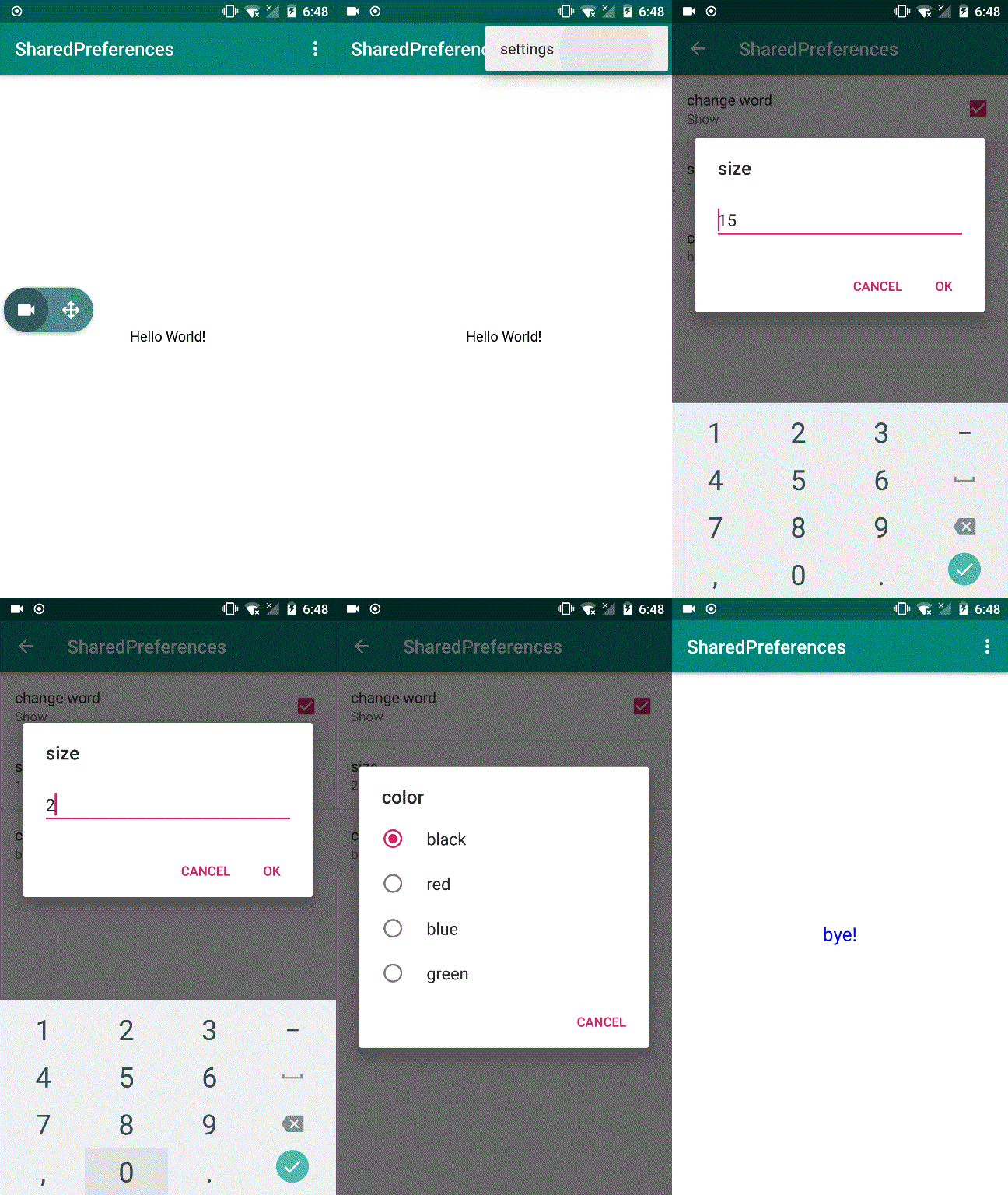
代码:
activity_main
<?xml version="1.0" encoding="utf-8"?><LinearLayout xmlns:android="http://schemas.android.com/apk/res/android" xmlns:tools="http://schemas.android.com/tools" android:layout_width="match_parent" android:layout_height="match_parent" android:gravity="center" tools:context=".MainActivity">
<TextView    android:id="@+id/textview"    android:layout_width="wrap_content"    android:layout_height="wrap_content"    android:text="@string/Hello_World" />

</LinearLayout>
activity_settings
<?xml version="1.0" encoding="utf-8"?>

    <fragment        xmlns:android="http://schemas.android.com/apk/res/android"        android:layout_width="match_parent"        android:layout_height="match_parent"        android:name="com.example.admin.sharedpreferences.SettingsActivity$preferenceFragment"        android:id="@+id/preference"/>
menu.menu
<?xml version="1.0" encoding="utf-8"?><menu xmlns:android="http://schemas.android.com/apk/res/android" xmlns:app="http://schemas.android.com/apk/res-auto"> <item android:id="@+id/menu_settings" android:title="@string/menu_title" app:showAsAction="never"/></menu>
arrays
<?xml version="1.0" encoding="utf-8"?><resources> <string-array name="color_show"> <item>@string/black</item> <item>@string/red</item> <item>@string/blue</item> <item>@string/green</item> </string-array></resources>
preferences_settings
<?xml version="1.0" encoding="utf-8"?><PreferenceScreen    xmlns:android="http://schemas.android.com/apk/res/android">

    <CheckBoxPreference        android:title="@string/CheckBoxPreference_title"        android:defaultValue="false"        android:summaryOn="@string/CheckBoxPreference_summaryOn"        android:summaryOff="@string/CheckBceoxPreferen_summaryOff"        android:key="@string/CheckBceoxPreferen_key"/>

    <EditTextPreference        android:title="@string/EditTextPreference_title"        android:defaultValue="@string/EditTextPreference_defaultValue"        android:inputType="numberDecimal"        android:selectAllOnFocus="true"        android:key="@string/EditTextPreference_key"/>

    <ListPreference        android:title="@string/ListPreference_title"        android:defaultValue="@string/ListPreference_defaultValue"        android:entries="@array/color_show"        android:entryValues="@array/color_show"        android:key="@string/ListPreference_key"/></PreferenceScreen>
AndroidMainFest
<?xml version="1.0" encoding="utf-8"?><manifest xmlns:android="http://schemas.android.com/apk/res/android"    package="com.example.admin.sharedpreferences">

    <application        android:allowBackup="true"        android:icon="@mipmap/ic_launcher"        android:label="@string/app_name"        android:roundIcon="@mipmap/ic_launcher_round"        android:supportsRtl="true"        android:theme="@style/AppTheme">        <activity android:name=".MainActivity">            <intent-filter>                <action android:name="android.intent.action.MAIN" />

                <category android:name="android.intent.category.LAUNCHER" />            </intent-filter>        </activity>

        <activity            android:name=".SettingsActivity"            android:parentActivityName=".MainActivity">            <meta-data                android:name="android.support.PARENT_ACTIVITY"                android:value=".MainActivity"/>        </activity>    </application>

</manifest>
MainActivity.java
package com.example.admin.sharedpreferences;

import android.content.Intent;import android.content.SharedPreferences;import android.graphics.Color;import android.preference.PreferenceManager;import android.support.v7.app.AppCompatActivity;import android.os.Bundle;import android.view.Menu;import android.view.MenuItem;import android.widget.TextView;

public class MainActivity extends AppCompatActivity {

    private TextView textView;

    @Override    protected void onCreate(Bundle savedInstanceState) {        super.onCreate(savedInstanceState);        setContentView(R.layout.activity_main);        textView = findViewById(R.id.textview);    }

    @Override    public boolean onCreateOptionsMenu(Menu menu) {        getMenuInflater().inflate(R.menu.menu, menu);        return super.onCreateOptionsMenu(menu);    }

    @Override    public boolean onOptionsItemSelected(MenuItem item) {        int id = item.getItemId();        switch (id) {            case R.id.menu_settings:                Intent intent = new Intent(this, SettingsActivity.class);                startActivity(intent);                break;        }        return true;    }

    @Override    protected void onStart() {        super.onStart();        SharedPreferences sharedPreferences = PreferenceManager.getDefaultSharedPreferences(this);

        if (sharedPreferences.getBoolean(getString(R.string.CheckBceoxPreferen_key), false)) {            textView.setText(R.string.Bye);        }

        String colorText = sharedPreferences.getString(getString(R.string.ListPreference_key), getString(R.string.ListPreference_defaultValue));        String[] color_array = getResources().getStringArray(R.array.color_show);

        for (int i = 0; i < color_array.length; i++) {

            if (color_array[i] .equals(colorText)){                setTextColor(i);                break;            }        }

        String sizeText = sharedPreferences.getString(getString(R.string.EditTextPreference_key), getString(R.string.EditTextPreference_defaultValue));        int size = Integer.parseInt(sizeText);        textView.setTextSize(size);    }

    public void setTextColor(int number) {        switch (number) {            default:                textView.setTextColor(Color.BLACK);            case 0:                textView.setTextColor(Color.BLACK);                break;            case 1:                textView.setTextColor(Color.RED);                break;            case 2:                textView.setTextColor(Color.BLUE);                break;            case 3:                textView.setTextColor(Color.GREEN);                break;

        }    }}
SettingsActivity.java
package com.example.admin.sharedpreferences;

import android.content.SharedPreferences;import android.os.Bundle;import android.preference.ListPreference;import android.preference.Preference;import android.preference.PreferenceFragment;import android.preference.PreferenceManager;import android.support.v4.app.NavUtils;import android.support.v7.app.AppCompatActivity;

public class SettingsActivity extends AppCompatActivity {    @Override    public void onCreate( Bundle savedInstanceState) {        super.onCreate(savedInstanceState);        setContentView(R.layout.activity_settings);    }

    @Override    public void onBackPressed() {        super.onBackPressed();        NavUtils.navigateUpFromSameTask(this);    }

    public static class  preferenceFragment extends PreferenceFragment implements Preference.OnPreferenceChangeListener {

        @Override        public void onCreate( Bundle savedInstanceState) {            super.onCreate(savedInstanceState);            addPreferencesFromResource(R.xml.preferences_settings);            Preference preference_size = findPreference(getString(R.string.EditTextPreference_key));            preferenceSummary(preference_size);            Preference preference_color = findPreference(getString(R.string.ListPreference_key));            preferenceSummary(preference_color);        }

        @Override        public boolean onPreferenceChange(Preference preference, Object newValue) {            String value=String.valueOf(newValue);            if (preference instanceof ListPreference){                ListPreference listPreference=(ListPreference) preference;                int index=listPreference.findIndexOfValue(value);                if (index >=0){                    CharSequence[] text=listPreference.getEntries();                    preference.setSummary(text[index]);                }            }else {                preference.setSummary(value);            }            return true;        }

        public void preferenceSummary(Preference preference) {            preference.setOnPreferenceChangeListener(this );            SharedPreferences sharedPreferences = PreferenceManager.getDefaultSharedPreferences(preference.getContext());            String text = sharedPreferences.getString(preference.getKey(), "");            onPreferenceChange(preference,text);        }    }

}
github项目源码: https://github.com/NeoWu55/Android-Sharedpreferences
SharedPreferences类的使用的更多相关文章
- Android学习之SharedPreferences类
SharedPreferences类 android.content.SharedPreferences 类概括: 访问和修改由函数getSharedPreferences(String,int)返回 ...
- 【Android】19.1 SharedPreferences类
分类:C#.Android.VS2015: 创建日期:2016-03-05 一.简介 SharedPreferences:简单共享存储首选项.实际上就是用加密的内部文件保存所有页面都能访问的一系列“n ...
- 安卓SharedPreferences类的使用
package com.lidaochen.phonecall; import android.content.Intent; import android.content.SharedPrefere ...
- Android数据存储方式--SharedPreferences
Android数据存储方式有如下四种:SharedPreferences.存储到文件.SQLite数据库.内容提供者(Content provider).存储到网络服务器. 本文主要介绍一下Share ...
- Android——配置文件的保存SharedPreferences进行数据存储
很多时候我们开发的软件需要向用户提供软件参数设置功能,例如我们常用的QQ,用户可以设置是否允许陌生人添加自己为好友.对于软件配置参数的保存,如果是window软件通常我们会采用ini文件进行保存,如果 ...
- SharedPreferences详解
我们在开发软件的时候,常需要向用户提供软件参数设置功能,例如我们常用的微信,用户可以设置是否允许陌生人添加自己为好友. 对于软件配置参数的保存, 如果是在window下通常我们会采用ini文件进行保存 ...
- 使用SharedPreferences进行数据存储
使用SharedPreferences进行数据存储 很多时候我们开发的软件需要向用户提供软件参数设置功能,例如我们常用的QQ,用户可以设置是否允许陌生人添加自己为好友.对于软件配置参数的保存,如果是w ...
- android开发之路11(用SharedPreferences存储数据)
Android平台给我们提供了一个SharedPreferences类,实际上SharedPreferences处理的就是一个key-value(键值对),它是 一个轻量级的存储类,特别适合用于保存软 ...
- Android数据存储方式之SharedPreferences
Android平台给我们提供了一个SharedPreferences类,它是一个轻量级的存储类,特别适合用于保存软件配置参数.使用SharedPreferences保存数据,其背后是用xml文件存放数 ...
随机推荐
- [MySQL] explain中的using where和using index
1. 查看表中的所有索引 show index from modify_passwd_log; 有两个 一个是id的主键索引 , 一个是email_id的普通索引 2. using index表示 ...
- alibaba fastjson 使用
// 对象转 json 字符串 User user1 = new User("Marry", 30, new Date()); String str1 = JSON.toJSONS ...
- JavaScript中的闭包和作用域链
这部分几乎是JavaScript中最难的部分,也是面试官最爱问的地方. 下面的内容是我以前写的<JavaScript学习手册>中被客户删除的部分,理由听起来有点诡异:太难.
- WordCount
一.Gitee地址:https://gitee.com/zjgss99/WordCount 二.项目分析: 对程序设计语言源文件统计字符数.单词数.行数,统计结果以指定格式输出到默认文件中,以及其他扩 ...
- MongoDB更需要好的模式设计 及 案例赏析
一 挑战 设计从来就是个挑战. 当我们第一次接触数据库,学习数据库基础理论时,都需要学习范式,老师也一再强调范式是设计的基础.范式是这门课程中的重要部分,在期末考试中也一定是个重要考点.如果我们当年 ...
- MySQL下perror工具查看System Error Code信息
在MySQL数据库的维护过程中,我们有时候会在MySQL的错误日志文件中看到一些关于Operating system error的错误信息,例如在MySQL的错误日志里面,有时候会看到关于 Inn ...
- AngularJS学习之旅—AngularJS Scope作用域(五)
1.AngularJS Scope(作用域) Scope(作用域) 是应用在 HTML (视图) 和 JavaScript (控制器)之间的纽带. Scope 是一个对象,有可用的方法和属性. Sco ...
- c/c++ socket API 调用后的错误判断 perror errno
socket API 调用后的错误判断 perror errno 调用完socket API后,需要判断调用是否成功与失败.如果失败,会自动设置errno(是个整数), 并且用perror可以打印出具 ...
- Linux学习历程——Centos 7 grep命令
一.命令简介 grep 命令用于在文本中执行关键词搜索,并显示匹配的结果. 由于grep命令参数很多,这里只列出一些常用的参数. 参数 作用 -b 将可执行文件当作文本文件来搜索 -c 仅显示找到的行 ...
- Linux 文件权限管理
1.文件权限的概述 在Linux系统下,使用权限来保护资源的安全将是一种不错的选择.系统中每个文件的权限都有可读(r).可写(w)和可执行(x)这三种权限,它们分别对应权限数值4.2 和1.系统为每个 ...