
SharedPreferences类的使用
SharedPreferences,用xml文件保存用户的偏好设置,是一个轻量级的存储类。
效果图:
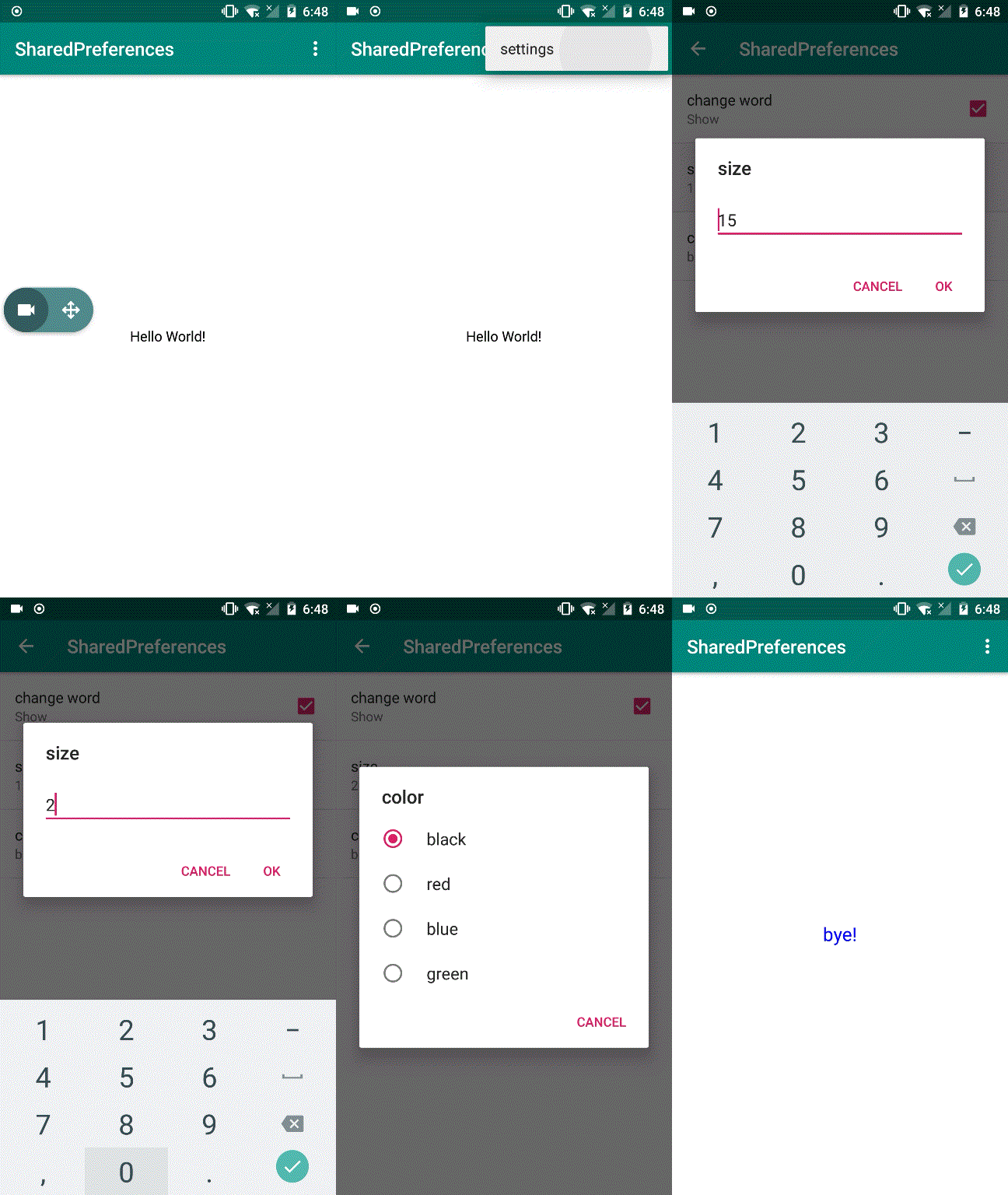
代码:
activity_main
<?xml version="1.0" encoding="utf-8"?><LinearLayout xmlns:android="http://schemas.android.com/apk/res/android" xmlns:tools="http://schemas.android.com/tools" android:layout_width="match_parent" android:layout_height="match_parent" android:gravity="center" tools:context=".MainActivity">
<TextView    android:id="@+id/textview"    android:layout_width="wrap_content"    android:layout_height="wrap_content"    android:text="@string/Hello_World" />

</LinearLayout>
activity_settings
<?xml version="1.0" encoding="utf-8"?>

    <fragment        xmlns:android="http://schemas.android.com/apk/res/android"        android:layout_width="match_parent"        android:layout_height="match_parent"        android:name="com.example.admin.sharedpreferences.SettingsActivity$preferenceFragment"        android:id="@+id/preference"/>
menu.menu
<?xml version="1.0" encoding="utf-8"?><menu xmlns:android="http://schemas.android.com/apk/res/android" xmlns:app="http://schemas.android.com/apk/res-auto"> <item android:id="@+id/menu_settings" android:title="@string/menu_title" app:showAsAction="never"/></menu>
arrays
<?xml version="1.0" encoding="utf-8"?><resources> <string-array name="color_show"> <item>@string/black</item> <item>@string/red</item> <item>@string/blue</item> <item>@string/green</item> </string-array></resources>
preferences_settings
<?xml version="1.0" encoding="utf-8"?><PreferenceScreen    xmlns:android="http://schemas.android.com/apk/res/android">

    <CheckBoxPreference        android:title="@string/CheckBoxPreference_title"        android:defaultValue="false"        android:summaryOn="@string/CheckBoxPreference_summaryOn"        android:summaryOff="@string/CheckBceoxPreferen_summaryOff"        android:key="@string/CheckBceoxPreferen_key"/>

    <EditTextPreference        android:title="@string/EditTextPreference_title"        android:defaultValue="@string/EditTextPreference_defaultValue"        android:inputType="numberDecimal"        android:selectAllOnFocus="true"        android:key="@string/EditTextPreference_key"/>

    <ListPreference        android:title="@string/ListPreference_title"        android:defaultValue="@string/ListPreference_defaultValue"        android:entries="@array/color_show"        android:entryValues="@array/color_show"        android:key="@string/ListPreference_key"/></PreferenceScreen>
AndroidMainFest
<?xml version="1.0" encoding="utf-8"?><manifest xmlns:android="http://schemas.android.com/apk/res/android"    package="com.example.admin.sharedpreferences">

    <application        android:allowBackup="true"        android:icon="@mipmap/ic_launcher"        android:label="@string/app_name"        android:roundIcon="@mipmap/ic_launcher_round"        android:supportsRtl="true"        android:theme="@style/AppTheme">        <activity android:name=".MainActivity">            <intent-filter>                <action android:name="android.intent.action.MAIN" />

                <category android:name="android.intent.category.LAUNCHER" />            </intent-filter>        </activity>

        <activity            android:name=".SettingsActivity"            android:parentActivityName=".MainActivity">            <meta-data                android:name="android.support.PARENT_ACTIVITY"                android:value=".MainActivity"/>        </activity>    </application>

</manifest>
MainActivity.java
package com.example.admin.sharedpreferences;

import android.content.Intent;import android.content.SharedPreferences;import android.graphics.Color;import android.preference.PreferenceManager;import android.support.v7.app.AppCompatActivity;import android.os.Bundle;import android.view.Menu;import android.view.MenuItem;import android.widget.TextView;

public class MainActivity extends AppCompatActivity {

    private TextView textView;

    @Override    protected void onCreate(Bundle savedInstanceState) {        super.onCreate(savedInstanceState);        setContentView(R.layout.activity_main);        textView = findViewById(R.id.textview);    }

    @Override    public boolean onCreateOptionsMenu(Menu menu) {        getMenuInflater().inflate(R.menu.menu, menu);        return super.onCreateOptionsMenu(menu);    }

    @Override    public boolean onOptionsItemSelected(MenuItem item) {        int id = item.getItemId();        switch (id) {            case R.id.menu_settings:                Intent intent = new Intent(this, SettingsActivity.class);                startActivity(intent);                break;        }        return true;    }

    @Override    protected void onStart() {        super.onStart();        SharedPreferences sharedPreferences = PreferenceManager.getDefaultSharedPreferences(this);

        if (sharedPreferences.getBoolean(getString(R.string.CheckBceoxPreferen_key), false)) {            textView.setText(R.string.Bye);        }

        String colorText = sharedPreferences.getString(getString(R.string.ListPreference_key), getString(R.string.ListPreference_defaultValue));        String[] color_array = getResources().getStringArray(R.array.color_show);

        for (int i = 0; i < color_array.length; i++) {

            if (color_array[i] .equals(colorText)){                setTextColor(i);                break;            }        }

        String sizeText = sharedPreferences.getString(getString(R.string.EditTextPreference_key), getString(R.string.EditTextPreference_defaultValue));        int size = Integer.parseInt(sizeText);        textView.setTextSize(size);    }

    public void setTextColor(int number) {        switch (number) {            default:                textView.setTextColor(Color.BLACK);            case 0:                textView.setTextColor(Color.BLACK);                break;            case 1:                textView.setTextColor(Color.RED);                break;            case 2:                textView.setTextColor(Color.BLUE);                break;            case 3:                textView.setTextColor(Color.GREEN);                break;

        }    }}
SettingsActivity.java
package com.example.admin.sharedpreferences;

import android.content.SharedPreferences;import android.os.Bundle;import android.preference.ListPreference;import android.preference.Preference;import android.preference.PreferenceFragment;import android.preference.PreferenceManager;import android.support.v4.app.NavUtils;import android.support.v7.app.AppCompatActivity;

public class SettingsActivity extends AppCompatActivity {    @Override    public void onCreate( Bundle savedInstanceState) {        super.onCreate(savedInstanceState);        setContentView(R.layout.activity_settings);    }

    @Override    public void onBackPressed() {        super.onBackPressed();        NavUtils.navigateUpFromSameTask(this);    }

    public static class  preferenceFragment extends PreferenceFragment implements Preference.OnPreferenceChangeListener {

        @Override        public void onCreate( Bundle savedInstanceState) {            super.onCreate(savedInstanceState);            addPreferencesFromResource(R.xml.preferences_settings);            Preference preference_size = findPreference(getString(R.string.EditTextPreference_key));            preferenceSummary(preference_size);            Preference preference_color = findPreference(getString(R.string.ListPreference_key));            preferenceSummary(preference_color);        }

        @Override        public boolean onPreferenceChange(Preference preference, Object newValue) {            String value=String.valueOf(newValue);            if (preference instanceof ListPreference){                ListPreference listPreference=(ListPreference) preference;                int index=listPreference.findIndexOfValue(value);                if (index >=0){                    CharSequence[] text=listPreference.getEntries();                    preference.setSummary(text[index]);                }            }else {                preference.setSummary(value);            }            return true;        }

        public void preferenceSummary(Preference preference) {            preference.setOnPreferenceChangeListener(this );            SharedPreferences sharedPreferences = PreferenceManager.getDefaultSharedPreferences(preference.getContext());            String text = sharedPreferences.getString(preference.getKey(), "");            onPreferenceChange(preference,text);        }    }

}
github项目源码: https://github.com/NeoWu55/Android-Sharedpreferences
SharedPreferences类的使用的更多相关文章
- Android学习之SharedPreferences类
SharedPreferences类 android.content.SharedPreferences 类概括: 访问和修改由函数getSharedPreferences(String,int)返回 ...
- 【Android】19.1 SharedPreferences类
分类:C#.Android.VS2015: 创建日期:2016-03-05 一.简介 SharedPreferences:简单共享存储首选项.实际上就是用加密的内部文件保存所有页面都能访问的一系列“n ...
- 安卓SharedPreferences类的使用
package com.lidaochen.phonecall; import android.content.Intent; import android.content.SharedPrefere ...
- Android数据存储方式--SharedPreferences
Android数据存储方式有如下四种:SharedPreferences.存储到文件.SQLite数据库.内容提供者(Content provider).存储到网络服务器. 本文主要介绍一下Share ...
- Android——配置文件的保存SharedPreferences进行数据存储
很多时候我们开发的软件需要向用户提供软件参数设置功能,例如我们常用的QQ,用户可以设置是否允许陌生人添加自己为好友.对于软件配置参数的保存,如果是window软件通常我们会采用ini文件进行保存,如果 ...
- SharedPreferences详解
我们在开发软件的时候,常需要向用户提供软件参数设置功能,例如我们常用的微信,用户可以设置是否允许陌生人添加自己为好友. 对于软件配置参数的保存, 如果是在window下通常我们会采用ini文件进行保存 ...
- 使用SharedPreferences进行数据存储
使用SharedPreferences进行数据存储 很多时候我们开发的软件需要向用户提供软件参数设置功能,例如我们常用的QQ,用户可以设置是否允许陌生人添加自己为好友.对于软件配置参数的保存,如果是w ...
- android开发之路11(用SharedPreferences存储数据)
Android平台给我们提供了一个SharedPreferences类,实际上SharedPreferences处理的就是一个key-value(键值对),它是 一个轻量级的存储类,特别适合用于保存软 ...
- Android数据存储方式之SharedPreferences
Android平台给我们提供了一个SharedPreferences类,它是一个轻量级的存储类,特别适合用于保存软件配置参数.使用SharedPreferences保存数据,其背后是用xml文件存放数 ...
随机推荐
- Mac下如何用SSH连接远程Linux服务器
终端命令 a).打开Mac的命令终端 b).输入ssh -p 22 root@102.210.86.213 它会提示你输入密码,输入正确的密码之后,你就发现已经登陆成功了.(22: 端口号 root ...
- PHP中的__get和__set理解
先来了解一下PHP类中的__get和__set函数 当我们试图获取一个不可达属性时(比如private),类会自动调用__get函数.当试图设置一个不可达属性时(比如private),类会自动调用__ ...
- Servlet版本冲突引起的Error
本地打包部署应用都可以正常启动和响应请求,但是通过CI打包部署到服务器有请求进来时就会报错: java.lang.NoSuchMethodError: javax.servlet.http.HttpS ...
- RabbitMQ如何工作和RabbitMQ核心概念
RabbitMQ是一个开源的消息代理软件.它接受来自生产者的消息并将其传递给消费者.它就像一个中间人,可以用来减少Web应用程序服务器的负载和交付时间. RabbitMQ如何工作 让我们简要介绍一下R ...
- Timeline Style
from: https://freefrontend.com/css-timelines/ https://bootstrapthemes.co/items/resources/timeline/ h ...
- 博弈论进阶之Multi-SG
Multi-Nim 从最简单的Nim模型开始 它的定义是这样的 有\(n\)堆石子,两个人可以从任意一堆石子中拿任意多个石子(不能不拿)或把一堆数量不少于\(2\)石子分为两堆不为空的石子,没法拿的人 ...
- 如何把activity当成dialog
在工作中有时候需要把activity当成dialog使用,其实做法挺简单的. 1.设置activity的style <style name="DialogTheme" par ...
- ASP.NET MVC从空项目开始定制项目
在上一篇net core的文章中已经讲过如何从零开始搭建WebSocket. 今天聊聊ASP.NET的文件结构,如何用自己的目录结构组织项目里的文件. 如果用Visual Studio(VS)向导或d ...
- selenium-判断元素是否可见(五)
很多 case 在运行时都会出现页面还没加载完成,但是脚本已经跑完,并且报未找到元素 这是就需要增加判断,在预定的时间内如果页面显示了某元素后再让脚本继续执行,则为判断元素是否可见或者说页面是否显示了 ...
- Windows Server 2016-查询并导出固定时间段创建AD用户
生产环境中往往我们有各式各样的需求,例如快速查询某段时间创建用户,或批量导出固定时间段创建用户列表,具体操作如下: $date=Get-Date $oldday=(Get-Date).AddDays( ...