
等价路由在路由器和CE交换机上默认的行为是不同的,路由器总是走第一个下一跳,CE交换机是逐包。
结论:
1、在eNSP中实验,路由器和CE交换机对于等价路由的默认转发行为是不同的,
路由器:默认是基于流的转发形态,更准确的来讲,ping两个不同的下一跳,都是走等价路由的第一个路由,不走第二条路由。
CE交换机:默认就是逐包转发,即使ping同一个目的ip, 流量也会在不同的下一跳上进行负载分担。
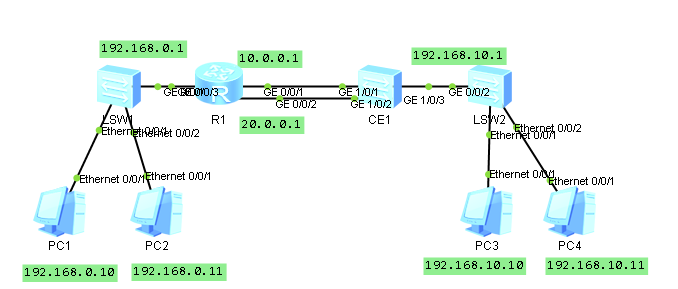
2、实验图如下:
3. 配置说明
R1 上配置默认路由,下一跳是两个,形成等价路由。
<Huawei>dis curr | inc ip route
ip route-static 0.0.0.0 0.0.0.0 20.0.0.2
ip route-static 0.0.0.0 0.0.0.0 10.0.0.2
<Huawei>
CE交换机上也是相同配置,下一跳是两个,形成等价路由。
<HUAWEI>dis curr | inc ip route
ip route-static 0.0.0.0 0.0.0.0 10.0.0.1
ip route-static 0.0.0.0 0.0.0.0 20.0.0.1
<HUAWEI>
4. 实验内容
(1)实验路由器默认情况下的等价路由。
步骤一、从PC1 ping PC3
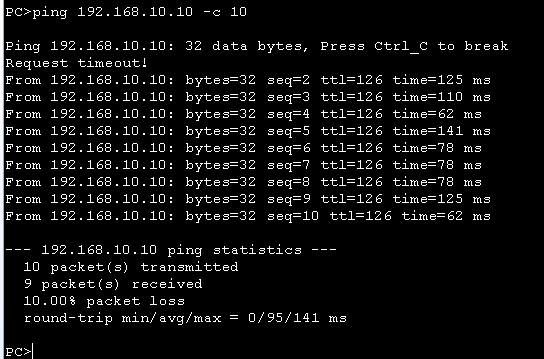
步骤二、查看路由器的GE0/0/1, GE0/0/2的端口统计信息,如下,
可以看出,流量只会从GE 0/0/1发送,GE0/0/2没有发送流量。
<Huawei>dis interface GigabitEthernet 0/0/1
GigabitEthernet0/0/1 current state : UP
Line protocol current state : UP
Last line protocol up time : 2018-01-14 18:48:37 UTC-08:00
Description:
Route Port,The Maximum Transmit Unit is 1500
Internet Address is 10.0.0.1/24
IP Sending Frames' Format is PKTFMT_ETHNT_2, Hardware address is 5489-9806-5754
Last physical up time : 2018-01-14 18:47:29 UTC-08:00
Last physical down time : 2018-01-14 18:46:51 UTC-08:00
Current system time: 2018-01-14 19:29:04-08:00
Hardware address is 5489-9806-5754
Last 300 seconds input rate 0 bytes/sec, 0 packets/sec
Last 300 seconds output rate 0 bytes/sec, 0 packets/sec
Input: 296 bytes, 4 packets
Output: 740 bytes, 10 packets
Input:
Unicast: 4 packets, Multicast: 0 packets
Broadcast: 0 packets
Output:
Unicast: 10 packets, Multicast: 0 packets
Broadcast: 0 packets
Input bandwidth utilization : 0%
Output bandwidth utilization : 0%
<Huawei>
<Huawei>dis interface GigabitEthernet 0/0/2
GigabitEthernet0/0/2 current state : UP
Line protocol current state : UP
Last line protocol up time : 2018-01-14 18:48:49 UTC-08:00
Description:
Route Port,The Maximum Transmit Unit is 1500
Internet Address is 20.0.0.1/24
IP Sending Frames' Format is PKTFMT_ETHNT_2, Hardware address is 5489-9806-5755
Last physical up time : 2018-01-14 18:47:29 UTC-08:00
Last physical down time : 2018-01-14 18:46:51 UTC-08:00
Current system time: 2018-01-14 19:29:07-08:00
Hardware address is 5489-9806-5755
Last 300 seconds input rate 0 bytes/sec, 0 packets/sec
Last 300 seconds output rate 0 bytes/sec, 0 packets/sec
Input: 370 bytes, 5 packets
Output: 0 bytes, 0 packets
Input:
Unicast: 5 packets, Multicast: 0 packets
Broadcast: 0 packets
Output:
Unicast: 0 packets, Multicast: 0 packets
Broadcast: 0 packets
Input bandwidth utilization : 0%
Output bandwidth utilization : 0%
<Huawei>
步骤三、从PC1 ping PC4, 目的是测试不同的流(PC4的ip和PC3的ip不同),会不会进行负载分担。
清楚R上的统计信息后,再ping.
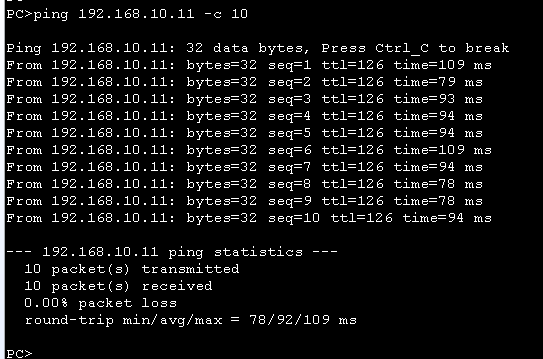
步骤四、查看路由器的GE0/0/1, GE0/0/2的端口统计信息,如下,
可以看出,流量只会从GE 0/0/1发送,GE0/0/2没有发送流量。也就是说,即使是不同的流,也不会进行负载分担。
<Huawei>dis interface GigabitEthernet 0/0/1
GigabitEthernet0/0/1 current state : UP
Line protocol current state : UP
Last line protocol up time : 2018-01-14 18:48:37 UTC-08:00
Description:
Route Port,The Maximum Transmit Unit is 1500
Internet Address is 10.0.0.1/24
IP Sending Frames' Format is PKTFMT_ETHNT_2, Hardware address is 5489-9806-5754
Last physical up time : 2018-01-14 18:47:29 UTC-08:00
Last physical down time : 2018-01-14 18:46:51 UTC-08:00
Current system time: 2018-01-14 19:33:39-08:00
Hardware address is 5489-9806-5754
Last 300 seconds input rate 0 bytes/sec, 0 packets/sec
Last 300 seconds output rate 0 bytes/sec, 0 packets/sec
Input: 370 bytes, 5 packets
Output: 740 bytes, 10 packets
Input:
Unicast: 5 packets, Multicast: 0 packets
Broadcast: 0 packets
Output:
Unicast: 10 packets, Multicast: 0 packets
Broadcast: 0 packets
Input bandwidth utilization : 0%
Output bandwidth utilization : 0%
<Huawei>
<Huawei>dis interface GigabitEthernet 0/0/2
GigabitEthernet0/0/2 current state : UP
Line protocol current state : UP
Last line protocol up time : 2018-01-14 18:48:49 UTC-08:00
Description:
Route Port,The Maximum Transmit Unit is 1500
Internet Address is 20.0.0.1/24
IP Sending Frames' Format is PKTFMT_ETHNT_2, Hardware address is 5489-9806-5755
Last physical up time : 2018-01-14 18:47:29 UTC-08:00
Last physical down time : 2018-01-14 18:46:51 UTC-08:00
Current system time: 2018-01-14 19:33:42-08:00
Hardware address is 5489-9806-5755
Last 300 seconds input rate 0 bytes/sec, 0 packets/sec
Last 300 seconds output rate 0 bytes/sec, 0 packets/sec
Input: 370 bytes, 5 packets
Output: 0 bytes, 0 packets
Input:
Unicast: 5 packets, Multicast: 0 packets
Broadcast: 0 packets
Output:
Unicast: 0 packets, Multicast: 0 packets
Broadcast: 0 packets
Input bandwidth utilization : 0%
Output bandwidth utilization : 0%
<Huawei>
(2)实验路由器的逐包转发功能。
路由器的逐包转发功能,需要配置命令行:
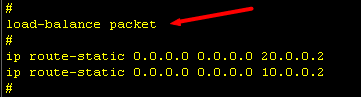
步骤一、从PC1 ping PC3

步骤二、查看路由器的GE0/0/1, GE0/0/2的端口统计信息,如下,
可以看出是每个下一跳端口上都有转发流量,实现的是负载分担模式。
<Huawei>dis interface GigabitEthernet 0/0/1
GigabitEthernet0/0/1 current state : UP
Line protocol current state : UP
Last line protocol up time : 2018-01-14 18:48:37 UTC-08:00
Description:
Route Port,The Maximum Transmit Unit is 1500
Internet Address is 10.0.0.1/24
IP Sending Frames' Format is PKTFMT_ETHNT_2, Hardware address is 5489-9806-5754
Last physical up time : 2018-01-14 18:47:29 UTC-08:00
Last physical down time : 2018-01-14 18:46:51 UTC-08:00
Current system time: 2018-01-14 19:20:52-08:00
Hardware address is 5489-9806-5754
Last 300 seconds input rate 0 bytes/sec, 0 packets/sec
Last 300 seconds output rate 0 bytes/sec, 0 packets/sec
Input: 370 bytes, 5 packets
Output: 370 bytes, 5 packets
Input:
Unicast: 5 packets, Multicast: 0 packets
Broadcast: 0 packets
Output:
Unicast: 5 packets, Multicast: 0 packets
Broadcast: 0 packets
Input bandwidth utilization : 0%
Output bandwidth utilization : 0%
<Huawei>
<Huawei>dis interface GigabitEthernet 0/0/2
GigabitEthernet0/0/2 current state : UP
Line protocol current state : UP
Last line protocol up time : 2018-01-14 18:48:49 UTC-08:00
Description:
Route Port,The Maximum Transmit Unit is 1500
Internet Address is 20.0.0.1/24
IP Sending Frames' Format is PKTFMT_ETHNT_2, Hardware address is 5489-9806-5755
Last physical up time : 2018-01-14 18:47:29 UTC-08:00
Last physical down time : 2018-01-14 18:46:51 UTC-08:00
Current system time: 2018-01-14 19:20:55-08:00
Hardware address is 5489-9806-5755
Last 300 seconds input rate 0 bytes/sec, 0 packets/sec
Last 300 seconds output rate 0 bytes/sec, 0 packets/sec
Input: 296 bytes, 4 packets
Output: 370 bytes, 5 packets
Input:
Unicast: 4 packets, Multicast: 0 packets
Broadcast: 0 packets
Output:
Unicast: 5 packets, Multicast: 0 packets
Broadcast: 0 packets
Input bandwidth utilization : 0%
Output bandwidth utilization : 0%
<Huawei>
其实,从上面的GE0/0/2能够接收到报文的结果看,已经证明CE交换机总是在逐包进行负载分担。下面再从实验上验证。
(3)验证交换机的默认转发
步骤一、从PC3 ping PC1. ping 10个包
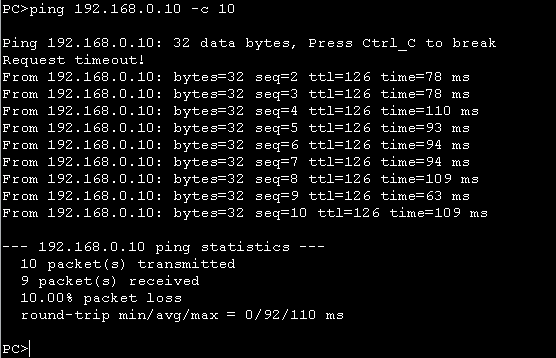
步骤二、查看CE交换机上的GE 1/0/1, GE1/0/2的统计信息,如下,
可以看出,即使目的ip相同,交换机也会进行逐包的转发行为。
<HUAWEI>dis interface GE 1/0/1
GE1/0/1 current state : UP (ifindex: 3)
Line protocol current state : UP
Last line protocol up time : 2018-01-14 18:50:25
Description:
Route Port,The Maximum Transmit Unit is 1500,The Maximum Frame Length is 9216
Internet Address is 10.0.0.2/24
IP Sending Frames' Format is PKTFMT_ETHNT_2, Hardware address is 0400-0611-0101
Last physical up time : 2018-01-14 18:50:25
Last physical down time : 2018-01-14 18:46:59
Current system time: 2018-01-14 19:39:46
Statistics last cleared:2018-01-14 19:38:38
Last 300 seconds input rate: 0 bits/sec, 0 packets/sec
Last 300 seconds output rate: 0 bits/sec, 0 packets/sec
Input peak rate 0 bits/sec, Record time: -
Output peak rate 0 bits/sec, Record time: -
Input: 0 bytes, 9 packets
Output: 0 bytes, 5 packets
Input:
Unicast: 9 packets, Multicast: 0 packets
Broadcast: 0 packets, JumboOctets: 0 packets
CRC: 0 packets, Symbol: 0 packets
Overrun: 0 packets, InRangeLength: 0 packets
LongPacket: 0 packets, Jabber: 0 packets, Alignment: 0 packets
Fragment: 0 packets, Undersized Frame: 0 packets
RxPause: 0 packets
Output:
Unicast: 5 packets, Multicast: 0 packets
Broadcast: 0 packets, JumboOctets: 0 packets
Lost: 0 packets, Overflow: 0 packets, Underrun: 0 packets
System: 0 packets, Overruns: 0 packets
TxPause: 0 packets
Last 300 seconds input utility rate: 0.00%
Last 300 seconds output utility rate: 0.00%
<HUAWEI>
<HUAWEI>dis interface GE 1/0/2
GE1/0/2 current state : UP (ifindex: 4)
Line protocol current state : UP
Last line protocol up time : 2018-01-14 18:50:25
Description:
Route Port,The Maximum Transmit Unit is 1500,The Maximum Frame Length is 9216
Internet Address is 20.0.0.2/24
IP Sending Frames' Format is PKTFMT_ETHNT_2, Hardware address is 0400-0611-0102
Last physical up time : 2018-01-14 18:50:25
Last physical down time : 2018-01-14 18:46:59
Current system time: 2018-01-14 19:39:53
Statistics last cleared:2018-01-14 19:38:38
Last 300 seconds input rate: 0 bits/sec, 0 packets/sec
Last 300 seconds output rate: 0 bits/sec, 0 packets/sec
Input peak rate 0 bits/sec, Record time: -
Output peak rate 0 bits/sec, Record time: -
Input: 0 bytes, 0 packets
Output: 0 bytes, 5 packets
Input:
Unicast: 0 packets, Multicast: 0 packets
Broadcast: 0 packets, JumboOctets: 0 packets
CRC: 0 packets, Symbol: 0 packets
Overrun: 0 packets, InRangeLength: 0 packets
LongPacket: 0 packets, Jabber: 0 packets, Alignment: 0 packets
Fragment: 0 packets, Undersized Frame: 0 packets
RxPause: 0 packets
Output:
Unicast: 5 packets, Multicast: 0 packets
Broadcast: 0 packets, JumboOctets: 0 packets
Lost: 0 packets, Overflow: 0 packets, Underrun: 0 packets
System: 0 packets, Overruns: 0 packets
TxPause: 0 packets
Last 300 seconds input utility rate: 0.00%
Last 300 seconds output utility rate: 0.00%
<HUAWEI>
等价路由在路由器和CE交换机上默认的行为是不同的,路由器总是走第一个下一跳,CE交换机是逐包。的更多相关文章
- 交换机上的trunk,hybrid,access配置和应用(转)
交换机上的trunk,hybrid,access配置和应用 以太网端口的链路类型: Access类型:端口只能属于一个vlan,一般用于连接计算机. Trunk类型:端口可以属于端个vlan,可以接收 ...
- 关于ECMP 等价路由
1.ECMP简介 Equal-CostMultipathRouting,等价多路径.即存在多条到达同一个目的地址的相同开销的路径.当设备支持等价路由时,发往该目的 IP 或者目的网段的三层转发流量就可 ...
- 浅析ECMP等价路由
1.ECMP简介 Equal-CostMultipathRouting,等价多路径.即存在多条到达同一个目的地址的相同开销的路径.当设备支持等价路由时,发往该目的 IP 或者目的网段的三层转发流量就可 ...
- 在H3C交换机上开通一个VLAN并且开通一个端口ping通它
<H3C>system-view System View: return to User View with Ctrl+Z. [H3C]interface vlan-interface 2 ...
- 交换机上的MAC地址表
拓扑图: 1.首先在R1上的配置: R1(config)#int R1(config)#interface g R1(config)#interface gigabitEthernet 0/0 R1( ...
- 交换机上禁止某个MAC地址通信
当分析出网络中某台机器中毒时而有不知道它的具体位置,我们可以通过获取其MAC地址然后在交换机上禁止其MAC来达到隔离它的效果.通过ARP表查询IP地址对应的MAC地址,再将该MAC地址加入黑名单过滤. ...
- linux 接口地址全部清除才清理从此接口发出的下一跳路由
接口地址全部清除才清理从此接口发出的下一跳路由 如: eth7配置两个地址 eth7: 192.168.1.1 10.1.1.1 添加一条路由: route add -net 2.2.2.0/24 g ...
- bootstrap导航条在手机上默认展开二级目录,必须用setTimeout才能实现
bootstrap导航条在手机上默认展开二级目录,必须用setTimeout才能实现 $(document).ready(function() { $('.dropdown').hover(funct ...
- Linux3.5内核以后的路由下一跳缓存
在Linux3.5版本号(包括)之前.存在一个路由cache.这个路由cache的初衷是美好的,可是现实往往是令人遗憾的.下面是陈列得出的两个问题:1.面临针对hash算法的ddos问题(描写叙述该问 ...
随机推荐
- 如何在JSP中获得Cookie对象
Cookie cookies[]=request.getCookies(); //读出用户硬盘上的Cookie,并将所有的Cookie放到一个cookie对象数组里面 Cookie sCookie=n ...
- Android OpenSL ES 开发:OpenSL ES利用SoundTouch实现PCM音频的变速和变调
缘由 OpenSL ES 学习到现在已经知道 OpenSL ES 不仅能播放和录制PCM音频数据,还能改变声音大小.设置左声道或右声道播放.还能变速播放,可谓是播放音频的王者.但是变速有一点不好的就是 ...
- MYSQL手册
原文出处:http://www.cnblogs.com/gaofei-1/p/7152875.html MySQL配置文件 MySQL软件使用的配置文件名为my.ini,在安装目录下. MySQL常用 ...
- [Swift]LeetCode906. 超级回文数 | Super Palindromes
Let's say a positive integer is a superpalindrome if it is a palindrome, and it is also the square o ...
- layui.table图片显示不全和404问题
1.图片显示不全 在使用layui.table组件中,加载的图片显示不全,需重新定义CSS如下: .layui-table-cell{ height: auto!important; white-sp ...
- the python challenge闯关记录(0-8)
0 第零关 2**38 = 274877906944 下一关的url:http://www.pythonchallenge.com/pc/def/274877906944.html 1 第一关 移位计 ...
- java基础(十二 )-----Java泛型详解
本文对java的泛型的概念和使用做了详尽的介绍. 概述 泛型在java中有很重要的地位,在面向对象编程及各种设计模式中有非常广泛的应用. 什么是泛型?为什么要使用泛型? 泛型,即“参数化类型”.一提到 ...
- PHP中Smarty引擎的常用语法
PHP中Smarty引擎的常用语法 输出今天的日期: {$smarty.now|date_format:"%H:%M %A, %B %e, %Y"} 实际上用到了PHP的time( ...
- Android:谈一谈安卓应用中的Toast情节(基础)
前言 Toast,这个曾经也是现在正在迷倒万千软件开发者尤其是android开发者的小美女,向来不乏在各个明星应用中频繁登场.Toast是神马~听说是一种吐司面包,能吃吗?如果手机屏幕是巧克力做的,我 ...
- Asp.Net SignalR 集群会遇到的问题
SignalR集群 当客户端数量上来,一台server自然是吃不消的.多个server集群部署是必然的解决方案.再通过负载均衡,嗯 简直是完美.但是问题也接踵而来.每个server只能管理到当前ser ...