
vue单文件组件实例2:简单单文件组件
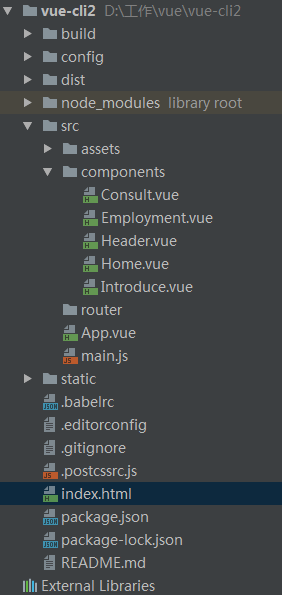

Introduce.vue:
<template>

  <div class="intro">

    单位介绍

  </div>

</template>

<script>

</script>

<style scoped>

.intro{

  font-size:20px;

  color:#000;

  margin:20px auto;

}

</style>
Employment.vue:
<template>

  <div class="employment">

    人才引进

  </div>

</template>

<script>

</script>

<style scoped>

.employment{

  font-size:20px;

  color:#000;

  margin:20px auto;

}

</style>
Consult.vue:
<template>

  <div class="consult">

    咨询

  </div>

</template>

<script>

</script>

<style scoped>

.consult{

  font-size:20px;

  color:#000;

  margin:20px auto;

}

</style>
Header.vue:
<template>

  <div class="header">

    <div class="header-wrapper">

      <ul class="nav">

        <li><router-link to="/home">首页</router-link></li>

        <li><router-link to="/introduce">单位介绍</router-link></li>

        <li><router-link to="/employment">人才引进</router-link></li>

        <li><router-link to="/consult">咨询</router-link></li>

      </ul>

    </div>

  </div>

</template>

<style>

  .header{

    height:60px;

    color:#fff;

    background: #42b983;

  }

  .header-wrapper{

    height:60px;

  }

  .nav{

    width:700px;

    height:60px;

    font-size:15px;

  }

  .nav li{

    float:left;

    margin-right:60px;

    height:60px;

    line-height:60px;

    overflow:hidden;

  }

  .nav li:last-child{

    margin-right:0;

  }

  .nav a{

    display:inline-block;

    padding:0 13px;

    color:#fff;

    border-radius:15px;

  }

  .nav a.router-link-active{

    background:#c10514;

  }

</style>
Home.vue:
<template>

  <div class="home">

    首页

  </div>

</template>

<script>

</script>

<style scoped>

.home{

  font-size:20px;

  color:#000;

  margin:20px auto;

}

</style>
App.vue:
<template>

  <div id="vue">

    <div class="nav-top">

      <!-- 引入公用的头部 header组件 -->

      <v-header></v-header>

    </div>

    <div class="contianer">

      <!-- 路由中的几个组件在这里被渲染,默认被渲染的为第一个组件,也就是home组件  -->

      <router-view></router-view>

    </div>

  </div>

</template>

<style>

#vue {

  font-family: 'Avenir', Helvetica, Arial, sans-serif;

  -webkit-font-smoothing: antialiased;

  -moz-osx-font-smoothing: grayscale;

  text-align: center;

  color: #2c3e50;

}

</style>

<script>

//引入header组件

import header from './components/Header.vue'

//输出header组件

export default{

  components: {

    'v-header': header

  }

}

</script>
main.js:
// The Vue build version to load with the `import` command

// (runtime-only or standalone) has been set in webpack.base.conf with an alias.

import Vue from 'vue'

import App from './App'

// 引入router路由

import Router from 'vue-router'

// 引入项目的四个模块组件

import introduce from './components/introduce'

import home from './components/home'

import employment from './components/employment'

import consult from './components/consult'

// 使用router

Vue.use(Router)

// 定义路由

var routes = [{

  path: '/home',

  component: home

}, {

  path: '/introduce',

  component: introduce

}, {

  path: '/employment',

  component: employment

}, {

  path: '/consult',

  component: consult

}]

// 实例化路由

var vueRouter = new Router({

  routes

})

// 创建和挂载根实例

new Vue({

  el: '#app',

  router: vueRouter,

  template: '<App></App>',

  components: { App }

})
vue单文件组件实例2:简单单文件组件的更多相关文章
- 在被vue组件引用的 js 文件里获取组件实例this
思路: 通过调用函数 把 组件实例this 传递 到 被应用的 js文件里 实例: 文件结构 在SendThis.vue 文件中引用 了modalConfig.js import modalConf ...
- VUE自学日志02-应用与组件实例
准备好了吗? 我们刚才简单介绍了 Vue 核心最基本的功能--本教程的其余部分将更加详细地涵盖这些功能以及其它高阶功能,所以请务必读完整个教程! 应用 & 组件实例 创建一个应用实例创建一个应 ...
- Vue.js 源码分析(十二) 基础篇 组件详解
组件是可复用的Vue实例,一个组件本质上是一个拥有预定义选项的一个Vue实例,组件和组件之间通过一些属性进行联系. 组件有两种注册方式,分别是全局注册和局部注册,前者通过Vue.component() ...
- 简单的文件ftp上传
目录 简单的文件ftp上传 简单的文件ftp上传 server import socket import struct service=socket.socket() service.bind(('1 ...
- Vue3组件(九)Vue + element-Plus + json = 动态渲染的表单控件
一个成熟的表单 表单表单,你已经长大了,你要学会: 动态渲染 支持单列.双列.多列 支持调整布局 支持表单验证 支持调整排列(显示)顺序 依据组件值显示需要的组件 支持 item 扩展组件 可以自动创 ...
- 第四节:Vue表单标签和组件的基本用法,父子组件间的通信
vue表单标签和组件的基本用法,父子组件间的通信,直接看例子吧. <!DOCTYPE html> <html> <head> <meta charset=&q ...
- Vue基础语法(样式绑定,事件处理,表单,Vue组件)
样式绑定 事件处理 表单 Vue组件 样式绑定 <!DOCTYPE html> <html> <head> <meta charset="utf-8 ...
- asp.net.mvc 的单文件上传和多文件上传的简单例子
首先打开vs2012,创建空的mvc4项目,名称为MVCStudy,选择基本模板
- Bootstrap历练实例:表单帮助文件
Bootstrap表单控件可以在输入框input上有一个块级帮助文本,为了添加一个占用整个宽度的内容块,请在input后添加help-block. 实例: <!DOCTYPE html>& ...
随机推荐
- 存储库之MongoDB、mysql
本篇导航: 简介 MongoDB基础知识 安装 基本数据类型 CRUD操作 其它 存储库之mysql 一.简介 MongoDB是一款强大.灵活.且易于扩展的通用型数据库1.易用性 MongoDB是 ...
- react_app 项目开发 (3)_单页面设计_react-router4
(web) 利用 react-router4 实现 单页面 开发 SPA 应用 ---- (Single Page Web Application) 整个应用只有 一个完整的页面 单击链接不会刷新页面 ...
- FTP服务器匿名登录
ftp需要开通对匿名用户.本地用户.及虚拟用户的支持.并且特别对虚拟用户中的(stu.teacher.admin)分别授予不同的权限. 1.创建多层目录,然后挂载 2.配置yum源文件 3.安 ...
- Adobe Premiere Pro CS6 下载安装包成功
Adobe Premiere Pro CS6 https://pan.baidu.com/s/1miBq59e 下载地址 安装方式 断网(必须):安装官方原版程序: 一.安装前先运行程序包的“必先运行 ...
- dhtmlx Gantt知识点1
鼠标放在任务上显示信息框: <script src="../../codebase/ext/dhtmlxgantt_tooltip.js?v=5.2.0"></s ...
- 洛谷P3388 【模板】割点(割顶)
题目背景 割点 题目描述 给出一个n个点,m条边的无向图,求图的割点. 输入输出格式 输入格式: 第一行输入n,m 下面m行每行输入x,y表示x到y有一条边 输出格式: 第一行输出割点个数 第二行按照 ...
- 火狐浏览器安装firebug和firepath插件方法(离线)
1.下载FF55以内版本安装包,安装后在Firefox 更新选择"不检查更新" 2.火狐浏览器各个版本下载地址:http://ftp.mozilla.org/pub/firefox ...
- Wpf DataGrid 自动滚动到最后一行
if (mainDataGrid.Items.Count > 0) { var border = VisualTreeHelper.GetChild(mainDataGrid, 0) as De ...
- COMP9334 Project
COMP9334 Project, Term 1, 2019:Fog/cloud ComputingVersion 1.0Due Date: 11:00pm Friday 26 April 2019. ...
- windows 操作系统发展过程
1.Windows 1.0 1985年5月推出Windows 1.0,是比尔.盖茨在苹果公司的Apple Lisa系统的GUI界面上得到的启发.Windows 1.0的GUI(图形用户界面)是基于字符 ...