
Flask 系列之 优化项目结构

说明
- 操作系统:Windows 10
- Python 版本:3.7x
- 虚拟环境管理器:virtualenv
- 代码编辑器:VS Code
实验目标
完善环境配置,添加 异常请求 处理
实现
400、404 和 500 处理
首先,在 todolist\app\templates\errors 目录下创建一个 400.html 文件,示例代码如下所示:
{% extends 'base.html' %} {% block content %}

<div class="text-center animated fadeInDown">

    <h1>400</h1>

    <h3> 错误请求!! !</h3>

    <div>

        <a href="{{ url_for('index') }}">返回首页</a>

    </div>

</div>

{% endblock %}
在 todolist\app\templates\errors 目录下创建一个 404.html 文件,示例代码如下所示:
{% extends 'base.html' %} {% block content %}

<div class="text-center animated fadeInDown">

    <h1>404</h1>

    <h3> 页面未能够找到!! !</h3>

    <div>

        抱歉,页面好像去火星啦!

    </div>

</div>

{% endblock %}
在 todolist\app\templates\errors 目录下创建一个 500.html 文件,示例代码如下所示:
{% extends 'base.html' %} {% block content %}

<div class="text-center animated fadeInDown">

    <h1>500</h1>

    <h3> 内部异常!! !</h3>

    <div>

        <a href="{{ url_for('index') }}">返回首页</a>

    </div>

</div>

{% endblock %}
接着,在 todolist\app 目录下创建 errors.py 文件,,注册 400、 404 、500 路由处理函数,示例代码如下所示:
from flask import render_template

from app import app

@app.errorhandler(400)

def bad_request(e):

    return render_template('errors/400.html'), 400

@app.errorhandler(404)

def page_not_found(e):

    return render_template('errors/404.html'), 404

@app.errorhandler(500)

def internal_server_error(e):

    return render_template('errors/500.html'), 500
添加 CLI
在 todolist\app 目录下创建 commands.py 文件,示例代码如下所示:
import click

from app import app, db

from app.models import User, Thing

@app.cli.command()

@click.option('--drop', is_flag=True, help='Create after drop.')

def initdb(drop):

    if drop:

        db.drop_all()

    db.create_all()

    print("Initialized database.")

@app.cli.command()

@click.option('--username', prompt=True, help='The username used to login.')

@click.option('--email', prompt=True, help='The email used to Identity.')

@click.option('--password', prompt=True, hide_input=True, confirmation_prompt=True, help='The password used to login.')

def admin(username, email, password):

    db.create_all()

    user = User.query.first()

    if user:

        print("Updating user...")

        user.name = username

        user.email = email

        user.generate_password_hash(password)

    else:

        print("Creating user...")

        user = User(name="hippieZhou")

        user.email = email

        user.generate_password_hash(password)

        db.session.add(user)

    db.session.commit()

    print('Done.')
此时,可以将 VS Code 的终端却换至该项目根目录下,可执行上面我们自定义的相关目录,如下图所示:

使用前需要先进入到 app 中,具体可参考 下面的
todolist\app\__init__.py代码。
完善 Config 配置
首先,修改 todolist\config.py 文件,示例代码如下所示:
import os

basedir = os.path.abspath(os.path.dirname(__file__))

class Config(object):

    SQLALCHEMY_TRACK_MODIFICATIONS = False

    SECRET_KEY = "you will never known it."

class DevelpmentConfig(Config):

    DEBUG = True

    SQLALCHEMY_DATABASE_URI = os.environ.get(

        'DEV_DATABASE_URL') or 'sqlite:///' + os.path.join(basedir, 'todo.sqlite')

class ProductionConfig(Config):

    DEBUG = False

    SQLALCHEMY_DATABASE_URI = os.environ.get(

        'SQLALCHEMY_DATABASE_URI') or 'mysql+pymysql://root:mysql@127.0.0.1:3306/todo'

config = {

    'development': DevelpmentConfig,

    'production': ProductionConfig

}
接着,修改 todolist\app\__init__.py 文件,示例代码如下所示:
from flask import Flask

from flask_bootstrap import Bootstrap

from flask_sqlalchemy import SQLAlchemy

from flask_login import LoginManager

from config import config

app = Flask(__name__)

app.config.from_object(config['development'])

bootstrap = Bootstrap(app)

db = SQLAlchemy(app)

login_manager = LoginManager(app)

login_manager.login_view = 'login'

login_manager.login_message = '你必须登陆后才能访问该页面'

login_manager.login_message_category = "info"

@login_manager.user_loader

def load_user(user_id):

    from app.models import User

    user = User.query.get(int(user_id))

    return user

@app.context_processor

def inject_user():

    from app.models import User

    user = User.query.first()

    return dict(user=user)

from app import views, errors,commands
最后,修改 todolist\manage.py 文件,示例代码如下所示:
from app import app

if __name__ == "__main__":

    app.run(debug=True, host='0.0.0.0', port=5000)
自此,我们的项目结构和代码已经进一步完善了,完整项目结构如下图所示:
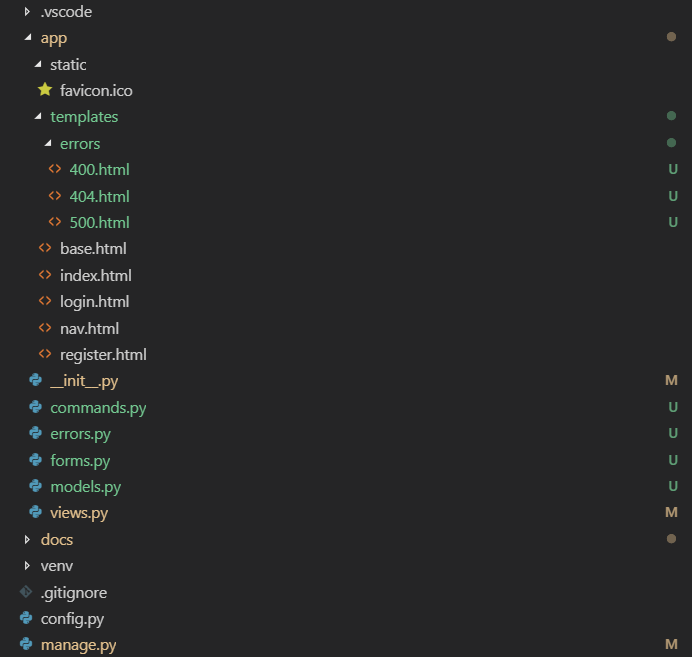
最后,我们可以在 Shell 窗口中执行 flask run 命令即可将我们的网站运行起来。
Flask 系列之 优化项目结构的更多相关文章
- vue 快速入门 系列 —— Vue(自身) 项目结构
其他章节请看: vue 快速入门 系列 Vue(自身) 项目结构 前面我们已经陆续研究了 vue 的核心原理:数据侦测.模板和虚拟 DOM,都是偏底层的.本篇将和大家一起来看一下 vue 自身这个项目 ...
- ABP架构学习系列一 整体项目结构及目录
本系列是基于aspnetboilerplate-0.8.4.0版本写的,其中原因是由于较高的版本太抽象难以理解和分析,对于还菜菜的我要花更多的时间去学习. abp的源码分析学习主要来源于 HK Zha ...
- flask开发restful api系列(7)-蓝图与项目结构
如果有几个原因可以让你爱上flask这个极其灵活的库,我想蓝图绝对应该算上一个,部署蓝图以后,你会发现整个程序结构非常清晰,模块之间相互不影响.蓝图对restful api的最明显效果就是版本控制:而 ...
- 【Flask】 项目结构说明
项目结构 Flask的一大优势就是其极其轻量化.但是也需要注意到,如果我们要用Flask做一个大项目的话,把所有代码写在一个文件里肯定是不合适的.非常难以维护.但是和Django这种框架又不一样,Fl ...
- React Native 系列(三) -- 项目结构介绍
前言 本系列是基于React Native版本号0.44.3写的,相信大家看了本系列前面两篇文章之后,对于React Native的代码应该能看懂一点点了吧.本篇文章将带着大家来认识一下React N ...
- flask实战-个人博客-虚拟环境、项目结构
个人博客 博客是典型的CMS(Content Management system,内容管理系统),通常由两部分组成:一部分是博客前台,用来展示开放给所有用户的博客内容:另一部分是博客后台,这部分内容仅 ...
- 一个比较良好的flask项目结构
一个比较良好的flask项目结构 project/ app/ # 整个程序的包目录 static/ # 静态资源文件 js/ ...
- 架构系列:ASP.NET 项目结构搭建
我们头开始,从简单的单项目解决方案,逐步添加业务逻辑的约束,从应用逻辑和领域逻辑两方面考虑,从简单的单个项目逐步搭建一个多项目的解决方案.主要内容:(1)搭建应用逻辑和领域逻辑都简单的单项目 (2)为 ...
- Vue.js系列之项目结构说明
转:https://www.jb51.net/article/111658.htm 前言 在上一篇项目搭建文章中,我们已经下载安装了node环境以及vue-cli,并且已经成功构建了一个vue-cli ...
随机推荐
- H5 和移动端 WebView 缓存机制解析与实战
本文来自于腾讯Bugly公众号(weixinBugly),未经作者同意,请勿转载,原文地址:https://mp.weixin.qq.com/s/qHm_dJBhVbv0pJs8Crp77w 作者:叶 ...
- 查看和修改Linux服务器的时区和时间
一.查看和修改Linux的时区1. 查看当前时区 命令 : "date -R" 2. 修改设置Linux服务器时区方法 A 命令 : "tzselect" 方法 ...
- [Swift]LeetCode470. 用 Rand7() 实现 Rand10() | Implement Rand10() Using Rand7()
Given a function rand7 which generates a uniform random integer in the range 1 to 7, write a functio ...
- [Swift]LeetCode541. 反转字符串 II | Reverse String II
Given a string and an integer k, you need to reverse the first k characters for every 2k characters ...
- SpringCloud微服务架构
1.Eureka承载大规模系统每天千万级访问的原理 1).首先每个服务的eureka client组件默认30秒发送一个请求到eureka server拉取最近有变化的服务信息: 2).eureka还 ...
- 了解django部署(Django + Uwsgi + Nginx)
首先了解下基本概念: 1 WSGI WSGI:全称是Web Server Gateway Interface,是python应用程序或者框架和web服务器之间的一种接口,被广泛接受.WSGI不是服务器 ...
- mogodb分片配置
下图展示了在MongoDB中使用分片集群结构分布: 上图中主要有如下所述三个主要组件: Shard: 用于存储实际的数据块,实际生产环境中一个shard server角色可由几台机器组个一个repli ...
- 如何更简单方便地执行SQL操作?
现在公司使用mybatis作为DAL层的框架. 使用起来比较简单,使用xml进行SQL的书写,java代码使用接口执行. 但在写一些简单SQL的时候会显得非常繁琐: xml和java分离(设计上为了解 ...
- 如何看待Google欲回归中国事件
最近一条新闻刷爆了朋友圈: 8 月 6 日,<人民日报>在它位于 Facebook.Twitter 社交媒体平台的官方账号上发布了一篇标题为<Stability prerequisi ...
- .NET Core实战项目之CMS 第六章 入门篇-Vue的快速入门及其使用
写在前面 上面文章我给大家介绍了Dapper这个ORM框架的简单使用,大伙会用了嘛!本来今天这篇文章是要讲Vue的快速入门的,原因是想在后面的文章中使用Vue进行这个CMS系统的后台管理界面的实现.但 ...