
IdentityServer4之Resource Owner Password Credentials(资源拥有者密码凭据许可)
IdentityServer4之Resource Owner Password Credentials(资源拥有者密码凭据许可)
参考
官方文档:2_resource_owner_passwords
概念:资源拥有者密码凭据许可
认证服务端配置
认证服务ApiResource配置
new ApiResource("api1", "api项目 一")

{

    ApiSecrets = { new Secret("api1pwd".Sha256()) }

},
认证服务Client配置
//resource owner password grant client

new Client

{

    ClientId = "ro.client",

    AllowedGrantTypes = GrantTypes.ResourceOwnerPassword,

    AccessTokenType = AccessTokenType.Reference,

    ClientSecrets =

    {

        new Secret("secret".Sha256())

    },

    AllowedScopes = { "api1" }

},
认证服务Startup配置
public void ConfigureServices(IServiceCollection services)

{

    // configure identity server with in-memory stores, keys, clients and scopes

    services.AddIdentityServer()

        .AddDeveloperSigningCredential()

        .AddInMemoryApiResources(Config.GetApiResources())

        .AddInMemoryClients(Config.GetClients())

        .AddTestUsers(Config.GetUsers());

}
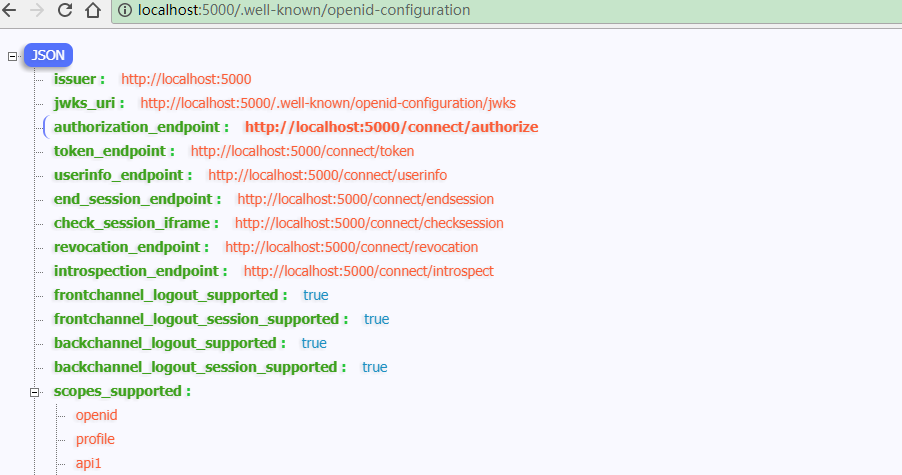
配置完成启动访问http://localhost:5000/.well-known/openid-configuration
资源服务Api配置
资源服务器Startup配置
services.AddMvcCore()

    .AddAuthorization()

    .AddJsonFormatters();

services.AddAuthentication("Bearer")

    .AddIdentityServerAuthentication(options =>

    {

        options.Authority = "http://localhost:5000";

        options.RequireHttpsMetadata = false;

        options.ApiName = "api1";

        options.ApiSecret = "api1pwd";  //对应ApiResources中的密钥

    });
添加接口
[Route("[controller]")]

[Authorize]

public class IdentityController : ControllerBase

{

    [HttpGet]

    public IActionResult Get()

    {

        var info = from c in User.Claims select new { c.Type, c.Value };

        var list = info.ToList();

        list.Add(new { Type = "api1返回", Value = DateTime.Now.ToString("yyyy-MM-dd HH:mm:ss") });

        return new JsonResult(list);

    }

}
Client客户端
(A)资源拥有者提供给客户端它的用户名和密码。
(B)通过包含从资源拥有者处接收到的凭据,客户端从授权服务器的令牌端点请求访问令牌。当发起请求时,客户端与授权服务器进行身份验证。
(C)授权服务器对客户端进行身份验证,验证资源拥有者的凭证,如果有效,颁发访问令牌。
//resource owner password grant client

private void btnROAuth_Click(object sender, EventArgs e)

{

    Task<DiscoveryResponse> discoTask = DiscoveryClient.GetAsync(txtROAuthSer.Text);

    discoTask.Wait();

    var disco = discoTask.Result;

    if (disco.IsError)

    {

        MessageBox.Show(disco.Error, "提示信息", MessageBoxButtons.OK, MessageBoxIcon.Information);

        txtROResult.Text = string.Empty;

        txtAccessToken.Text = string.Empty;

        return;

    }

    // request token

    var tokenClient = new TokenClient(disco.TokenEndpoint, txtROClient.Text, txtROSecret.Text);

    Task<TokenResponse> tokenTask = tokenClient.RequestResourceOwnerPasswordAsync(txtROUser.Text, txtROPwd.Text, txtROScopes.Text);

    tokenTask.Wait();

    var tokenResponse = tokenTask.Result;

    if (tokenResponse.IsError)

    {

        MessageBox.Show(tokenResponse.Error, "提示信息", MessageBoxButtons.OK, MessageBoxIcon.Information);

        txtROResult.Text = string.Empty;

        txtAccessToken.Text = string.Empty;

        return;

    }

    txtROResult.Text = tokenResponse.Json.ToString();

    txtAccessToken.Text = tokenResponse.AccessToken;

}
调用Api
private void btnCallApi_Click(object sender, EventArgs e)

{

    // call api

    var client = new HttpClient();

    client.SetBearerToken(txtAccessToken.Text);

    var responseTask = client.GetAsync(txtCCApiUrl.Text);

    responseTask.Wait();

    var response = responseTask.Result;

    if (!response.IsSuccessStatusCode)

    {

        MessageBox.Show(response.StatusCode.ToString(), "提示信息", MessageBoxButtons.OK, MessageBoxIcon.Information);

        txtApiResult.Text = string.Empty;

    }

    else

    {

        var contentTask = response.Content.ReadAsStringAsync();

        contentTask.Wait();

        var content = contentTask.Result;

        txtApiResult.Text = JArray.Parse(content).ToString();

    }

}
获取token过程解析
Jwt形式获取access_token、客户端身份验证两种方式,参考上一篇获取token过程解析。
Reference形式获取access_token
将client的AccessTokenType设置为1
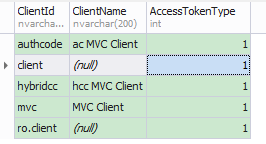
再次获取的access_token不包含Claim信息。
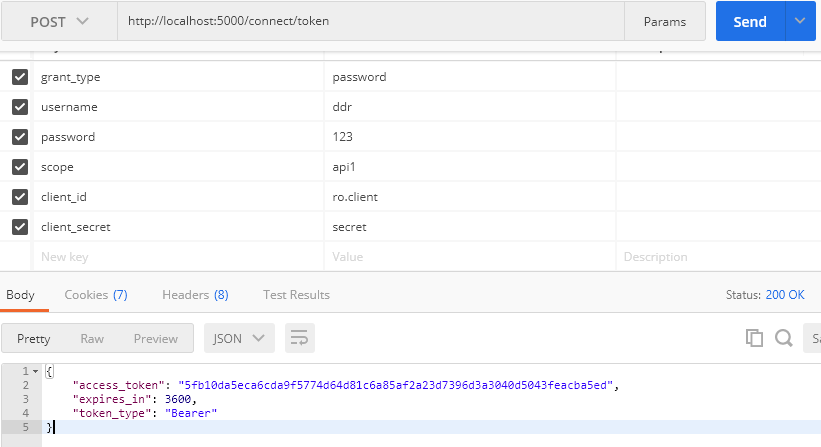
此时获取的access_token(加密后)对应PersistedGrants表中的key

调用Api资源服务过程解析
调用过程与上一篇调用Api资源服务过程解析一样。
IdentityServer4之Resource Owner Password Credentials(资源拥有者密码凭据许可)的更多相关文章
- IdentityServer4 之 Resource Owner Password Credentials 其实有点尴尬
前言 接着IdentityServer4的授权模式继续聊,这篇来说说 Resource Owner Password Credentials授权模式,这种模式在实际应用场景中使用的并不多,只怪其太开放 ...
- asp.net core IdentityServer4 实现 resource owner password credentials(密码凭证)
前言 OAuth 2.0默认四种授权模式(GrantType) 授权码模式(authorization_code) 简化模式(implicit) 密码模式(resource owner passwor ...
- OAuth2.0学习(1-6)授权方式3-密码模式(Resource Owner Password Credentials Grant)
授权方式3-密码模式(Resource Owner Password Credentials Grant) 密码模式(Resource Owner Password Credentials Grant ...
- 不要使用Resource Owner Password Credentials
不要使用Resource Owner Password Credentials 文章链接在这里 前言 最近公司项目在做一些重构,因为公司多个业务系统各自实现了一套登录逻辑,比较混乱.所以,现在需要做一 ...
- 基于OWIN WebAPI 使用OAuth授权服务【客户端验证授权(Resource Owner Password Credentials Grant)】
适用范围 前面介绍了Client Credentials Grant ,只适合客户端的模式来使用,不涉及用户相关.而Resource Owner Password Credentials Grant模 ...
- 使用Resource Owner Password Credentials Grant授权发放Token
对应的应用场景是:为自家的网站开发手机 App(非第三方 App),只需用户在 App 上登录,无需用户对 App 所能访问的数据进行授权. 客户端获取Token: public string Get ...
- 基于 IdentityServer3 实现 OAuth 2.0 授权服务【密码模式(Resource Owner Password Credentials)】
密码模式(Resource Owner Password Credentials Grant)中,用户向客户端提供自己的用户名和密码.客户端使用这些信息,向"服务商提供商"索要授权 ...
- IdentityServer4专题之六:Resource Owner Password Credentials
实现代码: (1)IdentityServer4授权服务器代码: public static class Config { public static IEnumerable<Identity ...
- ABP中使用OAuth2(Resource Owner Password Credentials Grant模式)
ABP目前的认证方式有两种,一种是基于Cookie的登录认证,一种是基于token的登录认证.使用Cookie的认证方式一般在PC端用得比较多,使用token的认证方式一般在移动端用得比较多.ABP自 ...
随机推荐
- MySQL 如何使用左链接代替 NOT IN
核心思想 通过左链接 查询出要排除的数据 然后和主表进行匹配 拿去未匹配到的数据 可以使用 IS NULL 来过滤掉 案例稍后 更新 select * from a left join on a.id ...
- kali安装vm tools
kali安装完毕后第一件事便是安装VMtools,tools能让kali和物理机进行交互,复制粘贴功能等. 在屏幕上会弹出一个光驱,点击进去,进入文件夹 将文件复制到home文件夹下. 1 tar z ...
- 左倾堆C++实现
#include <iostream> #include <vector> #include <queue> using namespace std; templa ...
- PeopleSoft 启用多语言输入
今天,我的一位同事询问有的人有语言选择,有的人没有(如下图所示). 以下是PT856.09菜单路经: 主菜单-->我的首选项--->一般设置--->多语言条目
- 《SpringMVC从入门到放肆》八、SpringMVC注解式开发(基本配置)
上一篇我们结束了配置式开发,配置式开发目前在企业中用的并不是很多,大部分企业都在使用注解式开发,所以今天我们就来学习注解式开发.所谓SpringMVC注解式开发是指,处理器是基于注解的类的开发方式.对 ...
- 方便快捷的求导求积分解方程在线工具sage介绍
有时候我们需要进行一些复杂的数学计算,比如求导, 求积分,解方程,还是用abcd字母代表变量的方程等,这就需要进行复杂的数学运算还需要具备良好的数学基础.不过现在有一个非常方便的在线工具,只需要几 ...
- Pyinstaller (python打包为exe文件)
需求分析: python脚本如果在没有安装python的机器上不能运行,所以将脚本打包成exe文件,降低脚本对环境的依赖性,同时运行更加迅速. 当然打包的脚本似乎不是在所有的win平台下都能使用,wi ...
- request.getRequestDispatcher跳转jsp页面失败
我在JS里面写了个Ajax,传值给控制器,然后利用request.getRequestDispatcher(),打算跳转至另外一个页面.但是没有跳转成功,运行之后没反应. 在网上搜了资料发现,利用aj ...
- [python] 溜了,溜了,七牛云图片资源批量下载 && 自建图床服务器
故事背景: 七牛云最近一波测试域名操作真是把我坑死了!这简直和百度赠送你2T网盘,之后再限速一样骚操作.于是,痛定思痛自己买个云主机.自己搭图床应用! 1.七牛图片批量下载到本地 1.1 曲折尝试 当 ...
- php.ini中文翻译版--转载
;;;;;;;; ; 警告 ; ;;;;;;;;;;; ; 此配置文件是对于新安装的PHP的默认设置. ; 默认情况下,PHP使用此配置文件安装 ; 此配置针对开发目的,并且*不是*针对生产环境 ; ...