
Mapreduce数据分析实例
数据包
百度网盘
链接:https://pan.baidu.com/s/1v9M3jNdT4vwsqup9N0mGOA
提取码:hs9c
复制这段内容后打开百度网盘手机App,操作更方便哦
1、 数据清洗说明:
(1) 第一列是时间;
(2) 第二列是卖出方;
(3) 第三列是买入方;
(4) 第四列是票的数量;
(5) 第五列是金额。
卖出方,买入方一共三个角色,机场(C开头),代理人(O开头)和一般顾客(PAX)
2、 数据清洗要求:
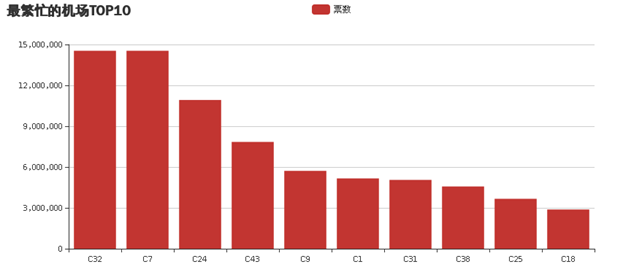
(1)统计最繁忙的机场Top10(包括买入卖出);
(2)统计最受欢迎的航线;(起点终点一致(或相反))
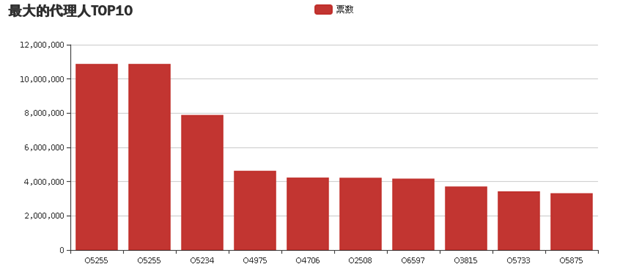
(3)统计最大的代理人TOP10;
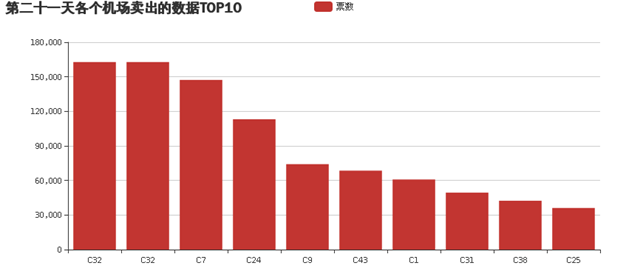
(4)统计某一天的各个机场的卖出数据top10。
3、 数据可视化要求:
(1)上述四中统计要求可以用饼图、柱状图等显示;
(2)可用关系图展示各个机场之间的联系程度(以机票数量作为分析来源)。
实验关键部分代码(列举统计最繁忙机场的代码,其他代码大同小异):
数据初步情理,主要是过滤出各个机场个总票数
1.    package mapreduce;

2.    import java.io.IOException;

3.    import java.net.URI;

4.    import org.apache.hadoop.conf.Configuration;

5.    import org.apache.hadoop.fs.Path;

6.    import org.apache.hadoop.io.LongWritable;

7.    import org.apache.hadoop.io.Text;

8.    import org.apache.hadoop.mapreduce.Job;

9.    import org.apache.hadoop.mapreduce.Mapper;

10.    import org.apache.hadoop.mapreduce.Reducer;

11.    import org.apache.hadoop.mapreduce.lib.chain.ChainMapper;

12.    import org.apache.hadoop.mapreduce.lib.chain.ChainReducer;

13.    import org.apache.hadoop.mapreduce.lib.input.FileInputFormat;

14.    import org.apache.hadoop.mapreduce.lib.input.TextInputFormat;

15.    import org.apache.hadoop.mapreduce.lib.output.FileOutputFormat;

16.    import org.apache.hadoop.mapreduce.lib.output.TextOutputFormat;

17.    import org.apache.hadoop.mapreduce.lib.partition.HashPartitioner;

18.    import org.apache.hadoop.fs.FileSystem;

19.    import org.apache.hadoop.io.IntWritable;

20.    public class ChainMapReduce {

21.        private static final String INPUTPATH = "hdfs://localhost:9000/mapreducetest/region.txt";

22.        private static final String OUTPUTPATH = "hdfs://localhost:9000/mapreducetest/out1";

23.        public static void main(String[] args) {

24.            try {

25.                Configuration conf = new Configuration();

26.                FileSystem fileSystem = FileSystem.get(new URI(OUTPUTPATH), conf);

27.                if (fileSystem.exists(new Path(OUTPUTPATH))) {

28.                    fileSystem.delete(new Path(OUTPUTPATH), true);

29.                }

30.                Job job = new Job(conf, ChainMapReduce.class.getSimpleName());

31.                FileInputFormat.addInputPath(job, new Path(INPUTPATH));

32.                job.setInputFormatClass(TextInputFormat.class);

33.                ChainMapper.addMapper(job, FilterMapper1.class, LongWritable.class, Text.class, Text.class, IntWritable.class, conf);

34.                ChainReducer.setReducer(job, SumReducer.class, Text.class, IntWritable.class, Text.class, IntWritable.class, conf);

35.                job.setMapOutputKeyClass(Text.class);

36.                job.setMapOutputValueClass(IntWritable.class);

37.                job.setPartitionerClass(HashPartitioner.class);

38.                job.setNumReduceTasks(1);

39.                job.setOutputKeyClass(Text.class);

40.                job.setOutputValueClass(IntWritable.class);

41.                FileOutputFormat.setOutputPath(job, new Path(OUTPUTPATH));

42.                job.setOutputFormatClass(TextOutputFormat.class);

43.                System.exit(job.waitForCompletion(true) ? 0 : 1);

44.            } catch (Exception e) {

45.                e.printStackTrace();

46.            }

47.        }

48.        public static class FilterMapper1 extends Mapper<LongWritable, Text, Text, IntWritable> {

49.            private Text outKey = new Text();

50.            private IntWritable outValue = new IntWritable();

51.            @Override

52.            protected void map(LongWritable key, Text value, Mapper<LongWritable, Text, Text, IntWritable>.Context context)

53.            throws IOException,InterruptedException {

54.                String line = value.toString();

55.                if (line.length() > 0) {

56.                    String[] arr = line.split(",");

57.                    int visit = Integer.parseInt(arr[3]);

58.                    if(arr[1].substring(0, 1).equals("C")||arr[2].substring(0, 1).equals("C")){

59.                        outKey.set(arr[1]);

60.                        outValue.set(visit);

61.                        context.write(outKey, outValue);

62.                    }

63.                }

64.            }

65.        }

66.

67.        public  static class SumReducer extends Reducer<Text, IntWritable, Text, IntWritable> {

68.            private IntWritable outValue = new IntWritable();

69.            @Override

70.            protected void reduce(Text key, Iterable<IntWritable> values, Reducer<Text, IntWritable, Text, IntWritable>.Context context)

71.        throws IOException, InterruptedException {

72.        int sum = 0;

73.        for (IntWritable val : values) {

74.        sum += val.get();

75.        }

76.        outValue.set(sum);

77.        context.write(key, outValue);

78.        }

79.        }

80.

81.

82.        }
数据二次清理,进行排序
package mapreduce;

import java.io.IOException;

import org.apache.hadoop.conf.Configuration;

import org.apache.hadoop.fs.Path;

import org.apache.hadoop.io.IntWritable;

import org.apache.hadoop.io.Text;

import org.apache.hadoop.mapreduce.Job;

import org.apache.hadoop.mapreduce.Mapper;

import org.apache.hadoop.mapreduce.Reducer;

import org.apache.hadoop.mapreduce.lib.input.FileInputFormat;

import org.apache.hadoop.mapreduce.lib.input.TextInputFormat;

import org.apache.hadoop.mapreduce.lib.output.FileOutputFormat;

import org.apache.hadoop.mapreduce.lib.output.TextOutputFormat;

public class OneSort {

    public static class Map extends Mapper<Object , Text , IntWritable,Text >{

    private static Text goods=new Text();

    private static IntWritable num=new IntWritable();

    public void map(Object key,Text value,Context context) throws IOException, InterruptedException{

    String line=value.toString();

    String arr[]=line.split("\t");

    num.set(Integer.parseInt(arr[1]));

    goods.set(arr[0]);

    context.write(num,goods);

    }

    }

    public static class Reduce extends Reducer< IntWritable, Text, IntWritable, Text>{

    private static IntWritable result= new IntWritable();

    public void reduce(IntWritable key,Iterable<Text> values,Context context) throws IOException, InterruptedException{

        for(Text val:values){

        context.write(key,val);

        }

        }

        }

        public static void main(String[] args) throws IOException, ClassNotFoundException, InterruptedException{

        Configuration conf=new Configuration();

        Job job =new Job(conf,"OneSort");

        job.setJarByClass(OneSort.class);

        job.setMapperClass(Map.class);

        job.setReducerClass(Reduce.class);

        job.setOutputKeyClass(IntWritable.class);

        job.setOutputValueClass(Text.class);

        job.setInputFormatClass(TextInputFormat.class);

        job.setOutputFormatClass(TextOutputFormat.class);

        Path in=new Path("hdfs://localhost:9000/mapreducetest/out1/part-r-00000");

        Path out=new Path("hdfs://localhost:9000/mapreducetest/out2");

        FileInputFormat.addInputPath(job,in);

        FileOutputFormat.setOutputPath(job,out);

        System.exit(job.waitForCompletion(true) ? 0 : 1);

        }

        }
从hadoop中读取文件
package mapreduce;

import java.io.BufferedReader;

import java.io.IOException;

import java.io.InputStreamReader;

import java.net.URI;

import java.util.ArrayList;

import java.util.List;

import org.apache.hadoop.conf.Configuration;

import org.apache.hadoop.fs.FSDataInputStream;

import org.apache.hadoop.fs.FileSystem;

import org.apache.hadoop.fs.Path;

public class ReadFile {

    public static List<String> ReadFromHDFS(String file) throws IOException

    {

        //System.setProperty("hadoop.home.dir", "H:\\文件\\hadoop\\hadoop-2.6.4");

        List<String> list=new ArrayList();

        int i=0;

         Configuration conf = new Configuration();

        StringBuffer buffer = new StringBuffer();

        FSDataInputStream fsr = null;

        BufferedReader bufferedReader = null;

        String lineTxt = null;

        try

        {

            FileSystem fs = FileSystem.get(URI.create(file),conf);

            fsr = fs.open(new Path(file));

            bufferedReader = new BufferedReader(new InputStreamReader(fsr));

            while ((lineTxt = bufferedReader.readLine()) != null)

            {

                String[] arg=lineTxt.split("\t");

                list.add(arg[0]);

                list.add(arg[1]);

            }

        } catch (Exception e)

        {

            e.printStackTrace();

        } finally

        {

            if (bufferedReader != null)

            {

                try

                {

                    bufferedReader.close();

                } catch (IOException e)

                {

                    e.printStackTrace();

                }

            }

        }

        return list;

    }

    public static void main(String[] args) throws IOException {

        List<String> ll=new  ReadFile().ReadFromHDFS("hdfs://localhost:9000/mapreducetest/out2/part-r-00000");

        for(int i=0;i<ll.size();i++)

        {

            System.out.println(ll.get(i));

        }

    }

}
前台网页代码
<%@page import="mapreduce.ReadFile"%>

<%@page import="java.util.List"%>

<%@page import="java.util.ArrayList"%>

<%@page import="org.apache.hadoop.fs.FSDataInputStream" %>

<%@ page language="java" contentType="text/html; charset=UTF-8"

    pageEncoding="UTF-8"%>

<!DOCTYPE html>

<html>

<head>

<meta charset="UTF-8">

<title>Insert title here</title>

<% List<String> ll= ReadFile.ReadFromHDFS("hdfs://localhost:9000/mapreducetest/out2/part-r-00000");%>

 <script src="../js/echarts.js"></script>

</head>

<body>

<div id="main" style="width: 900px;height:400px;"></div>

 <script type="text/javascript">

        // 基于准备好的dom,初始化echarts实例

        var myChart = echarts.init(document.getElementById('main'));

        // 指定图表的配置项和数据

        var option = {

            title: {

                text: '最繁忙的机场TOP10'

            },

            tooltip: {},

            legend: {

                data:['票数']

            },

            xAxis: {

                data:["<%=ll.get(ll.size()-1)%>"<%for(int i=ll.size()-3;i>=ll.size()-19;i--){

                    if(i%2==1){

                        %>,"<%=ll.get(i)%>"

                    <%

                    }

                    }

                    %>]

            },

            yAxis: {},

            series: [{

                name: '票数',

                type: 'bar',

                data: [<%=ll.get(ll.size()-2)%>

                <%for(int i=ll.size()-1;i>=ll.size()-19;i--){

                    if(i%2==0){

                    %>,<%=ll.get(i)%>

                <%

                }

                }

                %>]

            }]

        };

        // 使用刚指定的配置项和数据显示图表。

        myChart.setOption(option);

    </script>

    <h2 color="red"><a href="NewFile.jsp">返回</a></h2>

</body>
结果截图:

Mapreduce数据分析实例的更多相关文章
- Hadoop数据分析实例:P2P借款人信用风险实时监控模型设计
Hadoop数据分析实例:P2P借款人信用风险实时监控模型设计 一提到hadoop相信熟悉IT领域或者经常关注互联网新闻的朋友都应该很熟悉了,当然,这种熟悉可能也只是听着名字耳熟,但并不知道它具体是什 ...
- MapReduce编程实例6
前提准备: 1.hadoop安装运行正常.Hadoop安装配置请参考:Ubuntu下 Hadoop 1.2.1 配置安装 2.集成开发环境正常.集成开发环境配置请参考 :Ubuntu 搭建Hadoop ...
- MapReduce编程实例5
前提准备: 1.hadoop安装运行正常.Hadoop安装配置请参考:Ubuntu下 Hadoop 1.2.1 配置安装 2.集成开发环境正常.集成开发环境配置请参考 :Ubuntu 搭建Hadoop ...
- MapReduce编程实例4
MapReduce编程实例: MapReduce编程实例(一),详细介绍在集成环境中运行第一个MapReduce程序 WordCount及代码分析 MapReduce编程实例(二),计算学生平均成绩 ...
- MapReduce编程实例3
MapReduce编程实例: MapReduce编程实例(一),详细介绍在集成环境中运行第一个MapReduce程序 WordCount及代码分析 MapReduce编程实例(二),计算学生平均成绩 ...
- MapReduce编程实例2
MapReduce编程实例: MapReduce编程实例(一),详细介绍在集成环境中运行第一个MapReduce程序 WordCount及代码分析 MapReduce编程实例(二),计算学生平均成绩 ...
- 三、MapReduce编程实例
前文 一.CentOS7 hadoop3.3.1安装(单机分布式.伪分布式.分布式 二.JAVA API实现HDFS MapReduce编程实例 @ 目录 前文 MapReduce编程实例 前言 注意 ...
- hadoop2.2编程:使用MapReduce编程实例(转)
原文链接:http://www.cnblogs.com/xia520pi/archive/2012/06/04/2534533.html 从网上搜到的一篇hadoop的编程实例,对于初学者真是帮助太大 ...
- Python实现MapReduce,wordcount实例,MapReduce实现两表的Join
Python实现MapReduce 下面使用mapreduce模式实现了一个简单的统计日志中单词出现次数的程序: from functools import reduce from multiproc ...
随机推荐
- Windows 下常见的反调试方法
稍稍总结一下在Crack或Rervese中比较常见的一些反调试方法,实现起来也比较简单,之后有写的Demo源码参考,没有太大的难度. ①最简单也是最基础的,Windows提供的API接口:IsDebu ...
- Redis的复制是如何实现的?
前言 关系数据库通常会使用一个主服务器向多个从服务器发送更新,并使用从服务器来处理所有的读请求,Redis采用了同样方法来实现自己的复制特性. 简单总结起来就是:在接收到主服务器发送的数据初始副本之后 ...
- 【苹果通知APNs】不知道大家用过PushSharp没?
好久没写东西了,近期在研究Jenkins,大家有兴趣可以一起来玩玩交流,学习DevOps还是蛮重要. 近期我负责的项目里需要APNs的通知,这个自己单独开发还是蛮费功夫,故用了第三方开源的PushSh ...
- C# asp.net mvc 通过 HttpClient 访问 Web_API
//MVC 具体方法 //API地址 通过 WebConfig配置 private static string apiAdds = ConfigurationManager.AppSettings[& ...
- 从零开始学安全(三十八)●cobaltstrike生成木马抓肉鸡
链接:https://pan.baidu.com/s/1qstCSM9nO95tFGBsnYFYZw 提取码:w6ih 上面是工具 需要java jdk 在1.8.5 以上 实验环境windows ...
- cesium 之自定义气泡窗口 infoWindow 后续优化篇(附源码下载)
前言 cesium 官网的api文档介绍地址cesium官网api,里面详细的介绍 cesium 各个类的介绍,还有就是在线例子:cesium 官网在线例子,这个也是学习 cesium 的好素材. 该 ...
- 不指定源ip时,系统选择哪个ip作为ping包的源ip?
问题:当centos 有多个网口,发起ping包时,是根据什么规则来确定是使用哪个源ip? 解答:根据目的ip来确定,迭代可以确定源ip 具体的确定方法是, (1)先根据目的ip来确定使用哪个路由表项 ...
- 前后端交互实现(nginx,json,以及datatable的问题相关)
1.同源问题解决 首先,在同一个域下搭建网络域名访问,需要nginx软件,下载之后修改部分配置 然后再终端下cmd nginx.exe命令,或者打开nginx.exe文件,会运行nginx一闪而过, ...
- MongoDB 3.6版本关于bind_ip设置
2017年下半年新发布的MongoDB 3.6版本在安全性上做了很大提升,主要归结为两点: 1.将将bind_ip 默认值修改为了localhost: 2. 在db.createUser()和 db. ...
- window下 mongodb快速安装
下载地址 https://www.mongodb.org/dl/win32/x86_64-2008plus-ssl 建立文件夹和文件 #数据库路径 dbpath=G:\mongodb3.4.12\da ...