
WebService完成文件上传下载
由于开发需要使用webservice,第一个接触的工具叫axis2。项目开发相关jar下载。
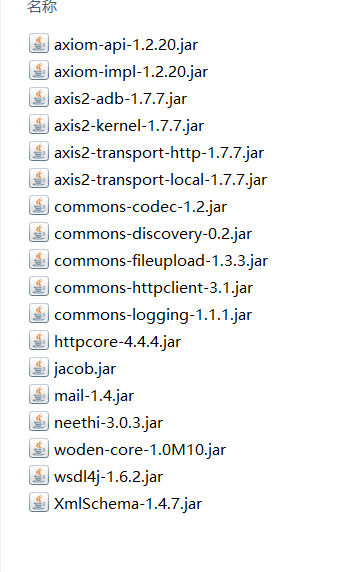
service端:
启动类:
import java.net.InetAddress;

import javax.xml.ws.Endpoint;

public class StartService

{

    public static void main(String[] args)

    {

        try {

            //获取当前IP

            String ip = InetAddress.getLocalHost().getHostAddress();

            //将服务发布到指定路径

            System.out.println("IP:" + ip);

            String relativelyPath=System.getProperty("user.dir");

            System.out.println(relativelyPath);

            Endpoint.publish("http://"+ip+":9527/webservice/CBRC", new WebServiceImp());

            System.out.println("webservice 发布成功!");

        } catch (Exception e) {

            System.out.println("webservice 发布失败!");

            ;

        }

    }

}
实现类:
import java.io.File;

import java.io.FileInputStream;

import java.io.FileNotFoundException;

import java.io.FileOutputStream;

import javax.jws.WebService;

import sun.misc.BASE64Decoder;

import sun.misc.BASE64Encoder;

//import Decoder.BASE64Decoder;

//import Decoder.BASE64Encoder;

@WebService

public class WebServiceImp

{

    public String sendFile(String name,String file) throws Exception

    {

        //上传文件

        String preference_path = "/webserviceupload";

        String relativelyPath=System.getProperty("user.dir");

        //存储路径

        String fileupload = relativelyPath + preference_path;

        File filepath = new File(fileupload);

        if (!filepath.exists()) {

            filepath.mkdirs();

        }

        /**

         *生成上传文件

         */

        FileOutputStream fos = null;

        try {

            fos = new FileOutputStream(fileupload + File.separator + name);

            byte[] filebs = new BASE64Decoder().decodeBuffer(file);

            fos.write(filebs);

        } catch (Exception e) {

            e.printStackTrace();

        } finally {

            fos.close();

        }

        System.out.println("----------------------------------------------------------------------------------------");

        System.out.println("----------------------------------------------------------------------------------------");

        System.out.println("the file "+name+" was gotten !!");

        System.out.println("----------------------------------------------------------------------------------------");

        System.out.println("----------------------------------------------------------------------------------------");

        int splitIndex = name.lastIndexOf(".");

        String newName = name.substring(0,splitIndex) + ".pdf";

        TransferToPDFUtil.PdfManager(fileupload +File.separator+ name, fileupload +File.separator+ newName);

        System.out.println("----------------------------------------------------------------------------------------");

        System.out.println("finish file transfer");

        System.out.println("----------------------------------------------------------------------------------------");

        /**

         * 上传文件到客户端

         */

        File loc_file = new File(fileupload +File.separator+ newName);

        FileInputStream fis = null;

        String out = null;

        try {

            fis = new  FileInputStream(loc_file);

            byte[] bs = new byte[(int)loc_file.length()];

            fis.read(bs);

            out = new BASE64Encoder().encode(bs);

            fis.close();

        } catch (FileNotFoundException e) {

            e.printStackTrace();

        }

        System.out.println("----------------------------------------------------------------------------------------");

        System.out.println("----------------------------------------------------------------------------------------");

        System.out.println("return CBRC");

        System.out.println("----------------------------------------------------------------------------------------");

        System.out.println("----------------------------------------------------------------------------------------");

        return out;

    }

}
client端:
import java.io.File;

import java.io.FileInputStream;

import java.io.FileOutputStream;

import javax.xml.namespace.QName;

import org.apache.axis2.addressing.EndpointReference;

import org.apache.axis2.client.Options;

import org.apache.axis2.rpc.client.RPCServiceClient;

import sun.misc.BASE64Decoder;

import sun.misc.BASE64Encoder;

public class CBRC {

  public static void main(String[] args) throws Exception {

      // 使用RPC方式调用WebService

      RPCServiceClient serviceClient = new RPCServiceClient();

      Options options = serviceClient.getOptions();

      EndpointReference targetEPR = new EndpointReference(

              "http://10.74.3.191:9527/webservice/CBRC?wsdl");// 指定调用WebService的URL

      options.setTo(targetEPR);

      // RPCServiceClient类的invokeBlocking方法调用了WebService中的方法。invokeBlocking方法有三个参数,其中第一个参数的类型是QName对象,表示要调用的方法名;第二个参数表示要调用的WebService方法的参数值,参数类型为Object[];第三个参数表示WebService方法的返回值类型的Class对象,参数类型为Class[]。当方法没有参数时,invokeBlocking方法的第二个参数值不能是null,而要使用new Object[]{}。

      /*String endpoint = "http://10.74.3.191:9527/webservice/CBRC?wsdl";        //此处为wsdl地址

        Service service = new Service();

        Call call = (Call) service.createCall();

        call.setTargetEndpointAddress(new URL(endpoint));

        //setOperationName 方法 Qname 前一个参数为设置namespace,后一个参数为设置想要访问的方法

        call.setOperationName(new QName("http://wtp/","sendFile"));

        //addParameter 方法即为添加元素的方法

        call.addParameter("arg0",org.apache.axis.encoding.XMLType.XSD_DATE,javax.xml.rpc.ParameterMode.IN);

        call.addParameter("arg1",org.apache.axis.encoding.XMLType.XSD_STRING,javax.xml.rpc.ParameterMode.IN);

        //设置返回值类型

        call.setReturnType(XMLType.XSD_STRING); */

        /**

         * 上传文件

         */

        File xml1 = new File("C:\\Users\\lenovo\\Desktop\\1.doc");

           FileInputStream fis1 = new FileInputStream(xml1);

           byte[] bytes1 = new byte[(int)xml1.length()];

           fis1.read(bytes1);

        //将byte数组转换为base64字符串

           String base64file = new BASE64Encoder().encode(bytes1);

           fis1.close();

        //访问目标方法

//        String result = (String) call.invoke(new Object[]{"1.doc",base64file});

        //指定方法返回值的数据类型的Class对象

        Class[] classes = new Class[] { String.class };// 指定getGreeting方法返回值的数据类型的Class对象

        QName opAddEntry = new QName("http://wtp/","sendFile");// 指定要调用的getGreeting方法及WSDL文件的命名空间

           Object[] opAddEntryArgs = new Object[]{"1.doc",base64file};// 指定getGreeting方法的参数值

           String result = serviceClient.invokeBlocking(opAddEntry, opAddEntryArgs, classes)[0].toString();

        /**

         * 下载文件

         */

        FileOutputStream fos = new  FileOutputStream("C:\\Users\\lenovo\\Desktop\\1.pdf");

        fos.write(new BASE64Decoder().decodeBuffer(result));

        fos.close();

        System.out.println("end");

    }

}
原文引用:
其他参考:
WebService完成文件上传下载的更多相关文章
- iOS开发之结合asp.net webservice实现文件上传下载
iOS开发中会经常用到文件上传下载的功能,这篇文件将介绍一下使用asp.net webservice实现文件上传下载. 首先,让我们看下文件下载. 这里我们下载cnblogs上的一个zip文件.使用N ...
- WebService实现文件上传下载
一:服务端:一个普通java web工程 package com.wzh.file; import com.sun.xml.ws.developer.StreamingAttachment; impo ...
- webservice文件上传下载
使用DataHandler实现webservice的文件上传下载 服务端代码: package com.hello.weChat.controller; import javax.activation ...
- Struts的文件上传下载
Struts的文件上传下载 1.文件上传 Struts2的文件上传也是使用fileUpload的组件,这个组默认是集合在框架里面的.且是使用拦截器:<interceptor name=" ...
- Android okHttp网络请求之文件上传下载
前言: 前面介绍了基于okHttp的get.post基本使用(http://www.cnblogs.com/whoislcj/p/5526431.html),今天来实现一下基于okHttp的文件上传. ...
- Selenium2学习-039-WebUI自动化实战实例-文件上传下载
通常在 WebUI 自动化测试过程中必然会涉及到文件上传的自动化测试需求,而开发在进行相应的技术实现是不同的,粗略可划分为两类:input标签类(类型为file)和非input标签类(例如:div.a ...
- 艺萌文件上传下载及自动更新系统(基于networkComms开源TCP通信框架)
1.艺萌文件上传下载及自动更新系统,基于Winform技术,采用CS架构,开发工具为vs2010,.net2.0版本(可以很容易升级为3.5和4.0版本)开发语言c#. 本系统主要帮助客户学习基于TC ...
- 艺萌TCP文件上传下载及自动更新系统介绍(TCP文件传输)(一)
艺萌TCP文件上传下载及自动更新系统介绍(TCP文件传输) 该系统基于开源的networkComms通讯框架,此通讯框架以前是收费的,目前已经免费并开元,作者是英国的,开发时间5年多,框架很稳定. 项 ...
- ssh框架文件上传下载
<!doctype html> <html lang="en"> <head> <meta charset="UTF-8&quo ...
随机推荐
- MySQL 压缩解决方案
From:https://www.qcloud.com/community/article/876100 导语 描述 MySQL 压缩的使用场景和解决方案,包括压缩传输协议.压缩列解决方案和压缩表解决 ...
- PADS的历史版本
1986年:PADS PCB,DOS操作系统 1989年:PADS Logic,DOS操作系统 1990年:PADS 2000,DOS操作系统 1993年:PADS Perform,DOS和Windo ...
- SGPIO
http://en.wikipedia.org/wiki/SGPIO SGPIO From Wikipedia, the free encyclopedia Serial General Purp ...
- Arduino关于旋转编码器程序的介绍(Reading Rotary Encoders)--by Markdown
介绍 旋转或编码器是一个角度測量装置. 他用作精确測量电机的旋转角度或者用来控制控制轮子(能够无限旋转,而电位器只能旋转到特定位置).其中有一些还安装了一个能够在轴上按的button,就像音乐播放器的 ...
- 使用mark-sweep算法的垃圾回收器
在我写C++代码的那些时间里,我没有写过垃圾回收器,也没有实现过自己的内存分配器,这方面的文章倒是看了不 少.比如我在写C#代码时只管new而不需要释放,我也明白有个垃圾回收器在那帮我回收那些堆上的对 ...
- OpenWrt:路由器上的Linux
官网:https://openwrt.org/ 适于嵌入式设备的一个Linux发行版,可刷无线路由器. 相对原厂固件而言,OpenWrt不是一个单一.静态的固件,而是提供了一个可添加软件包的可写的文件 ...
- 【上】安全HTTPS-全面具体解释对称加密,非对称加密,数字签名,数字证书和HTTPS
一,对称加密 所谓对称加密.就是它们在编码时使用的密钥e和解码时一样d(e=d),我们就将其统称为密钥k. 对称加解密的步骤例如以下: 发送端和接收端首先要共享同样的密钥k(即通信前两方都须要知道相应 ...
- React Native 学习(三)之 FlexBox 布局
React Native 学习(三)之 FlexBox 布局
- (转) 实现wince datagrid 上下滑屏数据浏览
开发 基于wince 手持设备数据库应用时 由于是触摸屏 当datagrid 数据过多 往往用户烦于去控制又窄又细的上下滚动条 尤其是高分辨率的屏上 (如魅族M8系统 720×480) 而且datag ...
- apache下实现301永久性重定向的方法
因为博客是使用了www.php100.com作为博客域名,所以想实现php100.com全部重定向(跳转)到www.php100.com.同时按照google的建议,使用服务器端 301 重定向,为了 ...