
vue2.0 仿手机新闻站(六)详情页制作
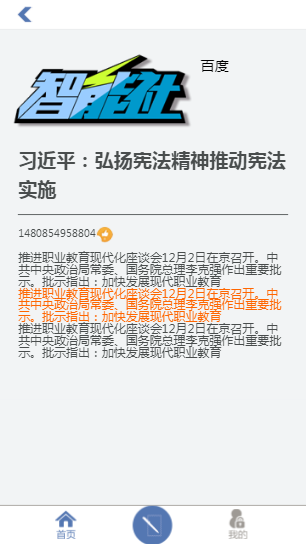
1.结构
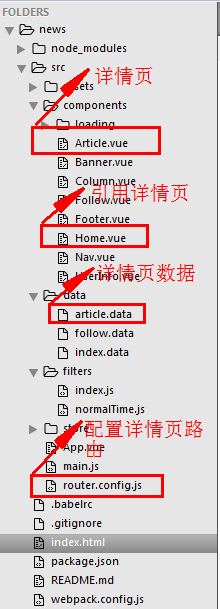
2.配置详情页路由


router.config.js
/**

 * 配置 路由

 */

// 导入组件

import Home from './components/Home.vue'

import Follow from './components/Follow.vue'

import Column from './components/Column.vue'

import UserInfo from './components/UserInfo.vue'

import Article from './components/Article.vue'

// 导出路由数组

export default [

	{ // 首页

		path:'/home',

		component:Home

	},

	{ // 关注页

		path:'/follow',

		component:Follow

	},

	{ // 栏目页

		path:'/column',

		component:Column

	},

	{ // 我的页

		path:'/user-info',

		component:UserInfo

	},

	{ // 文章详情页

		path:'/article/:id',

		component:Article

	},

	{ // 配置默认路由

		path:'/',

		redirect:'/home' // 路由重定向

	},

	{

		path:'*',

		redirect:'/home' // 路由重定向

	}

]
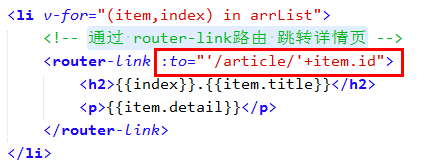
3.通过 router-link路由 跳转详情页
Home.vue
<!-- 首页 -->

<template>

	<div id="home">

		<div class="content mt30">

			<div class="newsList">

				<ul>

					<li v-for="(item,index) in arrList">

						<!-- 通过 router-link路由 跳转详情页 -->

						<router-link :to="'/article/'+item.id">

							<h2>{{index}}.{{item.title}}</h2>

							<p>{{item.detail}}</p>

						</router-link>

					</li>

				</ul>

			</div>

		</div>

	</div>

</template>

<script>

	export default{

		data(){

			return {

				arrList:[]

			}

		},

		mounted(){

			// 获取数据

			this.fetchData();

		},

		methods:{

			fetchData(){

				var _this = this;

				// this 为 vue的实例

				this.$http.get('src/data/index.data').then(function(res){

					_this.arrList = res.data;

				}).catch(function(err){

					console.log('Home',err);

				});

			}

		}

	}

</script>

<style scoped>

	.mt30{

		margin-top: 30px;

	}

</style>
4.通过 正则 获取 path 中的 id, 并 通过 id 获取该详情页信息
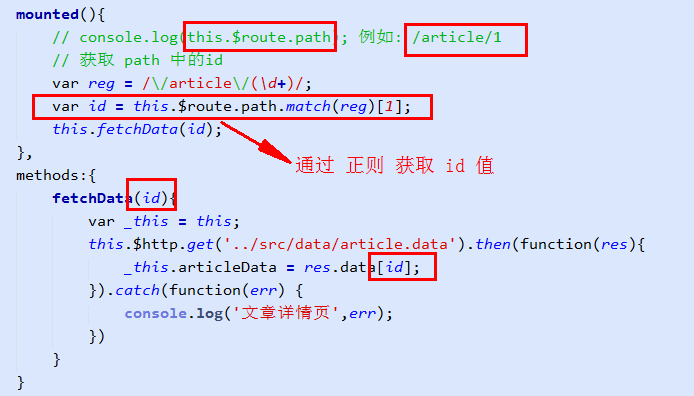
Article.vue
<!-- 文章详情页 -->

<template>

	<div id="article">

		<div class="nav">

			<ul>

				<li class="l-btn" onclick="window.history.go(-1)"></li>

			</ul>

		</div>

		<!-- 内容部分 -->

		<div class="content">

			<div class="header clear">

				<h2><img :src="articleData.author_face" alt="" /></h2>

				<p>百度</p>

			</div>

			<div class="cont">

				<h3>{{articleData.title}}</h3>

				<div class="time">

					<p>{{articleData.time}}<span><img src="../assets/img/zan.png" alt="" /></span></p>

				</div>

				<div class="text-box" v-html="articleData.content"></div>

			</div>

		</div>

		<!-- 底部 -->

		<div class="foot-btn">

			<ul>

				<li class="say"><a href="javascript:;">

					<i></i><span>0</span>

				</a></li>

				<li class="zan"><a href="javascript:;">

					<i></i><span>0</span>

				</a></li>

				<li class="xing"><a href="javascript:;">

					<i><img src="../assets/img/xing.png" alt="" /></i>

				</a></li>

				<li class="fx"><a href="javascript:;">

					<i><img src="../assets/img/fx.png" alt="" /></i>

				</a></li>

			</ul>

		</div>

	</div>

</template>

<script>

	export default{

		data(){

			return{

				// articleData 是个json

				articleData:{}

			}

		},

		mounted(){

			// console.log(this.$route.path); 例如: /article/1

			// 获取 path 中的id

			var reg = /\/article\/(\d+)/;

			var id = this.$route.path.match(reg)[1];

			console.log(id);

			this.fetchData(id);

		},

		methods:{

			fetchData(id){

				var _this = this;

				this.$http.get('../src/data/article.data').then(function(res){

					_this.articleData = res.data[id];

				}).catch(function(err) {

					console.log('文章详情页',err);

				})

			}

		}

	}

</script>

<style scoped>

	html,body{ overflow-x: hidden; }

	.nav{width:100%; position:fixed;top:0;left:0; background:#fff; border-bottom:1px solid #e8eaec; z-index:99;}

	.nav ul{width:6.4rem;height:0.45rem; padding-top:0.15rem; margin:0 auto;}

	.nav ul li{width:0.29rem;height:0.31rem; background:url(../assets/img/history.png) no-repeat 0 0; background-size:100%; margin:0 0 0 0.38rem;}

	.content{max-width:6.4rem; margin:0 auto; margin-top:0.6rem; background:#f2f4f5; padding-bottom:0.85rem;}

	.content .header{ padding:0.39rem 0.28rem 0.15rem 0.28rem; height:auto; background: none}

	.header h2{ float:left; margin-right:0.18rem;}

	.header p{ float:left; margin-top:0.18rem; font-size:0.3rem;}

	.content .cont{ padding:0 0.38rem; color:#494d4d;}

	.cont h3{ font-size:0.4rem; line-height:0.6rem; padding-bottom:0.25rem; border-bottom:1px solid #494d4d;}

	.cont .time{height:0.24rem; line-height:0.24rem; margin:0.26rem 0; }

	.time p{ float:left;position:relative;}

	.time span{width:0.33rem;height:0.32rem; position:absolute; top:-0.02rem;right:-0.35rem;}

	.time span img{width:100%;height:100%;}

	.cont .text-box{ font-size:0.25rem;}

	.text-box p{ line-height:0.45rem; margin-bottom:0.1rem;}

	.foot-btn{width:100%;height:0.8rem; background:#fff; border-top:1px solid #e8eaec; position:fixed; left:0;bottom:0;}

	.foot-btn ul{width:6.4rem; margin:0 auto;height:0.52rem; margin-top:0.16rem;}

	.foot-btn ul li{ float:left;}

	.foot-btn ul li a{width:100%;height:100%; display:block;}

	.foot-btn ul .say{width:2.03rem;height:0.52rem; border-right:1px solid #e8eaec;}

	.say i{width:0.36rem;height:0.26rem; background:url(../assets/img/say.png) no-repeat 0 0; background-size:100%; float:left; margin-left:0.7rem; margin-top:0.13rem;}

	.say span{height:0.26rem; float:left; line-height:0.26rem; margin-left:0.16rem; margin-top:0.13rem;}

	.foot-btn ul .zan{width:1.86rem;height:0.52rem; border-right:1px solid #e8eaec;}

	.zan i{width:0.36rem;height:0.28rem; background:url(../assets/img/zan1.png) no-repeat 0 0; background-size:100%; float:left; margin-left:0.54rem; margin-top:0.13rem;}

	.zan span{height:0.26rem; float:left; line-height:0.26rem; margin-left:0.16rem; margin-top:0.13rem;}

	.foot-btn ul .xing{width:1.2rem;height:0.52rem; border-right:1px solid #e8eaec;}

	.xing i{width:0.34rem;height:0.24rem; margin:0 auto; display:block; padding-top:0.1rem;}

	.xing i img{width:100%;}

	.foot-btn ul .fx{width:1.25rem;height:0.52rem;}

	.fx i{width:0.33rem;height:0.08rem;display:block; margin:0 auto; padding-top:0.15rem;}

	.fx i img{width:100%;}

</style>
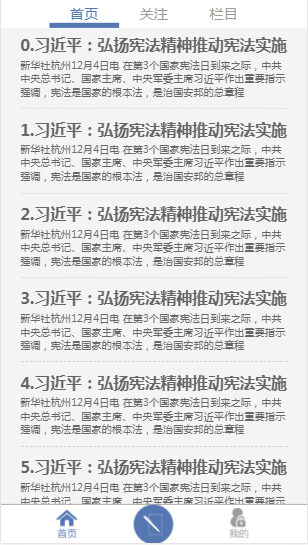
5.效果图
vue2.0 仿手机新闻站(六)详情页制作的更多相关文章
- vue2.0 仿手机新闻站(一)项目开发流程
vue仿手机新闻站: 1.拿到静态页面,直接用vue边布局,边写 2.假数据 没有用任何UI组件,切图完成 做项目基本流程: 1.规划组件结构 Nav.vue Header.vue Home.vue ...
- vue2.0 仿手机新闻站(七)过滤器、动画效果
1.全局过滤器 (1)normalTime.js 自定义 将 时间戳 转换成 日期格式 过滤器 /** * 将 时间戳 转换成 日期格式 */ export const normalTime = ( ...
- vue2.0 仿手机新闻站(五)全局的 loading 组件
1.组件结构 index.js const LoadingComponent = require('./Loading.vue') const loading = { install: functio ...
- vue2.0 仿手机新闻站(四)axios
1.axios的配置 main.js import Vue from 'vue' import App from './App.vue' // 引入 路由 import VueRouter from ...
- vue2.0 仿手机新闻站(二)项目结构搭建 及 路由配置
1.项目结构 $ vue init webpack-simple news $ npm install vuex vue-router axios style-loader css-loader -D ...
- vue2.0 仿手机新闻站(三)通过 vuex 进行状态管理
1.创建 store 结构 2.main.js 引入 vuex 3. App.vue 组件使用 vuex <template> <div id="app"&g ...
- 项目vue2.0仿外卖APP(六)
goods 商品列表页开发 布局编写 除了商品之外还有购物车,还有个详情页,挺复杂的. 两栏布局:左侧固定宽度,右侧自适应,还是用flex. 因为内容可能会超过手机高度,超过就隐藏.左右两侧的内容是可 ...
- Vue2.0仿饿了么webapp单页面应用
Vue2.0仿饿了么webapp单页面应用 声明: 代码源于 黄轶老师在慕课网上的教学视频,我自己用vue2.0重写了该项目,喜欢的同学可以去支持老师的课程:http://coding.imooc.c ...
- 第六章 “我要点爆”微信小程序云开发实例之爆文详情页制作
爆文详情页制作 从首页中数据列表打开相应详情页面的方法: 给数据列表中每个数据项加一个点击事件,同时将当前数据项的id暂时记录在本地,然后跳转到详情页面detail goopen: function ...
随机推荐
- tmux使用备忘
创建新的session tmux 查看已有session tmux ls 进入tmux后 默认快捷键前缀为Ctrl+b,可以通过配置文件来修改 从session中断开 C-b d 给session改名 ...
- TTL 和 RS-232
下面详细讲解下面这三种的区别 USB转TTL串口板(常用芯片PL2303,CH340) USB转RS-232串口线 TTL转RS-232串口板,RS-232转TTL串口板(常用芯片MAX3232,MA ...
- [ZJOI2014][bzoj3527]力 [FFT]
题面 传送门 思路 把要求的公式列出来: $E_i=\frac{F_i}{q_i}=\sum_{j=1}^i\frac{q_j}{\left(i-j\right)^2}-\sum_{j=i+1}^n\ ...
- [SDOI2016][bzoj4514] 数字配对 [费用流]
题面 传送门 思路 一个数字能且只能匹配一次 这引导我们思考:一次代表什么?代表用到一定上限(b数组)就不能再用,同时每用一次会产生价值(c数组) 上限?价值?网络流! 把一次匹配设为一点流量,那产生 ...
- Cmake——CMake+SVN或Hg生成版本号
CMake+SVN或Hg生成版本号 原来的CMake需要用shell脚本生成SVN版本号,再作为cmake参数传入.CMake调用脚本示例: #!/bin/sh # cmake.sh ServerCo ...
- 秀秀的照片(photo)
秀秀的照片(photo) 题目描述 华华在和秀秀视频时有截很多图.华华发现秀秀的每一张照片都很萌很可爱.为什么会这样呢?华华在仔细看过秀秀的所有照片后,发现秀秀的照片都具有一个相同的性质. 设秀秀的分 ...
- 【BZOJ 5047 空间传送装置】
Time Limit: 20 Sec Memory Limit: 256 MBSubmit: 282 Solved: 121[Submit][Status][Discuss] Descriptio ...
- react-router 4.0版本学习笔记
Router 所有路由组件的底层接口,一般情况都不使用,而是使用更加高级的路由. 最常用的有两种<BrowserRouter>.<HashRouter> <Browser ...
- 弱题(bzoj 2510)
Description 有M个球,一开始每个球均有一个初始标号,标号范围为1-N且为整数,标号为i的球有ai个,并保证Σai = M. 每次操作等概率取出一个球(即取出每个球的概率均为1/M),若这个 ...
- 《挑战程序设计竞赛》P196 铺砖问题
题意:给定n*m格子,每个格子被染成了黑色或者白色,现在要用1*2的砖块覆盖这些格子,块与块不得重叠,且覆盖所有的白色格子,但不覆盖任意一个黑色格子,求一共有多少种覆盖方法. 思路:书上给的思路太巧妙 ...