
【WPF学习笔记】之如何保存画面上新建的数据到数据库中并且删除画面上的数据和数据库的数据:动画系列之(五)
......
承接系列四后续:
首先,我要在用户控件2中添加“保存”,“删除”按钮。
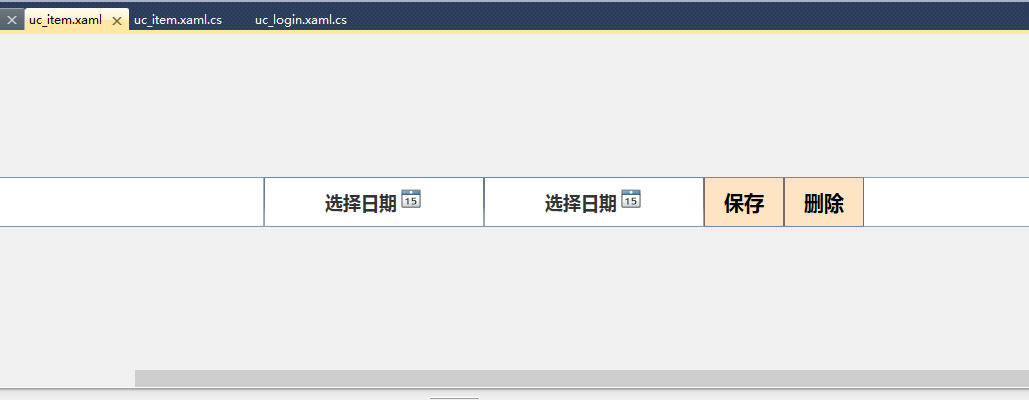
XAML代码:
<UserControl x:Class="User.uc_item"

             xmlns="http://schemas.microsoft.com/winfx/2006/xaml/presentation"

             xmlns:x="http://schemas.microsoft.com/winfx/2006/xaml"

             xmlns:mc="http://schemas.openxmlformats.org/markup-compatibility/2006"

             xmlns:d="http://schemas.microsoft.com/expression/blend/2008"

             mc:Ignorable="d"

             d:DesignHeight="50" d:DesignWidth="1920">

    <Viewbox>

        <StackPanel Width="1920" Height="50" Orientation="Horizontal" HorizontalAlignment="Left">

            <TextBox x:Name="tb_id" Width="120" FontSize="20" FontWeight="Bold" HorizontalContentAlignment="Center" VerticalContentAlignment="Center" BorderThickness="1"/>

            <TextBox x:Name="tb_uploader" Width="120" FontSize="20" FontWeight="Bold" HorizontalContentAlignment="Center" VerticalContentAlignment="Center" BorderThickness="1"/>

            <TextBox x:Name="cb_type2" Width="120" FontSize="20" FontWeight="Bold" HorizontalContentAlignment="Center" VerticalContentAlignment="Center" BorderThickness="1"/>

            <ComboBox x:Name="cb_type" Width="120" FontSize="20" FontWeight="Bold" HorizontalContentAlignment="Center" VerticalContentAlignment="Center" BorderThickness="1"/>

            <TextBox x:Name="tb_describe" Width="660" FontSize="20" FontWeight="Bold" HorizontalContentAlignment="Center" VerticalContentAlignment="Center" BorderThickness="1"/>

            <DatePicker x:Name="dp_date" Width="220" FontSize="18" FontWeight="Bold" HorizontalContentAlignment="Center" VerticalContentAlignment="Center" BorderThickness="1"/>

            <DatePicker x:Name="dp_date2" Width="220" FontSize="18" FontWeight="Bold" HorizontalContentAlignment="Center" VerticalContentAlignment="Center" BorderThickness="1"/>

            <Button x:Name="btn_save"  FontSize="20" FontWeight="Bold" Width="80" Height="50" HorizontalContentAlignment="Center" VerticalContentAlignment="Center" BorderThickness="1" Content="保存" Click="btn_save_Click"  Background="Bisque"/>

            <Button x:Name="btn_delete"  FontSize="20" FontWeight="Bold" Width="80" Height="50" HorizontalContentAlignment="Center" VerticalContentAlignment="Center" BorderThickness="1" Content="删除" Click="btn_delete_Click"  Background="Bisque"/>

        </StackPanel>

    </Viewbox>

</UserControl>
然后,编辑“保存按钮”和“删除按钮”的后台代码,前提是编写Word表的类,如下:
using System;

using System.Collections.Generic;

using System.Linq;

using System.Text;

using System.Data.SqlClient;

using System.Data;

namespace User.sqlHelper

{

    [Serializable]

    class Word

    {

        public Word()

        {

        }

        #region model

        private int _wordID;

        private int _submitterID;

        private string _currentStatus;

        private string _submitStatus;

        private string _wordDescribe;

        private DateTime _submitTime;

        private DateTime _lastTime;

        public int WordID

        {

            set { _wordID = value; }

            get { return _wordID;  }

        }

        public int SubmitterID

        {

            set { _submitterID = value; }

            get { return _submitterID;  }

        }

        public string CurrentStatus

        {

            set { _currentStatus = value; }

            get { return _currentStatus;  }

        }

        public string SubmitStatus

        {

            set { _submitStatus = value; }

            get { return _submitStatus;  }

        }

        public string WordDescribe

        {

            set { _wordDescribe = value; }

            get { return _wordDescribe;  }

        }

        public DateTime SubmitTime

        {

            set { _submitTime = value; }

            get { return _submitTime;  }

        }

        public DateTime LastTime

        {

            set { _lastTime = value; }

            get { return _lastTime;  }

        }

        #endregion model

        #region model

        public Word(int wordID)

        {

            StringBuilder strSql = new StringBuilder();

            strSql.Append("select WordID,SubmitterID,CurrentStatus,SubmitStatus,WordDescribe,SubmitTime,LastTime ");

            strSql.Append(" FROM [Word] ");

            strSql.Append(" where WordID=@wordID");

            SqlParameter[] parameter = {

                    new SqlParameter("@wordID",SqlDbType.Int, )};

            parameter[].Value = wordID;

            DataSet ds = DbHelperSQL.Query(strSql.ToString(), parameter);

            DataTable dt = ds.Tables[];

            if(ds.Tables[].Rows.Count > )

            {

                if (dt.Rows[]["WordID"] != null) { this.WordID = int.Parse(dt.Rows[]["WordID"].ToString().Trim()); }

                if (dt.Rows[]["SubmitterID"] != null) { this.SubmitterID = int.Parse(dt.Rows[]["SubmitterID"].ToString().Trim()); }

                if (dt.Rows[]["CurrentStatus"] != null) { this.CurrentStatus = dt.Rows[]["CurrentStatus"].ToString().Trim(); }

                if (dt.Rows[]["SubmitStatus"] != null) { this.SubmitStatus = dt.Rows[]["SubmitStatus"].ToString().Trim(); }

                if (dt.Rows[]["WordDescribe"] != null) { this.WordDescribe = dt.Rows[]["WordDescribe"].ToString().Trim(); }

                if (dt.Rows[]["SubmitTime"] != null) { this.SubmitTime = DateTime.Parse(dt.Rows[]["SubmitTime"].ToString().Trim()); }

                if (dt.Rows[]["LastTime"] != null) { this.LastTime = DateTime.Parse(dt.Rows[]["LastTime"].ToString().Trim()); }

            }

        }

        //添加一条数据

        public int Add(int submitterid, string currentstatus, string submitstatus, string worddescribe, DateTime submittime, DateTime lasttime)

        {

            StringBuilder strSql = new StringBuilder();

            strSql.Append("insert into [Word] (");

            strSql.Append("SubmitterID,CurrentStatus,SubmitStatus,WordDescribe,SubmitTime,LastTime)");

            strSql.Append(" values (");

            strSql.Append(" @submitterID,@currentStatus,@submitStatus,@wordDescride,@submitTime,@lastTime)");

            SqlParameter[] parameter = {

                    new SqlParameter("@submitterID", SqlDbType.Int, ),

                    new SqlParameter("@currentStatus", SqlDbType.VarChar, ),

                    new SqlParameter("@submitStatus", SqlDbType.VarChar, ),

                    new SqlParameter("@wordDescride", SqlDbType.VarChar, ),

                    new SqlParameter("@submitTime", SqlDbType.DateTime),

                    new SqlParameter("@lastTime", SqlDbType.DateTime)};

            parameter[].Value = submitterid;

            parameter[].Value = currentstatus;

            parameter[].Value = submitstatus;

            parameter[].Value = worddescribe;

            parameter[].Value = submittime;

            parameter[].Value = lasttime;

            object obj = DbHelperSQL.GetSingle(strSql.ToString(), parameter);

            if (obj == null)

            {

                return ;

            }

            else

            {

                return Convert.ToInt32(obj);

            }

        }

        //更新一条数据

        public bool Update(int submitterid, string currentstatus, string submitstatus, string worddescribe, DateTime submittime, DateTime lasttime, int wordid)

        {

            StringBuilder strSql = new StringBuilder();

            strSql.Append("update [Word] set ");

            strSql.Append("SubmitterID=@submitterID,CurrentStatus=@currentStatus,SubmitStatus=@submitStatus,WordDescribe=@wordDescribe,SubmitTime=@submitTime,LastTime=@lastTime");

            strSql.Append(" where WordID=@wordID");

            SqlParameter[] parameter = {

                    new SqlParameter("@submitterID",SqlDbType.Int, ),

                    new SqlParameter("@currentStatus",SqlDbType.VarChar, ),

                    new SqlParameter("@submitStatus",SqlDbType.VarChar, ),

                    new SqlParameter("@wordDescribe",SqlDbType.VarChar, ),

                    new SqlParameter("@submitTime",SqlDbType.DateTime),

                    new SqlParameter("@lastTime",SqlDbType.DateTime),

                    new SqlParameter("@wordID",SqlDbType.Int, )};

            parameter[].Value = submitterid;

            parameter[].Value = currentstatus;

            parameter[].Value = submitstatus;

            parameter[].Value = worddescribe;

            parameter[].Value = submittime;

            parameter[].Value = lasttime;

            parameter[].Value = wordid;

            int rows = DbHelperSQL.ExecuteSql(strSql.ToString(), parameter);

            if(rows > )

            {

                return true;

            }

            else

            {

                return false;

            }

        }

        //删除一条数据

        public bool Delete(int wordID)

        {

            StringBuilder strSql = new StringBuilder();

            strSql.Append("delete from [Word] ");

            strSql.Append(" where WordID=" + wordID.ToString());

            int rows = DbHelperSQL.ExecuteSql(strSql.ToString());

            if(rows > )

            {

                return true;

            }

            else

            {

                return false;

            }

        }

        //获取表数据

        public DataSet GetList()

        {

            StringBuilder strSql = new StringBuilder();

            strSql.Append("select * ");

            strSql.Append(" FROM [Word]");

            return DbHelperSQL.Query(strSql.ToString());

        }

        #endregion model

    }

}
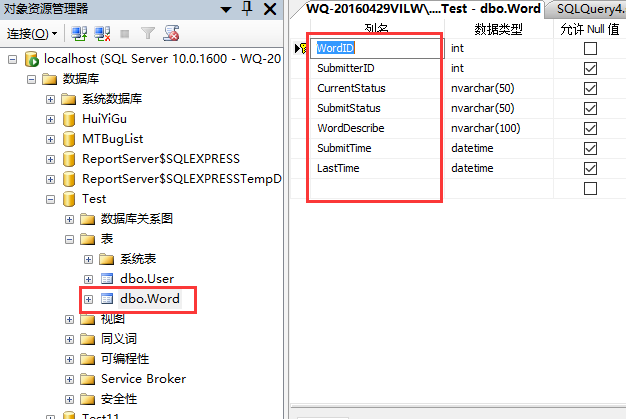
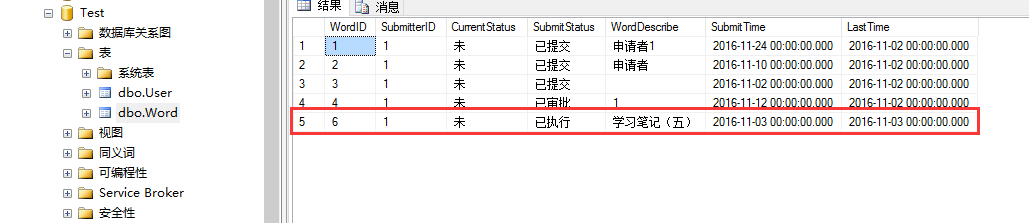
对应数据库建的表:
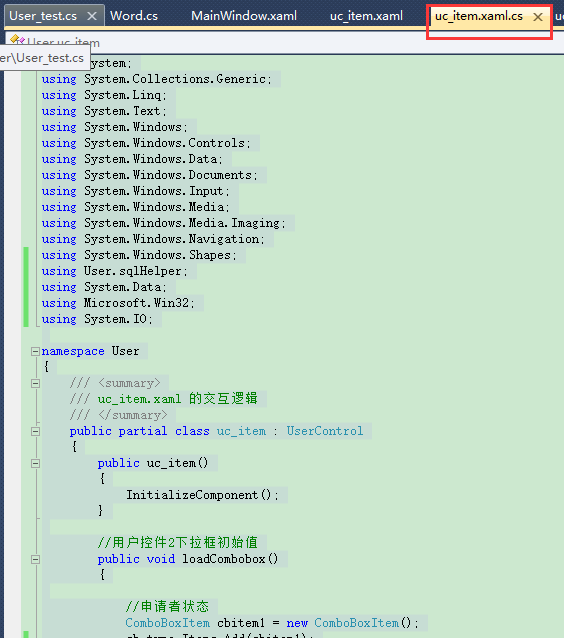
然后编译保存和删除按钮:
using System;

using System.Collections.Generic;

using System.Linq;

using System.Text;

using System.Windows;

using System.Windows.Controls;

using System.Windows.Data;

using System.Windows.Documents;

using System.Windows.Input;

using System.Windows.Media;

using System.Windows.Media.Imaging;

using System.Windows.Navigation;

using System.Windows.Shapes;

using User.sqlHelper;

using System.Data;

using Microsoft.Win32;

using System.IO;

namespace User

{

    /// <summary>

    /// uc_item.xaml 的交互逻辑

    /// </summary>

    public partial class uc_item : UserControl

    {

        public uc_item()

        {

            InitializeComponent();

        }

        //用户控件2下拉框初始值

        public void loadCombobox()

        {

            //申请者状态

            ComboBoxItem cbitem1 = new ComboBoxItem();

            cb_type.Items.Add(cbitem1);

            cbitem1.Content = "已提交";

            //审批者状态

            ComboBoxItem cbitem2 = new ComboBoxItem();

            cb_type.Items.Add(cbitem2);

            cbitem2.Content = "已审批";

            ComboBoxItem cbitem3 = new ComboBoxItem();

            cb_type.Items.Add(cbitem3);

            cbitem3.Content = "未审批";

            //执行人状态

            ComboBoxItem cbitem4 = new ComboBoxItem();

            cb_type.Items.Add(cbitem4);

            cbitem4.Content = "已执行";

            //ComboBoxItem cbitem2 = new ComboBoxItem();

            //cb_type.Items.Add(cbitem2);

            //cbitem2.Content = "UI";

            //ComboBoxItem cbitem3 = new ComboBoxItem();

            //cb_type.Items.Add(cbitem3);

            //cbitem3.Content = "其他";

            ////审批者状态

            //ComboBoxItem cbitemL1 = new ComboBoxItem();

            //cb_type.Items.Add(cbitemL1);

            //cbitemL1.Content = "已审批";

            //ComboBoxItem cbitemL2 = new ComboBoxItem();

            //cb_type.Items.Add(cbitemL2);

            //cbitemL2.Content = "未审批";

            ////执行人状态

            //ComboBoxItem cbitemR1 = new ComboBoxItem();

            //cb_type.Items.Add(cbitemR1);

            //cbitemR1.Content = "已执行";

            //ComboBoxItem cbitemR2 = new ComboBoxItem();

            //cb_result.Items.Add(cbitemR2);

            //cbitemR2.Content = "否";

        }

        //初始化表word的id

        int wordid = ;

        //保存按钮

        private void btn_save_Click(object sender, RoutedEventArgs e)

        {

            if (MainWindow.isnew)

            {

                //查询用户表信息,如果用户名一致,就把id号传递到word表

                User_test _u = new User_test();

                DataSet _ds = _u.GetList();

                if (_ds != null)

                {

                    DataTable _dt = _ds.Tables[];

                    for (int i = ; i < _dt.Rows.Count; i++)

                    {

                        string UserName = _dt.Rows[i]["UserName"].ToString().Trim();

                        int UserID = int.Parse(_dt.Rows[i]["UserID"].ToString().Trim());

                        if (this.tb_uploader.Text.Equals(UserName))

                        {

                            wordid = UserID;

                        }

                    }

                }

                //设置到插入数据到Word表

                //初始化Word表

                Word _w = new Word();

                //当前状态

                if (this.cb_type2.Text == "")

                {

                    cb_type2.Text = "未";

                }

                //提交日期

                if (dp_date.Text == "")

                {

                    dp_date.Text = System.DateTime.Now.ToShortTimeString();

                }

                //最后更改时间

                if (dp_date2.Text == "")

                {

                    dp_date2.Text = System.DateTime.Now.ToShortTimeString();

                }

                //插入数据库

                _w.Add(wordid, cb_type2.Text, cb_type.Text, tb_describe.Text, System.DateTime.Parse(dp_date.Text), System.DateTime.Parse(dp_date2.Text));

                //更新Word表的id

                Word _w1 = new Word();

                DataSet _ds1 = _w1.GetList();

                if (_ds1 != null)

                {

                    DataTable _dt1 = _ds1.Tables[];

                    for (int i = ; i < _dt1.Rows.Count; i++)

                    {

                        this.tb_id.Text = _dt1.Rows[_dt1.Rows.Count - ]["WordID"].ToString().Trim();

                    }

                }

            }

            else

            {

                //目的:从User表取出id继续赋给Word表

                User_test _u = new User_test();

                DataSet _ds = _u.GetList();

                if(_ds != null)

                {

                    DataTable _dt = _ds.Tables[];

                    for (int i = ; i < _dt.Rows.Count; i++)

                    {

                        int userid = int.Parse(_dt.Rows[i]["UserID"].ToString().Trim());

                        string UserName = _dt.Rows[i]["UserName"].ToString().Trim();

                        if (tb_uploader.Text.Equals(UserName))

                        {

                            wordid = userid;

                        }

                    }

                }

                //更新word表数据库中

                //初始化Word表

                Word _w = new Word();

                //更新

                _w.Update(wordid, cb_type2.Text, cb_type2.Text, tb_describe.Text, System.DateTime.Parse(dp_date.Text), System.DateTime.Parse(dp_date2.Text), int.Parse(tb_id.Text));

            }

            //设置是否新建为false

            MainWindow.isnew = false;

            //弹出消息成功

            MessageBox.Show("保存成功!");

        }

        //删除按钮

        private void btn_delete_Click(object sender, RoutedEventArgs e)

        {

            Word _w = new Word();

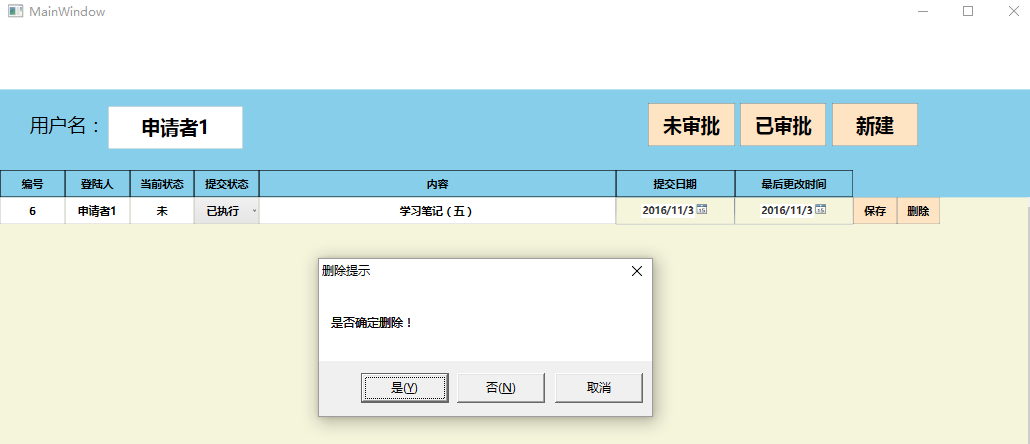
            MessageBoxResult mbr = MessageBox.Show("是否确定删除!","删除提示", MessageBoxButton.YesNoCancel);

            if (mbr == MessageBoxResult.Yes)

            {

                //删除数据库对应的值

                _w.Delete(int.Parse(tb_id.Text));

                //移除用户控件2

                (this.Parent as StackPanel).Children.Remove(this);

                MessageBox.Show("删除成功!");

            }

        }

    }

}
结果图:
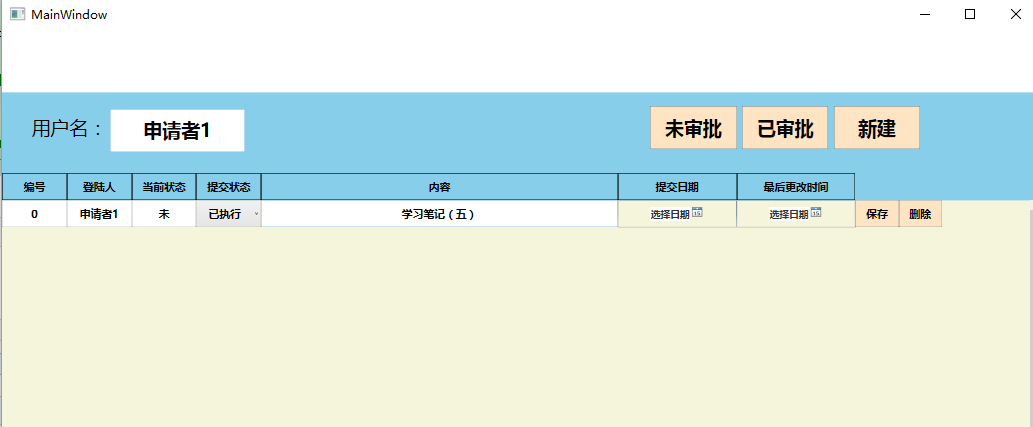
点击保存:
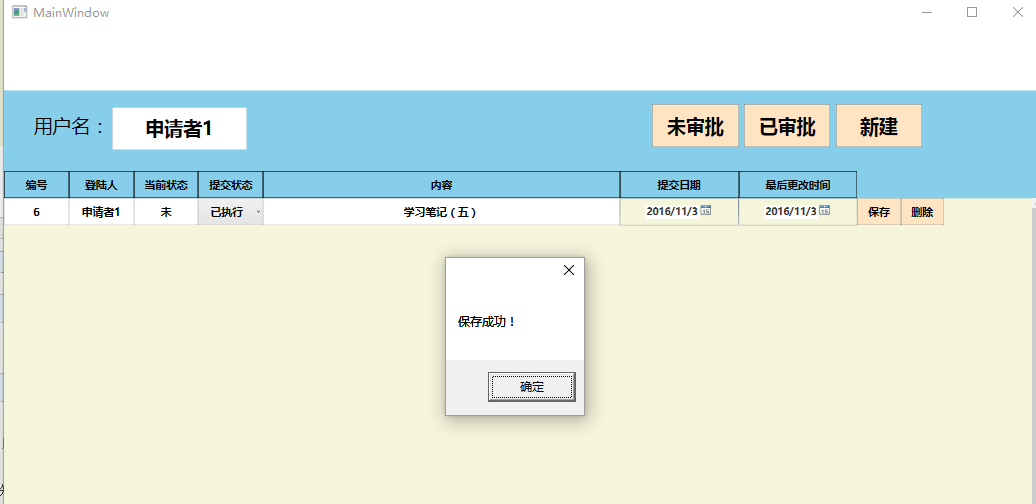
查看数据库:
然后,我再点击删除按钮。
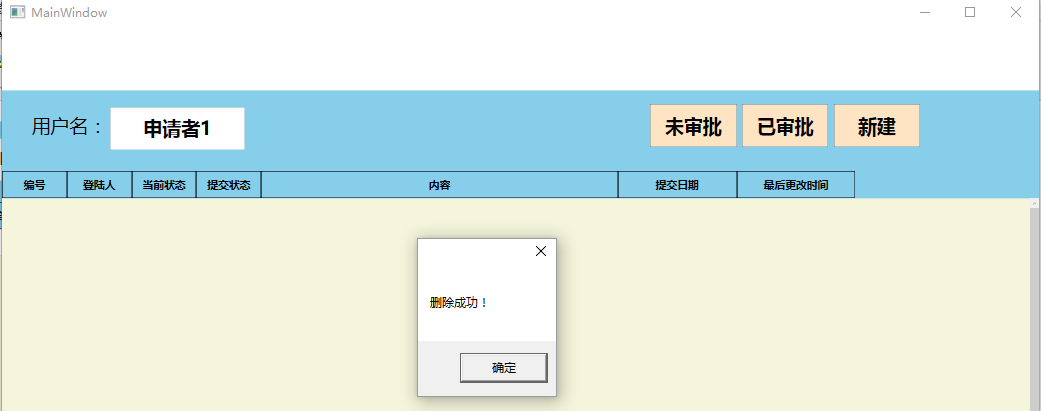
点击删除后查看数据库:
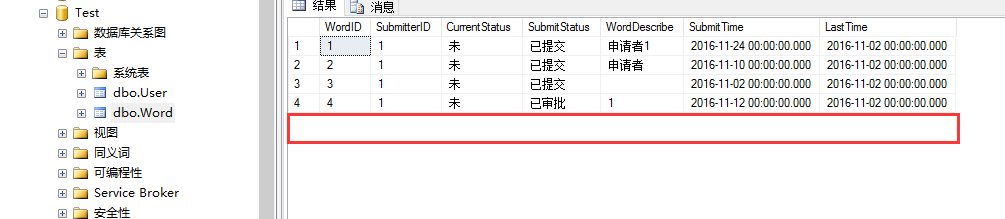
数据已经删除。
【WPF学习笔记】之如何保存画面上新建的数据到数据库中并且删除画面上的数据和数据库的数据:动画系列之(五)的更多相关文章
- 【WPF学习笔记】之如何点击“新建”按钮,在面板中加载一条条的“用户控件”的信息:动画系列之(四)
...... 承接上一系列动画三. 在主界面后台代码设置嵌套第二个用户控件. using System; using System.Collections.Generic; using System. ...
- WPF学习笔记-用Expression Design制作矢量图然后导出为XAML
WPF学习笔记-用Expression Design制作矢量图然后导出为XAML 第一次用Windows live writer写东西,感觉不错,哈哈~~ 1.在白纸上完全凭感觉,想象来画图难度很大, ...
- WPF 学习笔记-在WPF下创建托盘图标
原文:WPF 学习笔记-在WPF下创建托盘图标 首先需要在项目中引用System.Windows.Forms,System.Drawing; using System; using System.Co ...
- WPF 学习笔记-设置属性使窗口不可改变大小
原文:WPF 学习笔记-设置属性使窗口不可改变大小 调整Windows下的ResizeMode属性: ResizeMode = NoResize Resize属性是控制Windows是否可以改变大小, ...
- WPF学习笔记(8):DataGrid单元格数字为空时避免验证问题的解决
原文:WPF学习笔记(8):DataGrid单元格数字为空时避免验证问题的解决 如下图,在凭证编辑窗体中,有的单元格不需要数字,但如果录入数字后再删除,会触发数字验证,单元格显示红色框线,导致不能执行 ...
- Yii框架学习笔记(二)将html前端模板整合到框架中
选择Yii 2.0版本框架的7个理由 http://blog.chedushi.com/archives/8988 刚接触Yii谈一下对Yii框架的看法和感受 http://bbs.csdn.net/ ...
- 【转载】【时序约束学习笔记1】Vivado入门与提高--第12讲 时序分析中的基本概念和术语
时序分析中的基本概念和术语 Basic concept and Terminology of Timing Analysis 原文标题及网址: [时序约束学习笔记1]Vivado入门与提高--第12讲 ...
- 【WPF学习笔记】之如何把数据库里的值读取出来然后显示在页面上:动画系列之(六)(评论处有学习资料及源码)
(应博友们的需要,在文章评论处有源码链接地址,以及WPF学习资料.工具等,希望对大家有所帮助) ...... 承接系列五 上一节讲了,已经把数据保存到数据库并且删除数据,本讲是把已经存在的数据从数据库 ...
- WPF学习笔记(3)——style
http://www.cnblogs.com/Zhouyongh/archive/2011/08/01/2123610.html Style 用来在类型的不同实例之间共享属性.资源和事件处理程序,您可 ...
随机推荐
- [LeetCode] Maximum Product Subarray 连续数列最大积
Find the contiguous subarray within an array (containing at least one number) which has the largest ...
- request.setAttribute()、session.setAttribute()和request.getParameter()的联系与区别
1.session.setAttribute()和session.getAttribute()配对使用,作用域是整个会话期间,在所有的页面都使用这些数据的时候使用. 2.request.setAttr ...
- 基于c语言中调试工具的用法汇总(不包含gdb)【转】
转自:http://www.jb51.net/article/36829.htm 是不是只有编译的时候才知道程序写了错误?有没有在未编译的时候就让机器帮你检查错误的工具呢? 答案是:有!! splin ...
- 定时执行rsync同步数据以及mysql备份
需求:把机器A中的附件.图片等,备份到备份机B中.将数据库进行备份 附件备份 在A中,启动rsync服务,编辑/etc/xinetd.d/rsync文件,将其中的disable=yes改为disabl ...
- AC日记——数据流中的算法 51nod 1785
数据流中的算法 思路: 线段树模拟: 时间刚刚卡在边界上,有时超时一个点,有时能过: 来,上代码: #include <cstdio> #include <cstring> # ...
- superagent-promise
var Promise = this.Promise || require('promise'); var agent = require('superagent-promise')(require( ...
- HDU - 2970 Suffix reconstruction
Discription Given a text s[1..n] of length n, we create its suffix array by taking all its suffixes: ...
- andriod GridLayout
来自:http://blog.csdn.net/jianghuiquan/article/details/8299973 GridLayout网格布局 android4.0以上版本出现的GridLay ...
- ef SaveChanges()报"更新条目时出错,有关详细信息请参见内部异常"
报这个错误是因为表没有设置主键,设完主键后再重新更新Entity,就可以添加了
- nginx 按天生成日志
nginx日志access.log error.log按天生成存储,定时删除日志 logrotate https://linux.cn/article-4126-1.html http://blog. ...