
使用Python处理CSV文件的一些代码示例
笔记:使用Python处理CSV文件的一些代码示例,来自于《Python数据分析基础》一书,有删改
# 读写CSV文件,不使用CSV模块,仅使用基础Python

# 20181110 wangml

#!/usr/bin/env python3

input_file = 'D:\wangm\Documents\learning\code\python\supplier_data.csv'

output_file = 'D:\wangm\Documents\learning\code\python\supplier_data_out.csv'

# 分别以读、写方式打开input_file、output_file,当以 w 方式打开的文件不存在,则创建它

with open(input_file, 'r', newline='') as filereader:

    with open(output_file, 'w', newline='') as filewriter:

        # 读取一行文件内容

        header = filereader.readline()

        header = header.strip()

        header_list = header.split(',')

        print(header_list)

        filewriter.write(','.join(map(str, header_list))+'\n')

        for row in filereader:

            row = row.strip()

            row_list = row.split(',')

            print(row_list)

            filewriter.write(','.join(map(str, row_list))+'\n')
# 使用CSV模块读写CSV文件

# 20181112 wangml

# csv_pandas_1

#!/usr/bin/env python3

# 导入CSV库

import csv

input_file = 'D:\wangm\Documents\learning\code\python\supplier_data.csv'

output_file = 'D:\wangm\Documents\learning\code\python\supplier_data_out.csv'

with open(input_file, 'r', newline='') as csv_in_file:

    with open(output_file, 'w', newline='') as csv_out_file:

        # 使用CVS模块中csv.reader()、csv.writer()函数,创建一个读取对象、一个写入对象

        # delimiter指定CSV文件的分隔符,默认为 , 逗号

        filereader = csv.reader(csv_in_file, delimiter=',')

        filewriter = csv.writer(csv_out_file, delimiter=',')

        header = next(filereader)

        filewriter.writerow(header)

        # 循环,每次从CSV读取文件中读取一行数据,并将其打印出来,然后写入CSV写入对象

        for row_list in filereader:

            print(row_list)

            filewriter.writerow(row_list)

        # 筛选符合条件的行

        for row_list in filereader:

            #print(row_list[1])

            name = str(row_list[0]).strip()

            #print(row_list[3])

            cost = str(row_list[3]).strip('$').replace(',', '')

            #print(cost)

            #print(type(cost))

            # 选择name为z或者cost大于600的row,此处使用float()函数将cost由str类型转换为flost

            if name == 'z' or float(cost) > 600.0:

                filewriter.writerow(row_list)
# # csv_pandas_1

#!/usr/bin/env python3

import pandas as pd

input_file = 'D:\wangm\Documents\learning\code\python\supplier_data.csv'

output_file = 'D:\wangm\Documents\learning\code\python\supplier_data_out.csv'

# 使用pandas库函数pandas.read_csv()读取一个CSV文件,并由此创建一个数据框对象

data_frame = pd.read_csv(input_file)

# 通过列名作为index选取该数据框中的指定列

data_frame['Cost'] = data_frame['Cost'].str.strip('$').astype(float)

#print(type(data_frame['Cost']))

data_frame_value_meets_condition = data_frame.loc[(data_frame['Name'].str.contains('Z')) | (data_frame['Cost'] > 600.0), :]

# 此处导致CSV文件的Cost列的$消失了

# 下面的语句并没有将$加上去,暂时不知道怎么弄

data_frame['Cost'] = '$' + str(data_frame['Cost'])

# 将data_frame_value_meets_condition写入输出文件

data_frame_value_meets_condition.to_csv(output_file, index=False)
#

# csv_pandas_2

#!/usr/bin/env python3

# 导入CSV库

import csv

input_file = 'D:\wangm\Documents\learning\code\python\supplier_data.csv'

output_file = 'D:\wangm\Documents\learning\code\python\supplier_data_out.csv'

important_dates = ['1/1/2018', '2/1/2018']

with open(input_file, 'r', newline='') as csv_in_file:

    with open(output_file, 'w', newline='') as csv_out_file:

        filereader = csv.reader(csv_in_file)

        filewriter = csv.writer(csv_out_file)

        header = next(filereader)

        filewriter.writerow(header)

        for row_list in filereader:

            a_date = row_list[4]

            # 选取date值在important_dates中的行

            if a_date in important_dates:

                filewriter.writerow(row_list)
# # csv_pandas_2

#!/usr/bin/env python3

import pandas as pd

input_file = 'D:\wangm\Documents\learning\code\python\supplier_data.csv'

output_file = 'D:\wangm\Documents\learning\code\python\supplier_data_out.csv'

# 使用pandas库函数pandas.read_csv()读取一个CSV文件,并由此创建一个数据框对象

data_frame = pd.read_csv(input_file)

important_dates = ['1/1/2018', '2/1/2018']

# 选取date值在important_dates中的行

data_frame_value_set = data_frame.loc[data_frame['Date'].isin(important_dates), :]

data_frame_value_set.to_csv(output_file, index=False)
#

# csv_pandas_3

#!/usr/bin/env python3

# 导入CSV库、正则表达式库

import csv

import re

input_file = 'D:\wangm\Documents\learning\code\python\supplier_data.csv'

output_file = 'D:\wangm\Documents\learning\code\python\supplier_data_out.csv'

# 使用re.compile(正则表达式),创建一个正则表达式变量

# 元字符?P<my_pattern_group>捕获了名为<my_pattern_group>的组中匹配了的字符串

# pattern表示满足以:'001-'开头,后面可跟除任意字串的字符串

# re.I表示大小写敏感

pattern = re.compile(r'(?P<my_pattern_group>^001-.*)', re.I)

with open(input_file, 'r', newline='') as csv_in_file:

    with open(output_file, 'w', newline='') as csv_out_file:

        filereader = csv.reader(csv_in_file)

        filewriter = csv.writer(csv_out_file)

        header = next(filereader)

        filewriter.writerow(header)

        for row_list in filereader:

            id_number = row_list[1]

            if pattern.search(id_number):

                filewriter.writerow(row_list)
#

# csv_pandas_3

#!/usr/bin/env python3

import pandas as pd

input_file = 'D:\wangm\Documents\learning\code\python\supplier_data.csv'

output_file = 'D:\wangm\Documents\learning\code\python\supplier_data_out.csv'

# 使用pandas库函数pandas.read_csv()读取一个CSV文件,并由此创建一个数据框对象

data_frame = pd.read_csv(input_file)

# 筛选出ID值以001-开头的行

data_frame_value_matches_pattern = data_frame.loc[data_frame['ID'].str.startswith("001-"), :]

data_frame_value_matches_pattern.to_csv(output_file, index=False)
# 选取CSV文件中符合条件的列

#

# csv_pandas_4

# 通过列索引值选取特定列

# 在只知道需要选取的列名称时,我们可以通过列名称取得相应的索引值,在进行选取

# 具体方法是判断相应标题行每个元素是否在已知列名称中,若是,记下该item的index

#!/usr/bin/env python3

import csv

input_file = 'D:\wangm\Documents\learning\code\python\supplier_data.csv'

output_file = 'D:\wangm\Documents\learning\code\python\supplier_data_out.csv'

my_columns = [0, 3]

with open(input_file, 'r', newline='') as csv_in_file:

    with open(output_file, 'w', newline='') as csv_out_file:

        filereader = csv.reader(csv_in_file)

        filewriter = csv.writer(csv_out_file)

        for row_list in filereader:

            # 每次向输出文件中写入的一行值

            row_list_output = []

            for index_value in my_columns:

                row_list_output.append(row_list[index_value])

            filewriter.writerow(row_list_output)
# 选取CSV文件中符合条件的列

#

# csv_pandas_4

# 通过列索引值选取特定列

# 在只知道需要选取的列名称时,不需要像基本Python一样处理标题行,pandas可以将列名称当做index一样处理

#!/usr/bin/env python3

import pandas as pd

input_file = 'D:\wangm\Documents\learning\code\python\supplier_data.csv'

output_file = 'D:\wangm\Documents\learning\code\python\supplier_data_out.csv'

# 使用pandas库函数pandas.read_csv()读取一个CSV文件,并由此创建一个数据框对象

data_frame = pd.read_csv(input_file)

# 选取data_frame数据框对象中的所有行的列索引值为0,3的列

# iloc(行,列)函数可以选取数据框中选定的行、列

data_frame_value_column_by_value = data_frame.iloc[:, [0, 3]]

# data_frame_value_column_by_value = data_frame.iloc[:, [‘Name’, 'Cost']]

data_frame_value_column_by_value.to_csv(output_file, index=False)

# 给一个CSV文件添加标题行,在基础Python中,可能是将标题行通过csv库的writerow()函数写入

# 而pandas库提供了更加简单的方法

# title = [‘One’, 'Two'...]

# data_frame = pd.read_csv(input_file, header=None, names=title)
# 读取多个CSV文件,输出读取了多少个CSV文件

#!/usr/bin/env python3

import csv

import glob

import os

input_path = 'D:\wangm\Documents\learning\code\python'

file_counter = 0

for input_file in glob.glob(os.path.join(input_path, '*.csv')):

    file_counter = file_counter + 1

    #row_counter = 1

    #with open(input_file, 'r', newline='') as csv_input_file:

        #filereader = csv.reader(csv_input_file)

        #...

print(file_counter)
#

# 合并多个CSV文件

#!/usv/bin/env python3

import pandas as pd

import os

import glob

input_path = 'D:\wangm\Documents\learning\code\python'

output_file = 'D:\wangm\Documents\learning\code\python\supplier_data_out.csv'

#all_files = glob.glob(os.path.join(input_path, 'supplier_data_副本*'))

# OSError: Initializing from file failed上面这句出现错误,因为文件名含有中文,改成下面这句就行了

all_files = glob.glob(os.path.join(input_path, 'supplier_data_copy*'))

all_data_frame = []

for file in all_files:

    data_frame = pd.read_csv(file, index_col=None)

    all_data_frame.append(data_frame)

# pandas.concat()函数将数据框数据垂直堆叠(axis=0), 当水平连接数据时(asis=1)

data_frame_concat = pd.concat(all_data_frame, axis=0, ignore_index=True)

data_frame_concat.to_csv(output_file, index=False)
# 分别计算多个CSV文件中的某项数据的和、平均值等

# 在基本python中,可以读取多个CSV文件,然后要被计算的项的值一个一个取出来,然后计算

# 这里展示了使用pandas提供的方法

#!/usv/bin/env python3

import pandas as pd

import os

import glob

input_path = 'D:\wangm\Documents\learning\code\python'

output_file = 'D:\wangm\Documents\learning\code\python\supplier_data_out.csv'

all_files = glob.glob(os.path.join(input_path, 'supplier_data_copy*'))

all_data_frame = []

for file in all_files:

    data_frame = pd.read_csv(file, index_col=None)

    # 和

    total_cost = pd.DataFrame([float(str(value).strip('$').replace(',', '')) \

                               for value in data_frame.loc[:, 'Cost']]).sum()

    # 平均值

    average_cost = pd.DataFrame([float(str(value).strip('$').replace(',', '')) \

                               for value in data_frame.loc[:, 'Cost']]).mean()

    data = {'file_name': os.path.basename(file),

            'total_cost': total_cost,

            'average_cost': average_cost}

    all_data_frame.append(pd.DataFrame(data, columns=['file_name', 'total_cost', 'average_cost']))

data_frames_concat = pd.concat(all_data_frame, axis=0, ignore_index=True)

data_frames_concat.to_csv(output_file, index=False)
代码示例中使用的CSV文件:
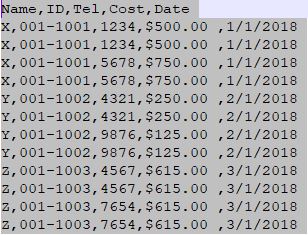
上述代码分别使用CSV库、pandas库来对CSV文件进行相同的操作
上述代码运行在Python 3.6版本下,在Win10、Spyder中
有关Python的csv库的详细介绍:https://docs.python.org/2/library/csv.html
使用Python处理CSV文件的一些代码示例的更多相关文章
- 使用Python处理Excel文件的一些代码示例
笔记:使用Python处理Excel文件的一些代码示例,以下代码来自于<Python数据分析基础>一书,有删改 #!/usr/bin/env python3 # 导入读取Excel文件的库 ...
- 使用Python读写csv文件的三种方法
Python读写csv文件 觉得有用的话,欢迎一起讨论相互学习~Follow Me 前言 逗号分隔值(Comma-Separated Values,CSV,有时也称为字符分隔值,因为分隔字符也可以不是 ...
- python读写csv文件
文章链接:https://www.cnblogs.com/cloud-ken/p/8432999.html Python读写csv文件 觉得有用的话,欢迎一起讨论相互学习~Follow Me 前言 逗 ...
- python导入csv文件时,出现SyntaxError
背景 np.loadtxt()用于从文本加载数据. 文本文件中的每一行必须含有相同的数据. *** loadtxt(fname, dtype=<class 'float'>, commen ...
- 数学建模之Python操作csv文件
1.用Python通过csv文件里面的某一列,形成键值,然后统计键在其他列出现的次数. import pandas as pd import numpy as np import csv import ...
- (Python基础教程之十二)Python读写CSV文件
Python基础教程 在SublimeEditor中配置Python环境 Python代码中添加注释 Python中的变量的使用 Python中的数据类型 Python中的关键字 Python字符串操 ...
- Python处理csv文件
Python处理csv文件 CSV(Comma-Separated Values)即逗号分隔值,可以用Excel打开查看.由于是纯文本,任何编辑器也都可打开.与Excel文件不同,CSV文件中: 值没 ...
- 使用python读写CSV文件
# -*- coding:UTF-8 -*- __autor__ = 'zhouli' __date__ = '2018/10/25 21:14' import csv with open('resu ...
- 解决python中csv文件中文写入问题
一.前言 一般来说,为了方便,使用python的时候都会使用csv模块去写数据到csv文件,但是写入中文的时候,经常会报错: UnicodeEncodeError: 'ascii' codec can ...
随机推荐
- iOS AFNetWorking中block执行完后再执行其它操作
需求:同时进行两次网络请求,网络请求是异步的,在网络请求成功后进行其它的操作.两个网络请求是这样,一个网络请求中block执行完之后,再进行其它操作,也是一样的原理,只是这时候不需要线程组了,只需要信 ...
- 筒子们,使用Protobuf优化你的协议
Protocol buffers是google提供的一种将结构化数据进行序列化和反序列化的方法,其优点是语言中立,平台中立,可扩展性好,目前在google内部大量用于数据存储,通讯协议等方面.PB在功 ...
- 【Luogu】P2045方格取数加强版(最小费用最大流)
题目链接 通过这题我学会了引诱算法的行为,就是你通过适当的状态设计,引诱算法按照你想要它做的去行动,进而达到解题的目的. 最小费用最大流,首先将点拆点,入点和出点连一条费用=-权值,容量=1的边,再连 ...
- java集合四种遍历方式
package conection; import java.util.Iterator;import java.util.LinkedList;import java.util.List; publ ...
- 解决v-for产生的警告的办法
当 Vue.js 用 v-for 正在更新已渲染过的元素列表时,它默认用 “就地复用” 策略.如果数据项的顺序被改变,Vue将不是移动 DOM 元素来匹配数据项的顺序, 而是简单复用此处每个元素,并且 ...
- Docker 架构详解
Docker 的核心组件包括: Docker 客户端 - Client Docker 服务器 - Docker daemon Docker 镜像 - Image Registry Docker 容器 ...
- vue.js源码学习分享(二)
/** * Check if value is primitive//检查该值是否是个原始值 */ function isPrimitive (value) { return typeof value ...
- 【Visual Studio】Windows program compatibility mode is on, turn it off……
[问题描述]Windows 10上安装 Visual Studio Ultimate 2013,出现下面错误: [解决方案]将.iso文件解压到硬盘再安装.
- BQ25890 charging ic evb 使用注意事項
Origin : 今天做了一個小實驗, 從 bq25890 spec 可以知道, enable bq25896 充電的功能,有二個條件, 1.CHG_CONFIG bit 需為1. 2.ce pin ...
- java parse 带英文单词的日期字符串(转化新浪微博api返回的时间)
String str = "Sun Sep 23 00:32:57 +0800 2012"; SimpleDateFormat dateFormat = new SimpleDat ...