
使用Python处理CSV文件的一些代码示例
笔记:使用Python处理CSV文件的一些代码示例,来自于《Python数据分析基础》一书,有删改
# 读写CSV文件,不使用CSV模块,仅使用基础Python

# 20181110 wangml

#!/usr/bin/env python3

input_file = 'D:\wangm\Documents\learning\code\python\supplier_data.csv'

output_file = 'D:\wangm\Documents\learning\code\python\supplier_data_out.csv'

# 分别以读、写方式打开input_file、output_file,当以 w 方式打开的文件不存在,则创建它

with open(input_file, 'r', newline='') as filereader:

    with open(output_file, 'w', newline='') as filewriter:

        # 读取一行文件内容

        header = filereader.readline()

        header = header.strip()

        header_list = header.split(',')

        print(header_list)

        filewriter.write(','.join(map(str, header_list))+'\n')

        for row in filereader:

            row = row.strip()

            row_list = row.split(',')

            print(row_list)

            filewriter.write(','.join(map(str, row_list))+'\n')
# 使用CSV模块读写CSV文件

# 20181112 wangml

# csv_pandas_1

#!/usr/bin/env python3

# 导入CSV库

import csv

input_file = 'D:\wangm\Documents\learning\code\python\supplier_data.csv'

output_file = 'D:\wangm\Documents\learning\code\python\supplier_data_out.csv'

with open(input_file, 'r', newline='') as csv_in_file:

    with open(output_file, 'w', newline='') as csv_out_file:

        # 使用CVS模块中csv.reader()、csv.writer()函数,创建一个读取对象、一个写入对象

        # delimiter指定CSV文件的分隔符,默认为 , 逗号

        filereader = csv.reader(csv_in_file, delimiter=',')

        filewriter = csv.writer(csv_out_file, delimiter=',')

        header = next(filereader)

        filewriter.writerow(header)

        # 循环,每次从CSV读取文件中读取一行数据,并将其打印出来,然后写入CSV写入对象

        for row_list in filereader:

            print(row_list)

            filewriter.writerow(row_list)

        # 筛选符合条件的行

        for row_list in filereader:

            #print(row_list[1])

            name = str(row_list[0]).strip()

            #print(row_list[3])

            cost = str(row_list[3]).strip('$').replace(',', '')

            #print(cost)

            #print(type(cost))

            # 选择name为z或者cost大于600的row,此处使用float()函数将cost由str类型转换为flost

            if name == 'z' or float(cost) > 600.0:

                filewriter.writerow(row_list)
# # csv_pandas_1

#!/usr/bin/env python3

import pandas as pd

input_file = 'D:\wangm\Documents\learning\code\python\supplier_data.csv'

output_file = 'D:\wangm\Documents\learning\code\python\supplier_data_out.csv'

# 使用pandas库函数pandas.read_csv()读取一个CSV文件,并由此创建一个数据框对象

data_frame = pd.read_csv(input_file)

# 通过列名作为index选取该数据框中的指定列

data_frame['Cost'] = data_frame['Cost'].str.strip('$').astype(float)

#print(type(data_frame['Cost']))

data_frame_value_meets_condition = data_frame.loc[(data_frame['Name'].str.contains('Z')) | (data_frame['Cost'] > 600.0), :]

# 此处导致CSV文件的Cost列的$消失了

# 下面的语句并没有将$加上去,暂时不知道怎么弄

data_frame['Cost'] = '$' + str(data_frame['Cost'])

# 将data_frame_value_meets_condition写入输出文件

data_frame_value_meets_condition.to_csv(output_file, index=False)
#

# csv_pandas_2

#!/usr/bin/env python3

# 导入CSV库

import csv

input_file = 'D:\wangm\Documents\learning\code\python\supplier_data.csv'

output_file = 'D:\wangm\Documents\learning\code\python\supplier_data_out.csv'

important_dates = ['1/1/2018', '2/1/2018']

with open(input_file, 'r', newline='') as csv_in_file:

    with open(output_file, 'w', newline='') as csv_out_file:

        filereader = csv.reader(csv_in_file)

        filewriter = csv.writer(csv_out_file)

        header = next(filereader)

        filewriter.writerow(header)

        for row_list in filereader:

            a_date = row_list[4]

            # 选取date值在important_dates中的行

            if a_date in important_dates:

                filewriter.writerow(row_list)
# # csv_pandas_2

#!/usr/bin/env python3

import pandas as pd

input_file = 'D:\wangm\Documents\learning\code\python\supplier_data.csv'

output_file = 'D:\wangm\Documents\learning\code\python\supplier_data_out.csv'

# 使用pandas库函数pandas.read_csv()读取一个CSV文件,并由此创建一个数据框对象

data_frame = pd.read_csv(input_file)

important_dates = ['1/1/2018', '2/1/2018']

# 选取date值在important_dates中的行

data_frame_value_set = data_frame.loc[data_frame['Date'].isin(important_dates), :]

data_frame_value_set.to_csv(output_file, index=False)
#

# csv_pandas_3

#!/usr/bin/env python3

# 导入CSV库、正则表达式库

import csv

import re

input_file = 'D:\wangm\Documents\learning\code\python\supplier_data.csv'

output_file = 'D:\wangm\Documents\learning\code\python\supplier_data_out.csv'

# 使用re.compile(正则表达式),创建一个正则表达式变量

# 元字符?P<my_pattern_group>捕获了名为<my_pattern_group>的组中匹配了的字符串

# pattern表示满足以:'001-'开头,后面可跟除任意字串的字符串

# re.I表示大小写敏感

pattern = re.compile(r'(?P<my_pattern_group>^001-.*)', re.I)

with open(input_file, 'r', newline='') as csv_in_file:

    with open(output_file, 'w', newline='') as csv_out_file:

        filereader = csv.reader(csv_in_file)

        filewriter = csv.writer(csv_out_file)

        header = next(filereader)

        filewriter.writerow(header)

        for row_list in filereader:

            id_number = row_list[1]

            if pattern.search(id_number):

                filewriter.writerow(row_list)
#

# csv_pandas_3

#!/usr/bin/env python3

import pandas as pd

input_file = 'D:\wangm\Documents\learning\code\python\supplier_data.csv'

output_file = 'D:\wangm\Documents\learning\code\python\supplier_data_out.csv'

# 使用pandas库函数pandas.read_csv()读取一个CSV文件,并由此创建一个数据框对象

data_frame = pd.read_csv(input_file)

# 筛选出ID值以001-开头的行

data_frame_value_matches_pattern = data_frame.loc[data_frame['ID'].str.startswith("001-"), :]

data_frame_value_matches_pattern.to_csv(output_file, index=False)
# 选取CSV文件中符合条件的列

#

# csv_pandas_4

# 通过列索引值选取特定列

# 在只知道需要选取的列名称时,我们可以通过列名称取得相应的索引值,在进行选取

# 具体方法是判断相应标题行每个元素是否在已知列名称中,若是,记下该item的index

#!/usr/bin/env python3

import csv

input_file = 'D:\wangm\Documents\learning\code\python\supplier_data.csv'

output_file = 'D:\wangm\Documents\learning\code\python\supplier_data_out.csv'

my_columns = [0, 3]

with open(input_file, 'r', newline='') as csv_in_file:

    with open(output_file, 'w', newline='') as csv_out_file:

        filereader = csv.reader(csv_in_file)

        filewriter = csv.writer(csv_out_file)

        for row_list in filereader:

            # 每次向输出文件中写入的一行值

            row_list_output = []

            for index_value in my_columns:

                row_list_output.append(row_list[index_value])

            filewriter.writerow(row_list_output)
# 选取CSV文件中符合条件的列

#

# csv_pandas_4

# 通过列索引值选取特定列

# 在只知道需要选取的列名称时,不需要像基本Python一样处理标题行,pandas可以将列名称当做index一样处理

#!/usr/bin/env python3

import pandas as pd

input_file = 'D:\wangm\Documents\learning\code\python\supplier_data.csv'

output_file = 'D:\wangm\Documents\learning\code\python\supplier_data_out.csv'

# 使用pandas库函数pandas.read_csv()读取一个CSV文件,并由此创建一个数据框对象

data_frame = pd.read_csv(input_file)

# 选取data_frame数据框对象中的所有行的列索引值为0,3的列

# iloc(行,列)函数可以选取数据框中选定的行、列

data_frame_value_column_by_value = data_frame.iloc[:, [0, 3]]

# data_frame_value_column_by_value = data_frame.iloc[:, [‘Name’, 'Cost']]

data_frame_value_column_by_value.to_csv(output_file, index=False)

# 给一个CSV文件添加标题行,在基础Python中,可能是将标题行通过csv库的writerow()函数写入

# 而pandas库提供了更加简单的方法

# title = [‘One’, 'Two'...]

# data_frame = pd.read_csv(input_file, header=None, names=title)
# 读取多个CSV文件,输出读取了多少个CSV文件

#!/usr/bin/env python3

import csv

import glob

import os

input_path = 'D:\wangm\Documents\learning\code\python'

file_counter = 0

for input_file in glob.glob(os.path.join(input_path, '*.csv')):

    file_counter = file_counter + 1

    #row_counter = 1

    #with open(input_file, 'r', newline='') as csv_input_file:

        #filereader = csv.reader(csv_input_file)

        #...

print(file_counter)
#

# 合并多个CSV文件

#!/usv/bin/env python3

import pandas as pd

import os

import glob

input_path = 'D:\wangm\Documents\learning\code\python'

output_file = 'D:\wangm\Documents\learning\code\python\supplier_data_out.csv'

#all_files = glob.glob(os.path.join(input_path, 'supplier_data_副本*'))

# OSError: Initializing from file failed上面这句出现错误,因为文件名含有中文,改成下面这句就行了

all_files = glob.glob(os.path.join(input_path, 'supplier_data_copy*'))

all_data_frame = []

for file in all_files:

    data_frame = pd.read_csv(file, index_col=None)

    all_data_frame.append(data_frame)

# pandas.concat()函数将数据框数据垂直堆叠(axis=0), 当水平连接数据时(asis=1)

data_frame_concat = pd.concat(all_data_frame, axis=0, ignore_index=True)

data_frame_concat.to_csv(output_file, index=False)
# 分别计算多个CSV文件中的某项数据的和、平均值等

# 在基本python中,可以读取多个CSV文件,然后要被计算的项的值一个一个取出来,然后计算

# 这里展示了使用pandas提供的方法

#!/usv/bin/env python3

import pandas as pd

import os

import glob

input_path = 'D:\wangm\Documents\learning\code\python'

output_file = 'D:\wangm\Documents\learning\code\python\supplier_data_out.csv'

all_files = glob.glob(os.path.join(input_path, 'supplier_data_copy*'))

all_data_frame = []

for file in all_files:

    data_frame = pd.read_csv(file, index_col=None)

    # 和

    total_cost = pd.DataFrame([float(str(value).strip('$').replace(',', '')) \

                               for value in data_frame.loc[:, 'Cost']]).sum()

    # 平均值

    average_cost = pd.DataFrame([float(str(value).strip('$').replace(',', '')) \

                               for value in data_frame.loc[:, 'Cost']]).mean()

    data = {'file_name': os.path.basename(file),

            'total_cost': total_cost,

            'average_cost': average_cost}

    all_data_frame.append(pd.DataFrame(data, columns=['file_name', 'total_cost', 'average_cost']))

data_frames_concat = pd.concat(all_data_frame, axis=0, ignore_index=True)

data_frames_concat.to_csv(output_file, index=False)
代码示例中使用的CSV文件:
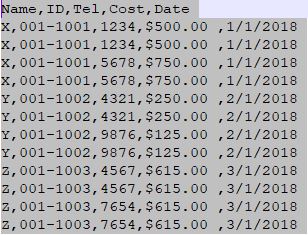
上述代码分别使用CSV库、pandas库来对CSV文件进行相同的操作
上述代码运行在Python 3.6版本下,在Win10、Spyder中
有关Python的csv库的详细介绍:https://docs.python.org/2/library/csv.html
使用Python处理CSV文件的一些代码示例的更多相关文章
- 使用Python处理Excel文件的一些代码示例
笔记:使用Python处理Excel文件的一些代码示例,以下代码来自于<Python数据分析基础>一书,有删改 #!/usr/bin/env python3 # 导入读取Excel文件的库 ...
- 使用Python读写csv文件的三种方法
Python读写csv文件 觉得有用的话,欢迎一起讨论相互学习~Follow Me 前言 逗号分隔值(Comma-Separated Values,CSV,有时也称为字符分隔值,因为分隔字符也可以不是 ...
- python读写csv文件
文章链接:https://www.cnblogs.com/cloud-ken/p/8432999.html Python读写csv文件 觉得有用的话,欢迎一起讨论相互学习~Follow Me 前言 逗 ...
- python导入csv文件时,出现SyntaxError
背景 np.loadtxt()用于从文本加载数据. 文本文件中的每一行必须含有相同的数据. *** loadtxt(fname, dtype=<class 'float'>, commen ...
- 数学建模之Python操作csv文件
1.用Python通过csv文件里面的某一列,形成键值,然后统计键在其他列出现的次数. import pandas as pd import numpy as np import csv import ...
- (Python基础教程之十二)Python读写CSV文件
Python基础教程 在SublimeEditor中配置Python环境 Python代码中添加注释 Python中的变量的使用 Python中的数据类型 Python中的关键字 Python字符串操 ...
- Python处理csv文件
Python处理csv文件 CSV(Comma-Separated Values)即逗号分隔值,可以用Excel打开查看.由于是纯文本,任何编辑器也都可打开.与Excel文件不同,CSV文件中: 值没 ...
- 使用python读写CSV文件
# -*- coding:UTF-8 -*- __autor__ = 'zhouli' __date__ = '2018/10/25 21:14' import csv with open('resu ...
- 解决python中csv文件中文写入问题
一.前言 一般来说,为了方便,使用python的时候都会使用csv模块去写数据到csv文件,但是写入中文的时候,经常会报错: UnicodeEncodeError: 'ascii' codec can ...
随机推荐
- Welcome-to-Swift-14构造过程(Initialization)
构造过程是为了使用某个类.结构体或枚举类型的实例而进行的准备过程.这个过程包含了为实例中的每个属性设置初始值和为其执行必要的准备和初始化任务. 构造过程是通过定义构造器(Initializers)来实 ...
- HDU——1257最少拦截系统(贪心)
最少拦截系统 Time Limit: 2000/1000 MS (Java/Others) Memory Limit: 65536/32768 K (Java/Others) Total Sub ...
- ideaaaaaaaaa
数据库proxy:可以用作自动化数据逆向SQL test4j/jtester:
- poj 1637 混合图欧拉回路 学习笔记
题目大意 求混合图是否存在欧拉回路 做法 有向边我们只有增加入度出度 对于无向边,我们给它设定一个初始方向 如果不能满足|入度-出度|为偶数,无解 然后在网络流图中, 设设定方向的反向连一条边,表示反 ...
- 欧拉函数之和(51nod 1239)
对正整数n,欧拉函数是小于或等于n的数中与n互质的数的数目.此函数以其首名研究者欧拉命名,它又称为Euler's totient function.φ函数.欧拉商数等.例如:φ(8) = 4(Phi( ...
- 如何从sql server导出到csv文件
如何从sql server导出到csv文件,具体代码如下: private static void WriteHeader(SqlDataReader reader, TextWriter outpu ...
- 驱动12.移植dm9000驱动程序
1 确定相异性 1.1 选中网卡芯片nGCS4 1.2 确定相异性:基地址,中断号,设置时序(内存控制器BWSCON,BANKCONn) 1.3 修改相应的部分 2 测试DM9000C驱动程序:2.1 ...
- SQL注入原理及防范
1.1.2 正文 SQL Injection:就是通过把SQL命令插入到Web表单递交或输入域名或页面请求的查询字符串,最终达到欺骗服务器执行恶意的SQL命令. 具体来说,它是利用现有应用程序,将(恶 ...
- 数据结构自己实现——Tree and Forest
//中D序??遍???历???二t叉?树??? //先??序??遍???历???二t叉?树??? //后??序??遍???历???二t叉?树??? #include <iostream> ...
- 广播broadcast的使用
很多时候我们有这样的需求,比如说,订单支付成功,需要更新订单列表或订单详情的订单状态,这时候我们就可以用到广播. 首先我们要使用Intent来发送一个广播 定义一个全局的广播名字 public sta ...