
Viewing the interface of your Swift code,查看Swift代码的头文件的三种方法
Viewing the interface of your Swift code
Q: How do I view the interface of my Swift code in Xcode?
问: 怎么在Xcode中查看swift文件的头文件?
A: Xcode generates an interface file that includes all your source code's internal and public declarations when using the Assistant editor button, the Navigate menu, or the Generated Interface feature.
第一种方法:Using the Assistant editor button
Select your Swift file in the project navigator.
Click the Assistant editor button in the Xcode toolbar as shown in Figure 1.
Figure 1 Viewing the ListItem file in the project navigator. The numbers in this figure correspond to the steps above.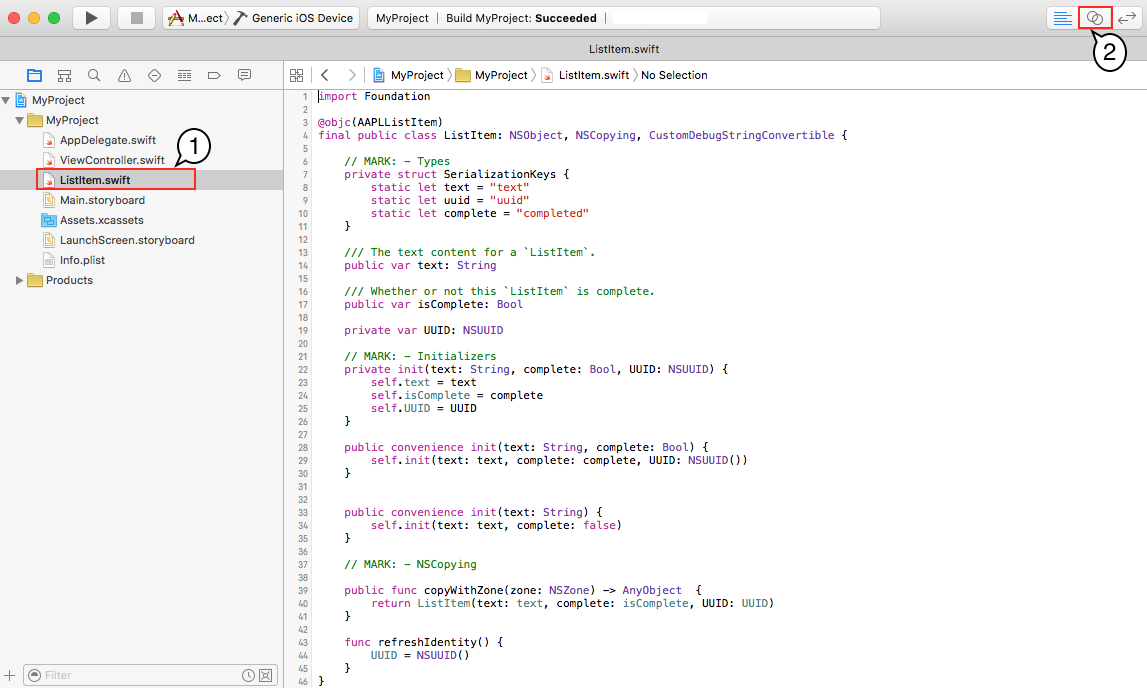
Xcode automatically shows the generated interface for your Swift code in its Assistant editor pane using the Counterparts mode as shown in Figure 2.
Figure 2 Viewing the interface of ListItem in the Assistant editor pane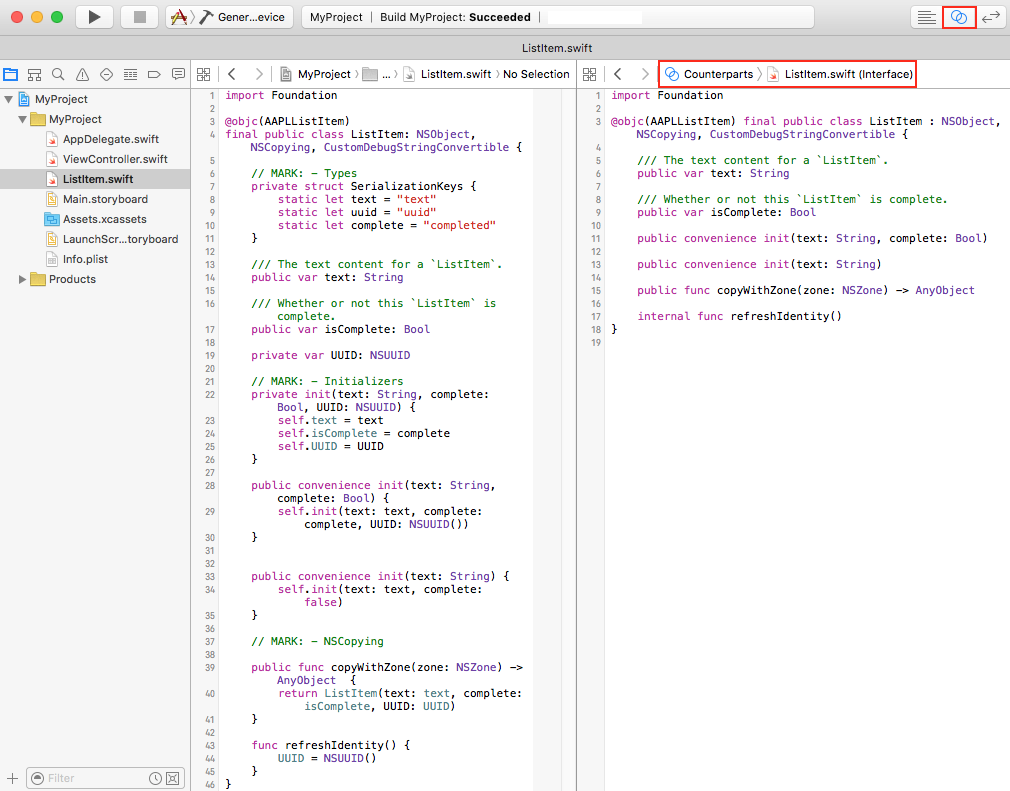
第二种方法Using the Navigate menu
Select your Swift file in the project navigator.
Choose Navigate > Jump to Generated Interface as shown in Figure 3 to view your code's interface.
Figure 3 Select Jump to Generated Interface to view the interface of ListItem. The numbers in this figure correspond to the steps above.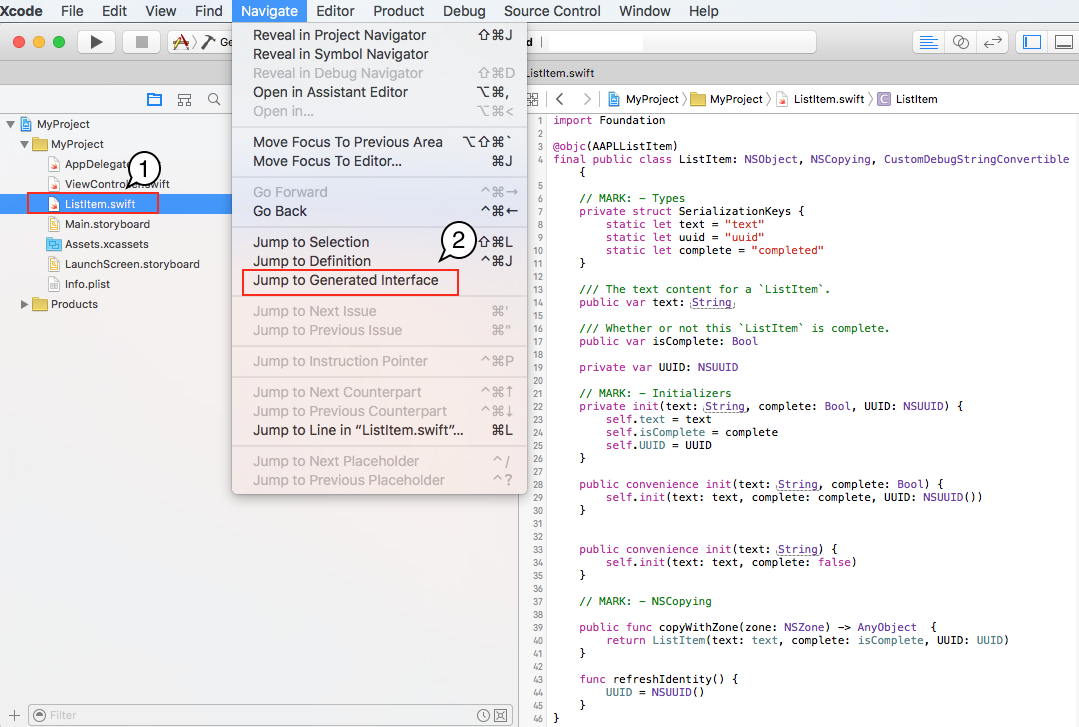
Note: To jump back to your original Swift code, choose Navigate > Jump to Original Source "<your_filename>.swift" as shown in Figure 4.
Figure 4 Switch back to the Swift file associated with the ListItem interface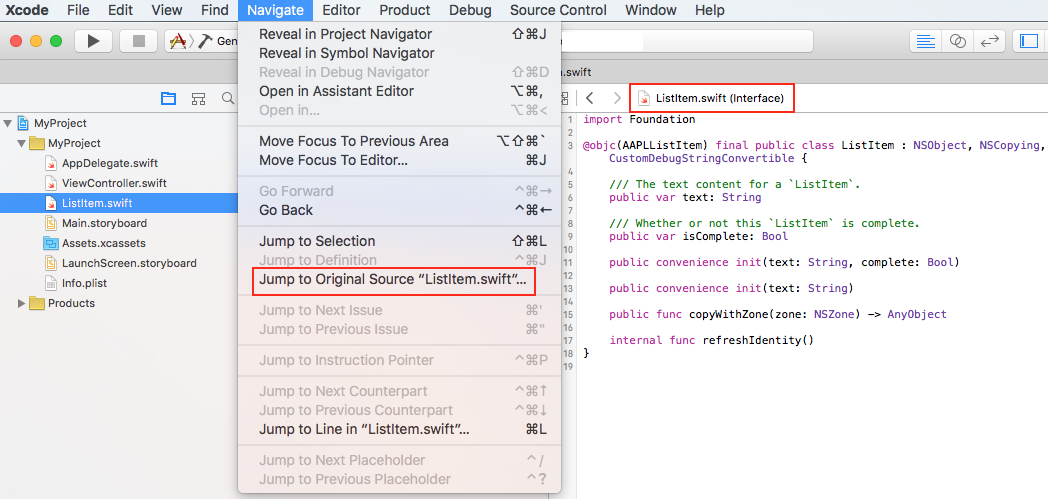
第三种方法Using the Generated Interface feature
Select your Swift file in the project navigator.
Click the related items button in the editor's jump bar.
Xcode displays a contextual menu. Choose Generated Interface as shown in Figure 5 to view your code's interface.
Figure 5 Select Generated Interface to view the interface of ListItem. The numbers in this figure correspond to the steps above.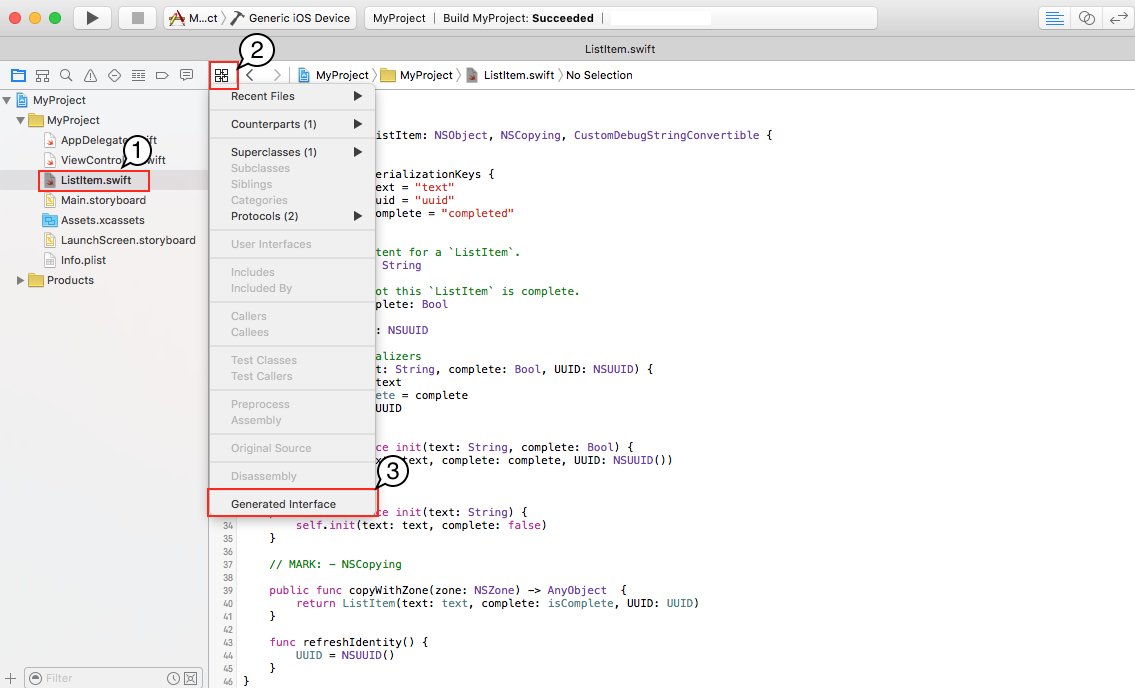
Note: To go back to your original Swift code, choose Original Source in the above contextual menu as shown in Figure 6.
Figure 6 Switch back to the Swift file associated with the ListItem interface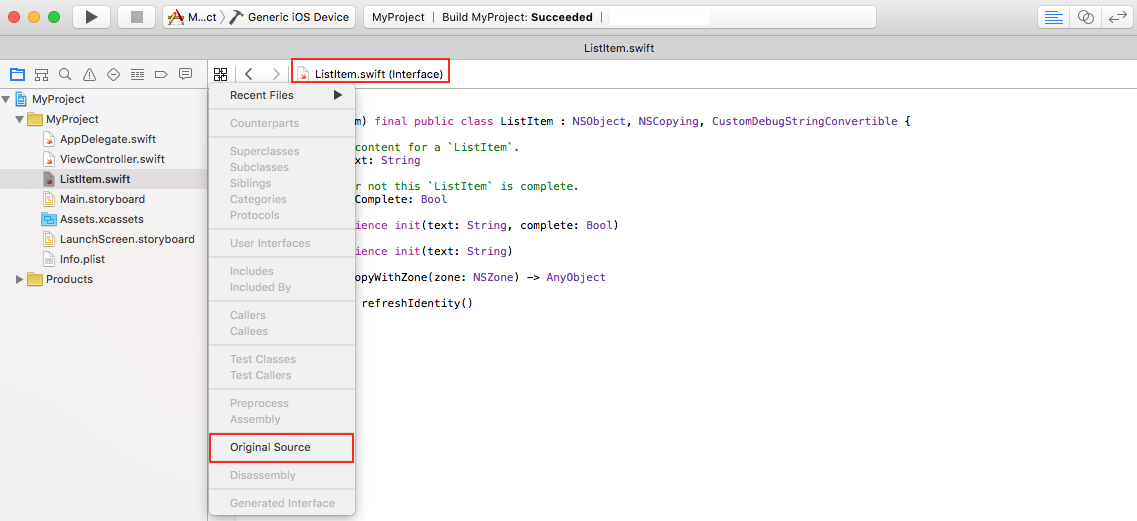
Document Revision History
| Date | Notes |
|---|---|
| 2016-03-23 |
New document that describes how to view the interface of your Swift code. |
Copyright © 2016 Apple Inc. All Rights Reserved. Terms of Use | Privacy Policy | Updated: 2016-03-23
*
*
Viewing the interface of your Swift code,查看Swift代码的头文件的三种方法的更多相关文章
- C#中??和?分别是什么意思? 在ASP.NET开发中一些单词的标准缩写 C#SESSION丢失问题的解决办法 在C#中INTERFACE与ABSTRACT CLASS的区别 SQL命令语句小技巧 JQUERY判断CHECKBOX是否选中三种方法 JS中!=、==、!==、===的用法和区别 在对象比较中,对象相等和对象一致分别指的是什么?
C#中??和?分别是什么意思? 在C#中??和?分别是什么意思? 1. 可空类型修饰符(?):引用类型可以使用空引用表示一个不存在的值,而值类型通常不能表示为空.例如:string str=null; ...
- 三种方法查看MySQL数据库的版本
1.使用-V参数 首先我们想到的肯定就是查看版本号的参数命令,参数为-V(大写字母)或者--version 使用方法: D:\xampp\mysql\bin>mysql -V 或者 D:\xam ...
- Linux下查看alert日志文件的两种方法
--linux下查看alert日志文件的两种方法: --方法1: SQL> show parameter background_dump_dest; NAME TYPE VALUE ------ ...
- 【MySQL】锁——查看当前数据库锁请求的三种方法 20
MySQL提供了查看当前数据库锁请求的三种方法:1. show full processlist命令 观察state和info列 2. show engine innodb status\G ...
- Linux下查看磁盘挂载的三种方法
Linux下查看磁盘挂载的三种方法 2009-06-05 23:17 好久没有更新日志了,呵呵.不是没有要写的东东.实在抽不出时间来写,要准备公司的考试呢,C++考试.已经有七个月没有写C++代码了, ...
- linux查看磁盘挂载的三种方法
第一种方法:使用df命令,例如: orientalson:/home # df Filesystem 1K-blocks Used Available Use% Mounted on /dev/sda ...
- 使用Idea当中的快捷键快速查看继承关系或其图表的两种方法
一.Idea当中有两种方法可以查看继承关系 在Idea当中选中一个类,然后按Ctrl+H,可以快速查看当前所选类的继承关系,如下图: 同样选中一个类,按CTRL+ALT+U,即可生成当前类的继承关 ...
- Docker MySql 查看版本的三种方法
目录 Docker MySql 查看版本的三种方法 1.mysql -V命令查看版本 2.status命令查看版本 3.version命令查看版本 Docker MySql 查看版本的三种方法 1.m ...
- Linux下用于查看系统当前登录用户信息的4种方法
1. 使用w命令查看登录用户正在使用的进程信息 w命令用于显示已经登录系统的用户的名称,以及他们正在做的事.该命令所使用的信息来源于/var/run/utmp文件.w命令输出的信息包括: 用户名称 用 ...
随机推荐
- 潭州课堂25班:Ph201805201 redis第四课 (课堂笔记)
redis支持丰富的数据类型, 是个非关系型数据库.以键值对存储,存在内存里, : string. 字符 list. 列表 set. 集合 zset(sorted set). 有序集合 hash ...
- PID控制器(比例-积分-微分控制器)- V
Linear Actuator - PID Control Introduction This application guide is designed to explain the basics ...
- 总结·展望
学了算法也有半年了.也是学期末,确实是该总结了.半年来说不上多努力,毕竟不如高中那时候早晨5点起晚上12点睡,但也确实学到不少东西(尽管眼下来说根本用不到并且我也不确定以为会不会去用.毕竟专业放在那里 ...
- C#编程(七十九)---------- 反射
反射 在介绍翻着之前,先说两个小案例 B超:什么叫B超呢?就是透过肚皮能看到你内脏的情况,不用打开肚子才能看.这是什么样的一种技术呢?B超是B型超声波,它可以透过肚皮通过向你体内发射B型超声波,当超声 ...
- Linux:FHS标准
FHS(英文:Filesystem Hierarchy Standard 中文:文件系统层次结构标准),多数Linux版本采用这种文件组织形式,FHS定义了系统中每个区域的用途.所需要的最小构成的文件 ...
- Launch 启动全屏 隐藏上方状态栏
1:statusBar字体为白色 在plist里面设置View controller-based status bar appearance 为 NO:设置statusBarStyle 为 UISta ...
- 在ASP.NET Core2.0中使用百度在线编辑器UEditor(转)
一.起因 UEditor是百度旗下的富文本编辑器,对于后端上传处理仅提供了Asp.Net 版的支持. 如果想在.Net Core项目中使用,那么后台上传接口需要重构. UEditorNetCore:百 ...
- Permutations II leetcode java
题目: Given a collection of numbers that might contain duplicates, return all possible unique permutat ...
- PL/SQL- ora-12154 '' TNS:could not resolve the connect identifier specified'
出现如上情况在使用pl/sql连接oracle服务器时很常见,问题出现的方式也很多 最终问题还是pl/sql在读取NETWORK\ADMIN\tnsnames.ora是配置的内容时解析错误 也就是说t ...
- Eclipse 4.5.0 离线安装 Veloeclipse 插件
下载 Veloeclipse 在 Eclipse eclipse-jee-mars-R-win32-x86_64 版本 4.5.0,Build id 为 20150621-1200,离线安装 Velo ...