
Java环境下shiro的测试-认证与授权
Java环境下shiro的测试
1.导入依赖的核心jar包
<dependency>

  <groupId>org.apache.shiro</groupId>

  <artifactId>shiro-core</artifactId>

  <version>1.3.2</version>

</dependency>
2.认证程序
2.1 构建users配置文件 xxx.ini doGetAuthenticationInfo方法从该配置文件中获取数据与token中比对
[users]

test=123456

lisi=123456
测试程序
public class TestShiro {

    public static void main(String[] args) {

        //获取安全管理器工厂

        IniSecurityManagerFactory iniSecurityManagerFactory = new IniSecurityManagerFactory("classpath:shiro.ini");

        //获取安全管理器

        SecurityManager securityManager = iniSecurityManagerFactory.getInstance();

        //set认证器

        SecurityUtils.setSecurityManager(securityManager);

        //subject发起认证,获取subject

        Subject subject = SecurityUtils.getSubject();

        AuthenticationToken authenticationToken = new UsernamePasswordToken("test","123456");

        //认证失败会抛出异常  密码:CredentialsException   账户:UnknownAccountException

        try {

            subject.login(authenticationToken);

        } catch (AuthenticationException e) {

            e.printStackTrace();

        }

        //当前subject是否认证通过

        boolean authenticated = subject.isAuthenticated();

        System.out.println(authenticated);

    }

}
认证流程:
token携带身份和凭证信息--->subject发起认证--->SimpleAccountRealm(doGetAuthenticationInfo)获取配置文件中的用户信息---->CredentialsMatcher接口的实现类SimpleCredentialsMatcher:doCredentialsMatch方法对配置文件中的信息与token携带的信息进行比对--->认证成功或者失败。
3.Shiro框架中的关键对象:
AuthenticatingRealm  //抽象类

    //3.关键属性 该属性为凭证匹配器

    CredentialsMatcher credentialsMatcher;

    //1.该方法为抽象方法 其作用使用来获取数据

    protected abstract AuthenticationInfo doGetAuthenticationInfo(AuthenticationToken var1) throws AuthenticationException;
SimpleAccountRealm

//2.实现了AuthenticatingRealm抽象方法,用来获取配置文件中的用户信息,该类不做数据比对
SimpleCredentialsMatcher

//4.shiro中默认的凭证匹配器

  public boolean doCredentialsMatch(AuthenticationToken token, AuthenticationInfo info) {

        Object tokenCredentials = this.getCredentials(token);

        Object accountCredentials = this.getCredentials(info);

        return this.equals(tokenCredentials, accountCredentials);

    }
必须要知道的类与接口,不然很难理解自定义Realm时属性为什么设置,使用哪种实现类方法等等:
以下代码或者截图贴出最重要的地方.
类继承关系
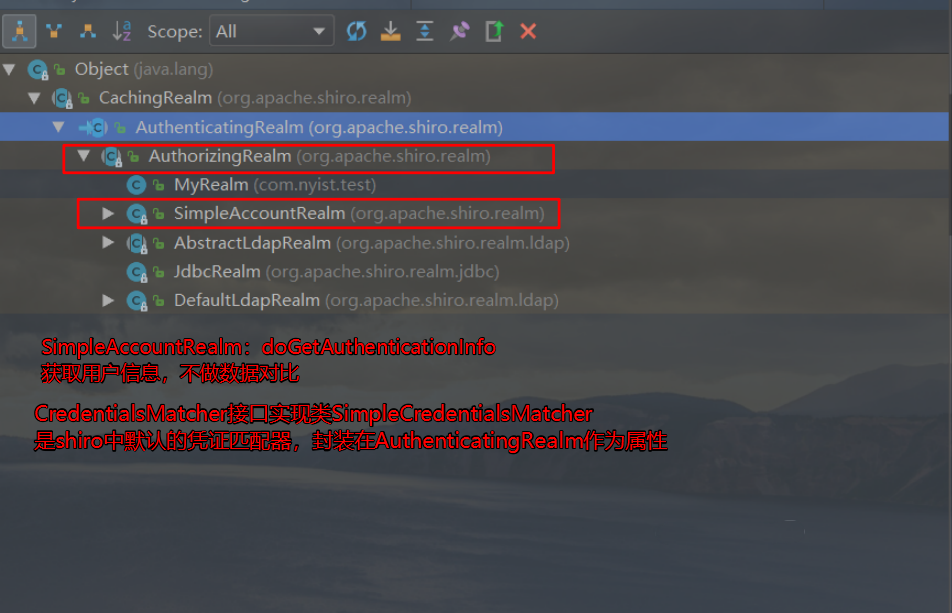

AuthenticatingRealm类
abstract class AuthenticatingRealm{

    //凭证匹配器 接口,其实现类做数据比对

    private CredentialsMatcher credentialsMatcher;

    //获取配置文件中的用户信息

    protected abstract AuthenticationInfo doGetAuthenticationInfo(AuthenticationToken var1) throws AuthenticationException;

}
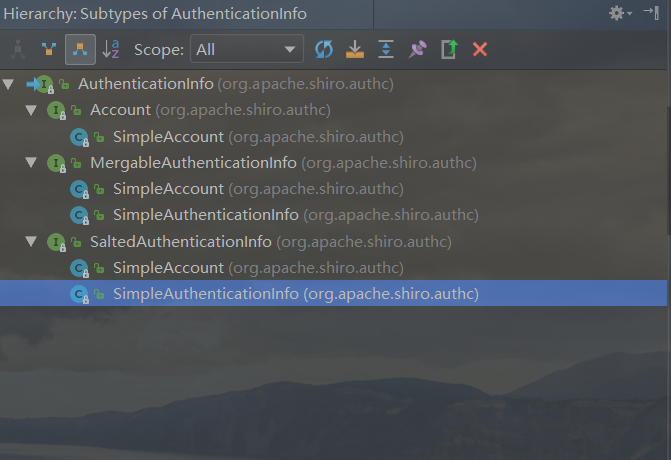
该抽象方法返回类型AuthenticationInfo接口:

AuthorizingRealm类 抽象方法后面测试授权时使用
abstract class AuthorizingRealm{

    //

    //该抽象方法  获取数据  获取授权的数据

	protected abstract AuthorizationInfo doGetAuthorizationInfo(PrincipalCollection var1);

}
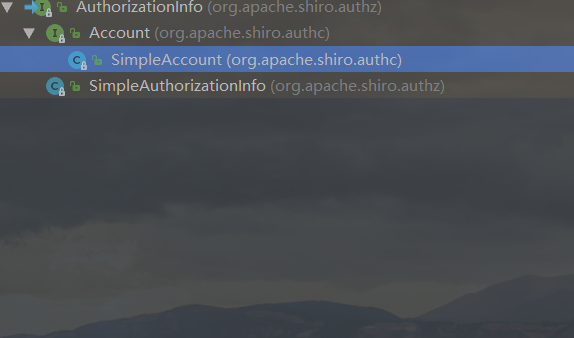
该抽象方法返回类型AuthorizationInfo接口:

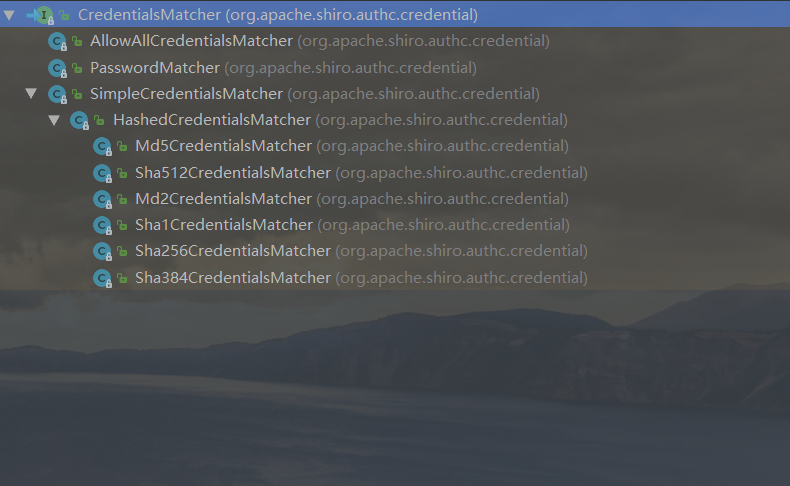
CredentialsMatcher凭证匹配器接口:
其中:SimpleCredentialsMatcher是shiro中默认的凭证匹配器,其子类Hashxxx等都是做加密认证时使用

4.开发自定义Realm
public class MyRealm extends AuthenticatingRealm {

    //实现抽象方法doGetAuthenticationInfo

    @Override

    protected AuthenticationInfo doGetAuthenticationInfo(AuthenticationToken authenticationToken)

            throws AuthenticationException {

        String principal =(String) authenticationToken.getPrincipal();

        //查库取回User对象

        SqlSession sqlSession = null;

        try {

            sqlSession = MySqlSession.getSqlSession();

        } catch (IOException e) {

            e.printStackTrace();

        }

        UserMapper mapper = sqlSession.getMapper(UserMapper.class);

        User user = mapper.queryUserByUserName(principal);

        AuthenticationInfo authenticationInfo = new SimpleAuthenticationInfo(principal,user.getPassword(),this.getName());

        return authenticationInfo;

    }

}
4.1通知shiro使用自定义realm
[main]

#自定义 realm

customRealm=com.nyist.test.MyRealm

#将realm设置到securityManager

securityManager.realms=$customRealm
注意:需要导入一个jar
<dependency>

    <groupId>commons-logging</groupId>

    <artifactId>commons-logging</artifactId>

    <version>1.2</version>

</dependency>
5.shiro的加密认证方式
5.1.使用shiro提供的Md5Hash类为一个字符串加密进行测试
public class TestMD5 {

    public static void main(String[] args) {

        Md5Hash hash = new Md5Hash("123456","salt",1024);

        String s = hash.toHex();

        System.out.println(s);

        //a18d2133f593d7b0e3ed488560404083

    }

}
5.2.修改配置文件,加入凭证匹配器的相关配置
[main]

#自定义凭证匹配器

hashedCredentialsMatcher=org.apache.shiro.authc.credential.HashedCredentialsMatcher

#凭证匹配器通知AuthenticatingRealm,由于自定义realm继承了AuthenticatingRealm,直接设置已有的MyRealm属性即可

#自定义 realm

customRealm=com.nyist.test.MyRealm

customRealm.credentialsMatcher=$hashedCredentialsMatcher

hashedCredentialsMatcher.hashAlgorithmName=MD5

hashedCredentialsMatcher.hashIterations=1024

#将realm设置到securityManager .realms使用set方式赋值

securityManager.realms=$customRealm
坑:Caused by: java.lang.IllegalStateException: Required 'hashAlgorithmName' property has not been set. This is required to execute the hashing algorithm.
HashedCredentialsMatcher类中set方法非常规,set方法为:setHashAlgorithmName
为什么这么设置凭证匹配器?
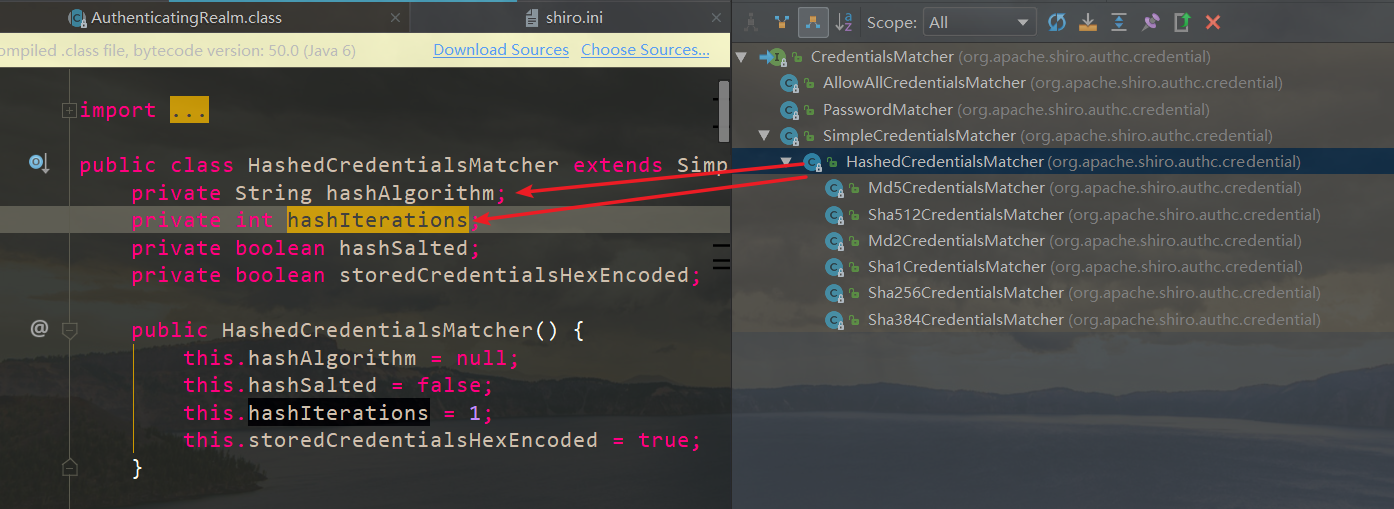

自定义MyRealm extends AuthorizingRealm,实现两个抽象方法
AuthenticationInfo doGetAuthenticationInfo()来自于AuthenticatingRealm类,获取认证数据
AuthorizationInfo doGetAuthorizationInfo()来自于AuthorizingRealm类,获取授权数据
public class MyRealm extends AuthorizingRealm {

    @Override

    protected AuthenticationInfo doGetAuthenticationInfo(AuthenticationToken authenticationToken)

            throws AuthenticationException {

        String principal =(String) authenticationToken.getPrincipal();

        //userDao.queryUserByUserName

        SqlSession sqlSession = null;

        try {

            sqlSession = MySqlSession.getSqlSession();

        } catch (IOException e) {

            e.printStackTrace();

        }

        UserMapper mapper = sqlSession.getMapper(UserMapper.class);

        User user = mapper.queryUserByUserName(principal);

        /*

        * ByteSource.Util.bytes("salt") 盐字段来自数据库,凭证匹配器不能写死盐值

        * 安全管理器可以获取到AuthenticationInfo中的盐值 对用户界面的凭证加密

        * */

        AuthenticationInfo authenticationInfo = new SimpleAuthenticationInfo(principal,user.getPassword(),ByteSource.Util.bytes("salt"),this.getName());

        return authenticationInfo;

    }

    @Override

    protected AuthorizationInfo doGetAuthorizationInfo(PrincipalCollection principalCollection) {

        //获取身份信息 Principal用户名、手机号、邮箱地址等 一个主体可以有多个身份,但是必须有一个主身份(Primary Principal)

        String primaryPrincipal = (String) principalCollection.getPrimaryPrincipal();

        /*

        * 用户----角色----权限

        *   中间表   中间表

        * */

        //由primaryPrincipal查库--->获得角色info ---->获取权限info

        SqlSession sqlSession = null;

        try {

            sqlSession = MySqlSession.getSqlSession();

        } catch (IOException e) {

            e.printStackTrace();

        }

        UserMapper mapper = sqlSession.getMapper(UserMapper.class);

        User user = mapper.queryUserByUserName(primaryPrincipal);

        //测试基于角色的授权

        /*if (primaryPrincipal.equals(user.getUsername())){

            // class SimpleAuthorizationInfo implements AuthorizationInfo

            SimpleAuthorizationInfo authorizationInfo = new SimpleAuthorizationInfo();

            authorizationInfo.addRole("super");

            return authorizationInfo;

        }*/

        //测试基于资源的授权

        if(primaryPrincipal.equals(user.getUsername())){

            SimpleAuthorizationInfo authorizationInfo = new SimpleAuthorizationInfo();

            authorizationInfo.addStringPermission("user:delete");

            authorizationInfo.addStringPermissions(Arrays.asList("admin:delete","admin:add"));

            return authorizationInfo;

        }

        return null;

    }

}
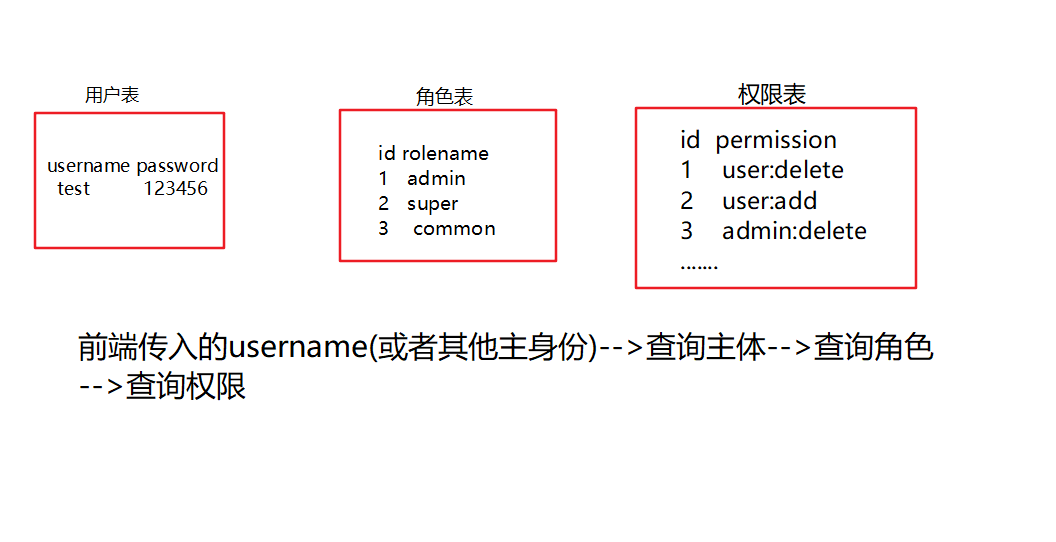
一张图看懂认证授权关系:


授权的api
基于角色
            //判断当前主体是否包含此角色

            boolean b = subject.hasRole("super");

            List<String> list = Arrays.asList("super", "admin");

            //判断当前主体是否包含某个角色

            boolean[] booleans = subject.hasRoles(list);

            //判断当前主体是否包含全部的角色

            boolean b = subject.hasAllRoles(list);
基于资源
            boolean b = subject.isPermitted("admin:delete");

            String[] strs={"admin:delete", "admin:add"};

            boolean[] permitted = subject.isPermitted(strs);

            boolean permittedAll = subject.isPermittedAll(strs);
资源权限的标识符
权限字符串的规则是:“资源标识符:操作:资源实例标识符”,意思是对哪个资源的哪个实例具有什么操作,“:”是资源/操作/实例的分割符,权限字符串也可以使用*通配符。
例子:
- 用户创建权限:user:create,或user:create:*
- 用户修改实例001的权限:user:update:001
- 用户实例001的所有权限:user:*:001
Java环境下shiro的测试-认证与授权的更多相关文章
- NLPIR分词工具的使用(java环境下)
一.NLPIR是什么? NLPIR(汉语分词系统)由中科大张华平博士团队开发,主要功能包括:中文分词,词性标注,命名实体识别,用户词典功能,详情见官网:http://ictclas.nlpir.org ...
- Java 环境下使用 AES 加密的特殊问题处理
在 Java 环境下使用 AES 加密,在密钥长度和字节填充方面有一些比较特殊的处理. 1. 密钥长度问题 默认 Java 中仅支持 128 位密钥,当使用 256 位密钥的时候,会报告密钥长度错误 ...
- 《安卓网络编程》之第一篇 java环境下模拟客户端、服务器端
1.Socket简介 在网络上的两个程序通过一个双向的通信连接实现数据的交换,这个双向链路的一端称为一个Socket.Socket通常用来实现客户方和服务方的连接.Socket是TCP/IP协议的一个 ...
- 这是关于FastJson的一个使用Demo,在Java环境下验证的
public class User { private int id; private String name; public int getId() { return id; } public vo ...
- 1、 Shiro框架:认证,授权(验权 2. Shiro框架实现权限控制方式:
1. Shiro框架:认证,授权(验权) a) 认证逻辑:applicationCode—>通过工具类获取subject对象,调用login方法参数令牌信息->安全管理器------> ...
- 用户登录安全框架shiro—用户的认证和授权(一)
ssm整合shiro框架,对用户的登录操作进行认证和授权,目的很纯粹就是为了增加系统的安全线,至少不要输在门槛上嘛. 这几天在公司独立开发一个供公司内部人员使用的小管理系统,客户不多但是登录一直都是 ...
- spring-security-4 (5)spring security Java配置实现自定义表单认证与授权
前面三篇讲解了spring security的搭建以及简单的表单认证与授权原理.本篇将实现我们自定义的表单登录与认证. 本篇不会再讲项目的搭建过程,因为跟第二节的搭建如出一辙.本篇也不会将项目中所有 ...
- 【转载】Selenim入门环境的搭建--Java环境下的Java Maven Project
一.开发环境 操作系统: xp win7 win8 win10都可以 JDK: 1.6或者1.7 下载地址 JDK1.7下载 Eclipse: 官网下载比较新的版本,建议下载EE的版本 eclips ...
- 如何在Java 环境下使用 HTTP 协议收发 MQ 消息
1. 准备环境在工程 POM 文件添加 HTTP Java 客户端的依赖. <dependency> <groupId>org.eclipse.jetty</groupI ...
随机推荐
- 用户管理--借鉴技术大牛ken
本节内容 useradd userdel usermod groupadd groupdel 用户管理 为什么需要有用户? 1. linux是一个多用户系统 2. 权限管理(权限最小化) 用户:存在的 ...
- 【Python】【一些概念与对比】
type.__new__() : 返回类.可以把类看作是metaclass 创建出来的实例 普通类里的__new__() : 返回类的实例. __new__() : 返回类的实例.Python解释器 ...
- WebPack基本概念以及基本使用
入门Webpack,看这篇就够了 2017年9月18日更新,添加了一个使用webpack配置多页应用的demo,可以点击此处查看 2017年8月13日更新,本文依据webpack3.5.3将文章涉及代 ...
- pymouse 点击指定坐标点
from pymouse import PyMouse mouse = PyMouse() mouse.click(,)
- php 中 public private protected的区别
public 子类,外部都可调用. protected 子类可以调用,外部不可以调用. private 子类不可以调用,外部不可以调用. <?php class AA { public func ...
- Java——Collections
反转数组 Collections.reserve(ArrayList) 例子如下 /** * public class ListNode { * int val; * ListNode next = ...
- 牛客小白月赛7 CSL的校园卡
CSL的校园卡 思路: bfs,用状压表示走过的区域,然后和x1,y1,x2,y2构成所有的状态,然后标记一下就可以了 代码: #pragma GCC optimize(2) #pragma GCC ...
- 第 6 章 存储 - 044 - volume 生命周期管理
volume 生命周期管理 1)备份 因为 volume 实际上是 host 文件系统中的目录和文件,所以 volume 的备份实际上是对文件系统的备份 例如:本地的Registry,所有镜像都存在/ ...
- C# http监听之Nancy.net
通过winform或者是控制台应用程序监听http请求,之前使用的是微软的HttpListener,参考https://www.cnblogs.com/duanjt/p/5566336.html 然后 ...
- PHP数组排序函数有哪些
PHP数组排序函数有哪些 一.总结 一句话总结:其实也就是是否保持索引,对键排序还是对值排序,除了sort,rsort.shuffle,usort外,都是保持索引的 是否保持索引 键排序 值排序 除了 ...