
centos7 编译php56
编译安装php5.6 centos7环境
步骤:
//下载php5.6

wget http://cn2.php.net/distributions/php-5.6.26.tar.bz2

yum install -y gcc  \ gcc-c++  \ autoconf  \ libjpeg  \ libjpeg-devel  \ libpng libpng-devel  \ freetype freetype-devel  \ libpng libpng-devel libxml2  \ libxml2-devel zlib zlib-devel  \ glibc glibc-devel glib2 glib2-devel  \ bzip2 bzip2-devel ncurses curl  \ openssl-devel gdbm-devel db4-devel  \ libXpm-devel libX11-devel gd-devel  \ gmp-devel readline-devel libxslt-devel  \ expat-devel xmlrpc-c xmlrpc-c-devel  \ httpd-devel

//解压

tar -jxvf php-5.6.26.tar.bz2

cd php-5.6.26

//编译

./configure --prefix=/usr/local/php --with-apxs2=/usr/bin/apxs --with-mysql=mysqlnd --with-mysql-sock --with-mysqli=mysqlnd --enable-fpm  --enable-soap --with-libxml-dir --with-openssl --with-mcrypt --with-mhash --with-pcre-regex --with-sqlite3 --with-zlib --enable-bcmath --with-iconv --with-bz2 --enable-calendar --with-curl --with-cdb --enable-dom --enable-exif --enable-fileinfo --enable-filter --with-pcre-dir --enable-ftp --with-gd --with-openssl-dir --with-jpeg-dir --with-png-dir --with-zlib-dir  --with-freetype-dir --enable-gd-native-ttf --enable-gd-jis-conv --with-gettext --with-gmp --with-mhash --enable-json --enable-mbstring --disable-mbregex --disable-mbregex-backtrack --with-libmbfl --with-onig --enable-pdo --with-pdo-mysql --with-zlib-dir --with-pdo-sqlite --with-readline --enable-session --enable-shmop --enable-simplexml --enable-sockets --enable-sysvmsg --enable-sysvsem --enable-sysvshm --enable-wddx   --with-xsl --enable-zip --enable-mysqlnd-compression-support --with-pear
提示: configure: error: xml2-config not found. Please check your libxml2 installation.
yum install libxml2-dev
提示:Cannot find OpenSSL's <evp.h>
yum install openssl openssl-devel
提示:configure: error: Please reinstall the BZip2 distribution
yum install bzip2-devel
提示: configure: error: Please reinstall the libcurl distribution -easy.h should be in <curl-dir>/include/curl/
yum install libcurl-devel
提示:If configure fails try --with-vpx-dir=<DIR> configure: error: jpeglib.h not found
yum install libjpeg-devel
提示:configure: error: png.h not found.
yum install libpng-devel
提示:configure: error: freetype-config not found
yum install freetype-devel
提示:configure: error: Unable to locate gmp.h
yum install gmp-devel
提示:configure: error: mcrypt.h not found. Please reinstall libmcrypt.,由于版权的原因没有自带mcrypt的包。额外安装
wget http://www.atomicorp.com/installers/atomic

chmod 777 atomic

./atomic

yum  install  php-mcrypt  libmcrypt  libmcrypt-devel
提示:configure: error: Cannot find MySQL header files under /usr/local/mysql.
Note that the MySQL client library is not bundled anymore!
yum install mysql-devel

然后修改为mysqlnd

 --with-mysql=mysqlnd  --with-mysqli=mysqlnd
Mysql Native驱动(Mysql Native Driver 简称:mysqlnd )在PHP5.3.0版本中被引入。PHP5.4之后的版本mysqlnd被作为默认配置选项
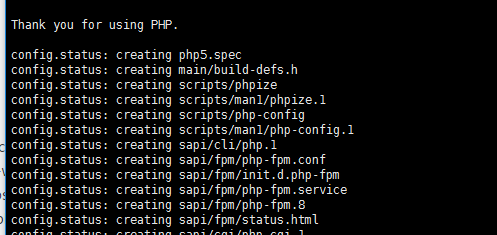
修改过后的安装依赖:
yum install -y gcc gcc-c++ autoconf libjpeg libjpeg-devel libpng libpng-devel freetype freetype-devel libpng libpng-devel libxml2 libxml2-devel zlib zlib-devel glibc glibc-devel glib2 glib2-devel bzip2 bzip2-devel ncurses curl openssl-devel gdbm-devel db4-devel libXpm-devel libX11-devel gd-devel gmp-devel readline-devel libxslt-devel expat-devel xmlrpc-c xmlrpc-c-devel httpd-devel libxml2-dev openssl openssl-devel bzip2-devel libcurl-devel libjpeg-devel libpng-devel freetype-devel gmp-devel
mycrypt
wget http://www.atomicorp.com/installers/atomic

chmod 777 atomic

./atomic

yum  install  php-mcrypt  libmcrypt  libmcrypt-devel
编译选项:
./configure --prefix=/usr/local/php --with-apxs2=/usr/bin/apxs --with-mysql=mysqlnd --with-mysql-sock --with-mysqli=mysqlnd --enable-fpm --enable-soap --with-libxml-dir --with-openssl --with-mcrypt --with-mhash --with-pcre-regex --with-sqlite3 --with-zlib --enable-bcmath --with-iconv --with-bz2 --enable-calendar --with-curl --with-cdb --enable-dom --enable-exif --enable-fileinfo --enable-filter --with-pcre-dir --enable-ftp --with-gd --with-openssl-dir --with-jpeg-dir --with-png-dir --with-zlib-dir --with-freetype-dir --enable-gd-native-ttf --enable-gd-jis-conv --with-gettext --with-gmp --with-mhash --enable-json --enable-mbstring --disable-mbregex --disable-mbregex-backtrack --with-libmbfl --with-onig --enable-pdo --with-pdo-mysql --with-zlib-dir --with-pdo-sqlite --with-readline --enable-session --enable-shmop --enable-simplexml --enable-sockets --enable-sysvmsg --enable-sysvsem --enable-sysvshm --enable-wddx --with-xsl --enable-zip --enable-mysqlnd-compression-support --with-pear
httpd.conf添加libphp5.so
LoadModule php5_module /usr/lib64/httpd/modules/libphp5.so
和mime添加
AddType application/x-httpd-php .php

AddType application/x-httpd-php-source .phps
centos7 编译php56的更多相关文章
- CentOS7编译安装Nginx-1.8.1和编译参数
CentOS7编译安装Nginx-1.8.1和编译参数 Web服务器Nginx LNMP是一组众所周知的Web网站服务器架构环境,即由Linux+Nginx+MySQL+PHP(MySQL有时也 ...
- centos7编译安装MySQL5.7.9
title: centos7编译安装MySQL5.7.9 date: 2016-05-12 16:20:17 tags: --- Centos7编译安装mysql5.7.9 mysql5.7有更好的性 ...
- Centos7编译opencv3.4.1
Centos7编译opencv3.4.1 参考博客 https://blog.csdn.net/wjbwjbwjbwjb/article/details/79111996 1.配置epel源 yum ...
- centos7 编译安装新版LNMP环境
centos7 编译安装新版LNMP环境 环境版本如下: 1.系统环境:Centos 7 x86_64 2.NGINX:nginx-1.11.3.tar.gz 3.数据库:mariadb-10.0.2 ...
- CentOS7编译安装httpd-2.4.41 php7.3
CentOS7编译安装httpd-2.4.41 php7.3 安装参考环境: CentOS Linux release 7.5.1804 (Core) 一.安装依赖包 httpd安装的依赖包 # yu ...
- centos7 编译问题:aclocal-1.14: command not found
centos7 编译问题:aclocal-1.14: command not found https://blog.csdn.net/vr7jj/article/details/80438663
- Centos7 编译安装PHP7
Centos7 编译安装PHP7 编译安装的方式可以让组件等设置更加合理,但需要你对PHP的代码及各种配置非常的熟悉,以下为大致的安装流程,大家可以参考 1.下载编译工具 yum groupinsta ...
- CentOS7编译和安装GCC7.5
CentOS7编译和安装GCC7.5 一. 环境介绍: CentOS7 虚拟机连上了互联网(为什么要强调这点呢,因为CentOS7每次进入系统,都需要手动点击右上角的Connect,才能连上互联 ...
- CentOS7编译安装php7.1配置教程详解
这篇文章主要介绍CentOS7编译安装php7.1的过程和配置详解,亲测 ,需要的朋友可以参考. 1.首先安装依赖包: yum install libxml2 libxml2-devel openss ...
随机推荐
- 用grunt搭建web前端开发环境
1.前言 本文章旨在讲解grunt入门,以及讲解grunt最常用的几个插件的使用. 2.安装node.js Grunt和所有grunt插件都是基于nodejs来运行的,如果你的电脑上没有nodejs, ...
- springMVC异常&&重定向&&转发
SpringMVC核心技术---转发和重定向 当处理器对请求处理完毕后,向其他资源进行跳转时,有两种跳转方式:请求转发与重定向.而根据要跳转的资源类型,又可分为两类:跳转到页面与跳转到其他处理器.对于 ...
- hibernate三种状态
转自:http://www.cnblogs.com/xiaoluo501395377/p/3380270.html 学过hibernate的人都可能都知道hibernate有三种状态,transien ...
- 一个简单移动页面ionic打包成app
先贴JS代码好了,缓动和调整透明度的功能,最后用ionic打包成应用就可以 window.onload=function(){ search(); move(); calc();}function s ...
- click与 mousedown
一.想做出鼠标右键 自己定义的菜单 则需要先使用 document.oncontextmenu= functions(){ event.preventDefault()//去除鼠标右键的默认格式 } ...
- [LeetCode] Max Sum of Rectangle No Larger Than K 最大矩阵和不超过K
Given a non-empty 2D matrix matrix and an integer k, find the max sum of a rectangle in the matrix s ...
- [LeetCode] Pascal's Triangle 杨辉三角
Given numRows, generate the first numRows of Pascal's triangle. For example, given numRows = 5,Retur ...
- Javascript两个感叹号的用法(!!)
var foo; alert(!foo);//undefind情况下或者null,一个感叹号返回的是true; alert(!goo);//undefind情况下,一个感叹号返回的也是true; 但是 ...
- Sensitive directory/file Integrity Monitoring and Checking
catalogue . OSSEC . HashSentry: Host-Based IDS in Python . Afick . 检测流程 1. OSSEC OSSEC is an Open So ...
- [虚拟机]Virtual Box的使用--共享文件夹
最近为系统测试使用了虚拟机,VM太卡,所以使用了VBox,运行效果还不错 为了主机和客户机之前方便进行数据传输,一般采用文件夹共享的方式(当然,可以直接拖拽) 1,直接拖拽,需要做如下设置 主要的是“ ...