
使用 IntraWeb (29) - 基本控件之 TIWAutherList、TIWAutherINI、TIWAutherEvent
TIWAutherList  //通过一组户名与密码验证登陆

TIWAutherINI   //通过记录户名与密码信息的 #Auth.ini 文件验证登陆

TIWAutherEvent //通过其 OnCheck 事件验证登陆

{作为站点级的验证, 验证控件应该是放在 ServerController 的窗体上, 并与其 Auther 属性关联.}
TIWAutherList 所在单元及继承链:
IWAutherList.TIWAutherList
主要成员:
property List: TStrings	//户名与密码表; 每行按 User=Pass 的格式输入

property AutherPolicy: TAutherPolicy //该属性有两个选项 apRestrictAll(默认)、apRestrictNone(选这个表示不执行验证)

property OnAuthenticate: TOnAuthenticate //验证成功后执行的事件
测试 TIWAutherList:
{在 ServerController 的窗体上放置 IWAutherList1, 然后双击该窗体(激活其 OnCreate 事件)}

procedure TIWServerController.IWServerControllerBaseCreate(Sender: TObject);

begin

  Self.Auther := IWAutherList1;

  IWAutherList1.List.Add('aaa=111');

  IWAutherList1.List.Add('bbb=222');

  IWAutherList1.List.Values['ccc'] := '333';

end;

{这就好了, 如果在设计时完成上面工作会更方便}
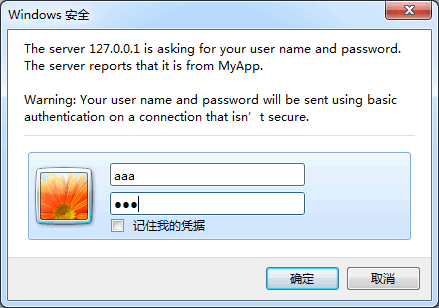
TIWAutherINI 所在单元及继承链:
IWAutherINI.TIWAutherINI
主要成员:
property AutherPolicy: TAutherPolicy //

property OnAuthenticate: TOnAuthenticate //

{它需要的 ini 文件须命名为 #Auth.ini(它会保证不被用户读取, 应该使用 UTF8 格式保存), 并且和程序文件放在同一目录(而非 wwwroot 下)}

{其格式规范:--------------------

[户名1]

Password=密码1

[户名2]

Password=密码2

...

------------------------------}

{建好文件, 放对地方, 再关联上 Auther 属性就可以了}
TIWAutherEvent 所在单元及继承链:
IWAutherEvent.TIWAutherEvent
主要成员:
property AutherPolicy: TAutherPolicy //

property OnCheck: TOnCheck		 //就是在该事件中验证; 假如要从数据库验证就应该用这种方法

property OnAuthenticate: TOnAuthenticate //

{更多时候可能需要把验证函数写在 UserSessionUnit 单元(譬如通过数据库验证时), 这时应该保证 IWServerController.AuthBeforeNewSession = False(这也是默认值)}
测试 TIWAutherEvent:
{IWAutherEvent1 的 OnCheck 事件}

function TIWServerController.IWAutherEvent1Check(const aUser, aPass: string): Boolean;

begin

  Result := aPass = aUser + '123'; //假如密码是: 用户名+123

end;

{需要保证关联到 Auther 属性}

procedure TIWServerController.IWServerControllerBaseCreate(Sender: TObject);

begin

  Auther := IWAutherEvent1;

end;
还是上面的例子, 现在改成通过 TIWUserSession 的一个方法来验证:
{UserSessionUnit.pas}

unit UserSessionUnit;

interface

uses

  IWUserSessionBase, SysUtils, Classes;

type

  TIWUserSession = class(TIWUserSessionBase)

  private

  public

    function MyCheck(const AUser, APass: string): Boolean;

  end;

implementation

{$R *.dfm}

{ TIWUserSession }

function TIWUserSession.MyCheck(const AUser, APass: string): Boolean;

begin

  Result := APass.ToLower = AUser.ToLower + '123';

end;

end.

{-------------------------------------------------}

{ServerController.pas, 有注释的是自己添加的代码}

unit ServerController;

interface

uses

  SysUtils, Classes, IWServerControllerBase, IWBaseForm, HTTPApp,

  UserSessionUnit, IWApplication, IWAppForm, IW.Browser.Browser, IWAutherEvent, IWAutherINI, IWAutherBase, IWAutherList;

type

  TIWServerController = class(TIWServerControllerBase)

    IWAutherEvent1: TIWAutherEvent;

    procedure IWServerControllerBaseNewSession(ASession: TIWApplication);

    procedure IWServerControllerBaseCreate(Sender: TObject);

    function IWAutherEvent1Check(const aUser, aPass: string): Boolean;

  private

  public

  end;

function UserSession: TIWUserSession;

function IWServerController: TIWServerController;

implementation

{$R *.dfm}

uses

  IWInit, IWGlobal;

function IWServerController: TIWServerController;

begin

  Result := TIWServerController(GServerController);

end;

function UserSession: TIWUserSession;

begin

  Result := TIWUserSession(WebApplication.Data);

end;

{IWAutherEvent1 的 OnCheck 事件, 调用 UserSessionUnit.TIWUserSession 的验证函数}

function TIWServerController.IWAutherEvent1Check(const aUser, aPass: string): Boolean;

begin

  Result := UserSession.MyCheck(aUser, aPass);

end;

{OnCreate 事件, 这个关联可以在设计时做}

procedure TIWServerController.IWServerControllerBaseCreate(Sender: TObject);

begin

  Auther := IWAutherEvent1;

end;

procedure TIWServerController.IWServerControllerBaseNewSession(ASession: TIWApplication);

begin

  ASession.Data := TIWUserSession.Create(nil, ASession);

end;

initialization

TIWServerController.SetServerControllerClass;

end.
使用 IntraWeb (29) - 基本控件之 TIWAutherList、TIWAutherINI、TIWAutherEvent的更多相关文章
- 使用 IntraWeb (24) - 基本控件之 TIWFileUploader、TIWFile
TIWFileUploader 是基于 Ajax 的上传控件, 最初是 Andrew Valums 开发, 从 IntraWeb XIV 纳入并替换 TIWFile. 虽然从组件面板上还能看到 TIW ...
- 使用 IntraWeb (28) - 基本控件之 TIWTemplateProcessorHTML、TIWLayoutMgrHTML、TIWLayoutMgrForm
TIWTemplateProcessorHTML //使用外部的 html 文件做模板 TIWLayoutMgrHTML //直接输入 Html 文本做模板 TIWLayoutMgrForm //这应 ...
- 使用 IntraWeb (26) - 基本控件之 TIWMenu
TIWMenu 的任务是让原来的 TMainMenu 呈现在网页上, 通过其 AttachedMenu 属性关联一个 TMainMenu 是必需的. TIWMenu 所在单元及继承链: IWCompM ...
- 使用 IntraWeb (25) - 基本控件之 TIWRegion
这应该是 IW 中最重要的容器了, 和它同父的还有 TIWTabControl TIWRegion 所在单元及继承链: IWRegion.TIWRegion 主要成员: property Align: ...
- 使用 IntraWeb (23) - 基本控件之 TIWTimer、TIWProgressBar、TIWProgressIndicator、TIWTimeEdit
TIWTimer //和 TTimer 没多大区别, 它的默认事件现在是异步的(OnAsyncTimer), 在网络上使用 OnTimer 肯定是非常糟糕的 TIWProgressBar //进度条 ...
- 使用 IntraWeb (22) - 基本控件之 TIWCalendar
TIWCalendar: 日历控件, 继承于 TIWCustomGrid, 所以它和 TIWGrid 共同属性特多. 它的 Cell 是 TIWCalendarCell 对象, 直接从 TIWGrid ...
- 使用 IntraWeb (20) - 基本控件之 TIWGrid
TIWGrid 最终通过 Html Table 呈现; 其每个 Cell 都是一个 TIWGridCell 对象, Cell 对象的 Control 属性非常好, 可以非常方便地嵌入其他控件. TIW ...
- 使用 IntraWeb (19) - 基本控件之 TIWTreeView
这是个饱受非议的控件; 我通过尝试, 理解了非议, 也能理解作者. 总之向作者的思路靠拢吧, 还是不错的. TIWTreeView 所在单元及继承链: IWCompTreeview.TIWTreeVi ...
- 使用 IntraWeb (16) - 基本控件之 TIWList、TIWListbox、TIWComboBox、TIWOrderedListbox
TIWList //列表; 它对应 Html 中的 OL.LI(某些选项下会用表格模拟); TIWListbox 和 TIWComboBox 则对应 Html 在的 Option TIWListbox ...
随机推荐
- 瞅瞅!!免费看VIP视频的技巧
最近再逛强大的知乎,发现一个免费看VIP视频的方法(腾讯是可能有点不稳定) 以爱奇艺为例: 复制URL到www.a6a6.org 把地址输入到输入框,点击开始 然后会提示你输入提取码 输入:22336 ...
- javascript判断是用什么设备打开
var userAgentInfo = navigator.userAgent //查看浏览器用于 HTTP 请求的用户代理头的值 var agents = ["Android", ...
- 【前端】JS文本比较插件
一.先上效果图 二.JS代码 /** * [文本比较插件] * 传递两个参数dom1.dom2,以dom1为基准进行比较. * 0)dom1和dom2不能都为空: * 1)如果dom1不存在,则dom ...
- opencv error: insufficient memory错误解决办法
用opencv合成图像时出现的错误,大概4000多张会报错,在网上查阅一些博客时才知道原因.之前编译的时候用的是x86,切换到x64下可解决问题,具体: 1.项目->属性->配置管理器-& ...
- CCF2014032窗口(C语言)
问题描述 在某图形操作系统中,有 N 个窗口,每个窗口都是一个两边与坐标轴分别平行的矩形区域.窗口的边界上的点也属于该窗口.窗口之间有层次的区别,在多于一个窗口重叠的区域里,只会显示位于顶层的窗口里的 ...
- zoj3469 区间dp好题
/* 按坐标排序 以餐厅为起点向两边扩展区间 dp[i][j][0]表示送完区间[i,j]的饭后停留在左边的代价 dp[i][j][1]表示送完区间[i,j]的饭后停留在右边的代价 */ #inclu ...
- Codeigniter使用HMVC(一)
涉及三方代码: https://tutorials.kode-blog.com/codeigniter-admin-panel https://bitbucket.org/wiredesignz/co ...
- django 2中的app_name和namespace
最近看<精通DJANGO>里遇到的疑惑. 简书URL如下: https://www.jianshu.com/p/404500a0408a 其中的官方解释: 应用命名空间 它表示正在部署的应 ...
- Android开发之实现多次点击事件
在Android中给我们提供了单次点击事件.但并没有给我们提供双击,或者实现在一定时间内的多次事件.所以需要我们自己在单机监听上进行修改实现. 有如下两种实现方式: 1.定义一个存贮上一个第一次点击的 ...
- -webkit-line-clamp超出省略
以前只用过超出一行显示省略号 有时候会碰到只显示两到三行,超出省略 -webkit-line-clamp属性就能解决这个问题 text-overflow: -o-ellipsis-lastline; ...