
activiti部署流程定义时出错:INSERT INTO ACT_GE_BYTEARRAY,修改数据库编码
activiti部署流程定义时出错
// 部署流程定义 Deployment deployment = deploymentBuilder.deploy();
错误信息:(有乱码的...没留下截图...)
 SLF4J: Class path contains multiple SLF4J bindings.

 SLF4J: Found binding in [jar:file:/D:/developing/eclipse/workspace/ProjectManagement/projectManagement/src/main/webapp/WEB-INF/lib/slf4j-log4j12-1.7.6.jar!/org/slf4j/impl/StaticLoggerBinder.class]

 SLF4J: Found binding in [jar:file:/C:/Users/Administrator/.m2/repository/org/slf4j/slf4j-log4j12/1.7.7/slf4j-log4j12-1.7.7.jar!/org/slf4j/impl/StaticLoggerBinder.class]

 SLF4J: See http://www.slf4j.org/codes.html#multiple_bindings for an explanation.

 SLF4J: Actual binding is of type [org.slf4j.impl.Log4jLoggerFactory]

 [org.springframework.beans.factory.xml.XmlBeanDefinitionReader] - Loading XML bean definitions from class path resource [spring-activiti.xml]

 [org.springframework.context.support.GenericApplicationContext] - Refreshing org.springframework.context.support.GenericApplicationContext@6b09bb57: startup date [Thu Feb 23 13:33:02 CST 2017]; root of context hierarchy

 [org.springframework.beans.factory.annotation.AutowiredAnnotationBeanPostProcessor] - JSR-330 'javax.inject.Inject' annotation found and supported for autowiring

 [org.activiti.engine.impl.ProcessEngineImpl] - ProcessEngine default created

 [org.springframework.test.context.transaction.TransactionalTestExecutionListener] - Began transaction (1) for test context [DefaultTestContext@192d74fb testClass = BpmDefinitionTest, testInstance = org.projMgr.TestCase.BpmDefinitionTest@4bef0fe3, testMethod = deploymentProcessDefinition@BpmDefinitionTest, testException = [null], mergedContextConfiguration = [MergedContextConfiguration@62ea3440 testClass = BpmDefinitionTest, locations = '{classpath:spring-activiti.xml}', classes = '{}', contextInitializerClasses = '[]', activeProfiles = '{}', contextLoader = 'org.springframework.test.context.support.DelegatingSmartContextLoader', parent = [null]]]; transaction manager [org.springframework.jdbc.datasource.DataSourceTransactionManager@27953a83]; rollback [false]

 [org.springframework.beans.factory.xml.XmlBeanDefinitionReader] - Loading XML bean definitions from class path resource [spring-activiti.xml]

 [org.activiti.engine.impl.ProcessEngineImpl] - ProcessEngine default created

 [org.activiti.engine.impl.bpmn.deployer.BpmnDeployer] - Processing resource org/projMgr/TestCase/MyProcess.png

 [org.activiti.engine.impl.bpmn.deployer.BpmnDeployer] - Processing resource org/projMgr/TestCase/MyProcess.bpmn

 [org.activiti.engine.impl.interceptor.CommandContext] - Error while closing command context

 org.apache.ibatis.exceptions.PersistenceException:

 ### Error updating database.  Cause: java.sql.SQLException: Column count doesn't match value count at row 1

 ### The error may involve org.activiti.engine.impl.persistence.entity.ResourceEntity.bulkInsertResource-Inline

 ### The error occurred while setting parameters

 ### SQL: INSERT INTO ACT_GE_BYTEARRAY(ID_, REV_, NAME_, BYTES_, DEPLOYMENT_ID_, GENERATED_) VALUES                    (?,          1,          ?,          ?,          ?,          ?)        ,           (?,          1,          ?,          ?,          ?,          ?)

 ### Cause: java.sql.SQLException: Column count doesn't match value count at row 1

     at org.apache.ibatis.exceptions.ExceptionFactory.wrapException(ExceptionFactory.java:30)

     at org.apache.ibatis.session.defaults.DefaultSqlSession.update(DefaultSqlSession.java:172)

     at org.apache.ibatis.session.defaults.DefaultSqlSession.insert(DefaultSqlSession.java:157)

     at org.activiti.engine.impl.db.DbSqlSession.flushBulkInsert(DbSqlSession.java:847)

     at org.activiti.engine.impl.db.DbSqlSession.flushPersistentObjects(DbSqlSession.java:817)

     at org.activiti.engine.impl.db.DbSqlSession.flushInserts(DbSqlSession.java:794)

     at org.activiti.engine.impl.db.DbSqlSession.flush(DbSqlSession.java:615)

     at org.activiti.engine.impl.interceptor.CommandContext.flushSessions(CommandContext.java:212)

     at org.activiti.engine.impl.interceptor.CommandContext.close(CommandContext.java:138)

     at org.activiti.engine.impl.interceptor.CommandContextInterceptor.execute(CommandContextInterceptor.java:66)

     at org.activiti.engine.impl.interceptor.LogInterceptor.execute(LogInterceptor.java:31)

     at org.activiti.engine.impl.cfg.CommandExecutorImpl.execute(CommandExecutorImpl.java:40)

     at org.activiti.engine.impl.cfg.CommandExecutorImpl.execute(CommandExecutorImpl.java:35)

     at org.activiti.engine.impl.RepositoryServiceImpl.deploy(RepositoryServiceImpl.java:79)

     at org.activiti.engine.impl.repository.DeploymentBuilderImpl.deploy(DeploymentBuilderImpl.java:156)

     at org.projMgr.TestCase.BpmDefinitionTest.deploymentProcessDefinition(BpmDefinitionTest.java:35)

     at sun.reflect.NativeMethodAccessorImpl.invoke0(Native Method)

     at sun.reflect.NativeMethodAccessorImpl.invoke(Unknown Source)

     at sun.reflect.DelegatingMethodAccessorImpl.invoke(Unknown Source)

     at java.lang.reflect.Method.invoke(Unknown Source)

     at org.junit.runners.model.FrameworkMethod$1.runReflectiveCall(FrameworkMethod.java:47)

     at org.junit.internal.runners.model.ReflectiveCallable.run(ReflectiveCallable.java:12)

     at org.junit.runners.model.FrameworkMethod.invokeExplosively(FrameworkMethod.java:44)

     at org.junit.internal.runners.statements.InvokeMethod.evaluate(InvokeMethod.java:17)

     at org.springframework.test.context.junit4.statements.RunBeforeTestMethodCallbacks.evaluate(RunBeforeTestMethodCallbacks.java:74)

     at org.springframework.test.context.junit4.statements.RunAfterTestMethodCallbacks.evaluate(RunAfterTestMethodCallbacks.java:83)

     at org.springframework.test.context.junit4.statements.SpringRepeat.evaluate(SpringRepeat.java:72)

     at org.springframework.test.context.junit4.SpringJUnit4ClassRunner.runChild(SpringJUnit4ClassRunner.java:232)

     at org.springframework.test.context.junit4.SpringJUnit4ClassRunner.runChild(SpringJUnit4ClassRunner.java:89)

     at org.junit.runners.ParentRunner$3.run(ParentRunner.java:238)

     at org.junit.runners.ParentRunner$1.schedule(ParentRunner.java:63)

     at org.junit.runners.ParentRunner.runChildren(ParentRunner.java:236)

     at org.junit.runners.ParentRunner.access$000(ParentRunner.java:53)

     at org.junit.runners.ParentRunner$2.evaluate(ParentRunner.java:229)

     at org.springframework.test.context.junit4.statements.RunBeforeTestClassCallbacks.evaluate(RunBeforeTestClassCallbacks.java:61)

     at org.springframework.test.context.junit4.statements.RunAfterTestClassCallbacks.evaluate(RunAfterTestClassCallbacks.java:71)

     at org.junit.runners.ParentRunner.run(ParentRunner.java:309)

     at org.springframework.test.context.junit4.SpringJUnit4ClassRunner.run(SpringJUnit4ClassRunner.java:175)

     at org.eclipse.jdt.internal.junit4.runner.JUnit4TestReference.run(JUnit4TestReference.java:50)

     at org.eclipse.jdt.internal.junit.runner.TestExecution.run(TestExecution.java:38)

     at org.eclipse.jdt.internal.junit.runner.RemoteTestRunner.runTests(RemoteTestRunner.java:459)

     at org.eclipse.jdt.internal.junit.runner.RemoteTestRunner.runTests(RemoteTestRunner.java:675)

     at org.eclipse.jdt.internal.junit.runner.RemoteTestRunner.run(RemoteTestRunner.java:382)

     at org.eclipse.jdt.internal.junit.runner.RemoteTestRunner.main(RemoteTestRunner.java:192)

 Caused by: java.sql.SQLException: Column count doesn't match value count at row 1

     at com.mysql.jdbc.SQLError.createSQLException(SQLError.java:1084)

     at com.mysql.jdbc.MysqlIO.checkErrorPacket(MysqlIO.java:4232)

     at com.mysql.jdbc.MysqlIO.checkErrorPacket(MysqlIO.java:4164)

     at com.mysql.jdbc.MysqlIO.sendCommand(MysqlIO.java:2615)

     at com.mysql.jdbc.MysqlIO.sqlQueryDirect(MysqlIO.java:2776)

     at com.mysql.jdbc.ConnectionImpl.execSQL(ConnectionImpl.java:2838)

     at com.mysql.jdbc.PreparedStatement.executeInternal(PreparedStatement.java:2082)

     at com.mysql.jdbc.PreparedStatement.execute(PreparedStatement.java:1307)

     at org.apache.commons.dbcp.DelegatingPreparedStatement.execute(DelegatingPreparedStatement.java:172)

     at org.apache.commons.dbcp.DelegatingPreparedStatement.execute(DelegatingPreparedStatement.java:172)

     at org.apache.ibatis.executor.statement.PreparedStatementHandler.update(PreparedStatementHandler.java:45)

     at org.apache.ibatis.executor.statement.RoutingStatementHandler.update(RoutingStatementHandler.java:73)

     at org.apache.ibatis.executor.SimpleExecutor.doUpdate(SimpleExecutor.java:49)

     at org.apache.ibatis.executor.BaseExecutor.update(BaseExecutor.java:115)

     at org.apache.ibatis.executor.CachingExecutor.update(CachingExecutor.java:75)

     at org.apache.ibatis.session.defaults.DefaultSqlSession.update(DefaultSqlSession.java:170)

     ... 42 more

 [org.springframework.test.context.transaction.TransactionalTestExecutionListener] - Committed transaction after test execution for test context [DefaultTestContext@192d74fb testClass = BpmDefinitionTest, testInstance = org.projMgr.TestCase.BpmDefinitionTest@4bef0fe3, testMethod = deploymentProcessDefinition@BpmDefinitionTest, testException = org.apache.ibatis.exceptions.PersistenceException:

 ### Error updating database.  Cause: java.sql.SQLException: Column count doesn't match value count at row 1

 ### The error may involve org.activiti.engine.impl.persistence.entity.ResourceEntity.bulkInsertResource-Inline

 ### The error occurred while setting parameters

 ### SQL: INSERT INTO ACT_GE_BYTEARRAY(ID_, REV_, NAME_, BYTES_, DEPLOYMENT_ID_, GENERATED_) VALUES                    (?,          1,          ?,          ?,          ?,          ?)        ,           (?,          1,          ?,          ?,          ?,          ?)

 ### Cause: java.sql.SQLException: Column count doesn't match value count at row 1, mergedContextConfiguration = [MergedContextConfiguration@62ea3440 testClass = BpmDefinitionTest, locations = '{classpath:spring-activiti.xml}', classes = '{}', contextInitializerClasses = '[]', activeProfiles = '{}', contextLoader = 'org.springframework.test.context.support.DelegatingSmartContextLoader', parent = [null]]]

 [org.springframework.test.context.transaction.TransactionalTestExecutionListener] - Began transaction (2) for test context [DefaultTestContext@192d74fb testClass = BpmDefinitionTest, testInstance = org.projMgr.TestCase.BpmDefinitionTest@733c423e, testMethod = test@BaseTestCase, testException = [null], mergedContextConfiguration = [MergedContextConfiguration@62ea3440 testClass = BpmDefinitionTest, locations = '{classpath:spring-activiti.xml}', classes = '{}', contextInitializerClasses = '[]', activeProfiles = '{}', contextLoader = 'org.springframework.test.context.support.DelegatingSmartContextLoader', parent = [null]]]; transaction manager [org.springframework.jdbc.datasource.DataSourceTransactionManager@27953a83]; rollback [false]

 通导test

 [org.springframework.test.context.transaction.TransactionalTestExecutionListener] - Committed transaction after test execution for test context [DefaultTestContext@192d74fb testClass = BpmDefinitionTest, testInstance = org.projMgr.TestCase.BpmDefinitionTest@733c423e, testMethod = test@BaseTestCase, testException = [null], mergedContextConfiguration = [MergedContextConfiguration@62ea3440 testClass = BpmDefinitionTest, locations = '{classpath:spring-activiti.xml}', classes = '{}', contextInitializerClasses = '[]', activeProfiles = '{}', contextLoader = 'org.springframework.test.context.support.DelegatingSmartContextLoader', parent = [null]]]

 [org.springframework.context.support.GenericApplicationContext] - Closing org.springframework.context.support.GenericApplicationContext@6b09bb57: startup date [Thu Feb 23 13:33:02 CST 2017]; root of context hierarchy
主要是
### SQL: INSERT INTO ACT_GE_BYTEARRAY(ID_, REV_, NAME_, BYTES_, DEPLOYMENT_ID_, GENERATED_) VALUES (?, 1, ?, ?, ?, ?) , (?, 1, ?, ?, ?, ?)

### Cause: java.sql.SQLException: Column count doesn't match value count at row 1
网上查询后,认为是数据库编码的问题。
查询后发现character_set_server编码是GBK,修改为gb2312后解决问题
查看、修改数据库(MySQL)编码参考:
http://www.2cto.com/database/201310/248493.html
MySQL数据库出现中文乱码的原因,往往是以下以下客户端、服务器、结果集、数据库的字符集不统一造成的,可以通过:
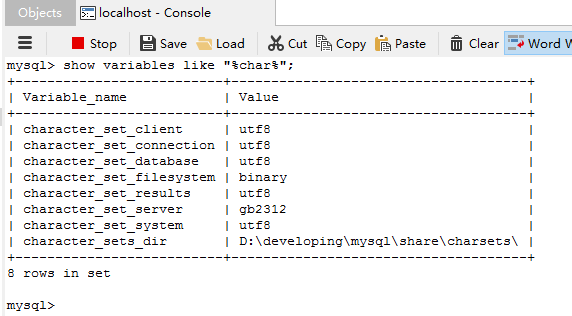
show variables like "%char%";
语句查询自己数据库当前字符集的配置。
对于数据库字符集,可以通过这个命令更改:
ALTER DATABASE `db_name` CHARACTER SET utf8;
其他的也可以通过这条语句修改:
set character_set_client='utf8';
但是,character_set_server如果默认为latin1,要永久更改,用set命令是行不通的,而更改my.ini文件,也没有效果。
正解是:
在MySQL的安装文件中进入bin目录下,双击MySQLInstanceConfig.exe,重新走一遍server的配置,但需要注意的是,在Character Set环节,要选择第三项,character选择gb2312,(第一项是默认server字符集为latin1)。
修改后查询编码:
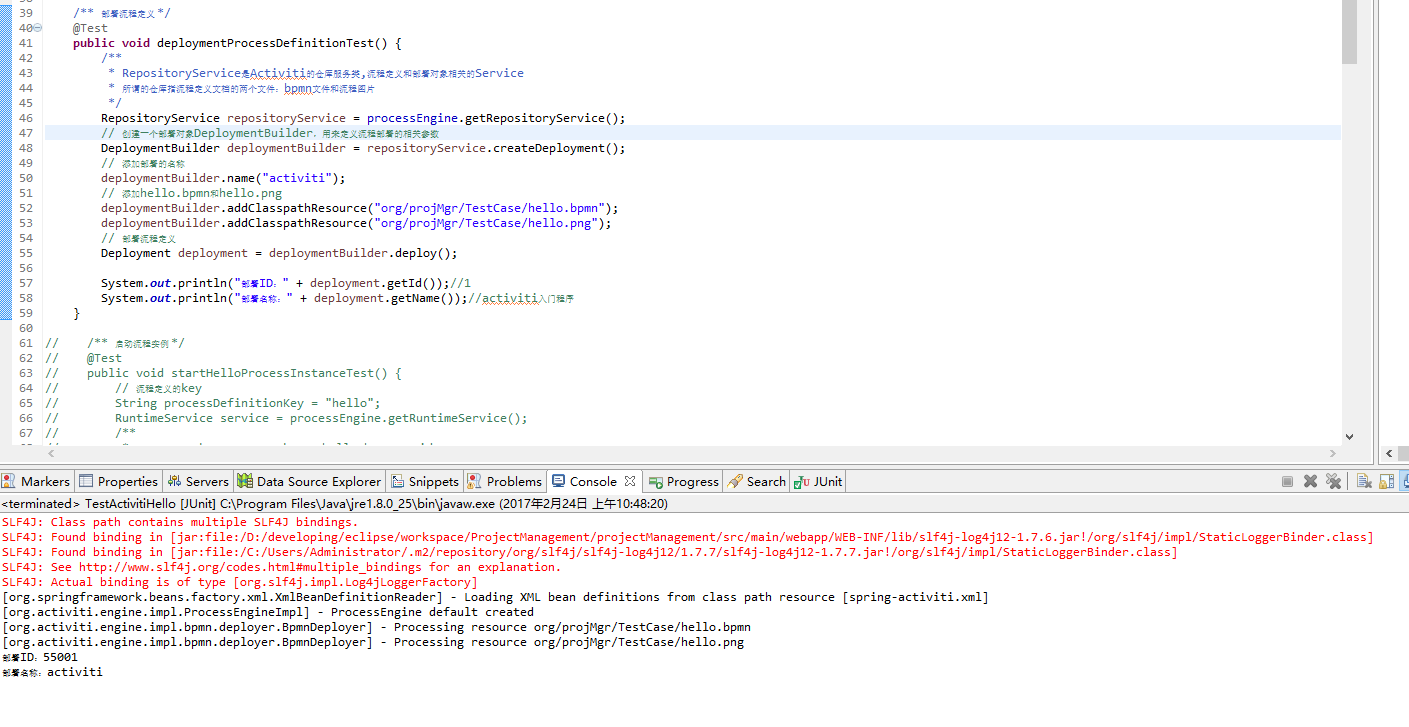
activiti流程部署启动:
activiti部署流程定义时出错:INSERT INTO ACT_GE_BYTEARRAY,修改数据库编码的更多相关文章
- Activiti 部署流程定义及相关的表(classpath部署、zip部署)
package com.mycom.processDefinition; import org.activiti.engine.ProcessEngine; import org.activiti.e ...
- activiti自定义流程之整合(四):整合自定义表单部署流程定义
综合前几篇博文内容,我想在整合这一部分中应该会有很多模块会跳过不讲,就如自定义表单的表单列表那一块,因为这些模块在整合的过程中都几乎没有什么改动,再多讲也是重复无用功. 正因为如此,在创建了流程模型之 ...
- activiti自定义流程之Spring整合activiti-modeler5.16实例(四):部署流程定义
注:(1)环境搭建:activiti自定义流程之Spring整合activiti-modeler5.16实例(一):环境搭建 (2)创建流程模型:activiti自定义流程之Spring ...
- activiti自己定义流程之整合(四):整合自己定义表单部署流程定义
综合前几篇博文内容.我想在整合这一部分中应该会有非常多模块会跳过不讲,就如自己定义表单的表单列表那一块,由于这些模块在整合的过程中都差点儿没有什么修改,再多讲也是反复无用功. 正由于如此,在创建了流程 ...
- activiti自己定义流程之Spring整合activiti-modeler5.16实例(四):部署流程定义
注:(1)环境搭建:activiti自己定义流程之Spring整合activiti-modeler5.16实例(一):环境搭建 (2)创建流程模型:activiti自己定义流程之Spr ...
- activiti基础--1------------------------生成.bpmn和.png以及部署流程定义
helloworld.dbmn <?xml version="1.0" encoding="UTF-8"?> <definitions xml ...
- (四)Activiti之流程定义部署之ZIP方式和流程定义查询
一.流程定义部署之ZIP方式 上一章节我们使用classpath的方式加载流程定义文件,这里我们使用ZIP的方式. 1.1 用activiti插件生成bpmn和png图片之后,压缩到一个zip格式的压 ...
- 深入了解Activiti工作流流程定义
深入了解Activiti工作流流程定义 2016-03-27| 发布: | 浏览: 2363 |保存PDF 部署流程定义 部署流程定义的流程: 1. 先获取流程引擎对象:在创建时会自动加载 class ...
- Activiti 删除流程定义
package com.mycom.processDefinition; import java.io.InputStream; import java.util.List; import java. ...
随机推荐
- 快速理解Java中的七种单例模式
饿汉式(推荐) package concurencyv2.chapter1; public class SingletonV2 { private static final SingletonV2 i ...
- R语言 apply,sapply,lapply,tapply,vapply, mapply的用法
apply() apply(m,dimcode,f,fargs) m 是一个矩阵. dimcode是维度编号,取1则为对行应用函数,取2则为对列运用函数. f是函数 fargs是f的可选参数集 > ...
- promise对象的使用
ES6中的promise的出现给我们很好的解决了回调地狱的问题,在使用ES5的时候,在多层嵌套回调时,写完的代码层次过多,很难进行维护和二次开发,ES6认识到了这点问题, 现在promise的使用,完 ...
- Derek解读Bytom源码-创世区块
作者:Derek 简介 Github地址:https://github.com/Bytom/bytom Gitee地址:https://gitee.com/BytomBlockchain/bytom ...
- 洛谷P1244 青蛙过河 DP/思路
又是一道奇奇怪怪的DP(其实是思路题). 原文戳>>https://www.luogu.org/problem/show?pid=1244<< 这题的意思给的挺模糊,需要一定的 ...
- python学习 day014打卡 内置函数二&递归函数
本节主要内容: 1.lambda匿名函数 2.sorted() 3.filter() 4.map() 5.递归函数 6.二分法 一.lambda匿名函数 为了解决一些简单的需求而设计的一句话函数 # ...
- Windows has encountered a critical problem and will restart automatically in one minute. Please save your work now
Windows has encountered a critical problem and will restart automatically in one minute. Please save ...
- Shell中的IFS
一.IFS 介绍 Shell 脚本中有个变量叫 IFS(Internal Field Seprator) ,内部域分隔符.完整定义是The shell uses the value stored in ...
- 关于Test类中不能使用Autowired注入bean的问题
在测试类中使用AutoWired注解一直不能获取到Bean,调用方法时一直报空指针异常,我有在其他类中使用AutoWired试了下,发现能够生效.问题应该就是处在Test类中,后面找了半天终于找到问题 ...
- JAVA中使用浮点数类型计算时,计算精度的问题
标题 在Java中实现浮点数的精确计算 AYellow(原作) 修改 关键字 Java 浮点数 精确计算 问题的提出:如果我们编译运行下面这个程序会看到什么?publi ...