
Mabatis三剑客分别是:mybatis-generator、mybatis-plugin、mybatis-pagehelper
本文用的是maven,idea15
Mabatis三剑客分别是:mybatis-generator、mybatis-plugin、mybatis-pagehelper
一、mybatis-generator
根据我们的数据库自动生成pojo、dao和xml文件
pojo里面放的是跟数据库字段一一对应的对象、dao层是接口,供service使用,xml是这个dao层接口的实现,sql语句都写在xml里
1.引入mabatis-generator
pom.xml里引入配置
-
<plugin>
-
<groupId>org.apache.maven.plugins</groupId>
-
<artifactId>maven-compiler-plugin</artifactId>
-
<configuration>
-
<source>1.7</source>
-
<target>1.7</target>
-
<encoding>UTF-8</encoding>
-
<compilerArguments>
-
<extdirs>${project.basedir}/src/main/webapp/WEB-INF/lib/</extdirs>
-
</compilerArguments>
-
</configuration>
-
</plugin>
引入generatorConfig.xml
generatorConfig.xml
-
<?xml version="1.0" encoding="UTF-8"?>
-
<!DOCTYPE generatorConfiguration
-
PUBLIC "-//mybatis.org//DTD MyBatis Generator Configuration 1.0//EN"
-
"http://mybatis.org/dtd/mybatis-generator-config_1_0.dtd">
-
-
<generatorConfiguration>
-
<!--导入属性配置-->
-
<properties resource="datasource.properties"></properties>
-
-
<!--指定特定数据库的jdbc驱动jar包的位置-->
-
<classPathEntry location="${db.driverLocation}"/>
-
-
<context id="default" targetRuntime="MyBatis3">
-
-
<!-- optional,旨在创建class时,对注释进行控制 -->
-
<commentGenerator>
-
<property name="suppressDate" value="true"/>
-
<property name="suppressAllComments" value="true"/>
-
</commentGenerator>
-
-
<!--jdbc的数据库连接 -->
-
<jdbcConnection
-
driverClass="${db.driverClassName}"
-
connectionURL="${db.url}"
-
userId="${db.username}"
-
password="${db.password}">
-
</jdbcConnection>
-
-
-
<!-- 非必需,类型处理器,在数据库类型和java类型之间的转换控制-->
-
<javaTypeResolver>
-
<property name="forceBigDecimals" value="false"/>
-
</javaTypeResolver>
-
-
-
<!-- Model模型生成器,用来生成含有主键key的类,记录类 以及查询Example类
-
targetPackage 指定生成的model生成所在的包名
-
targetProject 指定在该项目下所在的路径
-
-->
-
<!--<javaModelGenerator targetPackage="com.mmall.pojo" targetProject=".\src\main\java">-->
-
<javaModelGenerator targetPackage="com.mmall.pojo" targetProject="./src/main/java">
-
<!-- 是否允许子包,即targetPackage.schemaName.tableName -->
-
<property name="enableSubPackages" value="false"/>
-
<!-- 是否对model添加 构造函数 -->
-
<property name="constructorBased" value="true"/>
-
<!-- 是否对类CHAR类型的列的数据进行trim操作 -->
-
<property name="trimStrings" value="true"/>
-
<!-- 建立的Model对象是否 不可改变 即生成的Model对象不会有 setter方法,只有构造方法 -->
-
<property name="immutable" value="false"/>
-
</javaModelGenerator>
-
-
<!--mapper映射文件生成所在的目录 为每一个数据库的表生成对应的SqlMap文件 -->
-
<!--<sqlMapGenerator targetPackage="mappers" targetProject=".\src\main\resources">-->
-
<sqlMapGenerator targetPackage="mappers" targetProject="./src/main/resources">
-
<property name="enableSubPackages" value="false"/>
-
</sqlMapGenerator>
-
-
<!-- 客户端代码,生成易于使用的针对Model对象和XML配置文件 的代码
-
type="ANNOTATEDMAPPER",生成Java Model 和基于注解的Mapper对象
-
type="MIXEDMAPPER",生成基于注解的Java Model 和相应的Mapper对象
-
type="XMLMAPPER",生成SQLMap XML文件和独立的Mapper接口
-
-->
-
-
<!-- targetPackage:mapper接口dao生成的位置 -->
-
<!--<javaClientGenerator type="XMLMAPPER" targetPackage="com.mmall.dao" targetProject=".\src\main\java">-->
-
<javaClientGenerator type="XMLMAPPER" targetPackage="com.mmall.dao" targetProject="./src/main/java">
-
<!-- enableSubPackages:是否让schema作为包的后缀 -->
-
<property name="enableSubPackages" value="false" />
-
</javaClientGenerator>
-
-
-
<table tableName="mmall_shipping" domainObjectName="Shipping" enableCountByExample="false" enableUpdateByExample="false" enableDeleteByExample="false" enableSelectByExample="false" selectByExampleQueryId="false"></table>
-
<table tableName="mmall_cart" domainObjectName="Cart" enableCountByExample="false" enableUpdateByExample="false" enableDeleteByExample="false" enableSelectByExample="false" selectByExampleQueryId="false"></table>
-
<table tableName="mmall_cart_item" domainObjectName="CartItem" enableCountByExample="false" enableUpdateByExample="false" enableDeleteByExample="false" enableSelectByExample="false" selectByExampleQueryId="false"></table>
-
<table tableName="mmall_category" domainObjectName="Category" enableCountByExample="false" enableUpdateByExample="false" enableDeleteByExample="false" enableSelectByExample="false" selectByExampleQueryId="false"></table>
-
<table tableName="mmall_order" domainObjectName="Order" enableCountByExample="false" enableUpdateByExample="false" enableDeleteByExample="false" enableSelectByExample="false" selectByExampleQueryId="false"></table>
-
<table tableName="mmall_order_item" domainObjectName="OrderItem" enableCountByExample="false" enableUpdateByExample="false" enableDeleteByExample="false" enableSelectByExample="false" selectByExampleQueryId="false"></table>
-
<table tableName="mmall_pay_info" domainObjectName="PayInfo" enableCountByExample="false" enableUpdateByExample="false" enableDeleteByExample="false" enableSelectByExample="false" selectByExampleQueryId="false"></table>
-
<table tableName="mmall_product" domainObjectName="Product" enableCountByExample="false" enableUpdateByExample="false" enableDeleteByExample="false" enableSelectByExample="false" selectByExampleQueryId="false">
-
<columnOverride column="detail" jdbcType="VARCHAR" />
-
<columnOverride column="sub_images" jdbcType="VARCHAR" />
-
</table>
-
<table tableName="mmall_user" domainObjectName="User" enableCountByExample="false" enableUpdateByExample="false" enableDeleteByExample="false" enableSelectByExample="false" selectByExampleQueryId="false"></table>
-
-
-
<!-- mybatis插件的搭建 -->
-
</context>
-
</generatorConfiguration>
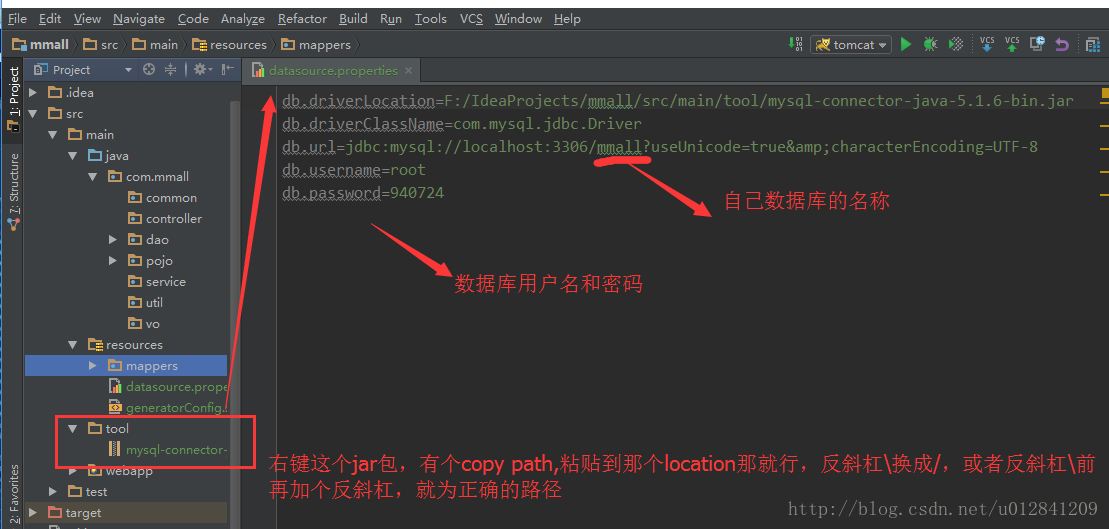
2.新建datasource.properties文件,配置数据库连接信息(这里配置本地数据库)
-
db.driverLocation=F:/IdeaProjects/mmall/src/main/tool/mysql-connector-java-5.1.6-bin.jar
-
db.driverClassName=com.mysql.jdbc.Driver
-
db.url=jdbc:mysql://localhost:3306/mmall?useUnicode=true&characterEncoding=UTF-8
-
db.username=root
-
db.password=940724
配置完之后,就点击idea的左下角有个小按钮,把右侧的maven project按钮调出来(右侧已有的请忽略) 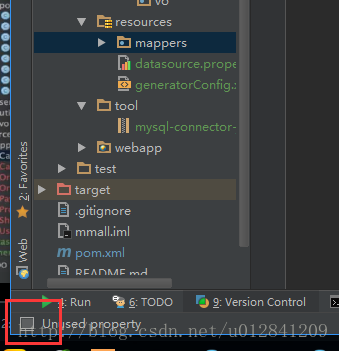
点击maven project,并选定插件加载(双击就行) 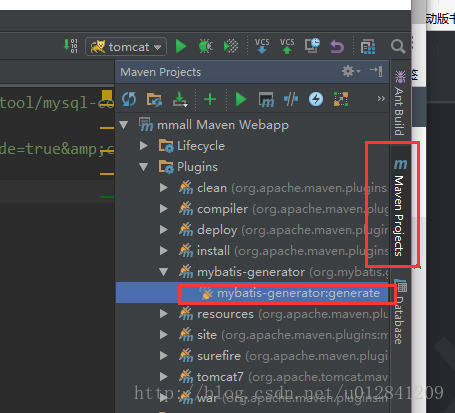
下方的控制台,出现build success就是成功了,就会发现dao的包和pojo包会生成好了接口和数据对象实体类,以及生成一个mapper文件夹,里面存储着数据库里各个实体的xml文件
注意mapper里生成的文件夹,我在创建的时候把时间戳给加里了,如果要完美的用的话,需要把时间戳优化一下
把insert标签下的#{createTime,jdbcType=TIMESTAMP}和#{updateTime,jdbcType=TIMESTAMP}改成now()
把update标签下的#{updateTime,jdbcType=TIMESTAMP}改成now()
这个now()方法是数据库自带的函数,表示现在的时间
二、mybatis-plugin
我用的是idea15,如果其他版本不好用的,可以换成idea 15
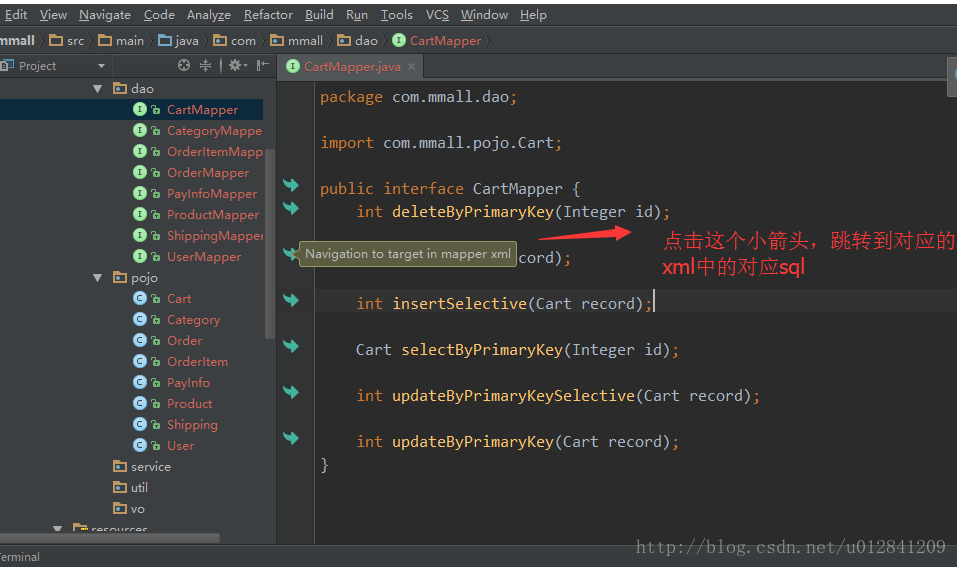
这是一个能够追踪dao接口和mapper文件里xml的一个插件
提供Mapper接口与配置文件中对应SQL的导航
提供Mapper接口与配置文件中对应SQL的导航
编辑XML文件时自动补全
根据Mapper接口, 使用快捷键生成xml文件及SQL标签
ResultMap中的property支持自动补全,支持级联(属性A.属性B.属性C)
快捷键生成@Param注解
XML中编辑SQL时, 括号自动补全
XML中编辑SQL时, 支持参数自动补全(基于@Param注解识别参数)
自动检查Mapper XML文件中ID冲突
自动检查Mapper XML文件中错误的属性值
支持Find Usage
支持重构从命名
支持别名
自动生成ResultMap属性
快捷键: Option + Enter(Mac) | Alt + Enter(Windows)(直接跳转到mapper中的sql语句的快捷键是:“Ctrl+ALT+B”)
效果:点击dao可以追踪到xml,,同理点击xml的sql右边小箭头,可以追踪到dao方法
1、安装插件:
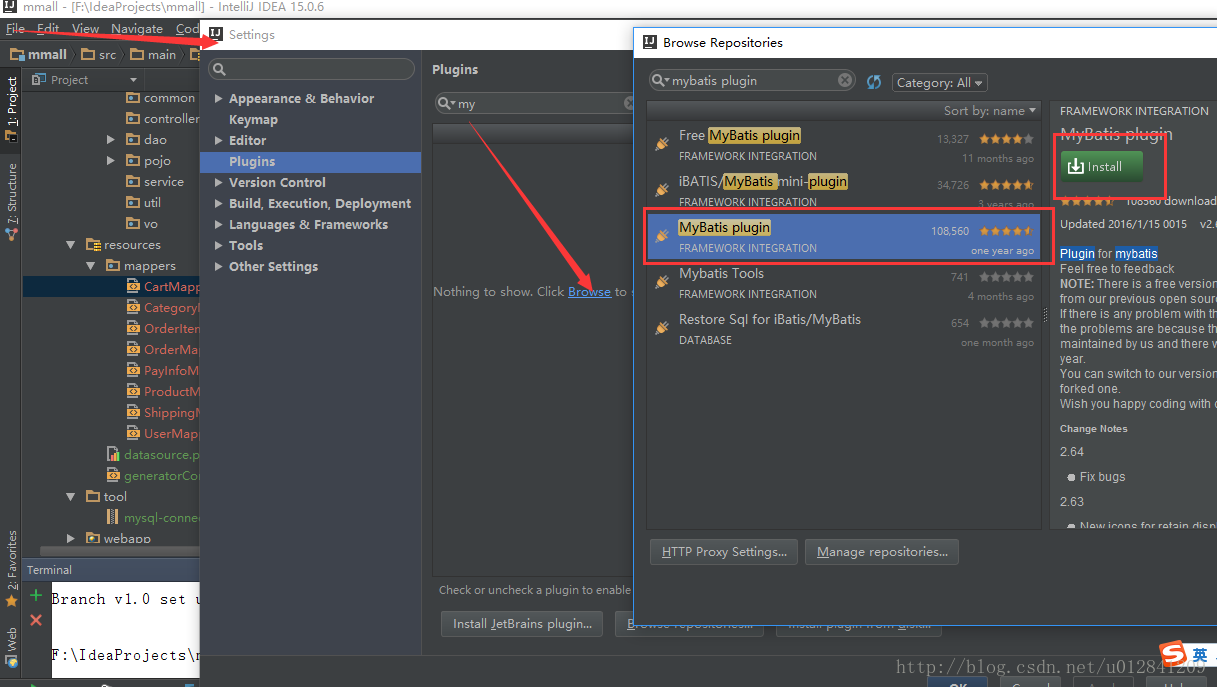
然后重启下idea
2.mybatis-plugin插件破解
到这个网址去
https://github.com/myoss/profile/tree/master/idea/plugin/MybatisPlugin
你看到了一个Git仓库,先clone下来,不会clone的down下来,记住路径
接下来,你看到一堆版本,选择你安装的mybatis_plugin版本号,比如我的是IDEA15版本的,我安装版本就是v2.64,进入v2.64你会看到一个com文件夹,牢牢记住这个文件夹有大作用

点击如图所示的右上角的fork,登录自己的github,登录之后,会发现右边有个绿色的Dowload图标,点击那个就可以下载别人的项目了
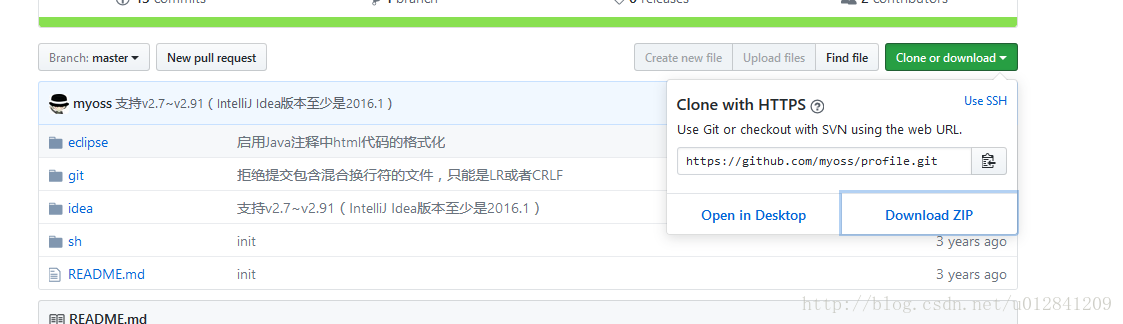
(1) windows破解
首先你要找到mybatis_plus.jar的位置,位置一般在这里
C:\Users\youname(你自己的文档).IntelliJIdea\config\plugins\mybatis_plus\lib
用winRAR打开 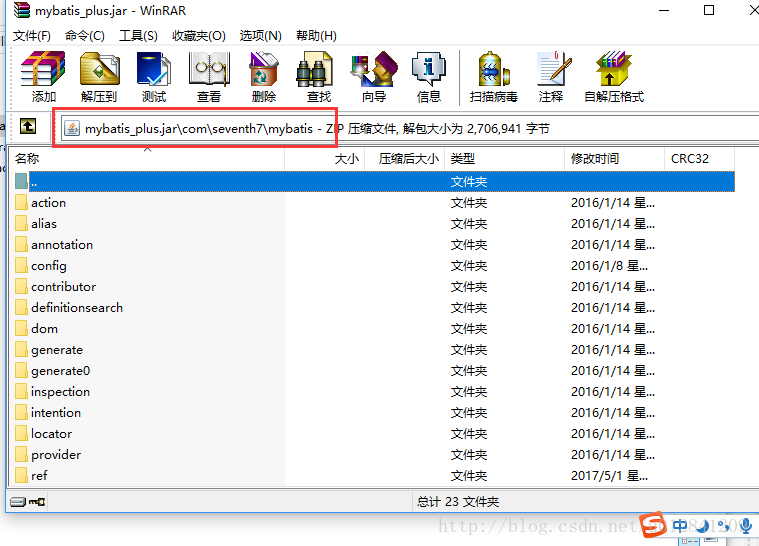
将下载好的破解,与plugin插件压缩包中的文件更换,拖入压缩包,更换就行
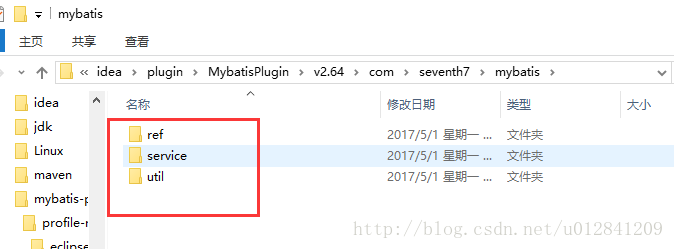
重启你的IDEA,完毕,破解搞定
(2)mac破解
使用find命令在你的用户目录下查找mybatis_plus.jar这个文件
find ~ -name "mybatis_plus.jar"
OK,拿到一个地址,然后进去
cd /Users/XXXXX/Library/Application Support/IntelliJIdea15/mybatis_plus/lib
看到了2个文件
-
#创建一个文件夹
-
mkdir m
-
#进去
-
cd m
-
#拷贝到m文件夹中
-
cp ../mybatis_plus.jar .
-
#解压jar包
-
jar xf mybatis_plus.jar
-
#复制com文件夹到这里 路径根据你情况而定,版本号也根据你情况而定
-
cp -r ~/Workspace/github/mybatis_plus/idea/plugin/MybatisPlugin/v2.7\~v2.83/com .
-
#重新打为jar包
-
jar cf mybatis_plus.jar *
-
#复制到m的上层目录
-
cp mybatis_plus.jar ../
重启你的IDEA,完毕,破解搞定
三、Mybatis-pageHelper
是一个开源的分页插件(如下网址有插件的全介绍)
https://github.com/pagehelper/Mybatis-PageHelper
它的原理,是通过spring的AOP来实现的,这个插件能在执行sql的时候,把相关的数据再执行一次
1.pom.xml里添加依赖
-
<dependency>
-
<groupId>com.github.pagehelper</groupId>
-
<artifactId>pagehelper</artifactId>
-
<version>4.1.0</version>
-
</dependency>
-
-
<dependency>
-
<groupId>com.github.miemiedev</groupId>
-
<artifactId>mybatis-paginator</artifactId>
-
<version>1.2.17</version>
-
</dependency>
-
-
<dependency>
-
<groupId>com.github.jsqlparser</groupId>
-
<artifactId>jsqlparser</artifactId>
-
<version>0.9.4</version>
-
</dependency>
2.在spring配置文件里添加配置
-
<bean id="sqlSessionFactory" class="org.mybatis.spring.SqlSessionFactoryBean">
-
<property name="dataSource" ref="dataSource"/>
-
<property name="mapperLocations" value="classpath*:mappers/*Mapper.xml"/>
-
-
<!-- 分页插件 -->
-
<property name="plugins">
-
<array>
-
<bean class="com.github.pagehelper.PageHelper">
-
<property name="properties">
-
<value>
-
dialect=mysql
-
</value>
-
</property>
-
</bean>
-
</array>
-
</property>
-
-
</bean>
注意不同数据库的方言的使用
这样三剑客就都配置OK了
Mabatis三剑客分别是:mybatis-generator、mybatis-plugin、mybatis-pagehelper的更多相关文章
- 使用Mybatis Generator自动生成Mybatis相关代码
本文将简要介绍怎样利用Mybatis Generator自动生成Mybatis的相关代码: 一.构建一个环境: 1. 首先创建一个表: CREATE TABLE pet (name VARCHAR(2 ...
- mybatis generator配置,Mybatis自动生成文件配置,Mybatis自动生成实体Bean配置
mybatis generator配置,Mybatis自动生成文件配置,Mybatis自动生成实体Bean配置 ============================== 蕃薯耀 2018年3月14 ...
- MyBatis Generator自动生成MyBatis的映射代码
MyBatis Generator大大简化了MyBatis的数据库的代码编写,有了一个配置文件,就可以直接根据表映射成实体类.Dao类和xml映射.资源地址:MyBatis项目地址:http://my ...
- Mybatis generator自动生成mybatis配置和类信息
自动生成代码方式两种: 1.命令形式生成代码,详细讲解每一个配置参数. 2.Eclipse利用插件形式生成代码. 安装插件方式: eclipse插件安装地址:http://mybatis.google ...
- 使用MyBatis Generator自动生成MyBatis的代码
这两天需要用到MyBatis的代码自动生成的功能,由于MyBatis属于一种半自动的ORM框架,所以主要的工作就是配置Mapping映射文件,但是由于手写映射文件很容易出错,所以可利用MyBatis生 ...
- MyBatis Generator 详解 【转来纯为备忘】
版权声明:版权归博主所有,转载请带上本文链接!联系方式:abel533@gmail.com 目录(?)[+] MyBatis Generator中文文档 运行MyBatis Generator X ...
- mybatis 自动生成代码(mybatis generator)
pom.xml 文件配置 引入 mybatis generator <properties> <mysql.connector.version>5.1.44</mysql ...
- MyBatis Generator中文文档
MyBatis Generator中文文档 MyBatis Generator中文文档地址: http://mbg.cndocs.tk/ 该中文文档由于尽可能和原文内容一致,所以有些地方如果不熟悉,看 ...
- MyBatis Generator 详解(转)
MyBatis Generator中文文档 MyBatis Generator中文文档地址:http://mbg.cndocs.tk/ 该中文文档由于尽可能和原文内容一致,所以有些地方如果不熟悉,看中 ...
随机推荐
- JavaScript使用jsonp实现跨域
为什么要把ajax跨域写一下呢,因为ajax跨域并不是想跨就能跨的.因为为了安全,ajax是不允许跨域的. 举个例子,你有一个卖水果的网站,你的ajax请求另一个网站提供的图片,正常的时候,图片是一个 ...
- Vue 的语法
<!DOCTYPE html> <html lang="en"> <head> <meta charset="UTF-8&quo ...
- 转载:必须收藏!50个最流行的免费Kubernetes工具集
必须收藏!50个最流行的免费Kubernetes工具集 http://cloud.51cto.com/art/201806/576406.htm 在短短的两年时间里,Kubernetes在容器编排的竞 ...
- Qt__文件打开保存对话框(QFileDialog)
转自豆子空间 使用QFileDialog有两种方法,一种是比较简单的使用"静态函数法",另一种是可以自定义各个细节的"构造函数法". 静态函数法 修改MainW ...
- centos7切换gnome3桌面与gnome经典桌面
登陆界面选择设置按钮,选择gnome,进行登陆
- maven 父工程 消除重复 对子模块进行管理 主要继承依赖
子类继承父类的 可以不需要groupid与versionid
- [转载]使用VS2015搭建Lua开发环境
参考原文请看: Lua学习笔记1:Windows7下使用VS2015搭建Lua开发环境(一) Lua学习笔记2:Windows7下使用VS2015搭建Lua开发环境(二) 本篇主要分以下几个部分: 一 ...
- CenOS_6.6_简单搭建vsFTP
0. 关闭selinux 永久性关闭(这样需要重启服务器后生效) sed -i 's/SELINUX=enforcing/SELINUX=disabled/' /etc/selinux/config ...
- BZOJ 1124: [POI2008]枪战Maf(构造 + 贪心)
题意 有 \(n\) 个人,每个人手里有一把手枪.一开始所有人都选定一个人瞄准(有可能瞄准自己).然后他们按某个顺序开枪,且任意时刻只有一个人开枪. 因此,对于不同的开枪顺序,最后死的人也不同. 问最 ...
- Android开源框架Afinal第一篇——揭开圣女的面纱
Android开源框架Afinal第一篇——揭开圣女的面纱 分类: Android开源框架哪点事2013-09-02 14:25 260人阅读 评论(0) 收藏 举报 Afinal 这是Afinal在 ...