
Ubuntu 14.10 下编译Hadoop2.4.0
在http://www.aboutyun.com/thread-8130-1-1.html 这里看到到,安装过程遇到了上面说的问题,所以将此文转载过来,以备不时之需,感谢此作者。
问题导读:
1.如果获取hadoop src maven包?
2.编译hadoop需要装哪些软件?
3.如何编译hadoop2.4?
扩展:
编译hadoop为何安装这些软件?
一、首先下载hadoop源码包
下载的方式还是比较多的
1.svn的方式
svn下载首先需要安装SVN,如果想尝试使用svn,可以参考源码管理、获取网络源码工具:TortoiseSVN使用手册,hadoop的svn下载地址点此
2.压缩包的方式
这里我们介绍一种压缩包的方式。
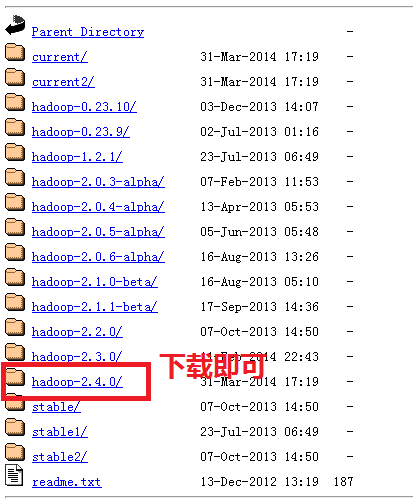
首先我们登录官网:
http://hadoop.apache.org/,我们找到下面链接,点进去下载即可。如果刚接触,不知道怎么下载,可以查看帖子新手指导:hadoop官网介绍及如何下载hadoop(2.4)各个版本与查看hadoop API介绍,里面介绍的很详细。
二、解压
- aboutyun@master:~$ tar zxvf hadoop-2.4.0-src.tar.gz
复制代码
解压完毕,我们会看到相应的文件夹:

三、解压完毕,我们开始准备编译所需要的软件
这里软件的准备,很多文章写的都不全,这里整理一下。哪些软件是需要安装的。
这里需要说明的是有的Linux有自带的这些工具,这个需要仔细看一下版本是否匹配,不匹配则升级一下,有些不能升级,那么就重装一下吧
1、jdk的安装
步骤下载压缩包、解压、配置环境变量
(1)jdk下载
链接: http://pan.baidu.com/s/1jGr41SU 密码: rawv
(2)jdk解压
- tar zxvf jdk-7u51-linux-x64.tar.gz
复制代码
然后重命令为:

(3)配置环境变量:
如下图所示红字部分为:(记得这里的路径改成自己的实际安装路径)
- /usr/jdk1.7/bin
复制代码

(4)检验是否安装成功

2、maven的安装
- sudo apt-get install maven
复制代码
我这里已经安装

上面可能还需要配置环境变量之类的,但是我这里没有好像是系统自带的,网上的资料也比较多,注意maven的版本,我这里是3.0.4,hadoop2.4需要maven的这个版本或则更高的版本3.2.1版本也是可以的。
验证安装是否成功
- mvn -version
复制代码

3.protobuf的安装
为防止出错,这里补充一些内容,
3.1先安装g++
- sudo apt-get install g++
复制代码
(1)下载
- sudo wget https://protobuf.googlecode.com/files/protobuf-2.5.0.tar.gz
复制代码
由于google不能访问,可以从网盘下载链接:http://pan.baidu.com/s/1dDgWe6P 密码:xgiu
(2)解压
- tar zxvf protobuf-2.5.0.tar.gz
复制代码
如下效果:

然后进入protobuf-2.5.0文件夹,进行如下操作:

- $ sudo ./configure
- $ sudo make
- $ sudo make check
- $ sudo make install
- $ sudo ldconfig
复制代码
修改环境变量:
- sudo nano /etc/profile
复制代码
- export LD_LIBRARY_PATH=~/protobuf-2.5.0
复制代码
(LD_LIBRARY_PATH的这里,填写的是protobuf文件的位置)
- source /etc/profile
复制代码
注意:配置/etc/profile,在虚拟机重启后,可能配置会失效,所以重启后,需要再次执行source操作。
(3)验证
- protoc --version
复制代码

4.安装openssl库
- sudo apt-get install libssl-dev
复制代码
5.CMake安装
- sudo yum install cmake
复制代码
或则
- sudo apt-get install cmake
复制代码
6.ant安装
(1)首先下载ant
百度网盘: apache-ant-1.9.4-bin.tar.gz
http://pan.baidu.com/s/1c0vjhBy
或则下面链接:
apache-ant-1.9.4-bin.tar.gz
(2)解压
- tar zxvf apache-ant-1.9.4-bin.tar.gz
复制代码
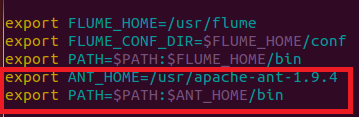
(3)配置环境变量
如下图所示:
1.打开profile
- sudo vi /etc/profile
复制代码
2.添加下图红字部分,记得修改成自己的路径
3.生效
- source /etc/profile
复制代码
4.检验
- ant -version
复制代码

四、编译hadoop2.4
上面准备工作已经做的差不多了,我们终于可以开始,记得进入src文件夹下,输入下面命令
- mvn package -Pdist,native -DskipTests -Dtar
复制代码

等了40多分钟,ok

在目录~/hadoop-2.4.0-src/hadoop-dist/target下有文件:
hadoop-2.4.0.tar.gz

更多内容:hadoop2.4汇总:hadoop2.4插件下载、完全分布式、伪分布、eclipse插件开发大全
问题总结:
这里还需要在补充:
1.遇到错误1:CMake没有安装
- [ERROR] Failed to execute goal org.apache.maven.plugins:maven-antrun-
- plugin:1.6:run (make) on project hadoop-common: An Ant BuildException has
- occured: Execute failed: java.io.IOException: Cannot run program "cmake" (in
- directory "/home/wyf/hadoop-2.0.2-alpha-src/hadoop-common-project/hadoop-
- common/target/native"): java.io.IOException: error=2, No such file or directory
- -> [Help 1]
- [ERROR]
- [ERROR] To see the full stack trace of the errors, re-run Maven with the -e
- switch.
- [ERROR] Re-run Maven using the -X switch to enable full debug logging.
- [ERROR]
- [ERROR] For more information about the errors and possible solutions, please
- read the following articles:
- [ERROR] [Help 1]
- http://cwiki.apache.org/confluence/display/MAVEN/MojoExecutionException
复制代码
解决方法:
CMake没有安装
- sudo yum install cmake
复制代码
或则使用
- sudo apt-get install cmake
复制代码

2.遇到错误2:ant没有安装
- ERROR] Failed to execute goal org.codehaus.mojo.jspc:jspc-maven-plugin:2.0-
- alpha-3:compile (hdfs) on project hadoop-hdfs: Execution hdfs of goal
- org.codehaus.mojo.jspc:jspc-maven-plugin:2.0-alpha-3:compile failed: Plugin
- org.codehaus.mojo.jspc:jspc-maven-plugin:2.0-alpha-3 or one of its dependencies
- could not be resolved: Could not transfer artifact ant:ant:jar:1.6.5 from/to
- central (http://repo.maven.apache.org/maven2): GET request of:
- ant/ant/1.6.5/ant-1.6.5.jar from central failed: Read timed out -> [Help 1]
- [ERROR]
- [ERROR] To see the full stack trace of the errors, re-run Maven with the -e
- switch.
- [ERROR] Re-run Maven using the -X switch to enable full debug logging.
- [ERROR]
- [ERROR] For more information about the errors and possible solutions, please
- read the following articles:
- [ERROR] [Help 1]
- http://cwiki.apache.org/confluence/display/MAVEN/PluginResolutionException
- [ERROR]
- [ERROR] After correcting the problems, you can resume the build with the command
- [ERROR] mvn <goals> -rf :hadoop-hdfs
复制代码
1.首先下载ant
百度网盘: apache-ant-1.9.4-bin.tar.gz
http://pan.baidu.com/s/1c0vjhBy
或则下面链接:
apache-ant-1.9.4-bin.tar.gz
2.解压
- tar zxvf apache-ant-1.9.4-bin.tar.gz
复制代码
3.配置环境变量
记得配置环境变量
如下图所示:
1.打开profile
- sudo vi /etc/profile
复制代码
2.添加下图红字部分,记得修改成自己的路径
3.生效
- source /etc/profile
复制代码
4.检验
- ant -version
复制代码
3.protobuf版本过低,错误现象
- [ERROR] Failed to execute goal org.apache.hadoop:hadoop-maven-plugins:2.4.0:prot
- oc (compile-protoc) on project hadoop-common: org.apache.maven.plugin.MojoExecut
- ionException: 'protoc --version' did not return a version -> [Help 1]
- [ERROR]
- [ERROR] To see the full stack trace of the errors, re-run Maven with the -e swit
- ch.
- [ERROR] Re-run Maven using the -X switch to enable full debug logging.
- [ERROR]
- [ERROR] For more information about the errors and possible solutions, please rea
- d the following articles:
- [ERROR] [Help 1] http://cwiki.apache.org/confluence/display/MAVEN/MojoExecutionE
- xception
- [ERROR]
- [ERROR] After correcting the problems, you can resume the build with the command
- [ERROR] mvn <goals> -rf :hadoop-common
复制代码

hadoop2.4对应的版本是protobuf-2.5.0
解决办法:按照安装步骤中protobuf的安装即可
4.权限问题

解决办法:
(1)加上sudo
(2)通过
- ll
复制代码
安装包解压之后,所属用户可能发生变化:
改变用户
sudo chown -R aboutyun:aboutyun hadoop-2.4.0-src
上面aboutyun改成自己的所属组和用户
命令查看是否属于当前用户
-------------------------------------------------------------------------------------------------------------------------------
因为之前机器上安装过hadoop2.3.0,所以这次在编辑的时候遇到了上面的几个问题
1 protobuf版本过低,升到2.5就没问题了
2 cmake命令找不到,安装后就欧克了
所以要是按照上面的步骤一步步来,应该不会有问题
Ubuntu 14.10 下编译Hadoop2.4.0的更多相关文章
- Ubuntu 14.10 下ZooKeeper+Hadoop2.6.0+HBase1.0.0 的HA机群高可用配置
1 硬件环境 Ubuntu 14.10 64位 2 软件环境 openjdk-7-jdk hadoop 2.6.0 zookeeper-3.4.6 hbase-1.0.0 3 机群规划 3.1 zoo ...
- Ubuntu 14.04下安装Hadoop2.4.0 (单机模式)
转自 http://www.linuxidc.com/Linux/2015-01/112370.htm 一.在Ubuntu下创建Hadoop组和hadoop用户 增加hadoop用户组,同时在该组里增 ...
- 在干净的ubuntu 14.10上编译Qemu2.2.0的过程
下载Qemu的源代码 从官网http://wiki.qemu.org/Main_Page 中下载最新的源代码,目前是2.2.0. 安装依赖库和编译 编译过程分两步1. ./configure 2. m ...
- Ubuntu 14.10下基于Nginx搭建mp4/flv流媒体服务器(可随意拖动)并支持RTMP/HLS协议(含转码工具)
Ubuntu 14.10下基于Nginx搭建mp4/flv流媒体服务器(可随意拖动)并支持RTMP/HLS协议(含转码工具) 最近因为项目关系,收朋友之托,想制作秀场网站,但是因为之前一直没有涉及到这 ...
- VoIP应用在Ubuntu 14.04下编译FFmpeg libX264及PJSIP
PJSIP是一个开源的SIP协议栈.它支持多种SIP的扩展功能,可说算是最目前流行的SIP协议栈之一了. 它实现了SIP.SDP.RTP.STUN.TURN和ICE.PJSIP作为基于SIP的一个多 ...
- Ubuntu 14.10 下Hive配置
1 系统环境 Ubuntu 14.10 JDK-7 Hadoop 2.6.0 2 安装步骤 2.1 下载Hive 我第一次安装的时候,下载的是Hive-1.2.1,配置好之后,总是报错 [ERROR] ...
- Ubuntu 14.10 下安装java反编译工具 jd-gui
系统环境,Ubuntu 14.10 ,64位 1 下载JD-GUI,网址http://221.3.153.126/1Q2W3E4R5T6Y7U8I9O0P1Z2X3C4V5B/jd.benow.ca/ ...
- Ubuntu 14.10 下安装Ganglia监控集群
关于 Ganglia 软件,Ganglia是一个跨平台可扩展的,高性能计算系统下的分布式监控系统,如集群和网格.它是基于分层设计,它使用广泛的技术,如XML数据代表,便携数据传输,RRDtool用于数 ...
- Ubuntu 14.10 下DokuWiki安装
环境说明: Ubuntu 14.10 64位 1 下载DokuWiki:http://download.dokuwiki.org/ 2 解压到 /var/www/html下面 3 如果没有安装Apac ...
随机推荐
- websocket介绍 以及 vue websocket使用案例
1 介绍: https://www.zhihu.com/question/20215561 2 案例: https://www.jianshu.com/p/0d20a032d0ec (坑说明). ht ...
- hihocoder1489 Legendary Items 概率期望
Little Hi is playing a video game. Each time he accomplishes a quest in the game, Little Hi has a ch ...
- nginx安装最简单教程
[root@bogon ~]# wget -c http://nginx.org/download/nginx-1.7.9.tar.gz #下载安装包 [root@bogon ~]# ls anaco ...
- lvm入门
实例: 使用lvm存储结构的主机需要扩容,现在我们已经将一个新的硬盘安装上去,将该新的硬盘的空间全部增加到主机上 20 ls /dev/sd* #查看新增加的硬盘名,我的为xvdb 21 ls /de ...
- pycharm 的操作1
- go-elasticsearch 来自官方的 golang es client
elasticsearch 终于有了官方的golang sdk 了,地址 https://github.com/elastic/go-elasticsearch 当前还不稳定,同时主要是对于es7 的 ...
- S老师 C#编程数据结构篇 学习
直接插入排序 冒泡排序 简单选择排序 线性表: using System; using Sy ...
- APACHE REWRITE ? 匹配问号的写法
RewriteRule 不会去匹配 ? 后面的字符串,需要用RewriteCond来匹配 把 /abc?id=123 => /def.php?id=123 的写法: RewriteEng ...
- super and this
super 指向父类的一个指针, 引用父类中的属性,方法或者构造函数 public class Father { String name ; Father(String myName){ name = ...
- mongodb之 mongodump 与 mongorestore
一.备份 和之前介绍的 mongoexport 的数据导出工具不同, mongodump 是将数据以二进制形式导出,而 mongoexport 导出的数据格式为 csv 或 json 格式: mong ...