
SpringBoot------MockMvc单元测试
1.添加测试依赖
<project xmlns="http://maven.apache.org/POM/4.0.0" xmlns:xsi="http://www.w3.org/2001/XMLSchema-instance" xsi:schemaLocation="http://maven.apache.org/POM/4.0.0 http://maven.apache.org/xsd/maven-4.0.0.xsd">

  <modelVersion>4.0.0</modelVersion>

  <groupId>top.ytheng</groupId>

  <artifactId>springboot-demo</artifactId>

  <version>0.0.1-SNAPSHOT</version>

  <packaging>jar</packaging>

  <parent>

        <groupId>org.springframework.boot</groupId>

        <artifactId>spring-boot-starter-parent</artifactId>

        <version>2.0.5.RELEASE</version>

        <relativePath/> <!-- lookup parent from repository -->

    </parent>

    <properties>

        <project.build.sourceEncoding>UTF-8</project.build.sourceEncoding>

        <project.reporting.outputEncoding>UTF-8</project.reporting.outputEncoding>

        <java.version>1.8</java.version>

    </properties>

    <dependencies>

        <dependency>

            <groupId>org.springframework.boot</groupId>

            <artifactId>spring-boot-starter-web</artifactId>

        </dependency>

        <dependency>

            <groupId>org.springframework.boot</groupId>

            <artifactId>spring-boot-starter-test</artifactId>

            <scope>test</scope>

        </dependency>

        <dependency>

            <groupId>org.springframework.boot</groupId>

            <artifactId>spring-boot-starter-thymeleaf</artifactId>

        </dependency>

        <dependency>

            <groupId>org.springframework.boot</groupId>

            <artifactId>spring-boot-devtools</artifactId>

            <optional>true</optional>

              <scope>true</scope>

        </dependency>

    </dependencies>

    <build>

        <plugins>

            <plugin>

                <groupId>org.springframework.boot</groupId>

                <artifactId>spring-boot-maven-plugin</artifactId>

            </plugin>

        </plugins>

    </build>

</project>
2.添加MocMvc测试类
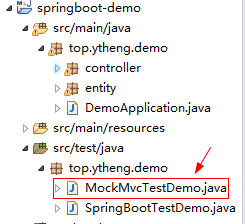
package top.ytheng.demo;

import org.junit.Test;

import org.junit.runner.RunWith;

import org.springframework.beans.factory.annotation.Autowired;

import org.springframework.boot.test.autoconfigure.web.servlet.AutoConfigureMockMvc;

import org.springframework.boot.test.context.SpringBootTest;

import org.springframework.test.context.junit4.SpringRunner;

import org.springframework.test.web.servlet.MockMvc;

import org.springframework.test.web.servlet.MvcResult;

import org.springframework.test.web.servlet.request.MockMvcRequestBuilders;

import org.springframework.test.web.servlet.result.MockMvcResultMatchers;

//底层用junit SpringJunit4ClassRunner

@RunWith(SpringRunner.class)

//启动整个Springboot工程

@SpringBootTest(classes= {DemoApplication.class})

//鼠标选中SpringBootTestDemo后执行Run As -> JUnit Test可以同时执行多个测试

@AutoConfigureMockMvc

public class MockMvcTestDemo {

    @Autowired

    private MockMvc mockMvc;

    @Test

    public void mockTest() throws Exception {

        MvcResult mockResult = mockMvc.perform(MockMvcRequestBuilders.get("/file/testpath")).

                andExpect(MockMvcResultMatchers.status().isOk()).andReturn();

        int status = mockResult.getResponse().getStatus();

        System.out.println(status);

    }

}
3.添加测试控制器
package top.ytheng.demo.controller;

import org.springframework.stereotype.Controller;

import org.springframework.web.bind.annotation.RequestMapping;

import org.springframework.web.bind.annotation.ResponseBody;

@Controller

@RequestMapping("/file")

public class FileController {

    @RequestMapping("/testpath")

    @ResponseBody

    private Object testPath() {

        return filePath;

    }

}
4.添加启动类
package top.ytheng.demo;

import org.springframework.boot.SpringApplication;

import org.springframework.boot.autoconfigure.SpringBootApplication;

@SpringBootApplication //等于下面3个

//@SpringBootConfiguration

//@EnableAutoConfiguration

//@ComponentScan

public class DemoApplication {

    public static void main(String[] args) {

        SpringApplication.run(DemoApplication.class, args);

    }

}
5.鼠标选中MockMvcTestDemo类名,使用快捷键启动JUnit测试(Shift + Alt + X,T),进行测试
SpringBoot------MockMvc单元测试的更多相关文章
- SpringBoot系列: 单元测试2
之前发了SpringBoot 单元测试的博客, https://www.cnblogs.com/harrychinese/p/springboot_unittesting.html , 内容较少, 现 ...
- SpringBoot系列: 单元测试
SpringBoot 项目单元测试也很方便, Web项目中单元测试应该覆盖:1. Service 层2. Controller 层 本文前半部分讲解是一些测试基础配置. 对于Service和Contr ...
- SpringBoot项目单元测试
关于SpringBoot的单元测试,描述一下三种单元测试的方式. 1.约定 单元测试代码写在src/test/java目录下单元测试类命名为*Test,前缀为要测试的类名 2. 使用mock方式单元测 ...
- 【SpringBoot】单元测试进阶实战、自定义异常处理、t部署war项目到tomcat9和启动原理讲解
========================4.Springboot2.0单元测试进阶实战和自定义异常处理 ============================== 1.@SpringBoot ...
- SpringBoot进行单元测试
SpringBoot进行单元测试,需要在maven中加入以下依赖 <dependency> <groupId>org.springframework.boot</grou ...
- springboot的单元测试(总结两种)
.personSunflowerP { background: rgba(51, 153, 0, 0.66); border-bottom: 1px solid rgba(0, 102, 0, 1); ...
- SpringBoot基础之MockMvc单元测试
SpringBoot创建的Maven项目中,会默认添加spring-boot-starter-test依赖.在<5分钟快速上手SpringBoot>中编写的单元测试使用了MockMvc.本 ...
- SpringBoot MockMvc的单元测试
对于类的测试,可以有很多的方式进行实现,比如可以使用PostMan,使用HttpClient请求等,这里主要讲的是MockMcv的测试 一:引入依赖 <dependency> <gr ...
- SpringBoot使用MockMVC单元测试Controller
对模块进行集成测试时,希望能够通过输入URL对Controller进行测试,如果通过启动服务器,建立http client进行测试,这样会使得测试变得很麻烦,比如,启动速度慢,测试验证不方便,依赖网络 ...
- springBoot(5)---单元测试,全局异常
单元测试,全局异常 一.单元测试 1.基础版 1.引入相关依赖 <!--springboot程序测试依赖,如果是自动创建项目默认添加--> <dependency> <g ...
随机推荐
- 喵哈哈村的魔法考试 Round #8 (Div.2) 题解
喵哈哈村的美食面馆 签到题,就不停的if就好了. #include<bits/stdc++.h> using namespace std; string name[5]={"ni ...
- react-native开源组件react-native-wechat学习
转载链接:http://www.ncloud.hk/%E6%8A%80%E6%9C%AF%E5%88%86%E4%BA%AB/react-native-open-source-components-r ...
- C# Dictionary<TKey,TValue>如何添加键重复的内容
这里以Dictionary<string,string>为例 当我们实例化Dictionary<string,string>集合时,其中有一个重载构造方法如下: // // 摘 ...
- 中国非正常死亡最高的行业 TOP 10
1月2日晚,佟大为等艺人.业内人士及小马奔腾集团员工纷纷在朋友圈或微博上发布消息,小马奔腾集团董事长李明因心肌梗塞于当晚去世,年仅47岁. 这再次将创业者和职场人士健康问题推到了公众面前,而就在去年中 ...
- STM32 逐次逼近寄存器型(SAR)模拟数字转换器(ADC)
是采样速率低于5Msps (每秒百万次采样)的中等至高分辨率应用的常见结构. SAR ADC的分辨率一般为8位至16位,具有低功耗.小尺寸等特点. 这些特点使该类型ADC具有很宽的应用范围,例如便携/ ...
- EasyUI学习总结(五)——EasyUI组件使用
一.EasyUI组件的简单介绍 easyUI提供了很多组件让我们使用,如下图所示:
- Gson 与 fastJson 在使用上的差异(fastJson的优点)
一.android 常用的json解析方式 Android 开发上常用的json解析方式有:Gson, fastJson,jackson. 因为jackjson jar包会比较大点(700+k),Gs ...
- 【T08】避免重新编写TCP
1.有时候为了所谓的性能,我们倾向于使用udp,但是我们又期望数据的传输是可靠的,因此需要在应用层提供可靠性. 2.可靠.健壮的udp必须提供: a.在合理的时间内没有收到回复,进行重传 b.保证应答 ...
- Kafka的安装和设置
Kafka是一种分布式发布订阅消息系统. Kafka有三种模式: (1)单节点单Broker,在一台机器上运行一个Kafka实例: (2)单节点多Broker,在一台机器上运行多个Kafka实例: ( ...
- EasyUI tab问题记录
1. 关闭当前tab 此代码放在 布局页中,然后所有的页面都可以随时关闭tab了,适当的根据你的项目,更改下js <script> function closetab(subtitle ...