
Spring Boot入门第一天:Hello, Spring Boot!
1. 新建一个Maven Web项目。
2. 配置pom.xml文件。
|
1
2
3
4
5
6
7
8
9
10
11
12
13
14
15
16
17
18
19
20
21
22
23
24
|
<?xml version="1.0" encoding="UTF-8"?><project xmlns="http://maven.apache.org/POM/4.0.0" xmlns:xsi="http://www.w3.org/2001/XMLSchema-instance" xsi:schemaLocation="http://maven.apache.org/POM/4.0.0 http://maven.apache.org/xsd/maven-4.0.0.xsd"> <modelVersion>4.0.0</modelVersion> <groupId>com.yws710.springboot</groupId> <artifactId>demo1</artifactId> <version>1.0-SNAPSHOT</version> <packaging>war</packaging> <parent> <groupId>org.springframework.boot</groupId> <artifactId>spring-boot-starter-parent</artifactId> <version>1.5.4.RELEASE</version> </parent> <dependencies> <dependency> <groupId>org.springframework.boot</groupId> <artifactId>spring-boot-starter-web</artifactId> </dependency> </dependencies></project> |
3. 编写控制器类
|
1
2
3
4
5
6
7
8
9
10
11
12
13
14
15
16
17
18
|
package com.yws710.springboot.demo1.controller;import org.springframework.stereotype.Controller;import org.springframework.web.bind.annotation.RequestMapping;import org.springframework.web.bind.annotation.ResponseBody;/** * Created by Administrator on 2017/7/19. */@Controllerpublic class HelloController { @ResponseBody @RequestMapping("/hello") public String hello() { return "Hello, Spring Boot!"; }} |
4. 编写启动类
|
1
2
3
4
5
6
7
8
9
10
11
12
13
14
15
16
|
package com.yws710.springboot.demo1;import org.springframework.boot.SpringApplication;import org.springframework.boot.autoconfigure.SpringBootApplication;/** * Created by Administrator on 2017/7/19. */@SpringBootApplicationpublic class App { public static void main(String[] args) { SpringApplication.run(App.class, args); }} |
5. 启动项目。只需要运行上面代码的main方法,运行成功,控制台输出如下:
|
1
2
3
4
5
6
7
8
9
10
11
12
13
|
"D:\Program Files\Java\jdk1.7.0_67\bin\java" ... . ____ _ __ _ _ /\\ / ___'_ __ _ _(_)_ __ __ _ \ \ \ \( ( )\___ | '_ | '_| | '_ \/ _` | \ \ \ \ \\/ ___)| |_)| | | | | || (_| | ) ) ) ) ' |____| .__|_| |_|_| |_\__, | / / / / =========|_|==============|___/=/_/_/_/ :: Spring Boot :: (v1.5.4.RELEASE)省略部分信息2017-07-20 00:16:44.849 INFO 5388 --- [ main] s.b.c.e.t.TomcatEmbeddedServletContainer : Tomcat started on port(s): 8080 (http)2017-07-20 00:16:44.858 INFO 5388 --- [ main] com.yws710.springboot.demo1.App : Started App in 5.835 seconds (JVM running for 6.364) |
6. 在浏览器中输入 http://localhost:8080/hello,显示结果如下:
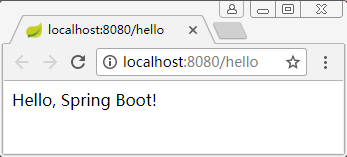
好了,一个最简单的Web项目完成了。没有写任何的配置文件,也没有任何的xml文件(这里完全可以把web.xml文件删掉)。
Spring Boot入门第一天:Hello, Spring Boot!的更多相关文章
- Spring Boot入门(一):搭建Spring Boot项目
从本篇博客开始,我们开始进入Spring Boot的世界,它的出现使Spring的开发变得更加简洁,因此一经推出受到众多程序员的喜爱. 作为Spring Boot系列的第一篇博客,我们先来讲解下如何搭 ...
- Spring Boot学习第一部分(Spring 4.x)第一章(Spring 基础)
1.spring概述 1.1.spring的简史 第一阶段:XML配置spring 1.x时代, 第二阶段:注解配置spring 2.x时代, @Controller @Service @Compon ...
- [Spring Batch 系列] 第一节 初识 Spring Batch
距离开始使用 Spring Batch 有一段时间了,一直没有时间整理,现在项目即将完结,整理下这段时间学习和使用经历. 官网地址:http://projects.spring.io/spring-b ...
- Spring入门第一课:Spring基础与配置Bean
1.入门 Spring是简化java开发的一个框架,其中IoC和AOP是Spring的两个重要核心.由于Spring是非侵入性的,通过Ioc容器来管理bean的生命周期,还整合了许多其他的优秀框架,所 ...
- Spring Security 入门(1-6-1)Spring Security - 配置文件解析和访问请求处理
1.在pom.xml中添加maven坐标 <dependency> <groupId>org.springframework.security</groupId> ...
- Spring Security 入门(1-3-5)Spring Security - remember me!
Remember-Me 功能 概述 Remember-Me 是指网站能够在 Session 之间记住登录用户的身份,具体来说就是我成功认证一次之后在一定的时间内我可以不用再输入用户名和密码进行登录了, ...
- Spring Security 入门(1-6-2)Spring Security - 内置的filter顺序、自定义filter、http元素和对应的filterChain
Spring Security 的底层是通过一系列的 Filter 来管理的,每个 Filter 都有其自身的功能,而且各个 Filter 在功能上还有关联关系,所以它们的顺序也是非常重要的. 1.S ...
- Spring Security 入门(1-4-2)Spring Security - 认证过程之AuthenticationProvider的扩展补充说明
1.用户信息从数据库获取 通常我们的用户信息都不会向第一节示例中那样简单的写在配置文件中,而是从其它存储位置获取,比如数据库.根据之前的介绍我们知道用户信息是通过 UserDetailsService ...
- Spring Security 入门(1-4-1)Spring Security - 认证过程
理解时可结合一下这位老兄的文章:http://www.importnew.com/20612.html 1.Spring Security的认证过程 1.1.登录过程 - 如果用户直接访问登录页面 用 ...
随机推荐
- vue2.0之echarts使用
1.首先下载echart依赖 npm install echarts --save备注:npm 安装报错时使用cnpm 2.全局注册 在main.js里引入echart并在vue中注册echart / ...
- 基础_cifar10_model
今天进一步在cifar10数据集上解决几个问题: 1.比较一下序贯和model,为什么要分成两块: 2.同样的条件下,我去比较一下序贯和model.这个例子作为今天的晚间运行. 1.比较一下序贯和mo ...
- python --- 18 类与类之间的关系, 特殊成员
类与类之间的关系 一.依赖关系 执行某个动作的时候. 需要xxx来帮助你完成这个操作 随时可以更换另外一个东西来完成此操作 此时的关系是最轻的. 二.关联关系(组合关系,聚合关系) 1.一对 ...
- ol3对地图上某些特定的经纬度进行标注
最终效果需要类似于这种 1.首先我们需要一个最基本的地图,这一步骤可以浏览该分类下的上一篇随笔. 2.ol3支持的文件格式有.geojson,我们需要将坐标制作成符合这种格式的样子才能被ol3识别并显 ...
- topcoder srm 707 div1
1 构造一个棋盘,长宽n,m不超过50,每个格子为障碍或者非障碍两种,使得从(0,0)到(n-1,m-1)的最短路为给定的值k. 思路:如果k小于等于98,那么一定存在没有障碍的棋盘满足要求.否则,最 ...
- MATLAB小波包的分解与重构
该文章用来直观上先感受一下小波包的分解与重构 例1 有一个信号,变量名为wave,随便找一个信号load进来就行了. t=wpdec(wave,3,'dmey'); t2 = wpjoin(t,[ ...
- Linux 题目收集
目录 1.库函数,系统调用,用户态及内核态 2.查看进程,杀死进程 3.查看文档 4.scp命令 5.不在 sudoers 文件中.此事将被报告 6.chmod: 更改"minikube&q ...
- SpringBoot Mybatis问题收集
1.在SpringBoot中打印mybatis中执行的sql 其实在application.properties 文件下,添加一下配置即可: logging.level.org.springframe ...
- c 语言中宏定义和定义全局变量的区别
宏定义和定义全局变量的区别: 1 作用时间不同. 宏定义在编译期间即会使用并替换,而全局变量要到运行时才可以. 2 本质类型不同. 宏定义的只是一段字符,在编译的时候被替换到引用的位置.在运行中是没有 ...
- Eclipse 创建maven项目 报错 one or more constraints have not been satisfied
首先 在 pom.xml > plugins 中添加 <plugin> <groupId>org.apache.maven.plugins</groupId> ...