
第2-1-4章 SpringBoot整合FastDFS文件存储服务
5 SpringBoot整合
5.1 操作步骤
- 配置FastDFS执行环境
- 文件上传配置
- 整合Swagger2测试接口
5.2 项目依赖
<!-- FastDFS依赖 -->

<dependency>

    <groupId>com.github.tobato</groupId>

    <artifactId>fastdfs-client</artifactId>

    <version>1.26.5</version>

</dependency>

<!-- Swagger2 核心依赖 -->

<dependency>

    <groupId>io.springfox</groupId>

    <artifactId>springfox-swagger2</artifact>

    <version>2.9.2</version>

</dependency>

<dependency>

    <groupId>io.springfox</groupId>

    <artifactId>springfox-swagger-ui</artifactId>

    <version>2.9.2</version>

</dependency>
5.3 客户端开发
5.3.1 FastDFS配置
fdfs:

  # 链接超时

  connect-timeout: 60

  # 读取时间

  so-timeout: 60

  # 生成缩略图参数

  thumb-image:

    width: 150

    height: 150

  tracker-list: 192.168.86.101:22122
5.3.2 FastDFS配置类
@Configuration

@Import(FdfsClientConfig.class)

// 避免Jmx重复注册bean

@EnableMBeanExport(registration = RegistrationPolicy.IGNORE_EXISTING)

public class DFSConfig {

}
5.3.3 文件工具类
import com.github.tobato.fastdfs.domain.fdfs.StorePath;

import com.github.tobato.fastdfs.service.FastFileStorageClient;

import org.slf4j.Logger;

import org.slf4j.LoggerFactory;

import org.springframework.stereotype.Component;

import org.springframework.util.StringUtils;

import org.springframework.web.multipart.MultipartFile;

import javax.annotation.Resource;

@Component

public class FileDfsUtil {

    private static final Logger LOGGER = LoggerFactory.getLogger(FileDfsUtil.class);

    @Resource

    private FastFileStorageClient storageClient ;

    /**

     * 上传文件

     */

    public String upload(MultipartFile multipartFile) throws Exception{

        String originalFilename = multipartFile.getOriginalFilename().

                substring(multipartFile.getOriginalFilename().

                        lastIndexOf(".") + 1);

        StorePath storePath = this.storageClient.uploadImageAndCrtThumbImage(

                multipartFile.getInputStream(),

                multipartFile.getSize(),originalFilename , null);

        return storePath.getFullPath() ;

    }

    /**

     * 删除文件

     */

    public void deleteFile(String fileUrl) {

        if (StringUtils.isEmpty(fileUrl)) {

            LOGGER.info("fileUrl == >>文件路径为空...");

            return;

        }

        try {

            StorePath storePath = StorePath.parseFromUrl(fileUrl);

            storageClient.deleteFile(storePath.getGroup(), storePath.getPath());

        } catch (Exception e) {

            LOGGER.info(e.getMessage());

        }

    }

}
5.3.4 文件上传配置
spring:

  application:

    name: fdfs-demo

  jackson:

    time-zone: GMT+8

    date-format: yyyy-MM-dd HH:mm:ss

  servlet:

    multipart:

      max-file-size: 100MB

      max-request-size: 100MB

      enabled: true
5.3.5 配置Swagger2
配置类:
import org.springframework.context.annotation.Bean;

import org.springframework.context.annotation.Configuration;

import springfox.documentation.builders.ApiInfoBuilder;

import springfox.documentation.builders.PathSelectors;

import springfox.documentation.builders.RequestHandlerSelectors;

import springfox.documentation.service.ApiInfo;

import springfox.documentation.spi.DocumentationType;

import springfox.documentation.spring.web.plugins.Docket;

/**

 * Swagger 配置文件

 */

@Configuration

public class SwaggerConfig {

    @Bean

    public Docket createRestApi() {

        return new Docket(DocumentationType.SWAGGER_2)

                .apiInfo(apiInfo())

                .select()

                .apis(RequestHandlerSelectors.basePackage("com.itheima.fdfs.demo"))

                .paths(PathSelectors.any())

                .build();

    }

    private ApiInfo apiInfo() {

        return new ApiInfoBuilder()

                .title("SpringBoot利用Swagger构建API文档")

                .description("Fast DFS接口")

                .version("version 1.0")

                .build();

    }

}
启动类:
import org.springframework.boot.SpringApplication;

import org.springframework.boot.autoconfigure.SpringBootApplication;

import springfox.documentation.swagger2.annotations.EnableSwagger2;

@EnableSwagger2

@SpringBootApplication

public class FdfsDemoApplication {

	public static void main(String[] args) {

		SpringApplication.run(FdfsDemoApplication.class, args);

	}

}
5.3.6 API接口
import com.itheima.fdfs.demo.common.FileDfsUtil;

import io.swagger.annotations.ApiOperation;

import org.springframework.http.ResponseEntity;

import org.springframework.util.StringUtils;

import org.springframework.web.bind.annotation.RequestMapping;

import org.springframework.web.bind.annotation.RequestMethod;

import org.springframework.web.bind.annotation.RequestParam;

import org.springframework.web.bind.annotation.RestController;

import org.springframework.web.multipart.MultipartFile;

import javax.annotation.Resource;

@RestController

public class FileController {

    @Resource

    private FileDfsUtil fileDfsUtil ;

    /**

     * http://localhost:8081/swagger-ui.html

     */

    @ApiOperation(value="上传文件", notes="测试FastDFS文件上传")

    @RequestMapping(value = "/uploadFile",headers="content-type=multipart/form-data", method = RequestMethod.POST)

    public ResponseEntity<String> uploadFile (@RequestParam("file") MultipartFile file){

        String result ;

        try{

            String path = fileDfsUtil.upload(file) ;

            if (!StringUtils.isEmpty(path)){

                result = path ;

            } else {

                result = "上传失败" ;

            }

        } catch (Exception e){

            e.printStackTrace() ;

            result = "服务异常" ;

        }

        return ResponseEntity.ok(result);

    }

    /**

     * 文件删除

     */

    @RequestMapping(value = "/deleteByPath", method = RequestMethod.GET)

    public ResponseEntity<String> deleteByPath (){

        String filePathName = "group1/M00/00/00/rBIAAmNmi82AJxLsAABdrZgsqUU214.jpg" ;

        fileDfsUtil.deleteFile(filePathName);

        return ResponseEntity.ok("SUCCESS") ;

    }

}
5.4 接口演示
测试接口
- 上传接口
- 删除接口
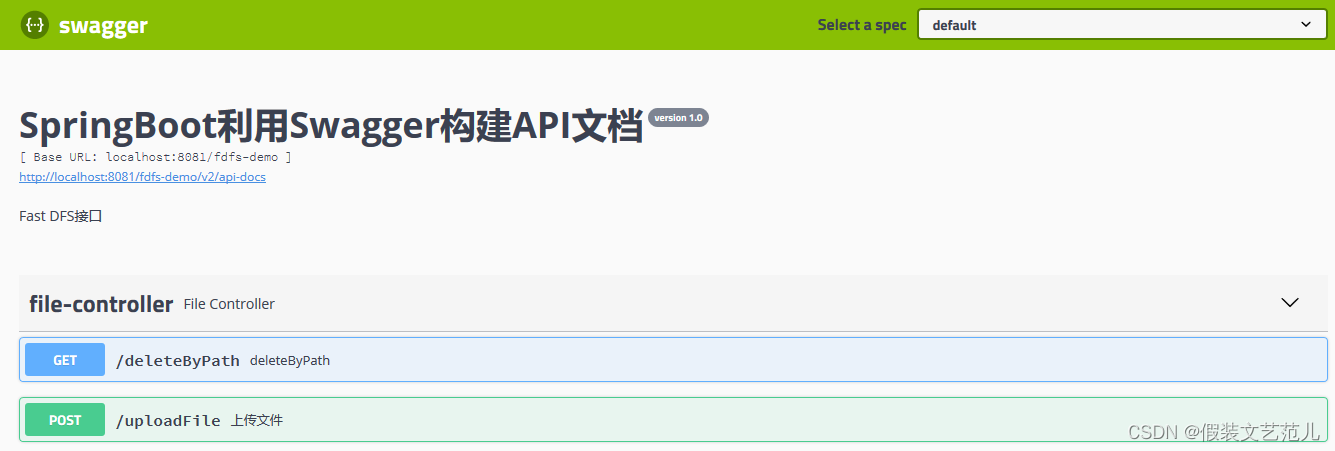
第2-1-4章 SpringBoot整合FastDFS文件存储服务的更多相关文章
- SpringBoot整合阿里短信服务
导读 由于最近手头上需要做个Message Gateway,涉及到:邮件(点我直达).短信.公众号(点我直达)等推送功能,网上学习下,整理下来以备以后使用. 步骤 点我直达 登录短信服务控制台 点我直 ...
- 第2-3-1章 文件存储服务系统-nginx/fastDFS/minio/阿里云oss/七牛云oss
目录 文件存储服务 1. 需求背景 2. 核心功能 3. 存储策略 3.1 本地存储 3.2 FastDFS存储 3.3 云存储 3.4 minio 4. 技术设计 文件存储服务 全套代码及资料全部完 ...
- springboot整合fastdfs实现上传和下载
FastDFS_Client源码 https://github.com/tobato/FastDFS_Client 友情提示:由于FastDFS_Client这个源码不是很多,并且目前没有找到相关文档 ...
- SpringBoot整合Fastdfs,实现图片上传(IDEA)
我们部署Fastdfs,就是为了实现文件的上传. 现在使用idea整合Fastdfs,实现图片上传 部署环境:Centos7部署分布式文件存储(Fastdfs) 利用Java客户端调用FastDFS ...
- SpringBoot整合redis哨兵主从服务
前提环境: 主从配置 http://www.cnblogs.com/zwcry/p/9046207.html 哨兵配置 https://www.cnblogs.com/zwcry/p/9134721. ...
- dubbo学习实践(4)之Springboot整合Dubbo及Hystrix服务熔断降级
1. springboot整合dubbo 在provider端,添加maven引入,修改pom.xml文件 引入springboot,版本:2.3.2.RELEASE,dubbo(org.apache ...
- springboot整合TinyMCE文件上传回显
今天想尝试TinyMCE富文本,准备着手搭建自己的博客,发现springboot上传文件,如果把文件放在static文件夹不能即时回显,百度了下,说是要刷新文件夹才能解决. 有问题就有解决办法 方法1 ...
- 第2-1-3章 docker-compose安装FastDFS,实现文件存储服务
目录 4 docker-compose安装FastDFS 4.1 docker-compose-fastdfs.yml 4.2 nginx.conf 4.3 storage.conf 4.4 测试 4 ...
- (转)FastDFS文件存储
一.FastDFS介绍 FastDFS开源地址:https://github.com/happyfish100 参考:分布式文件系统FastDFS设计原理 参考:FastDFS分布式文件系统 个人封装 ...
随机推荐
- JavaScript基础回顾知识点记录3
js 中 垃圾回收 //将不在使用的对象设置为null , js就会自动进行垃圾回收机制 var obj = {}; obj = null; js 中 数组基本介绍 数组也是一个对象 与普通对象功能类 ...
- java数组---稀疏数组与数组之间的相互转化
public static void main(String[] args) { int[][]array1=new int[11][11]; array1[1][2]=1; array1[2][3] ...
- C#基础_XML文件读写
使用C#对XML文件进行操作,包括生成一个XML文档,以及读取XML文档中的内容,修改某个元素中的内容 using System; using System.Collections.Generic; ...
- 状态 :睡眠中,进程ID:13431,yum提示Another app is currently holding the yum lock; waiting for it to exit...
问题描述: 今天想在虚拟机上重新安装docker然后使用到yum命令报错: 解决办法: [root@localhost ~]# rm -f /var/run/yum.pid 然后重新运行刚才的yum命 ...
- Windows 系统 PostgreSQL 手工安装配置方法
自从2020年底开始接触 PostgreSQL 以来就喜欢上了这个数据库,个人感觉比 MySQL 好用,多表联合查询性能好很多,同时也不存在 SQLServer 的版权授权费用问题.搭配 .NET 开 ...
- python 中matplotlib 绘图
python 中matplotlib 绘图 数学建模需要,对于绘图进行简单学习 matpoltlib之类的包安装建议之间用anaconda 绘制一条y=x^2的曲线 #比如我们要绘制一条y=x^2的曲 ...
- Merge Into 语法支持
KINGBASE 兼容Oracle 语法,实现了merge into 的功能.以下以例子的形式,介绍merge into语法的使用.以下例子在V8R6 ,且 database_mode=oracle ...
- Mysql 安全加固经验总结
本文为博主原创,转载请注明出处: 目录 1.内网部署Mysql 2. 使用独立用户运行msyql 3.为不同业务创建不同的用户,并设置不同的密钥 4.指定mysql可访问用户ip和权限 5. 防sql ...
- .NET 反向代理 YARP 跨域请求 CORS
使用过 nginx 的小伙伴应该都知道,这个中间件是可以设置跨域的,作为今天的主角,同样的 反向代理中间件的 YARP 毫无意外也支持了跨域请求设置. 有些小伙伴可能会问了,怎样才算是跨域呢? 在 H ...
- PAT (Basic Level) Practice 1011 A+B 和 C 分数 15
给定区间 [−231,231] 内的 3 个整数 A.B 和 C,请判断 A+B 是否大于 C. 输入格式: 输入第 1 行给出正整数 T (≤10),是测试用例的个数.随后给出 T 组测试用例,每组 ...