
配置全局路由表和VRF路由表之间的路由泄漏
1、拓扑图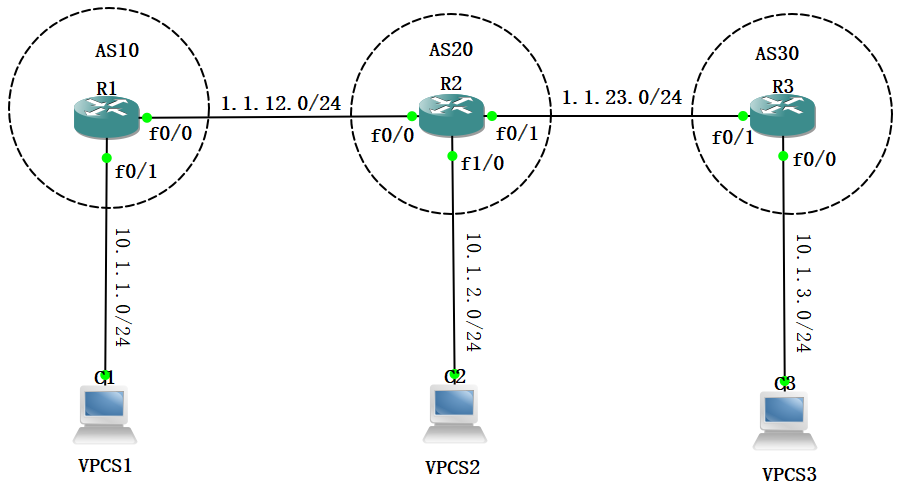
2、R1配置


R1#sho run

Building configuration...

Current configuration : 1360 bytes

!

upgrade fpd auto

version 12.4

service timestamps debug datetime msec

service timestamps log datetime msec

no service password-encryption

!

hostname R1

!

boot-start-marker

boot-end-marker

!

logging message-counter syslog

!

no aaa new-model

ip source-route

no ip icmp rate-limit unreachable

ip cef

!

!

!

!

no ip domain lookup

ip vrf R1

 rd 1:1

!

no ipv6 cef

!

multilink bundle-name authenticated

!

!

!

!

!

!

!

!

!

!

!

!

!

!

!

!

memory-size iomem 0

archive

 log config

  hidekeys

!

!

!

!

!

ip tcp synwait-time 5

!

!

!

!

interface FastEthernet0/0

 ip vrf forwarding R1

 ip address 1.1.12.1 255.255.255.0

 duplex auto

 speed auto

!

interface FastEthernet0/1

 ip vrf forwarding R1

 ip address 10.1.1.1 255.255.255.0

 duplex auto

 speed auto

!

router bgp 10

 no synchronization

 bgp router-id 1.1.1.1

 bgp log-neighbor-changes

 no auto-summary

 !

 address-family ipv4 vrf R1

  neighbor 1.1.12.2 remote-as 20

  neighbor 1.1.12.2 activate

  no synchronization

  network 10.1.1.0 mask 255.255.255.0

 exit-address-family

!

ip forward-protocol nd

no ip http server

no ip http secure-server

!

!

!

!

!

!

!

!

!

control-plane

!

!

!

mgcp fax t38 ecm

!

!

!

!

gatekeeper

 shutdown

!

!

line con 0

 exec-timeout 0 0

 privilege level 15

 logging synchronous

 stopbits 1

line aux 0

 exec-timeout 0 0

 privilege level 15

 logging synchronous

 stopbits 1

line vty 0 4

 login

!

end
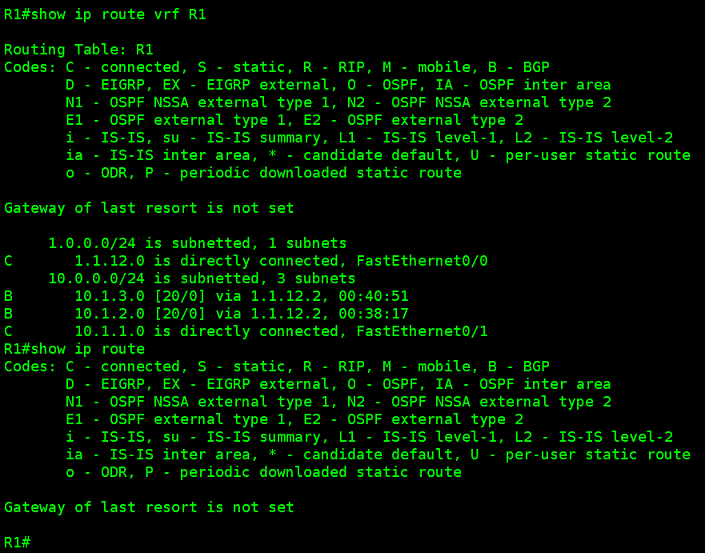
R1配置
3、R2配置
R2#sho run

Building configuration...

Current configuration : 1780 bytes

!

upgrade fpd auto

version 12.4

service timestamps debug datetime msec

service timestamps log datetime msec

no service password-encryption

!

hostname R2

!

boot-start-marker

boot-end-marker

!

logging message-counter syslog

!

no aaa new-model

ip source-route

no ip icmp rate-limit unreachable

ip cef

!

!

!

!

no ip domain lookup

ip vrf R2

 rd 2:2

 import ipv4 unicast map R3

!

no ipv6 cef

!

multilink bundle-name authenticated

!

!

!

!

!

!

!

!

!

!

!

!

!

!

!

!

memory-size iomem 0

archive

 log config

  hidekeys

!

!

!

!

!

ip tcp synwait-time 5

!

!

!

!

interface FastEthernet0/0

 ip vrf forwarding R2

 ip address 1.1.12.2 255.255.255.0

 duplex auto

 speed auto

!

interface FastEthernet0/1

 ip address 1.1.23.2 255.255.255.0

 duplex auto

 speed auto

!

interface FastEthernet1/0

 ip address 10.1.2.1 255.255.255.0

 duplex half

!

router bgp 20

 bgp router-id 2.2.2.2

 bgp log-neighbor-changes

 neighbor 1.1.23.3 remote-as 30

 !

 address-family ipv4

  neighbor 1.1.23.3 activate

  no auto-summary

  no synchronization

  network 10.1.1.0 mask 255.255.255.0

  network 10.1.2.0 mask 255.255.255.0

 exit-address-family

 !

 address-family ipv4 vrf R2

  neighbor 1.1.12.1 remote-as 10

  neighbor 1.1.12.1 activate

  no synchronization

 exit-address-family

!

ip forward-protocol nd

ip route 10.1.1.0 255.255.255.0 FastEthernet0/0

no ip http server

no ip http secure-server

!

!

!

!

ip prefix-list 1 seq 5 permit 10.1.3.0/24

ip prefix-list 1 seq 10 permit 10.1.2.0/24

!

!

!

!

route-map R3 permit 10

 match ip address prefix-list 1

!

!

!

control-plane

!

!

!

mgcp fax t38 ecm

!

!

!

!

gatekeeper

 shutdown

!

!

line con 0

 exec-timeout 0 0

 privilege level 15

 logging synchronous

 stopbits 1

line aux 0

 exec-timeout 0 0

 privilege level 15

 logging synchronous

 stopbits 1

line vty 0 4

 login

!

end
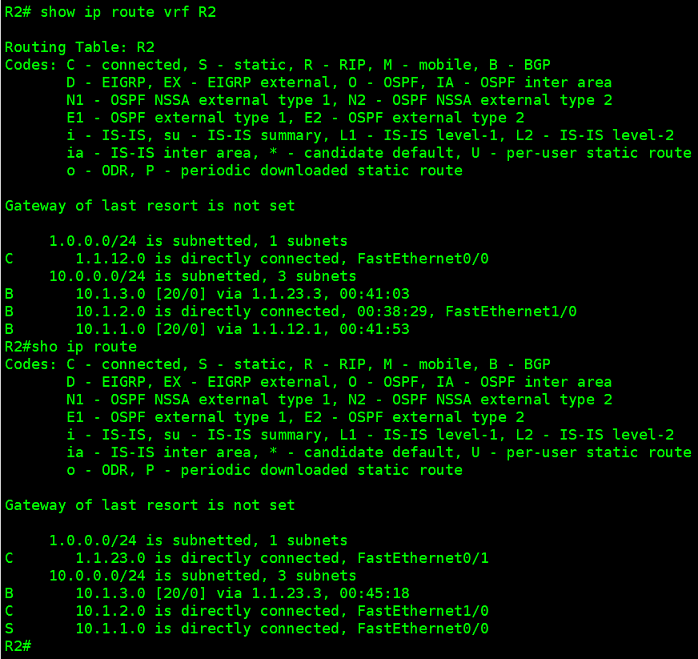
R2配置
4、R3配置
R3#sho run

Building configuration...

Current configuration : 1269 bytes

!

upgrade fpd auto

version 12.4

service timestamps debug datetime msec

service timestamps log datetime msec

no service password-encryption

!

hostname R3

!

boot-start-marker

boot-end-marker

!

logging message-counter syslog

!

no aaa new-model

ip source-route

no ip icmp rate-limit unreachable

ip cef

!

!

!

!

no ip domain lookup

no ipv6 cef

!

multilink bundle-name authenticated

!

!

!

!

!

!

!

!

!

!

!

!

!

!

!

!

memory-size iomem 0

archive

 log config

  hidekeys

!

!

!

!

!

ip tcp synwait-time 5

!

!

!

!

interface FastEthernet0/0

 ip address 10.1.3.1 255.255.255.0

 duplex auto

 speed auto

!

interface FastEthernet0/1

 ip address 1.1.23.3 255.255.255.0

 duplex auto

 speed auto

!

router bgp 30

 bgp router-id 3.3.3.3

 bgp log-neighbor-changes

 neighbor 1.1.23.2 remote-as 20

 !

 address-family ipv4

  neighbor 1.1.23.2 activate

  no auto-summary

  no synchronization

  network 10.1.3.0 mask 255.255.255.0

 exit-address-family

!

ip forward-protocol nd

no ip http server

no ip http secure-server

!

!

!

!

!

!

!

!

!

control-plane

!

!

!

mgcp fax t38 ecm

!

!

!

!

gatekeeper

 shutdown

!

!

line con 0

 exec-timeout 0 0

 privilege level 15

 logging synchronous

 stopbits 1

line aux 0

 exec-timeout 0 0

 privilege level 15

 logging synchronous

 stopbits 1

line vty 0 4

 login

!

end
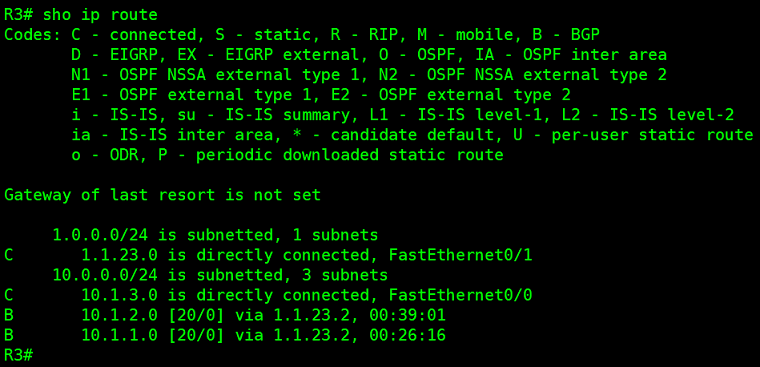
R3配置
5、华三全局路由表和VRF之间路由泄漏配置(写静态路由然后分别重分布到全局路由和VRF路由)
[H3C]dis current-configuration

#

 version 7.1.064, Release 0427P22

#

 sysname H3C

#

ip vpn-instance R2

 route-distinguisher 2:2

#

 system-working-mode standard

 xbar load-single

 password-recovery enable

 lpu-type f-series

#

vlan 1

#

interface NULL0

#

interface GigabitEthernet0/0

 port link-mode route

 combo enable copper

 ip binding vpn-instance R2

 ip address 1.1.12.2 255.255.255.0

#

interface GigabitEthernet0/1

 port link-mode route

 combo enable copper

 ip address 1.1.23.2 255.255.255.0

#

bgp 20

 router-id 2.2.2.2

 peer 1.1.23.3 as-number 30

 #

 address-family ipv4 unicast

  import-route static

  peer 1.1.23.3 enable

 #

 ip vpn-instance R2

  peer 1.1.12.1 as-number 10

  #

  address-family ipv4 unicast

   import-route static

   peer 1.1.12.1 enable

#

 scheduler logfile size 16

#

 ip route-static 1.1.1.0 24 vpn-instance R2 1.1.12.1

 ip route-static vpn-instance R2 3.3.3.0 24 GigabitEthernet0/1 1.1.23.3

#

return

[H3C]dis ip routing-table protocol static

Summary count : 1

Static Routing table status : <Active>

Summary count : 1

Destination/Mask   Proto   Pre Cost        NextHop         Interface

1.1.1.0/24         Static  60  0           1.1.12.1        GE0/0

Static Routing table status : <Inactive>

Summary count : 0

[H3C]dis ip routing-table protocol bgp

Summary count : 1

BGP Routing table status : <Active>

Summary count : 1

Destination/Mask   Proto   Pre Cost        NextHop         Interface

3.3.3.0/24         BGP     255 0           1.1.23.3        GE0/1

BGP Routing table status : <Inactive>

Summary count : 0

[H3C]dis ip routing-table vpn-instance R2 protocol static

Summary count : 1

Static Routing table status : <Active>

Summary count : 1

Destination/Mask   Proto   Pre Cost        NextHop         Interface

3.3.3.0/24         Static  60  0           1.1.23.3        GE0/1

Static Routing table status : <Inactive>

Summary count : 0

[H3C]dis ip routing-table vpn-instance R2 protocol bgp

Summary count : 1

BGP Routing table status : <Active>

Summary count : 1

Destination/Mask   Proto   Pre Cost        NextHop         Interface

1.1.1.0/24         BGP     255 0           1.1.12.1        GE0/0

BGP Routing table status : <Inactive>

Summary count : 0

[H3C]
参考链接:
配置全局路由表和VRF路由表之间的路由泄漏(无下一跳)
https://www.cisco.com/c/zh_cn/support/docs/ip/ip-routing/200158-Configure-Route-Leaking-between-Global-a.html
在Cisco IOS XE上配置VRF泄漏
https://www.cisco.com/c/zh_cn/support/docs/ip/ip-routing/216541-vrf-configuration-examples-on-ios-xe.html
在 Cisco Nexus 交换机上配置 VRF 路由泄漏
https://www.cisco.com/c/zh_cn/support/docs/ios-nx-os-software/nx-os-software/213908-configure-vrf-route-leak-on-nexus.html
配置全局路由表和VRF路由表之间的路由泄漏的更多相关文章
- mycat 配置全局表
在已配置全局序列号的基础上 1.schema.xml <table name="hf_ctrlorder_split_config" primaryKey="HF_ ...
- Linux配置全局jdk
Linux配置全局jdk 1.确保相应文件夹下有apache-tomcat和jdk的压缩文件 注意:jdk文件必须为适应Linux版本的文件 (如果已经有了相应文件,可以跳过以下第2-3个步骤) 2. ...
- maven配置全局的jdk和配置局部的jdk
配置全局的jdk需要修改maven的setting.xml文件 <profile> <id>jdk17</id> <activation> <ac ...
- 通过Application配置全局的Context
我本来配置了全局变量,但是使用SharedPreferences时总是报空指针异常,报错如下: FATAL EXCEPTION: main Process: com.XXX.xxx, PID: 192 ...
- asp.net core webapi项目配置全局路由
0.目录 整体架构目录:ASP.NET Core分布式项目实战-目录 一.前言 在开发项目的过程中,我新创建了一个controller,发现vs会给我们直接在controller头添加前缀,比如[Ro ...
- SpringMVC配置全局日期转换器,处理日期转换异常
Spring 3.1.1使用Mvc配置全局日期转换器,处理日期转换异常链接地址: https://www.2cto.com/kf/201308/236837.html spring3.0配置日期转换可 ...
- asp.net mvc 3 配置全局错误处理 Web.config中设置CustomError
摘自: http://www.myexception.cn/web/1130191.html asp.net mvc 配置全局异常处理 Web.config中设置CustomError Web.con ...
- *** + Polipo 配置全局代理(Linux 版本)
转,原文:http://blog.csdn.net/jon_me/article/details/53525059 我本来是想查这个问题: How to start server and local ...
- linux 配置全局jdk环境
1.在usr/local下新建software文件夹(mkdir software),将下载的jdk和tomcat放在此文件夹下 2.解压 tar -xzvf jdk-8u191-linux-x64. ...
- eNSP——配置全局地址池的DHCP
原理: 拓扑图: 实验编址: 1.基本配置 2.配置全局地址池的DHCP Server 在R1上开启DHCP功能,使用ip pool命令创建一个全局地址池,名字自己定. 在全局地址池配置网段.掩码.租 ...
随机推荐
- redis(12)持久化操作-RDB
前言 Redis 提供了 2 个不同形式的持久化方式: RDB(Redis DataBase) AOF(Append Of File) RDB 在指定的时间间隔内将内存中的数据集快照写入磁盘, 也就是 ...
- gin 01
1.gin介绍: 2.gin的安装 go get -u github.com/gin-gonic/gin 3.gin的第一个helloWord package main import ( " ...
- LeetCode-382 链表随机结点
来源:力扣(LeetCode)链接:https://leetcode-cn.com/problems/linked-list-random-node 题目描述 给你一个单链表,随机选择链表的一个节点, ...
- fabric学习笔记8
fabric学习笔记8 20201303张奕博 2023.1.19 具体结构: Wallet中的X.509数字证书将组织和持有者联系起来,使得持有者能够有权限连接到网络,不同的持有者身份拥有不同的权限 ...
- VS 生成事件 xcopy 报错的解决方法
出现这种情况有可能原因有2种可能: 1.目标文件夹设为只读:此时报错:MSB3073 代码4 ,输出显示:访问遭到拒绝. 解决:去掉文件夹只读属性. 2.缺少环境变量:报错为::MSB3073 代码9 ...
- MSF设置监听
一.msf需要生成一个payload 需要生成一个paylaod,window下面生成一个exe,注意:权限不够用sudo权限 sudo ./msfvenom -p windows/x64/meter ...
- gitignore文件中忽略项不起作用的解决方法
在使用git的时候会遇到这样的情况,我们生产的一些class或者target的目录,我不能提交,这个时候我们需要使用gitignore,但是有的时候虽然添加了,但是不起作用. 情况:开发过程中,我们自 ...
- java原生的分页工具
@NoArgsConstructor @Data //生成 空参构造 get.set. tostring. equals. hascode public class PageUtils<T> ...
- cookie,session,token,drf-jwt
1.cookie,session,token发展史 引入:我们都知道 http 协议本身是一种无状态的协议,一个普通的http请求简单分为三步:客户端发送请求request服务端收到请求并进行处理服务 ...
- MobaXterm激活专业版
本文思路来自 https://github.com/flygon2018/MobaXterm-keygen 有python 环境 并且不看英文的可以继续往下 不然直接访问这个地址也行. 1.需要一个大 ...