
jq全选、全不选、反选、单删、批量删除
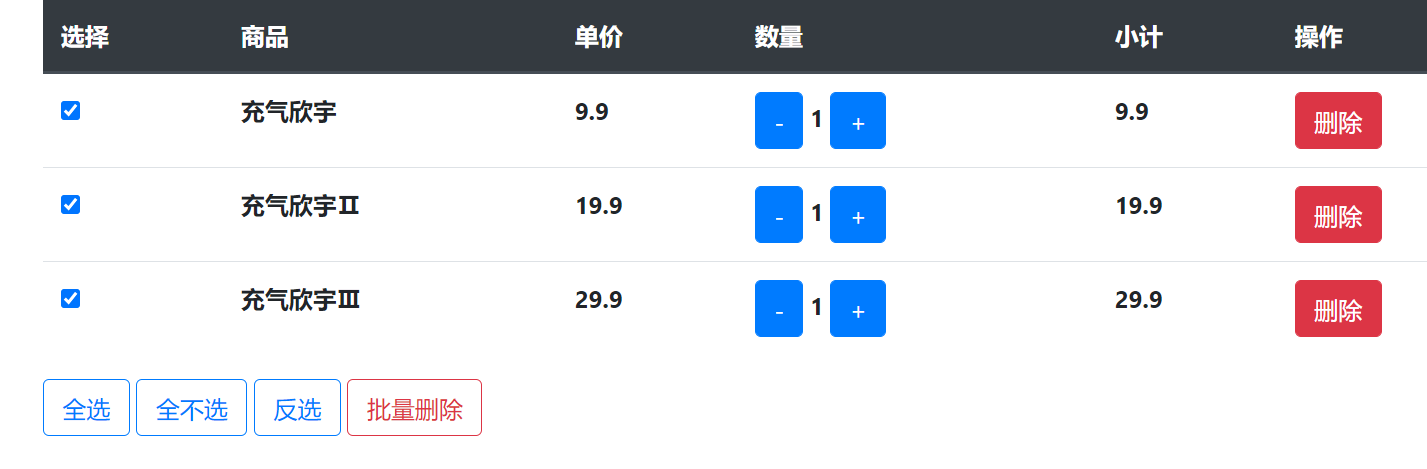
<!DOCTYPE html>
<html>
<head>
<meta charset="utf-8" />
<title></title>
<link rel="stylesheet" type="text/css" href="css/Bootstrap4.css" />
</head>
<body>
<div style="width: 999px;margin: 10px auto;">
<table class="table">
<thead class="thead-dark">
<tr>
<th>选择</th>
<th>商品</th>
<th>单价</th>
<th>数量</th>
<th>小计</th>
<th>操作</th>
</tr>
</thead>
<tbody>
<tr>
<th><input type="checkbox"></th>
<th>充气欣宇</th>
<th>9.9</th>
<th>
<button type="button" class="btn btn-primary jian">-</button>
<span>1</span>
<button type="button" class="btn btn-primary jia">+</button>
</th>
<th>9.9</th>
<th><button class="btn btn-danger">删除</button></th>
</tr>
<tr>
<th><input type="checkbox"></th>
<th>充气欣宇Ⅱ</th>
<th>19.9</th>
<th>
<button type="button" class="btn btn-primary jian">-</button>
<span>1</span>
<button type="button" class="btn btn-primary jia">+</button>
</th>
<th>19.9</th>
<th><button class="btn btn-danger">删除</button></th>
</tr>
<tr>
<th><input type="checkbox"></th>
<th>充气欣宇Ⅲ</th>
<th>29.9</th>
<th>
<button type="button" class="btn btn-primary jian">-</button>
<span>1</span>
<button type="button" class="btn btn-primary jia">+</button>
</th>
<th>29.9</th>
<th><button class="btn btn-danger">删除</button></th>
</tr>
</tbody>
</table>
<button type="button" class="btn btn-outline-primary all">全选</button>
<button type="button" class="btn btn-outline-primary alln">全不选</button>
<button type="button" class="btn btn-outline-primary allf">反选</button>
<button type="button" class="btn btn-outline-danger delall">批量删除</button>
</div>
</body>
</html>
<script src="js/1.js"></script>
<script>
//减号
$('.jian').click(function(){
//获取原来的数量
var num = $(this).next().text();
var last_num = num-- <=1 ? 1 : num--;
//获取单价
var price = $(this).parent().prev().text();
//最终的价格
var last_price = price*last_num
$(this).next().text(last_num)
//替换小计
$(this).parent().next().text(last_price.toFixed(2))
})
//加号
$('.jia').click(function(){
//获取原来的数量
var num = $(this).prev().text();
//数量+1
num++;
//获取单价
var price = $(this).parent().prev().text();
//最终的价格
var last_price = price*num
//替换数量
$(this).prev().text(num)
//替换小计
$(this).parent().next().text(last_price.toFixed(2))
})
//批量删除
$('.delall').click(function(){
if(confirm('确定要删除吗?')){
//获取选中的多选框
var checks = $(':checkbox:checked');
$(checks).each(function(k,v){
$(v).parents('tr').remove();
})
}
})
//单个删除
$('.btn-danger').click(function(){
if(confirm('确定要删除吗?')){
$(this).parents('tr').remove();
}
})
//全选
$('.all').click(function(){
//获取所有的复选框
var check = $(':checkbox');
$(check).each(function(k,v){
v['checked'] = true
})
})
//全不选
$('.alln').click(function(){
//获取所有的复选框
var check = $(':checkbox');
$(check).each(function(k,v){
v['checked'] = false
})
})
//反选
$('.allf').click(function(){
//获取所有的复选框
var check = $(':checkbox');
$(check).each(function(k,v){
if(v['checked']){
v['checked'] = false
}else{
v['checked'] = true
}
})
})
</script>
jq全选、全不选、反选、单删、批量删除的更多相关文章
- AJAX实现弹窗显示详情,全选和批量删除
以Nation表为例,将Nation表显示在页面上,每一行数据前面加上复选框,后面加上查看详情,点击以弹窗形式显示每一行的数据,并且在表格最后一行加上全选复选框,点击选中全部数据,后面跟一个批量删除按 ...
- PHP基础班初学心得:用JQ实现表单的全选、反选、取消和删除功能
摘要: 本人刚参加PHP基础班培训,由于之前毫无基础,分享的心得可能不规范,方法也许也"旁门左道",不能保证质量,只作自己总结学习,也希望能帮助到同样是初学者的朋友们,共同进步. ...
- ajax全选、全不选、反选、单删/批删
<meta charset="utf-8"> <?php //链接数据库 $link = mysqli_connect('127.0.0.1','root','r ...
- jquery中的全选、反选、全不选和单删、批删
HTML页面 <!doctype html><html lang="en"><head> <meta charset="UTF- ...
- Vue-表单验证-全选-反选-删除-批量删除
<!DOCTYPE html> <html> <head> <meta charset="utf-8"> <title> ...
- Jq 遍历 全选 全不选 反选
//全选 全不选 $('#checkAll').click(function () { //判断是否被选中 var bischecked = $('#checkAll').is(':checked') ...
- 基于JQ的多选/全选/反选及获取选中的值
<!-- author:青芒 --> <!DOCTYPE html> <html lang="en"> <head> <met ...
- 利用jQuery实现CheckBox全选/全不选/反选
转自:http://www.cnblogs.com/linjiqin/p/3148259.html jQuery有些版本中实现CheckBox全选/全不选/反选会有bug,经测试jquery-1.3. ...
- jquery 全选 全不选 反选
1.概述 在项目中经常遇到列表中对复选框进行勾选操作,全选...反选.. 2. example <html> <body> <form id="test-for ...
随机推荐
- 对于fetch的理解
在一篇文章里见到一位作者是这么说的 XMLHttpRequest 是一个设计粗糙的 API,不符合关注分离(Separation of Concerns)的原则,配置和调用方式非常混乱,而且基于事件的 ...
- 使用UrlConnection请求一个url地址获取内容
访问网络需要加Internet权限:android.permission.INTERNET 使用UrlConnection请求一个url地址获取内容: //1.创建一个Url对 ...
- 内联函数 在ios中的运用 --黄仁斌
定义: 有函数的结构,但不具备函数的性质,类似于宏替换.代码中使用inline定义,能否形成内联函数,还要看编译器对内联函数体内部的定义的具体处理.产生的动机: 消除函数调用产生的开销 ...
- HTTPStatus(状态码返回)详情
1xx(临时响应) 表示临时响应并需要请求者继续执行操作的状态代码. 代码 说明 100 (继续) 请求者应当继续提出请求. 服务器返回此代码表示已收到请求的第一部分,正在等待其余部分. 101 (切 ...
- MySQL之视图篇
MySQL之视图篇 文章目录 MySQL之视图篇 1. 概述 1.1 为什么使用视图? 1.2 视图的理解 2. 创建视图 2.1 创建单表视图 2.2 针对于多表 2.3 基于视图创建视图 3. 查 ...
- python基础语法_7运算符
http://www.runoob.com/python3/python3-basic-operators.html#ysf7 目录 Python语言支持以下8类型的运算符: 算术运算符(-,+,*, ...
- VNCTF 2022 cm cm1 RE复现
cm1 安卓逆向 JEB 直接跟进主函数找到 ASSERT里面拿到ooo文件 直接脚本解密 k = "vn2022" with open('ooo', 'rb') as f: c ...
- Linux-CPU优化之上下文切换
为什么大量进程(通常进程数大于CPU个数)的运行会导致CPU长时间处于等待时间而导致平均负债率过高呢?没有使用CPU且无不可中断的进程,这就涉及到了上下文切换. 巧妙地利用了时间片轮转的方式, CPU ...
- python2发微信脚本
#!/usr/bin/env python # -*- coding: utf-8 -*- import urllib,urllib2,json import sys reload(sys) sys. ...
- Spring源码之BeanFactoryPostProcessor(后置处理器)
Spring源码之BeanFactoryPostProcessor(后置处理器). 有点水平的Spring开发人员想必都知道BeanFactoryPostProcessor也就是常说的后置管理器,这是 ...