
axios utils axios.postForm
npm install axios -S
目录
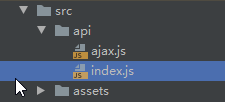
ajax.js 请求工具
/*

ajax请求函数模块

返回值: promise对象(异步返回的数据是: response.data)

 */

import axios from "axios";

import da from 'element-ui/src/locale/lang/da'

export default function ajax (url, data={}, type='GET',headers={}) {

  return new Promise(function (resolve, reject) {

    // headers["Aauthorized"]= "xxxx"

    const user_headers = {headers: headers};

    // 执行异步ajax请求

    let promise

    if (type === 'GET')

    {// 发送get请求

      // 准备url query参数数据

      let dataStr = '' //数据拼接字符串

      Object.keys(data).forEach(key => {

        dataStr += key + '=' + data[key] + '&'

      })

      if (dataStr !== '') {

        dataStr = dataStr.substring(0, dataStr.lastIndexOf('&'))

        url = url + '?' + dataStr

      }

      promise = axios.get(url=url,headers=user_headers)

    } else if(type === 'POST')

    {

      // 发送POST请求

      promise = axios.post(url=url, data=data,headers=user_headers)

    }else //FORM

    {

      promise =  axios.postForm(url=url,data=data,headers=headers)

    }

    promise.then(function (response) {

      // 成功了调用resolve()

      // resolve(response.data)

      resolve(response)

    }).catch(function (error) {

      //失败了调用reject()

      reject(error)

    })

  })

}

/**

 import {queryData} from '../api/index.js'

 import ajax from './ajax'

 export  const  queryData = () => ajax(url=`${BASE_URL}/sea/category/queryWithPage`,data={},type="POST",headers={"xx":"XXXXXXXX","sea":"SEAAAAAA"})

 use:

 methods: {

      handleClick(row) {

        console.log(row);

      },

      async findData(){

        const result = await queryData()

         console.log(result.data)

        this.xx=result.data

        return  result.data

      }

    }

 */
index.js 定义API
 */

import ajax from './ajax'

const BASE_URL = '/api'

export  const  queryData = () => ajax(url=`${BASE_URL}/sea/category/queryWithPage`,{},type="POST",headers={"my_header":"XXXXXXXX","sea":"SEAAAAAA"})
使用:
  import {queryData} from '../api/index.js'

  export default {

    name: 'About',

    methods: {

      handleClick(row) {

        console.log(row);

      },

      async findData(){

        const result = await  queryData()

         console.log(result.data)

        this.xx=result.data

        return  result.data

      }

    }
:
axios utils axios.postForm的更多相关文章
- vue中使用axios与axios的请求响应拦截
VUE中使用Axios axios的安装 npm install axios vue-axios axios在vue的配置与使用 在main.js中引入axios和vue-axios import a ...
- Axios 类似于for循环发送批量请求{:axios.all axios.spread}。
Axios的请求都是异步的!不能用for循环遍历去批量发送请求 那如果我们需要类似与这样的请求怎么办呢 for(let i =0;i<array.length;i++){ axios.post( ...
- axios源码解析 - 请求方法的别名实现
axios中的创建请求方式很多,比如axios(url),axios.get(url),axios.post(url),axios.delete(url),方便快捷的api设计让axios火得一塌糊涂 ...
- axios封装
前言 作为出入vue的小萌新,我在写请求的时候,也是毫不犹豫写了ajax,结果肯定是不行的... Vue 原本有一个官方推荐的 ajax 插件 vue-resource,但是自从 Vue 更新到 2. ...
- AXIOS源代码重点难点分析
摘要 vue使用axios进行http通讯,类似jquery/ajax的作用,类似angular http的作用,axios功能强大,使用方便,是一个优秀的http软件,本文旨在分享axios源代码重 ...
- Axios源码深度剖析 - 替代$.ajax,成为xhr的新霸主
前戏 在正式开始axios讲解前,让我们先想想,如何对现有的$.ajax进行简单的封装,就可以直接使用原声Promise了? let axios = function(config){ return ...
- axios 封装
来自:https://www.jianshu.com/p/68d81da4e1ad 侵删 import axios from 'axios' import qs from 'qs' let baseu ...
- 封装axios
import axios from 'axios' // import store from '@/vuex/store.js' import router from '../router' impo ...
- vue项目实践-添加axios封装api请求
安装 axios npm install axios --save 创建实例 (utils/fetch.js) axios 默认提交格式为:application/json 可使用 qs 模块(需要安 ...
- 使用axios post 提交数据,后台获取不到
https://www.cnblogs.com/yiyi17/p/9409249.html(copy https://www.cnblogs.com/loveyaxin/p/8385694.html( ...
随机推荐
- FIFO 串口接收处理机制
与安富莱电子的串口处理机制做对比交互 参考链接: https://www.eet-china.com/mp/a161019.html
- vue 页面中切换国际语言
1.npm i vue-i18n 2. 3.main.js 4.vue页面
- 语言-页面-模板-thymeleaf
一.语法 二.使用 Thymeleaf入门到吃灰 - 鞋破露脚尖儿 - 博客园 (cnblogs.com)
- 2022-3-15内部群每日三题-清辉PMP
1.一家公司被一家大公司收购,这家大公司希望把重点放在其核心产品和服务上.处于规划阶段的所有项目都正在进行修定,以包含新的变更管理程序.一个项目的项目经理需要持续的高级输入,以确保与新的组织结构保持一 ...
- echart 悬浮窗超边界了怎么办?
悬浮窗超边界了怎么办? 在渲染界面函数里面 写一个 // tooltip浮窗未知 chartOption.tooltip.position = function(point, params, dom, ...
- CSS中Position几种属性的总结
定位position 定位方向:left right top bottom 静态定位:static 默认值,就是文档流 绝对定位:absolute 特点: 1.不占据原来的位置(脱标) ...
- mysql 删除数据所有表
SELECT CONCAT('drop table ',table_name,';') FROM information_schema.`TABLES` WHERE table_schema='car ...
- React++antd+ProComponents可编辑表格EditableProTable组件实现表单中的可编辑列表组件
需求: 在新增&编辑表单中,共分三个表单模块,第二个模块设计为一个可编辑表格组件,其中可选下拉列表依赖外层第一个模块的某条数据值,提供新增.编辑.删除.按规定条件去重等功能,并在第三个模块中自 ...
- oracle相关知识
1. 给表字段添加注释的语法 comment on column 表名.字段名 is '注释信息'; 2. 数据库字段重命名 alter table ORGAN_PARTER_EXT_TWO rena ...
- https://计算机等级分类总结
4个等级: 一级:定位为满足人们在一般性工作中对计算机的应用,重点是操作能力的考核: 二级:定位为计算机程序员,可谓"计算机蓝领". 三级:定位为"开发工程师" ...