
C#自行实现安装卸载程序(不使用官方组件)
正规软件建议还是使用官方的标准安装程序组件,因为官方的标准安装/卸载组件能更好的与操作系统衔接,安装和卸载流程更加规范。
今天提供一种野路子,全用代码实现安装卸载器。
需要写一个程序,包含安装器、卸载器、主程序。
在visual studio中创建一个解决方案,解决方案里创建3个项目分别对应安装器、卸载器、主程序。
如图

制作安装包目录时,将三个项目全部生成可执行程序。然后按下方文件结构组织安装包,复制最终程序文件到相应位置。
U8FileTransferIntaller
+-- U8FileTransfer
| +-- main
| |-- U8FileTransfer.exe
| |-- ...
| +-- uninstall.exe
+-- intall.exe
* Installer生成install.exe,用于拷贝U8FileTransfer目录到用户选择的安装路劲,注册表添加开机自启,启动U8FileTransfer.exe
* UnInstaller生成uninstall.exe,用于卸载程序(退出主程序,取消开机自启,删除main目录)
* U8FileTransfer是主程序。
卸载时会删除main目录,uninstall.exe无法自己删除自己,需手动删除。
下面只讲安装和卸载器的实现,不讲主程序。
安装器

功能:复制目录及文件,注册表添加开启自启,启动程序,关闭自身
Intaller.cs 代码:
using System;

using System.Collections.Generic;

using System.ComponentModel;

using System.Data;

using System.Drawing;

using System.Linq;

using System.Text;

using System.Windows.Forms;

using System.IO;

using Microsoft.Win32;

using System.Reflection;

// using System.Diagnostics;

namespace Installer

{

    public partial class Intaller : Form

    {

        private string appDirName = "U8FileTransfer";

        public Intaller()

        {

            InitializeComponent();

        }

        /// <summary>

        /// 复制目录(包括子目录及所有文件)到另一个地方

        /// </summary>

        /// <param name="sourceDirName"></param>

        /// <param name="destDirName"></param>

        /// <param name="copySubDirs"></param>

        private void directoryCopy(string sourceDirName, string destDirName, bool copySubDirs)

        {

            // Get the subdirectories for the specified directory.

            DirectoryInfo dir = new DirectoryInfo(sourceDirName);

            if (!dir.Exists)

            {

                throw new DirectoryNotFoundException(

                    "Source directory does not exist or could not be found:"

                    + sourceDirName);

            }

            DirectoryInfo[] dirs = dir.GetDirectories();

            // If the destination directory doesn't exist, create it.

            Directory.CreateDirectory(destDirName);

            // Get the files in the directory and copy them to the new location.

            FileInfo[] files = dir.GetFiles();

            foreach (FileInfo file in files)

            {

                string tempPath = Path.Combine(destDirName, file.Name);

                file.CopyTo(tempPath, true);

            }

            // If copying subdirectories, copy them and their contents to new location.

            if (copySubDirs)

            {

                foreach (DirectoryInfo subdir in dirs)

                {

                    string tempPath = Path.Combine(destDirName, subdir.Name);

                    directoryCopy(subdir.FullName, tempPath, copySubDirs);

                }

            }

        }

        // 文件浏览按钮事件

        private void folderBrowserButton_Click(object sender, EventArgs e)

        {

            DialogResult dr = folderBrowserDialog.ShowDialog();

            if (dr == System.Windows.Forms.DialogResult.OK)

            {

                folderPathTextBox.Text = folderBrowserDialog.SelectedPath + "\\" + appDirName;

            }

        }

        // 确认按钮事件

        private void okButton_Click(object sender, EventArgs e)

        {

            /**

             * 1.复制目录及文件

             */

            string sourceDirName = Application.StartupPath + "\\" + appDirName;

            string destDirName = @folderPathTextBox.Text;

            directoryCopy(sourceDirName, destDirName, true);

            /**

             * 2.注册表添加开启自启

             */

            RegistryKey key = Registry.LocalMachine.OpenSubKey("SOFTWARE\\Microsoft\\Windows\\CurrentVersion\\Run", true);

            if(key == null)//如果该项不存在的话,则创建该子项

            {

                key = Registry.LocalMachine.CreateSubKey("SOFTWARE\\Microsoft\\Windows\\CurrentVersion\\Run");

            }

            key.SetValue(appDirName, destDirName + "\\main\\U8FileTransfer.exe");

            key.Close();

            /**

             * 3.启动程序

             */

            string start = @folderPathTextBox.Text + "\\main\\U8FileTransfer.exe";

            System.Diagnostics.Process.Start(start);

            //关闭自身

            Application.Exit();

        }

    }

}
卸载器
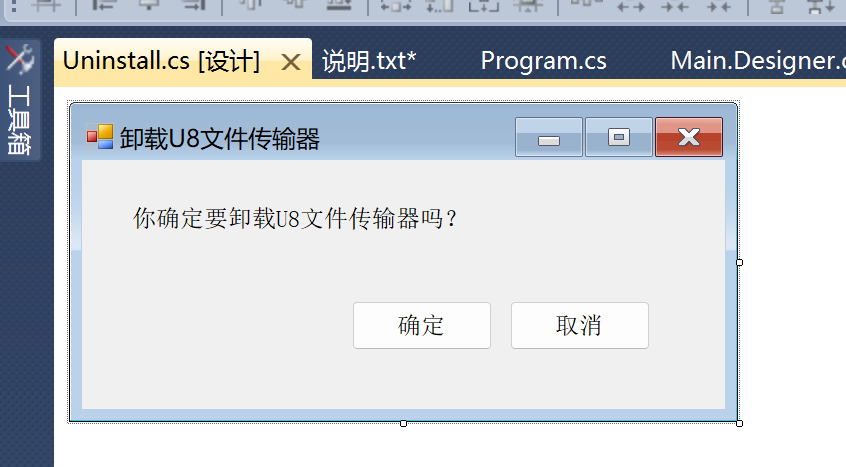
功能:退出运行中的主程序,删除注册表开机自启项,删除安装目录,弹出提示,退出自身
Uninstall.cs 代码:
using System;

using System.Collections.Generic;

using System.ComponentModel;

using System.Data;

using System.Drawing;

using System.Linq;

using System.Text;

using System.Windows.Forms;

using System.Diagnostics;

using Microsoft.Win32;

using System.IO;

namespace Uninstaller

{

    public partial class Uninstall : Form

    {

        public Uninstall()

        {

            InitializeComponent();

        }

        private void cancelButton_Click(object sender, EventArgs e)

        {

            Application.Exit();

        }

        private void confirmButton_Click(object sender, EventArgs e)

        {

            // 退出运行中的主程序

            Process[] process = Process.GetProcesses();

            foreach (Process prc in process)

            {

                // ProcessName为exe程序的名称,比如叫main.exe,那么ProcessName就为main

                if (prc.ProcessName == "U8FileTransfer")

                {

                    prc.Kill();

                    break;

                }

            }

            // 删除注册表开机自启项

            // 打开注册表子项

            RegistryKey key = Registry.LocalMachine.OpenSubKey("SOFTWARE\\Microsoft\\Windows\\CurrentVersion\\Run", true);

            if (key != null)

            {

                try

                {

                    key.DeleteValue("U8FileTransfer");

                }

                catch (Exception ex)

                {

                    MessageBox.Show(ex.Message);

                }

            }

            key.Close();

            // 删除目录

            DeleteDir(Application.StartupPath + "\\main");

            // 弹出提示

            MessageBox.Show("以卸载完成,Uninstall.exe需要手动删除");

            // 退出自身

            Application.Exit();

        }

        /// <summary>

        /// 删除文件夹

        /// </summary>

        /// <param name="file">需要删除的文件路径</param>

        /// <returns></returns>

        public bool DeleteDir(string file)

        {

            try

            {

                //去除文件夹和子文件的只读属性

                //去除文件夹的只读属性

                System.IO.DirectoryInfo fileInfo = new DirectoryInfo(file);

                fileInfo.Attributes = FileAttributes.Normal & FileAttributes.Directory;

                //去除文件的只读属性

                System.IO.File.SetAttributes(file, System.IO.FileAttributes.Normal);

                //判断文件夹是否还存在

                if (Directory.Exists(file))

                {

                    foreach (string f in Directory.GetFileSystemEntries(file))

                    {

                        if (File.Exists(f))

                        {

                            //如果有子文件删除文件

                            File.Delete(f);

                            //Console.WriteLine(f);

                        }

                        else

                        {

                            //循环递归删除子文件夹

                            DeleteDir(f);

                        }

                    }

                    //删除空文件夹

                    Directory.Delete(file);

                }

                return true;

            }

            catch (Exception) // 异常处理

            {

                return false;

            }

        }

    }

}
C#自行实现安装卸载程序(不使用官方组件)的更多相关文章
- WPF 自己动手来做安装卸载程序
原文:WPF 自己动手来做安装卸载程序 前言 说起安装程序,这也许是大家比较遗忘的部分,那么做C/S是小伙伴们,难道你们的程序真的不需要一个炫酷的安装程序么? 声明在先 本文旨在教大家以自己的方式实现 ...
- 帮同事写了几行代码,在 安装/卸载 程序里 注册/卸载 OCX控件
写了个小控制台程序,这个程序用来注册 / 卸载OCX控件,用在Inno Setup做的安装卸载程序里. #include "stdafx.h" #include <windo ...
- 使用Powershell实现自动化安装/卸载程序
最近需要制作软件安装包,需要附带VC运行时和.Net Framework的安装,但又不想让用户自己点下一步,所以就有了以下操作. 微软提供了一个程序叫msiexec.exe,位于C:\Windows\ ...
- 用Setup系列函数完成驱动卸载安装[驱动安装卸载程序]
// InstallWDFDriver.cpp : Defines the entry point for the console application. // #include "std ...
- centos7 安装卸载程序rpm使用方法
1.安装 rpm 包: ➢ 基本语法 rpm -ivh RPM 包全路径名称 2.卸载 rpm 包: ➢ 基本语法 rpm -e RPM 包的名称 ➢ 应用案例 删除 firefox 软件包 rpm ...
- Linux如何安装卸载软件
Linux 中如何卸载已安装的软件. Linux软件的安装和卸载一直是困扰许多新用户的难题.在Windows中,我们可以使用软件自带的安装卸载程序或在控制面板中的“添加/删除程 序” 来实现.与其相类 ...
- Android 安装 卸载 更新 程序
安装程序的方法: .通过Intent机制,调出系统安装应用,重新安装应用的话,会保留原应用的数据. 1. String fileName =Environment.getExternalStorage ...
- inno安装卸载时检测程序是否正在运行卸载完成后自动打开网页-代码无效
inno安装卸载时检测程序是否正在运行卸载完成后自动打开网页-代码无效 inno setup 安装卸载时检测程序是佛正在运行卸载完成后自动打开网页-代码无效 --------------------- ...
- Inno Setup 在安装程序开始前和卸载程序开始前,检查并关闭运行的进程
(2011-12-29 11:54:56) 转载▼ 标签: innosetup it 分类: 开发工具经验累积 Inno Setup在安装程序前,如果有使用的进程在运行,会有错误提示,而使得Insta ...
- InnoSetup打包exe安装应用程序,并添加卸载图标 转
http://blog.csdn.net/guoquanyou/article/details/7445773 InnoSetup真是一个非常棒的工具.给我的印象就是非常的精干.所以,该工具已经一步步 ...
随机推荐
- bash中的basename与dirname以及${}
var=/dir1/dir2/file.tar.gz basename $var #获取文件名 file.tar.gz dirname $var #获取目录名称 / ...
- switch case return return 返回不了值的原因
我在页面写了一个ajax ,但是控制器 是 用switch case break 控制的控制器 , 我想 在case login 方法里 直接 return , 但是不好使 始终是 null , ...
- iText5实现Java生成PDF
参考代码:https://github.com/youcong1996/study_simple_demo 参考博客:https://blog.csdn.net/weixin_37848710/art ...
- “==” 与 equals 区别 简化易懂版
首先,我们只需要看Object中的equals 方法写的是啥 很显然,就是一句话,"==" 与 equals方法作用完全一致. 都是用来比较在内存的首地址,即用来比较两个引用变量是 ...
- 一个基于GPT模型实现的Git Commit信息自动生成工具
每次提交代码的时候,你是否有为如何写Commit Message而迟迟按不下提交的时刻呢?然后,死磨硬泡写了一些并提交后,又被review的小伙伴吐槽了呢?相信很多小伙伴有过这样的经历吧? 趁着最近C ...
- Android LineChart 折线图Demo
1 首先在 build.gradle 里导入包 implementation 'com.github.PhilJay:MPAndroidChart:v3.1.0' 2.新建 启动Activity Li ...
- 【故障公告】数据库服务器 CPU 近 100% 造成全站故障,雪上加霜难上加难的三月
数据库服务器 CPU 近 100% 问题几乎每年都要发生一次,上次发生在去年1月31日,每次都是通过主备切换或者重启实例解决,数据库服务用的是阿里云 RDS SQL Server 2016 标准版. ...
- 记一次 .NET 某企业 ERP网站系统 崩溃分析
一:背景 1. 讲故事 前段时间收到了一个朋友的求助,说他的ERP网站系统会出现偶发性崩溃,找了好久也没找到是什么原因,让我帮忙看下,其实崩溃好说,用 procdump 自动抓一个就好,拿到 dump ...
- QML中border、padding、margin
1.border 定义 border代表边框,可以设置border的宽度和颜色等属性 实现image 实现code Rectangle { width: 200 height: 160 anchors ...
- 在react中使用wangEditorV5
wangEditor是基于JavaScript和css的一款web富文本编辑器,是国内比较好用的一款轻量级富文本编辑器,上手简单,易用且开源免费. 官方文档:http://www.wangeditor ...