
python读取word文档,插入mysql数据库实例
表格内容如下:
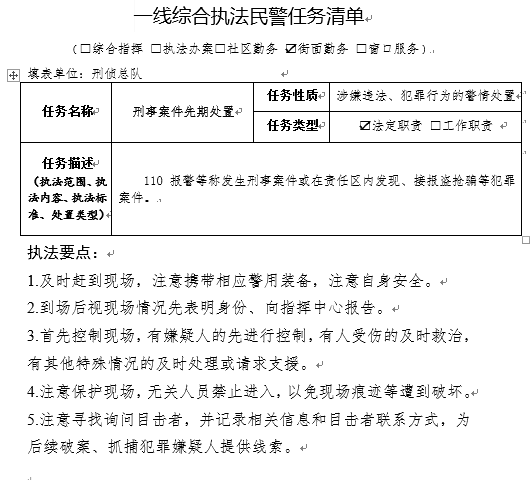
1、实现批量导入word文档,取文档标题中的数字作为编号
2、除取上面打钩的内容需要匹配出来入库入库,其他内容全部直接入库mysql
# wuyanfeng
# -*- coding:utf-8 -*-
# 读取docx中的文本代码示例
import docx
import pymysql
import re
import os

# 创建数据库链接
conn = pymysql.connect(
    host='rm-bp1vu5d84dg12c6d59o.mysql.rds.aliyuncs.com',
    port=3306,
    user='root',
    passwd='wYf092415*',
    db='pays',
    charset='utf8',
)
# 创建游标
cursor = conn.cursor()

#切片函数
def section(info,key,len11):
    a = len(info)
    print(a, type(a))
    d = []
    e = 0
    g = -1
    i = 0
    task_class=[]
    while i < len(info):
        # for i in range(len(info)):
        # i+=1
        print("i::::", i)
        try:
            #c = info.index("a", e)
            #print("c:::::", c)
            c = info.index(key, e)
            #print("c:::::", c)

            print("c类型判断",type(c))
        except ValueError:
            print(ValueError)
        try:
            if (c != '') & (g < int(c)):
                d.append(c)
                g = c
                i = c + 1
                print("illlldddd:", i)
                e = c + 1
                continue

            elif (c == ''):
                 break
        except UnboundLocalError:
            print(UnboundLocalError)

            return task_class
        break
    print("d", d, type(d))
    print(d[0], type(d[0]))
    print("d的长度:",len(d))
    #开始切片
    if len(d) != 0:
        for j in range(len(d)):
            print("info11:::", info, type(info))
            info = ''.join(info)
            print("info222:::",info,type(info))
            print("d[%d]"%j,d[j])
            #print("d[j]:5"%j,info[d[j]:5])

            llll = info[d[j]+1:d[j]+5]
            print("d[%d]:5" % j, llll)
            task_class.append(llll)
            print("task_class::11", task_class)

    task_class=",".join(task_class)
    print("str1112222",task_class)
    return task_class

def insettable(file):
    print("file::::::::::::::::::::", file)
    print("type::::::::::::::::::::", type(file))
    # file1 = file
    # file1 = str(file1)
    ddd = re.findall("知识库\\\(\d+)", file)
    print("ddd:::::::::::", ddd)
    print("ddd[0]:::", ddd[0])
    ddd = int(ddd[0])
    print("ddd::::", type(ddd))

    file = docx.Document(file)
    # 读取表格:
    t = file.tables[0]
    print(t)
    print("1:", t.cell(0, 0).text)  # 1
    cell1 = t.cell(0, 0).text
    print("tyep::::", type(t.cell(0, 0).text))

    print("2:", t.cell(0, 1).text)  # 2
    cell2 = t.cell(0, 1).text

    print("2:", t.cell(0, 2).text)  # 2
    cell3 = t.cell(0, 2).text

    print("2:", t.cell(0, 3).text)  # 2
    cell4 = t.cell(0, 3).text
    print("cell4:::::::::", cell4)

    print("3:", t.cell(1, 0).text)  # 3
    cell5 = t.cell(1, 0).text

    print("4:", t.cell(1, 2).text)  # 4
    cell6 = t.cell(1, 2).text

    print("5:", t.cell(1, 3).text)  # 5
    task_type = t.cell(1, 3).text
    # task_type = re.findall('.*[√](.*)$', cell7)
    # task_type = ''.join(cell7)
    print("task_type111111:", task_type)
    # task_class = task_class[0:4]
    '''低级处理方式
    a = int(task_type.count(""))
    print("a|||||||", a, type(a))
    b = int(task_type.count("√"))
    print("b|||||||", b, type(a))
    if (a == 1) | (b == 1):
        print("111111111111111111")
        # task_type = re.findall('.*[√](.*)$', task_type)
        task_type = re.findall('.*[√](.*)$', task_type)
        print("task_type1", task_type)
        task_type = ''.join(task_type)
        print("task_type2", task_type)
        task_type = task_type[0:4]
        print("task_type3:d:%s,b=%d" % (a, b), task_type)
    elif (a == 0) & (b == 0):
        print("2222222222222222222")
        task_type = '法定职责'
        print("a:%s,b=%s" % (a, b), task_type)
    elif (a == 2) | (b == 2):
        print("333333333333333333333")
        task_type = '法定职责,工作职责 '
        print("a:%s,b=%s" % (a, b), task_type)
    '''
    #调用切片函数
    task_type1 = section(task_type, "√", 4)
    task_type2 = section(task_type, "", 4)
    task_type1 = "".join(task_type1)
    task_type2 = "".join(task_type2)
    print("task_type1:::", task_type1,type(task_type1))
    print("task_type2:::", task_type2,type(task_type2))
    if task_type1.strip()!="":
        task_type = task_type1
        print("task_type111:::", task_type1)
    elif task_type2.strip()!="":
        task_type = task_type2
        print("task_type222:::", task_type2)

    print("6:", t.cell(1, 4).text)  # 6
    cell8 = t.cell(1, 4).text

    print("7:", t.cell(2, 1).text)  # 7
    cell9 = t.cell(2, 1).text

    # 获取文档对象
    # file = docx.Document("D:\\配置库\\公案APP\\1.2 系统规格\\知识库\\14人员死亡先期处置.docx")
    print("段落数:" + str(len(file.paragraphs)))  # 段落数为13,每个回车隔离一段
    lenn = len(file.paragraphs)
    print("len:", lenn)
    # 输出每一段的内容
    for para in file.paragraphs:
        print(para.text)

    # 输出段落编号及段落内容
    for i in range(len(file.paragraphs)):
        print("第" + str(i) + "段的内容是:" + file.paragraphs[i].text)

    list6 = []
    for i in range(len(file.paragraphs)):
        if 0 == i:
            print("i:", i)
            lis0 = file.paragraphs[i].text
            print("list0:", lis0)
            print(type(lis0))

        elif 1 == i:
            print("i:", i)
            task_class = file.paragraphs[i].text
            print("lis1", task_class,type(task_class))
            '''低级处理方式
            print("task_class111111:", task_class)

            c = int(task_class.count(""))
            task_class = ''.join(task_class)
            #print(task_class.index(''))
            print("c|||||||", c, type(c))
            d = int(task_class.count("√"))
            print(task_class.index('√'))

            print("d|||||||", d, type(d))
            task_class = re.findall(r'[√](?:.*)', task_class)
            task_class = ''.join(task_class)
            task_class = task_class[1:5]
            print("task_class", task_class)
        '''
            #调用切片函数
            task_class1 = section(task_class, "√", 4)
            task_class2 = section(task_class, "", 4)
            task_class1 = "".join(task_class1)
            task_class2 = "".join(task_class2)
            print("task_class1:::", task_class1,type(task_class1))
            print("task_class2:::", task_class2,type(task_class2))
            if task_class1.strip()!="":
                task_class = task_class1
                print("task_class11:::", task_class1)
            elif task_class2.strip()!="":
                task_class = task_class2
                print("task_class22:::", task_class2)

        if 2 == i:
            print("i:", i)
            lis2 = file.paragraphs[i].text

            print("lis2", lis2)
            print(type(lis2))
            preparer = re.findall('填表单位:(.*?)$', lis2)
            preparer = ''.join(preparer)
            print("preparer:%s" % preparer)

        # elif 3 == i:
        #     print("i:", i)
        #     lis3 = file.paragraphs[i].text
        elif 3 == i:
            print("i:", i)
            lis4 = file.paragraphs[i].text
            print("lis4", lis4)
            print(type(lis4))
        elif 3 < i < lenn - 1:
            print("i:", i)
            print(file.paragraphs[i].text)
            print(type(file.paragraphs[i].text))
            # list6[i-5] = list6.append(file.paragraphs[i].text)
            list6.append(str(file.paragraphs[i].text).strip('\xa0'))
            # list6.append("%s\n" % str(file.paragraphs[i].text).strip('\xa0'))
            print(list6)
    key_steps = "\n".join(list6)
    # print("key_steps:\n",key_steps.strip('\n'))

    cursor.execute(
        "insert into `t_knowledge_base` (`no`, `preparer`, `task_class`, `task_name`, `task_specification`, `task_type`, `task_desc`, `task_basis`, `key_steps`) values ('%d','%s','%s','%s','%s','%s','%s',NULL,'%s')" % (
            ddd, preparer, task_class, cell2, cell4, task_type, cell9, key_steps))
    conn.commit()

def traverse(f):
    fs = os.listdir(f)
    for f1 in fs:
        tmp_path = os.path.join(f, f1)
        if not os.path.isdir(tmp_path):
            print('文件: %s' % tmp_path)
            insettable(tmp_path)
        else:
            print('文件夹:%s' % tmp_path)
            traverse(tmp_path)

path = 'D:\\配置库\公案APP\\1.2 系统规格\\知识库'
traverse(path)

#单文件调测
# path = 'D:\\配置库\\公案APP\\1.2 系统规格\\知识库\\14人员死亡先期处置.docx'
# insettable(path)

# 关闭游标
cursor.close()
# 关闭连接
conn.close()
python读取word文档,插入mysql数据库实例的更多相关文章
- Python读取word文档内容
1,利用python读取纯文字的word文档,读取段落和段落里的文字. 先读取段落,代码如下: 1 ''' 2 #利用python读取word文档,先读取段落 3 ''' 4 #导入所需库 5 fro ...
- Python读取word文档(python-docx包)
最近想统计word文档中的一些信息,人工统计的话...三天三夜吧 python 不愧是万能语言,发现有一个包叫做 docx,非常好用,具体查看官方文档:https://python-docx.read ...
- 2018-10-04 [日常]用Python读取word文档中的表格并比较
最近想对某些word文档(docx)的表格内容作比较, 于是找了一下相关工具. 参考Automate the Boring Stuff with Python中的word部分, 试用了python-d ...
- python读取word文档
周末需要做一个统计word文档字数的问题,刚开始以为很简单,因为之前做过excel表格相关的任务,所以认为利用扩展模块应该比较简单. 通过搜索,确实搜到了一个python操作word的模块,pytho ...
- java读取Excel文档插入mysql
/** * 读取excel插入myslq */package com.excel; import java.io.BufferedInputStream;import java.io.File;imp ...
- 利用POI工具读取word文档并将数据存储到sqlserver数据库中
今天实现了利用POI工具读取word文档,并将数据存储到sql数据库中,代码如下: package word; import java.io.File; import java.io.FileInpu ...
- Python之word文档模板套用 - 真正的模板格式套用
Python之word文档模板套用: 1 ''' 2 #word模板套用2:套用模板 3 ''' 4 5 #导入所需库 6 from docx import Document 7 ''' 8 #另存w ...
- C#读取Word文档内容代码
首先要添加引用com组件:然后引用: using Word = Microsoft.Office.Interop.Word; 获取内容: /// /// 读取 word文档 返回内容 /// //// ...
- C#如何向word文档插入一个新段落及隐藏段落
编辑Word文档时,我们有时会突然想增加一段新内容:而将word文档给他人浏览时,有些信息我们是不想让他人看到的.那么如何运用C#编程的方式巧妙地插入或隐藏段落呢?本文将与大家分享一种向Word文档插 ...
- Python datatime 格式转换,插入MySQL数据库
Python datatime 格式转换,插入MySQL数据库 zoerywzhou@163.com http://www.cnblogs.com/swje/ 作者:Zhouwan 2017-11-2 ...
随机推荐
- Markdown箭头总汇
Markdown箭头的汇总 普通箭头 \[\uparrow \] $$\uparrow$$ \[\Uparrow \] $$\Uparrow$$ \[\downarrow \] $$\downarro ...
- 【EFCore框架】支持多数库 、支持读写分离框架、支持事务提交保存、跨库实现事务
1.支持多数库: 数据库上下文实现 多数据支持: 2. 支持读写分离框架(支持多从库随机) 工作单元(以及仓储)实现读写分离 配置文件: 3. 支持事务提交保存 工作单元 实现事务数据统一提交保存 具 ...
- 【DS】1.2
top-iron man 算法 效率度量 时间T=T(n) 1.顺序忽略2.只选一个基本操作分析3.多层嵌套只考虑最深的循环循环了几次 test1: test2: 空间 原地工作:算法所需内 ...
- Vue过滤案例、按键修饰符、数据双向绑定
目录 Vue过滤案例.按键修饰符.数据双向绑定 一.v-for能循环的类型 二.js的几种循环方式 三.key值的解释 四.数组.对象的检测与更新 五.input的几个事件 六.事件修饰符 七.按键修 ...
- 如何优化 Vue.js 应用程序
单页面应用(SPAs)当处理实时.异步数据时,可以提供丰富的.可交互的用户体验.但它们也可能很重,很臃肿,而且性能很差.在这篇文章中,我们将介绍一些前端优化技巧,以保持我们的Vue应用程序相对精简,并 ...
- .net gRPC初探 - 从一个简单的Demo中了解并学习gRPC
一..NET 上的 gRPC 的简介 gRPC 是一种与语言无关的高性能远程过程调用 (RPC) 框架. gRPC 的主要优点是: 现代高性能轻量级 RPC 框架. 协定优先 API 开发,默认使用协 ...
- JZOJ 4872.集体照
\(\text{Problem}\) 一年一度的高考结束了,我校要拍集体照.本届毕业生共分 \(n\) 个班,每个班的人数为 \(A_i\).这次拍集体照的要求非常奇怪:所有学生站一排,且相邻两个学生 ...
- 通过反射机制简化 JDBC ResultSet 实体类的注入
提出问题 查询完某个表之后,一般都是把结果的每一个字段注入到一个实体类中.比如,数据库 users 表,查询出来的结果注入到 User 实体类中. 通过 while 遍历 ResultSet,把字段对 ...
- Word 表格对文字、图文进行排版
在以前,Web 前端工程师利用 <table /> 元素对网页布局进行排版,但是如今却不推荐此元素排版了,而是改用 <div /> 元素和 CSS 弹性布局(或网格布局)对网页 ...
- Postgresql清理WAL日志
WAL是Write Ahead Log的简写,和oracle的redo日志类似,存放在$PGDATA/pg_xlog中,10版本以后在$PGDATA/pg_wal目录. 1.如果开启了归档,在目录ar ...