
配置MSTP功能示例
组网需求
在一个复杂的网络中,网络规划者由于冗余备份的需要,一般都倾向于在设备之间部署多条物理链路,其中一条作主用链路,其他链路作备份。这样就难免会形成环形网络,若网络中存在环路,可能会引起广播风暴和MAC桥表项被破坏。网络规划者规划好网络后,可以在网络中部署MSTP协议预防环路。MSTP可阻塞二层网络中的冗余链路,将网络修剪成树状,达到消除环路的目的。
如图1所示,为实现VLAN2~VLAN10和VLAN11~VLAN20的流量负载分担,MSTP引入了多实例。MSTP可设置VLAN映射表,把VLAN和生成树实例联系起来。图1中RouterA、SwitchA、SwitchB、SwitchC和SwitchD都运行MSTP。
图1 配置MSTP功能组网图
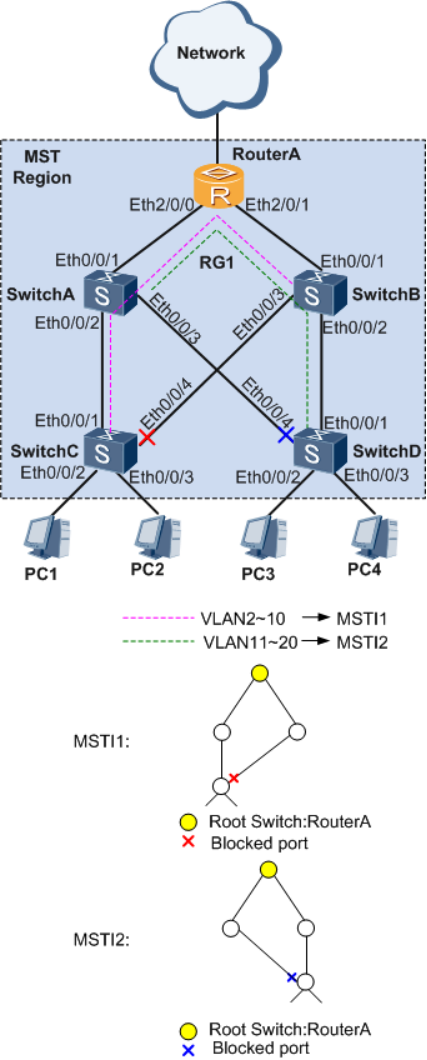
配置思路
采用以下思路配置MSTP功能:
1. 在处于环形网络中的交换设备上配置MSTP基本功能,包括:
a. 配置环网中的设备生成树协议工作在MSTP模式。
b. 配置MST域并创建多实例,实现流量的负载分担。
c. 在MST域内,配置各实例的根桥与备份根桥。
d. 配置各实例中某端口的路径开销值,实现将该端口阻塞。
e. 使能MSTP,实现破除环路,包括:
设备全局使能MSTP。
与终端设备相连的端口,去使能MSTP,或者配置为边缘端口。
除与终端设备相连的端口外,其他端口使能MSTP。
说明:
与PC机相连的端口不用参与MSTP计算,建议将其去使能MSTP,或者配置为边缘端口。
2. 配置保护功能,实现对设备或链路的保护。例如:在各实例的根桥设备指定端口配置根保护功能。
3. 配置设备的二层转发功能。
操作步骤
1. 配置MSTP基本功能
a. 配置环网中的设备生成树协议工作在MSTP模式
# 配置RouterA的MSTP工作模式,MSTP为设备缺省工作模式。
<Huawei> system-view
[Huawei] sysname RouterA
[RouterA] stp mode mstp
# 配置交换设备SwitchA,SwitchB,SwitchC和SwitchD的MSTP工作模式。
b. 配置环网中的设备到域名为RG1的域内,创建实例MSTI1映射VLAN2~VLAN10,创建实例MSTI2映射VLAN11~VLAN20
# 配置RouterA的MST域。
[RouterA] stp region-configuration
[RouterA-mst-region] region-name RG1
[RouterA-mst-region] instance 1 vlan 2 to 10
[RouterA-mst-region] instance 2 vlan 11 to 20
[RouterA-mst-region] active region-configuration
[RouterA] quit
# 配置交换设备SwitchA、SwitchB、SwitchC和SwitchD的MST域。域名为RG1,创建实例MSTI1映射VLAN2~VLAN10,创建实例MSTI2映射VLAN11~VLAN20。
c. 在域RG1内,配置MSTI1与MSTI2的根桥与备份根桥
# 配置MSTI1的根桥为RouterA。
[RouterA] stp instance 1 root primary
# 配置MSTI1的备份根桥为SwitchA。
# 配置MSTI2的根桥为RouterA。
[RouterA] stp instance 2 root primary
# 配置MSTI2的备份根桥为SwitchB。
d. 配置实例MSTI1和MSTI2中需被阻塞的端口的路径开销值大于缺省值,实现将该端口阻塞
说明:
· 端口路径开销值取值范围由路径开销计算方法决定,这里选择使用华为私有计算方法为例,配置将被阻塞的端口的路径开销值为200000。
· 如实际场景中的交换机设备为非华为设备,请遵循“同一网络内所有交换设备的端口路径开销应使用相同计算方法”的原则进行配置。配置其他计算方法,请查阅STP路径开销列表。
# 配置RouterA的端口路径开销缺省值的计算方法为华为私有计算方法。
[RouterA] stp pathcost-standard legacy
# 配置SwitchA、SwitchB、SwitchC和SwitchD的端口路径开销缺省值的计算方法为华为的私有计算方法。
# 如图1,配置SwitchC的端口Eth0/0/4在实例1中的路径开销值为200000。
# 如图1,配置SwitchD的端口Eth0/0/4在实例2中的路径开销值为200000。
e. 使能MSTP,实现破除环路
将与PC终端相连的端口去使能MSTP
# 如图1,配置交换机设备SwitchC的端口,Eth0/0/2和Eth0/0/3,去使能MSTP或者配置为边缘端口。
# 如图1,配置交换机设备SwitchD的端口,Eth0/0/2和Eth0/0/3,去使能MSTP或者配置为边缘端口。

1.设备全局使能MSTP
# 设备RouterA全局使能MSTP。
[RouterA] stp enable
# 为交换机设备SwitchA,SwitchB,SwitchC和SwitchD全局使能MSTP。
除与PC终端相连的端口外,端口使能MSTP
# 设备RouterA端口Eth2/0/0和Eth2/0/1使能MSTP。
[RouterA] interface ethernet 2/0/0
[RouterA-Ethernet2/0/0] stp enable
[RouterA-Ethernet2/0/0] quit
[RouterA] interface ethernet 2/0/1
[RouterA-Ethernet2/0/1] stp enable
[RouterA-Ethernet2/0/1] quit
# 如图1,交换机设备SwitchA,SwitchB,SwitchC和SwitchD除与PC终端相连的端口外,其他端口使能MSTP。
2. 配置保护功能
# 在根桥RouterA的端口Eth2/0/0和Eth2/0/1上启动根保护。
[RouterA] interface ethernet 2/0/0
[RouterA-Ethernet2/0/0] stp root-protection
[RouterA-Ethernet2/0/0] quit
[RouterA] interface ethernet 2/0/1
[RouterA-Ethernet2/0/1] stp root-protection
[RouterA-Ethernet2/0/1] quit
3. 配置处于环网中的设备的二层转发功能
在交换设备RouterA、SwitchA、SwitchB、SwitchC和SwitchD上创建VLAN
# 在RouterA上创建VLAN2~VLAN20。
[RouterA] vlan batch 2 to 20
# 在交换机SwitchA和SwitchB上创建VLAN2~VLAN20。
# 在交换机SwitchC上创建VLAN2~VLAN10。
# 在交换机SwitchD上创建VLAN11~VLAN20。
将交换设备上接入环路中的端口加入VLAN
# 将RouterA的端口Eth2/0/0和Eth2/0/1加入VLAN2~VLAN20。
[RouterA] interface ethernet 2/0/0
[RouterA-Ethernet2/0/0] port link-type trunk
[RouterA-Ethernet2/0/0] port trunk allow-pass vlan 2 to 20
[RouterA-Ethernet2/0/0] quit
[RouterA] interface ethernet 2/0/1
[RouterA-Ethernet2/0/1] port link-type trunk
[RouterA-Ethernet2/0/1] port trunk allow-pass vlan 2 to 20
[RouterA-Ethernet2/0/1] quit
# 将SwitchA的端口Eth0/0/1、Eth0/0/2和Eth0/0/3加入VLAN2~VLAN20。
# 将SwitchB的端口Eth0/0/1、Eth0/0/2和Eth0/0/3加入VLAN2~VLAN20。
# 将SwitchC的端口Eth0/0/1、Eth0/0/2、Eth0/0/3、Eth0/0/4加入VLAN2~VLAN10。
# 将SwitchD的端口Eth0/0/1、Eth0/0/2、Eth0/0/3、Eth0/0/4加入VLAN11~VLAN20。
4. 验证配置结果
经过以上配置,在网络计算稳定后,执行以下操作,验证配置结果。
# 在RouterA上执行display stp brief命令,查看端口状态和端口的保护类型,结果如下:
[RouterA] display stp brief
MSTID Port Role STP State Protection
0 Ethernet2/0/0 DESI FORWARDING NONE
0 Ethernet2/0/1 DESI FORWARDING NONE
1 Ethernet2/0/0 DESI FORWARDING ROOT
1 Ethernet2/0/1 DESI FORWARDING ROOT
2 Ethernet2/0/0 DESI FORWARDING ROOT
2 Ethernet2/0/1 DESI FORWARDING ROOT
在MSTI1中,由于RouterA是根桥,RouterA的端口Eth2/0/0和Eth2/0/1成为指定端口。在MSTI2中,RouterA同样是根桥,RouterA的端口Eth2/0/0和Eth2/0/1是指定端口。
# 在SwitchA查看端口状态和端口的保护类型。在MSTI1中,端口Eth0/0/1成为根端口,端口Eth0/0/2和端口Eth0/0/3成为指定端口。在MSTI2中,端口Eth0/0/1成为根端口,端口Eth0/0/2和端口Eth0/0/3成为指定端口。
# 在SwitchB查看端口状态和端口的保护类型。在MSTI1中,端口Eth0/0/1成为根端口,端口Eth0/0/2和端口Eth0/0/3成为指定端口。在MSTI2中,端口Eth0/0/1成为根端口,端口Eth0/0/2和端口Eth0/0/3成为指定端口。
# 在SwitchC查看端口状态和端口的保护类型。在MSTI1中,端口Eth0/0/1成为根端口,端口Eth0/0/4被阻塞。在MSTI2中,端口Eth0/0/1成为根端口,端口Eth0/0/4成为指定端口。
# 在SwitchD查看端口状态和端口的保护类型。在MSTI1中,端口Eth0/0/1成为根端口,端口Eth0/0/4成为指定端口。在MSTI2中,端口Eth0/0/1成为根端口,端口Eth0/0/4被阻塞。
配置文件
RouterA的配置文件
#
sysname RouterA
#
vlan batch 2 to 20
#
stp instance 1 root primary
stp instance 2 root primary
stp pathcost-standard legacy
#
stp region-configuration
region-name RG1
instance 1 vlan 2 to 10
instance 2 vlan 11 to 20
active region-configuration
#
interface Ethernet2/0/0
port link-type trunk
port trunk allow-pass vlan 2 to 20
stp root-protection
#
interface Ethernet2/0/1
port link-type trunk
port trunk allow-pass vlan 2 to 20
stp root-protection
#
return
SwitchA的配置文件
#
sysname SwitchA
#
vlan batch 2 to 20
#
stp instance 1 root secondary
stp pathcost-standard legacy
#
stp region-configuration
region-name RG1
instance 1 vlan 2 to 10
instance 2 vlan 11 to 20
active region-configuration
#
interface Ethernet0/0/1
port link-type trunk
port trunk allow-pass vlan 2 to 20
#
interface Ethernet0/0/2
port link-type trunk
port trunk allow-pass vlan 2 to 20
#
interface Ethernet0/0/3
port link-type trunk
port trunk allow-pass vlan 2 to 20
#
return
SwitchB的配置文件
#
sysname SwitchB
#
vlan batch 2 to 20
#
stp instance 2 root secondary
stp pathcost-standard legacy
#
stp region-configuration
region-name RG1
instance 1 vlan 2 to 10
instance 2 vlan 11 to 20
active region-configuration
#
interface Ethernet0/0/1
port link-type trunk
port trunk allow-pass vlan 2 to 20
#
interface Ethernet0/0/2
port link-type trunk
port trunk allow-pass vlan 2 to 20
#
interface Ethernet0/0/3
port link-type trunk
port trunk allow-pass vlan 2 to 20
#
return
SwitchC的配置文件
#
sysname SwitchC
#
vlan batch 2 to 10
#
stp pathcost-standard legacy
#
stp region-configuration
region-name RG1
instance 1 vlan 2 to 10
instance 2 vlan 11 to 20
active region-configuration
#
interface Ethernet0/0/1
port link-type trunk
port trunk allow-pass vlan 2 to 10
#
interface Ethernet0/0/2
port link-type trunk
port trunk allow-pass vlan 2 to 10
stp disable
#
interface Ethernet0/0/3
port link-type trunk
port trunk allow-pass vlan 2 to 10
stp disable
#
interface Ethernet0/0/4
port link-type trunk
port trunk allow-pass vlan 2 to 10
stp instance 1 cost 200000
#
return
SwitchD的配置文件
#
sysname SwitchD
#
vlan batch 11 to 20
#
stp pathcost-standard legacy
#
stp region-configuration
region-name RG1
instance 1 vlan 2 to 10
instance 2 vlan 11 to 20
active region-configuration
#
interface Ethernet0/0/1
port link-type trunk
port trunk allow-pass vlan 11 to 20
#
interface Ethernet0/0/2
port link-type trunk
port trunk allow-pass vlan 11 to 20
stp disable
#
interface Ethernet0/0/3
port link-type trunk
port trunk allow-pass vlan 11 to 20
stp disable
#
interface Ethernet0/0/4
port link-type trunk
port trunk allow-pass vlan 11 to 20
stp instance 2 cost 200000
#
return
配置MSTP功能示例的更多相关文章
- springcloud(七):配置中心svn示例和refresh
上一篇springcloud(六):配置中心git示例留了一个小问题,当重新修改配置文件提交后,客户端获取的仍然是修改前的信息,这个问题我们先放下,待会再讲.国内很多公司都使用的svn来做代码的版本控 ...
- 分布式大数据多维分析(OLAP)引擎Apache Kylin安装配置及使用示例【转】
Kylin 麒麟官网:http://kylin.apache.org/cn/download/ 关键字:olap.Kylin Apache Kylin是一个开源的分布式分析引擎,提供Hadoop之上的 ...
- 企业网络拓扑MSTP功能实例(二)
组网图形 MSTP简介 以太网交换网络中为了进行链路备份,提高网络可靠性,通常会使用冗余链路.但是使用冗余链路会在交换网络上产生环路,引发广播风暴以及MAC地址表不稳定等故障现象,从而导致用户通信质量 ...
- 【java】org.apache.commons.lang3功能示例
org.apache.commons.lang3功能示例 package com.simple.test; import java.util.Date; import java.util.Iterat ...
- Linux下Apache配置HTTPS功能
Apache配置HTTPS功能 转 https://www.cnblogs.com/liaojiafa/p/6028816.html 一.yum 安装openssl和openssl-devel,ht ...
- 利用JavaScriptSOAPClient直接调用webService --完整的前后台配置与调用示例
JavaScriptSoapClient下载地址:https://archive.codeplex.com/?p=javascriptsoapclient JavaScriptSoapClient的D ...
- linux之vim配置及使用示例
作者:tongqingliu 转载请注明出处:http://www.cnblogs.com/liutongqing/p/7056193.html linux之vim配置及使用示例 vi的三种模式: 一 ...
- 5G RRC——为NAS层提供连接管理,消息传递等服务; 对接入网的底层协议实体提供参数配置的功能; 负责UE移动性管理相关的测量、控制等功能
from:http://www.cnblogs.com/kkdd-2013/p/3868676.html 1 RRC协议功能 为NAS层提供连接管理,消息传递等服务: 对接入网的底层协议实体提供参数配 ...
- Django-中间件-csrf扩展请求伪造拦截中间件-Django Auth模块使用-效仿 django 中间件配置实现功能插拔式效果-09
目录 昨日补充:将自己写的 login_auth 装饰装在 CBV 上 django 中间件 django 请求生命周期 ***** 默认中间件及其大概方法组成 中间件的执行顺序 自定义中间件探究不同 ...
- drf框架安装配置及其功能概述
0902自我总结 drf框架安装配置及其功能概述 一.安装 pip3 install djangorestframework 二.配置 # 注册drf app NSTALLED_APPS = [ # ...
随机推荐
- 【FAQ】接入华为应用内支付服务常见问题解答
HMS Core应用内支付服务(In-App Purchases,IAP)为应用提供便捷的应用内支付体验和简便的接入流程.开发者的应用集成IAP SDK后,调用IAP SDK接口,启动IAP收银台,即 ...
- webpack打包优化点
目录 1. noParse 2. 包含和排除目录 3. IgnorePlugin 4. happypack 5. DllPlugin动态链接库 6. 热更新 7. 开发环境 tree-shaking ...
- 基于koa模块和socket.io模块搭建的node服务器实现通过jwt 验证来渲染列表、私聊、群聊功能
1. 具体代码在需要的下载 https://gitee.com/zyqwasd/socket 效果: 2. package.json文件 1. 下载基本的模块 修改了start 脚本 nodemo ...
- Python数据科学手册-Pandas:累计与分组
简单累计功能 Series sum() 返回一个 统计值 DataFrame sum.默认对每列进行统计 设置axis参数,对每一行 进行统计 describe()可以计算每一列的若干常用统计值. 获 ...
- Job for redis-server.service failed because the control process exited with error code(Centos 7 设置Redis开机自启报错)
报错信息如下: Job for redis-server.service failed because the control process exited with error code. See ...
- centos7使用yum方式安装redis6
yum -y install epel-release wget make gcc-c++ cd /opt wget https://download.redis.io/releases/redis- ...
- Docker Compose配置文件详解(V3)
Docker Compose配置文件是Docker Compose的核心,用于定义服务.网络和数据卷.格式为YAML,默认路径为./docker-compose.yml,可以使用.yml或.yaml扩 ...
- MySQL学习(1)---MySQL概述
什么是数据库 概述 数据库(Database)是长期存储在计算机内有组织.大量.共享的数据集合.它可以供各种用户共享,具有最小冗余度和较高的数据独立性.数据库管理系统DBMS(Database Man ...
- 记录一次Bitbucket鉴权的坑
目录 发生了什么 什么原因 如何解决 总结 发生了什么 今天首次在Fedora上使用git,因为没有小王八(TortoiseGit)帮助,其过程异常焦灼-- 反正经过一系列折腾,我在本地新建了一个项目 ...
- 微信小程序分享好友,朋友圈
<template> <view> <button open-type="share">发送给好友</button> </vi ...