
springcloud学习03-spring cloud eureka(下)
7.配置服务提供者(生产者)
7.1.配置resources/application.yml.
值eureka.client.service-url(或serviceUrl).defaultZone是配置将服务注册到那个注册中心,server.port是自己服务占用的端口,spring.application.name是服务在注册中心的名字,需要是唯一的,见7.2下图:
eureka:

  client:

    serviceUrl:

      defaultZone: http://localhost:8888/eureka/

server:

  port: 8889

spring:

  application:

    name: server-provider
7.2.在启动入口类上加入注解@EnableEurekaClient,然后启动,刷新localhost:8888,可以看到这个服务。
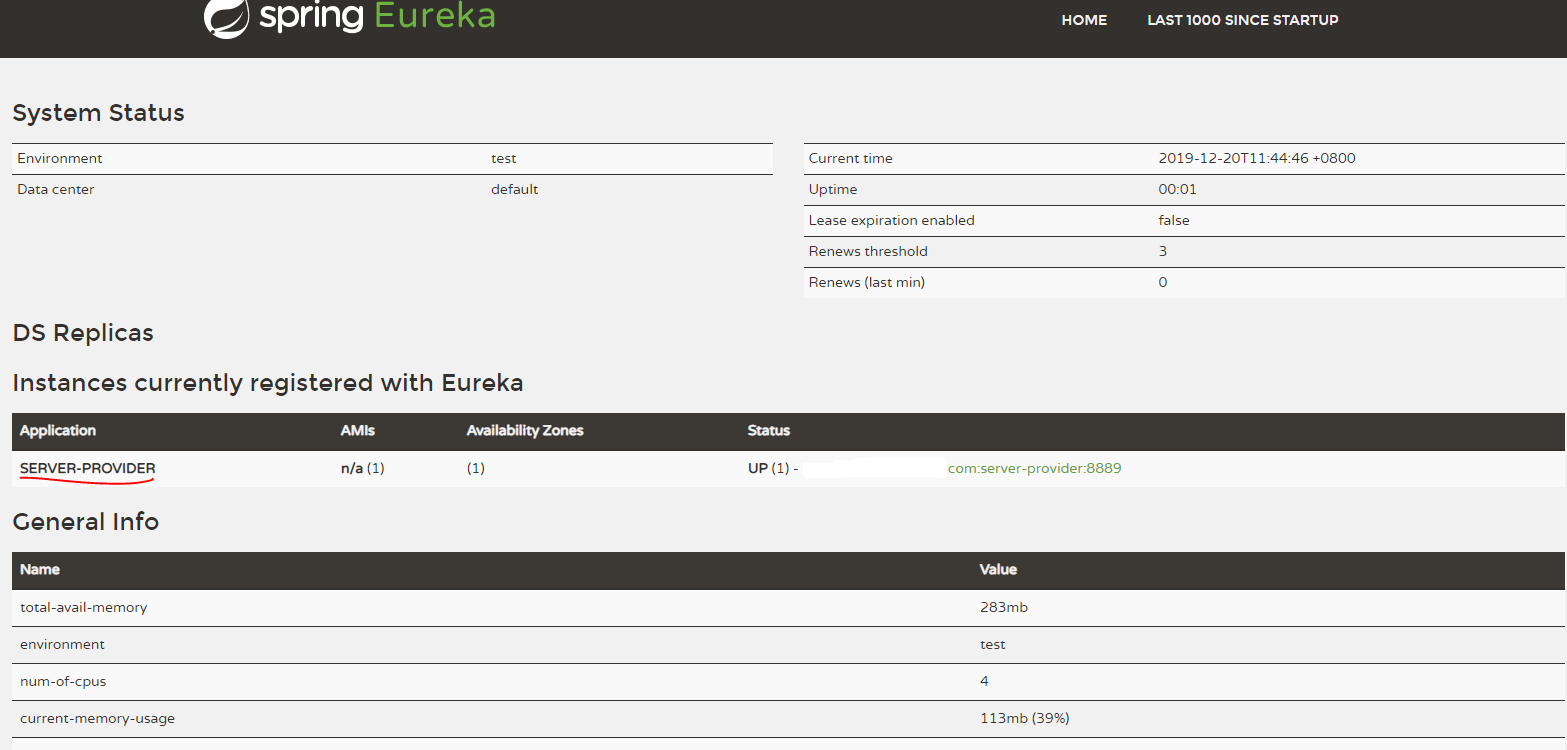
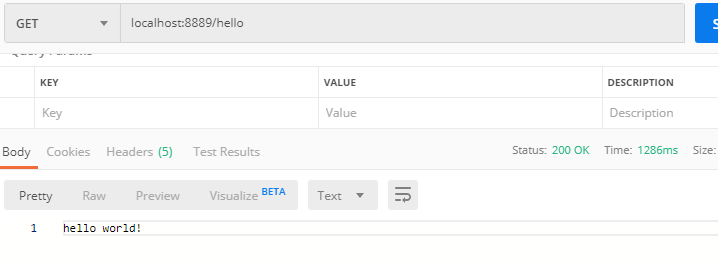
7.3.用postman测试这个服务,在启动类上加注解@RestController(sprig中注解constroller与responsebody的合体),测个返回hello world!的接口(一个服务)。EurekaProviderApplication.java文件
package com.springcloud.eurekaprovider;

import org.springframework.boot.SpringApplication;

import org.springframework.boot.autoconfigure.SpringBootApplication;

import org.springframework.cloud.netflix.eureka.EnableEurekaClient;

import org.springframework.web.bind.annotation.RequestMapping;

import org.springframework.web.bind.annotation.RequestParam;

import org.springframework.web.bind.annotation.RestController;

@SpringBootApplication

@EnableEurekaClient

@RestController

public class EurekaProviderApplication {

    public static void main(String[] args) {

        SpringApplication.run(EurekaProviderApplication.class, args);

    }

    @RequestMapping("/hello")

    public String home() {

        return "hello world! ";

    }

}
postman选择get/post请求,然后输入localhost:8889/hello发送请求能看到hello world!就说明服务时可用的
8.陪服务的消费者
8.1.打开pom文件,添加几个新的依赖,我看到有说spring-cloud-starter-eureka这个包被官方放弃了,和spring-cloud-starter-netflix-eureka-server推荐用作个包,我这里都加进来了,参考的文章是这样的,等下成功了,我去掉试一下。(参考文章:https://blog.csdn.net/zhou199252/article/details/80745151)
    <dependency>

            <groupId>org.springframework.cloud</groupId>

            <artifactId>spring-cloud-starter-eureka</artifactId>

            <version>1.4.4.RELEASE</version>

        </dependency>

        <dependency>

            <groupId>org.springframework.cloud</groupId>

            <artifactId>spring-cloud-starter-ribbon</artifactId>

            <version>1.4.2.RELEASE</version>

        </dependency>

        <dependency>

            <groupId>org.springframework.boot</groupId>

            <artifactId>spring-boot-starter-web</artifactId>

        </dependency>
8.2.配置resources/application.yml.各个含义与配置生产者哪里一个意思。
eureka:

  client:

    serviceUrl:

      defaultZone: http://localhost:8888/eureka/

server:

  port: 8887

spring:

  application:

    name: server-customer
8.3.启动入口类中加入注解:@EnableDiscoveryClient.启动服务,然后刷新eureka注册中心可以到这个服务。(这个和我想的不一样呀服务消费者不应该在这一呀)

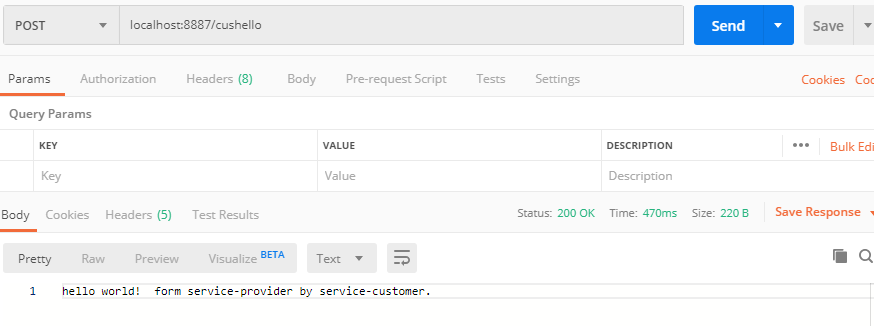
8.4.用postman进行测试,在启动类中加入restTemplate以消费相关的服务。
启动类中加入restTemplate,注解@LoadBalanced是开启负载均衡,具体解释https://blog.csdn.net/u011063112/article/details/81295376
这个restTemplate可以在service时在创建(new),测试时可以这样,但是在工程中可能到处在用,所以启动时就加入容器中,通过依赖注入的方式调用。
package com.springcloud.eurekacustomer;

import org.springframework.boot.SpringApplication;

import org.springframework.boot.autoconfigure.SpringBootApplication;

import org.springframework.cloud.client.discovery.EnableDiscoveryClient;

import org.springframework.cloud.client.loadbalancer.LoadBalanced;

import org.springframework.context.annotation.Bean;

import org.springframework.web.client.RestTemplate;

@SpringBootApplication

@EnableDiscoveryClient

public class EurekaCustomerApplication {

    public static void main(String[] args) {

        SpringApplication.run(EurekaCustomerApplication.class, args);

    }

    @Bean

    @LoadBalanced

    RestTemplate restTemplate(){

        return new RestTemplate();

    }

}
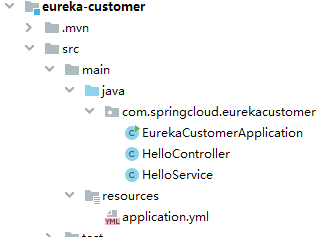
简单测试,增加HelloController.java和HelloService.java文件。
目录结构
package com.springcloud.eurekacustomer;

import org.springframework.beans.factory.annotation.Autowired;

import org.springframework.stereotype.Service;

import org.springframework.web.client.RestTemplate;

@Service

public class HelloService {

    @Autowired

    RestTemplate restTemplate;

    public String helloService(){

        String rltStr = restTemplate.getForObject("http://server-provider/hello",String.class);

        rltStr = rltStr + " form service-provider by service-customer.";

        return rltStr;

    }

}
package com.springcloud.eurekacustomer;

import org.springframework.beans.factory.annotation.Autowired;

import org.springframework.web.bind.annotation.RequestMapping;

import org.springframework.web.bind.annotation.RestController;

@RestController

public class HelloController {

    @Autowired

    HelloService helloService;

    @RequestMapping("/cushello")

    public String hello(){

        return helloService.helloService();

    }

}
用postman测试的结果如下,
8.5.关于消费者是否用在注册中心中注册吗?
查了一下没有找到相关的解释,先放着吧。
8.6.总结。
通过这个调用过程可以看出来,他与dubbo有一个不同时,customer的调用并没有依赖provider相关的代码即jar,这样开发中就不需要频繁的更新jar包了。
springcloud学习03-spring cloud eureka(下)的更多相关文章
- Spring Cloud 学习 之 Spring Cloud Eureka(源码分析)
Spring Cloud 学习 之 Spring Cloud Eureka(源码分析) Spring Boot版本:2.1.4.RELEASE Spring Cloud版本:Greenwich.SR1 ...
- Spring Cloud 学习 之 Spring Cloud Eureka(概述)
Spring Boot版本:2.1.4.RELEASE Spring Cloud版本:Greenwich.SR1 前述: 服务治理可以说是微服务架构中最为核心和基础的模块,它主要用来实现各个微服务 ...
- springCloud学习6(Spring Cloud Sleuth 分布式跟踪)
springcloud 总集:https://www.tapme.top/blog/detail/2019-02-28-11-33 前言 在第四篇和第五篇中提到一个叫关联 id的东西,用这个东西来 ...
- Spring Cloud 学习 之 Spring Cloud Eureka(搭建)
Spring Boot版本:2.1.4.RELEASE Spring Cloud版本:Greenwich.SR1 文章目录 搭建服务注册中心: 注册服务提供者: 高可用注册中心: 搭建服务注册中心: ...
- springcloud学习04- 断路器Spring Cloud Netflix Hystrix
依赖上个博客:https://www.cnblogs.com/wang-liang-blogs/p/12072423.html 1.断路器存在的原因 引用博客 https://blog.csdn.ne ...
- Spring Cloud 学习 之 Spring Cloud Eureka(架构)
Spring Boot版本:2.1.4.RELEASE Spring Cloud版本:Greenwich.SR1 文章目录 Eureka服务治理基础架构的三个核心要素: 服务治理机制: 服务提供者: ...
- 【SpringCloud微服务实战学习系列】服务治理Spring Cloud Eureka
Spring Cloud Eureka是Spring Cloud Netflix微服务中的一部分,它基于NetFlix Sureka做了二次封装,主要负责完成微服务架构中的服务治理功能. 一.服务治理 ...
- spring cloud深入学习(二)-----服务注册中心spring cloud eureka
服务治理 主要用来实现各个微服务实例的自动化注册与发现,为啥需要这玩意呢?在一开始比如A系统调用B服务,可能通过手工维护B服务的实例,并且还得采用负载均衡等方式,这些全部都得需要手工维护,等后面系统越 ...
- SpringCloud微服务实战一:Spring Cloud Eureka 服务发现与注册中心(高可用实列为两个注册中心)
微服务架构: 微服务架构的核心思想是,一个应用是由多个小的.相互独立的.微服务组成,这些服务运行在自己的进程中,开发和发布都没有依赖.不同服务通过一些轻量级交互机制来通信,例如 RPC.HTTP 等, ...
- SpringCloud学习心得—1.3—Eureka与REST API
SpringCloud学习心得—1.3—Eureka与REST API Eureka的REST API接口 API的基本访问 Eureka REST APIEureka 作为注册中心,其本质是存储 ...
随机推荐
- python篇第6天【数据类型】
Python有五个标准的数据类型: Numbers(数字) String(字符串) List(列表) Tuple(元组) Dictionary(字典) Python数字 数字数据类型用于存储数值. 他 ...
- ASP.NET Core 6框架揭秘实例演示[03]:Dapr初体验
也许你们可能没有接触过Dapr,但是一定对它"有所耳闻",感觉今年它一下子就火了,一时间很多人都在谈论它.我们从其命名(Dapr的全称是"分布式应用运行时Distribu ...
- Pytorch技法:继承Subset类完成自定义数据拆分
我们在<torch.utils.data.DataLoader与迭代器转换>中介绍了如何使用Pytorch内置的数据集进行论文实现,如torchvision.datasets.下面是加载内 ...
- Unreal ListView使用篇
应用 ListView,在Unreal UI界面开发中用途非常广泛,基本只要你使用列表,就得需要用ListView.比如排行榜100个列表,界面上只需要显示出10个,我们肯定不能生成100个ui实例, ...
- Office RTF远程模板注入
远程模板插入 ProofPoin最近写了一篇文章,报告中提到近年来RTF模板注入进行office钓鱼攻击的数量增加.之前还没怎么了解过RTF模板注入的,现在和小编一起去看看吧(笑hhh). 相 ...
- SpringBoot 自定义MessageConvert
创建一个MessageConvert类,实现HttpMessageConvert接口 简单实现,只完成写功能.其他默认false package com.boot.converter; import ...
- ios开发 Rsa签名 base64转码
因为公司要求做了一个加密 网上的资料少有可用的 于是我看到了一位大神的曙光 但是未介绍使用方法 然后另一位大神给予了使用方法 但是没有把库给出来 我整理了一下 希望大家看的有些启发 证书生成 ...
- Go Exec 僵尸与孤儿进程
原文地址:Go Exec 僵尸与孤儿进程 最近,使用 golang 去管理本地应用的生命周期,期间有几个有趣的点,今天就一起看下. 场景一 我们来看看下面两个脚本会产生什么问题: 创建两个 shell ...
- Hive复杂数组字典(Json-Array)解析
数据存储字段格式如下(Json-Array互相嵌套): string='{"id":"9088848902695992720","title" ...
- 小白学python第1问: int 占几个字节?
windows 64位机器,python3.7:后面的文章中,没有特别说明的话,都是在该环境下运行 int 占几个字节? C语言中(GCC编译器),int 占据4个字节,python呢? 我们用pyt ...