
使用阿里云镜像站NTP服务搭建NTP服务器(基于CentOS 7系统)
镜像下载、域名解析、时间同步请点击 阿里云开源镜像站
一、NTP服务器介绍
网络时间协议(Network Time Protocol,NTP)服务器,也就是日常所说的NTP服务器,用来提供同步时间服务。在生产环境中,很多人都会忽略时间问题,实际上服务器、网络设备等,特别是Linux操作系统和虚拟化平台的时间不同步会导致很多问题。那么搭建一台NTP服务器就非常重要,生产环境中的设备可以直接与NTP服务器进行时间同步,NTP服务器本身也可以访问互连的NTP服务器进行同步。NTP服务器可以是物理服务器,也可以是虚拟机。
二、安装NTP服务组件
在Linux服务器(如,CentOS、Ubuntu等操作系统)上,使用命令进行安装。
本实验以CentOS 7 Linux环境进行演示操作记录。
YUM源已更新成阿里云开源镜像站里的CentOS镜像,加速快捷访问。
[root@ntp ~]# yum clean all

Loaded plugins: fastestmirror

Cleaning repos: base extras updates

Cleaning up list of fastest mirrors

[root@ntp ~]# yum repolist

Loaded plugins: fastestmirror

Determining fastest mirrors

 * base: mirrors.aliyun.com

 * extras: mirrors.aliyun.com

 * updates: mirrors.aliyun.com

base                                                                                      | 3.6 kB  00:00:00

extras                                                                                    | 2.9 kB  00:00:00

updates                                                                                   | 2.9 kB  00:00:00

(1/4): base/7/x86_64/group_gz                                                             | 153 kB  00:00:00

(2/4): extras/7/x86_64/primary_db                                                         | 243 kB  00:00:00

(3/4): updates/7/x86_64/primary_db                                                        |  12 MB  00:00:01

(4/4): base/7/x86_64/primary_db                                                           | 6.1 MB  00:00:03

repo id                                   repo name                                                        status

base/7/x86_64                             CentOS-7 - Base - mirrors.aliyun.com                             10,072

extras/7/x86_64                           CentOS-7 - Extras - mirrors.aliyun.com                              500

updates/7/x86_64                          CentOS-7 - Updates - mirrors.aliyun.com                           2,963

repolist: 13,535

[root@ntp ~]#
执行yum install -y ntp命令,进行ntp组件安装。
[root@ntp ~]# yum install -y ntp

Loaded plugins: fastestmirror

Loading mirror speeds from cached hostfile

 * base: mirrors.aliyun.com

 * extras: mirrors.aliyun.com

 * updates: mirrors.aliyun.com

Resolving Dependencies

--> Running transaction check

---> Package ntp.x86_64 0:4.2.6p5-29.el7.centos.2 will be installed

--> Processing Dependency: ntpdate = 4.2.6p5-29.el7.centos.2 for package: ntp-4.2.6p5-29.el7.centos.2.x86_64

--> Processing Dependency: libopts.so.25()(64bit) for package: ntp-4.2.6p5-29.el7.centos.2.x86_64

--> Running transaction check

---> Package autogen-libopts.x86_64 0:5.18-5.el7 will be installed

---> Package ntpdate.x86_64 0:4.2.6p5-29.el7.centos.2 will be installed

--> Finished Dependency Resolution

Dependencies Resolved

=================================================================================================================

 Package                      Arch                Version                                Repository         Size

=================================================================================================================

Installing:

 ntp                          x86_64              4.2.6p5-29.el7.centos.2                base              549 k

Installing for dependencies:

 autogen-libopts              x86_64              5.18-5.el7                             base               66 k

 ntpdate                      x86_64              4.2.6p5-29.el7.centos.2                base               87 k

Transaction Summary

=================================================================================================================

Install  1 Package (+2 Dependent packages)

Total download size: 701 k

Installed size: 1.6 M

Downloading packages:

(1/3): autogen-libopts-5.18-5.el7.x86_64.rpm                                              |  66 kB  00:00:00

(2/3): ntpdate-4.2.6p5-29.el7.centos.2.x86_64.rpm                                         |  87 kB  00:00:00

(3/3): ntp-4.2.6p5-29.el7.centos.2.x86_64.rpm                                             | 549 kB  00:00:00

-----------------------------------------------------------------------------------------------------------------

Total                                                                            1.7 MB/s | 701 kB  00:00:00

Running transaction check

Running transaction test

Transaction test succeeded

Running transaction

  Installing : autogen-libopts-5.18-5.el7.x86_64                                                             1/3

  Installing : ntpdate-4.2.6p5-29.el7.centos.2.x86_64                                                        2/3

  Installing : ntp-4.2.6p5-29.el7.centos.2.x86_64                                                            3/3

  Verifying  : ntpdate-4.2.6p5-29.el7.centos.2.x86_64                                                        1/3

  Verifying  : ntp-4.2.6p5-29.el7.centos.2.x86_64                                                            2/3

  Verifying  : autogen-libopts-5.18-5.el7.x86_64                                                             3/3

Installed:

  ntp.x86_64 0:4.2.6p5-29.el7.centos.2

Dependency Installed:

  autogen-libopts.x86_64 0:5.18-5.el7                  ntpdate.x86_64 0:4.2.6p5-29.el7.centos.2

Complete!

[root@ntp ~]#
三、配置阿里云镜像站NTP服务
配置之前,测试服务器是否能够访问到阿里云NTP服务器。
ping ntp.aliyun.com -c 5

修改/etc/ntp.conf配置文件。
注释掉原来配置文件中的NTP服务器地址,添加阿里云NTP服务器地址。

[root@ntp ~]# vi /etc/ntp.conf

[root@ntp ~]# cat /etc/ntp.conf

# For more information about this file, see the man pages

# ntp.conf(5), ntp_acc(5), ntp_auth(5), ntp_clock(5), ntp_misc(5), ntp_mon(5).

driftfile /var/lib/ntp/drift

# Permit time synchronization with our time source, but do not

# permit the source to query or modify the service on this system.

restrict default nomodify notrap nopeer noquery

# Permit all access over the loopback interface.  This could

# be tightened as well, but to do so would effect some of

# the administrative functions.

restrict 127.0.0.1

restrict ::1

# Hosts on local network are less restricted.

#restrict 192.168.1.0 mask 255.255.255.0 nomodify notrap

# Use public servers from the pool.ntp.org project.

# Please consider joining the pool (http://www.pool.ntp.org/join.html).

#server 0.centos.pool.ntp.org iburst

#server 1.centos.pool.ntp.org iburst

#server 2.centos.pool.ntp.org iburst

#server 3.centos.pool.ntp.org iburst

server ntp.aliyun.com

#broadcast 192.168.1.255 autokey    # broadcast server

#broadcastclient            # broadcast client

#broadcast 224.0.1.1 autokey        # multicast server

#multicastclient 224.0.1.1        # multicast client

#manycastserver 239.255.254.254        # manycast server

#manycastclient 239.255.254.254 autokey # manycast client

# Enable public key cryptography.

#crypto

includefile /etc/ntp/crypto/pw

# Key file containing the keys and key identifiers used when operating

# with symmetric key cryptography.

keys /etc/ntp/keys

# Specify the key identifiers which are trusted.

#trustedkey 4 8 42

# Specify the key identifier to use with the ntpdc utility.

#requestkey 8

# Specify the key identifier to use with the ntpq utility.

#controlkey 8

# Enable writing of statistics records.

#statistics clockstats cryptostats loopstats peerstats

# Disable the monitoring facility to prevent amplification attacks using ntpdc

# monlist command when default restrict does not include the noquery flag. See

# CVE-2013-5211 for more details.

# Note: Monitoring will not be disabled with the limited restriction flag.

disable monitor

[root@ntp ~]#
四、启动NTP服务
启动ntp服务
systemctl start ntpd
设置ntp服务开机自启动
systemctl enable ntpd
查看ntp服务是否正常
systemctl status ntpd
[root@ntp ~]# systemctl start ntpd

[root@ntp ~]# systemctl enable ntpd

Created symlink from /etc/systemd/system/multi-user.target.wants/ntpd.service to /usr/lib/systemd/system/ntpd.service.

[root@ntp ~]# systemctl status ntpd

● ntpd.service - Network Time Service

   Loaded: loaded (/usr/lib/systemd/system/ntpd.service; enabled; vendor preset: disabled)

   Active: active (running) since Sun 2021-11-28 19:06:34 CST; 23h left

 Main PID: 1988 (ntpd)

   CGroup: /system.slice/ntpd.service

           └─1988 /usr/sbin/ntpd -u ntp:ntp -g

Nov 28 19:06:34 ntp ntpd[1988]: Listen normally on 3 ens32 192.168.1.50 UDP 123

Nov 28 19:06:34 ntp ntpd[1988]: Listen normally on 4 lo ::1 UDP 123

Nov 28 19:06:34 ntp ntpd[1988]: Listen normally on 5 ens32 fe80::e4b:3ef:613c:8741 UDP 123

Nov 28 19:06:34 ntp ntpd[1988]: Listening on routing socket on fd #22 for interface updates

Nov 28 19:06:34 ntp ntpd[1988]: 0.0.0.0 c016 06 restart

Nov 28 19:06:34 ntp ntpd[1988]: 0.0.0.0 c012 02 freq_set kernel 0.000 PPM

Nov 28 19:06:34 ntp ntpd[1988]: 0.0.0.0 c011 01 freq_not_set

Nov 28 19:09:51 ntp ntpd[1988]: 0.0.0.0 c61c 0c clock_step -86398.982768 s

Nov 27 19:09:52 ntp ntpd[1988]: 0.0.0.0 c614 04 freq_mode

Nov 27 19:09:53 ntp ntpd[1988]: 0.0.0.0 c618 08 no_sys_peer

[root@ntp ~]#
五、查看NTP源
ntpq -p
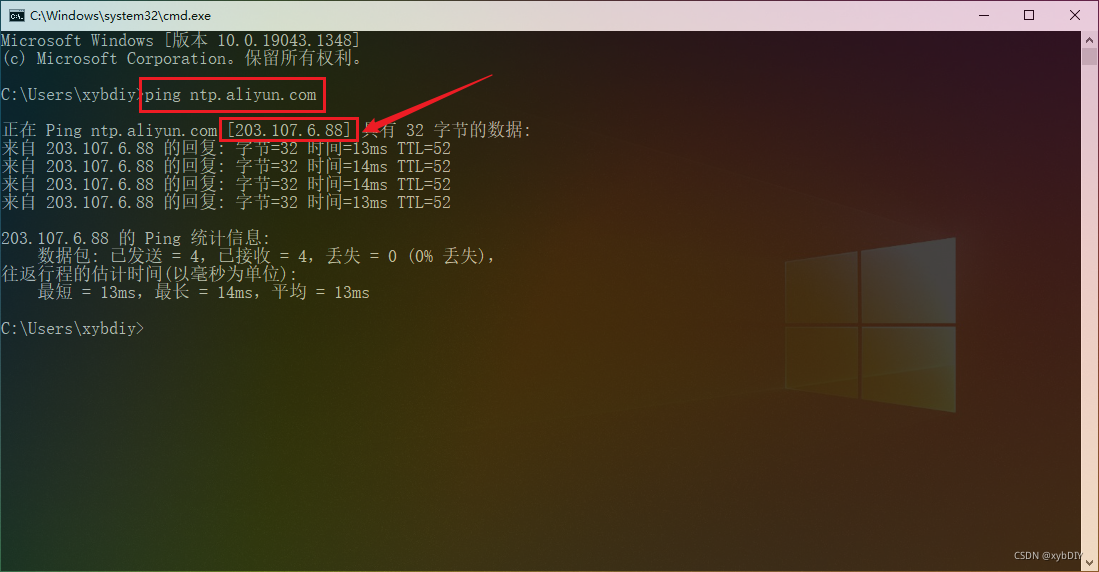
即[203.107.6.88]地址为阿里云NTP服务器的IP地址。

[root@ntp ~]# ntpq -p
remote refid st t when poll reach delay offset jitter
==============================================================================
203.107.6.88 100.107.25.114 2 u 56 64 7 13.685 -0.002 0.415
六、查看NTP服务状态
# 输出如下内容,表示在同步中,需要耐心等待一下

[root@ntp ~]# ntpstat

unsynchronised

  time server re-starting

   polling server every 8 s

# 输出如下内容,表示同步成功

[root@ntp ~]# ntpstat

synchronised to NTP server (203.107.6.88) at stratum 3

   time correct to within 958 ms

   polling server every 64 s

七、将客户端与NTP服务器同步

[root@client ~]# ntpdate -d 192.168.1.50

28 Nov 19:37:54 ntpdate[2880]: ntpdate 4.2.6p5@1.2349-o Tue Jun 23 15:38:19 UTC 2020 (1)

Looking for host 192.168.1.50 and service ntp

host found : 192.168.1.50

transmit(192.168.1.50)

receive(192.168.1.50)

transmit(192.168.1.50)

receive(192.168.1.50)

transmit(192.168.1.50)

receive(192.168.1.50)

transmit(192.168.1.50)

receive(192.168.1.50)

server 192.168.1.50, port 123

stratum 3, precision -25, leap 00, trust 000

refid [192.168.1.50], delay 0.02652, dispersion 0.00000

transmitted 4, in filter 4

reference time:    e54c9534.6f868aa9  Sat, Nov 27 2021 19:29:56.435

originate timestamp: e54c9719.4617ce7f  Sat, Nov 27 2021 19:38:01.273

transmit timestamp:  e54de898.b45bc870  Sun, Nov 28 2021 19:38:00.704

filter delay:  0.02658  0.02655  0.02652  0.02660

         0.00000  0.00000  0.00000  0.00000

filter offset: -86399.4 -86399.4 -86399.4 -86399.4

         0.000000 0.000000 0.000000 0.000000

delay 0.02652, dispersion 0.00000

offset -86399.431479

28 Nov 19:38:00 ntpdate[2880]: step time server 192.168.1.50 offset -86399.431479 sec

[root@client ~]#
八、将系统时间同步到硬件
[root@client ~]# hwclock -w

[root@client ~]# date

Sun Nov 28 19:39:10 CST 2021
本文转自:https://developer.aliyun.com/article/831625
使用阿里云镜像站NTP服务搭建NTP服务器(基于CentOS 7系统)的更多相关文章
- 阿里云镜像站DNS——Chrome配置方法
镜像下载.域名解析.时间同步请点击 阿里巴巴开源镜像站 DNS 简介 域名系统(服务)协议(DNS)是一种分布式网络目录服务,主要用于域名与 IP 地址的相互转换,以及控制因特网的电子邮件的发送. 阿 ...
- 解决.NET Core中MailKit无法使用阿里云邮件推送服务的问题
在博问中(.net core怎么实现邮件发送)知道了MailKit无法使用阿里云邮件推送服务发送邮件的问题,自已实测也遇到同样的问题,而用自己搭建的邮件服务器没这个问题. 于是,向阿里云提交了工单.. ...
- CentOS8 使用 aliyun 阿里云 镜像站点的方法
CentOS8现已可使用国内的aliyun阿里云镜像站,方法如下: 用cd命令切换到yum.repos目录,备份原始的3个repo文件:cd /etc/yum.repos.d/sudo cp Cent ...
- 阿里云服务器配置免费https服务
过程总述 购买服务器,购买域名,备案 申请ssl证书 DNS验证 上传证书,配置nginx 很关键,打开端口!!!阿里云的443端口默认是不打开的 1.购买服务器,域名,备案 服务器我是买的阿里云的, ...
- 阿里云linux配置ftp服务
阿里云linux配置ftp服务 一.ftp服务安装 运行以下命令安装ftp yum install -y vsftpd 运行以下命令打开及查看etc/vsftpd cd /etc/vsftpd ls ...
- 阿里云加Picgo或MPic搭建最豪横的图床
阿里云加Picgo或MPic搭建最豪横的图床 首先解释一下什么是图床,图床其实就是提供图片存储的服务器. 对于自建博客来说,由于各种原因的限制(比如穷...)可能无法购买存储空间比较大的VPS. 而对 ...
- 阿里云的NoSQL存储服务OTS的应用分析
这篇文章主要介绍了阿里云的NoSQL存储服务OTS的应用分析,OTS作为阿里巴巴开发的NoSQL存储技术服务现已面向用户商业化,需要的朋友可以参考下. 1. 概要 OTS是构建在阿里云飞天分布式系统 ...
- 【阿里云产品公测】在Laravel4框架中使用阿里云ACE的缓存服务
作者:阿里云用户dvbhack 受论坛排版和格式限制,这篇帖子的格式不是很利于阅读,如果你看帖子觉得不那么舒服,可以看我发表在自己博客上的原文:http://www.ofcss.com/2014/04 ...
- (二)初探Maven之设置代理和阿里云镜像
引言: 在许多公司,可能因为安全性的要求配置了代理服务器,用户无法直接访问外网,所以在项目中使用Maven必须设置好代理才能下载依赖. 并且直接从中央仓库下载依 ...
随机推荐
- VNCTF 2022 cm cm1 RE复现
cm1 安卓逆向 JEB 直接跟进主函数找到 ASSERT里面拿到ooo文件 直接脚本解密 k = "vn2022" with open('ooo', 'rb') as f: c ...
- 扯 C++ 里的 Lambda
之前写(抄) parsec 的时候, 在重载 operator>> 的时候, operator>> 需要接收一个 lambda, 之后返回一个 Component<R&g ...
- Solution -「多校联训」博弈
\(\mathcal{Description}\) Link. A B 两人在树上博弈,初始时有一枚棋子在结点 \(1\).由 A 先操作,两人轮流移动沿树上路径棋子,且满足本次移动的树上距离 ...
- Mybatis结果映射器resultMap的基本用法
<mapper namespace="全局唯一的名称空间"> <resultMap id="本namespace下唯一" type=" ...
- axios请求方式
`// 使用默认进行请求(默认是get) axios({ url: "http://localhost:9999/student/student/getAllStudent" }) ...
- flag_in_your_hand1
给了两个 文件 index.html 和 一个js文件 ,考察js代码审计能力首先借助浏览器来运行js 程序.用浏览器打开index.html,分析 js 代码: 首先无论在 token 输入框中输入 ...
- 思迈特软件Smartbi的特色功能有哪些?
Smartbi产品价值: 从最终用户角度 管理层:KPI监控.风险预警.绩效考核.大屏展示,移动分析,实现经营管理主题(财务.销售.人事.绩效等)的直观监控,为经营管理提供决策支持 分析人员:拖拽式的 ...
- .NET Standard与BCL有什么区别?
Net标准主要是为了改善代码共享,并使每个.Net实现中的API更加一致. .NET Standard 是.NET 平台(.net framework\.net core\.net mono)尚未在实 ...
- vs2019 NuGet安装及简单使用
Nuget介绍 官网定义:NuGet是.NET的软件包管理器(免费).NuGet客户端工具提供了生成和使用软件包的能力.NuGet Gallery 是所有软件包作者和消费者都使用的中央软件包存储库. ...
- node热加载
node可以通过require热加载文件,这里先提一下require的加载方式: 当我们第一次使用require加载模块时require会把被加载文件的绝对路径作为key存放在require的cach ...