
CentOS 7.9 安装 kafka_2.13
一、CentOS 7.9 安装 kafka_2.13
地址
二、安装准备
1 安装JDK
在安装kafka之前必须先安装JDK和zookeeper,如何安装JDK,可以查看:CentOS 7.9 安装 jdk-8u333
2 下载安装zookeeper
如何在CentOS 7 下安装zookeeper,可以查看:CentOS 7.9 安装 zookeeper-3.6.3
二、kafka
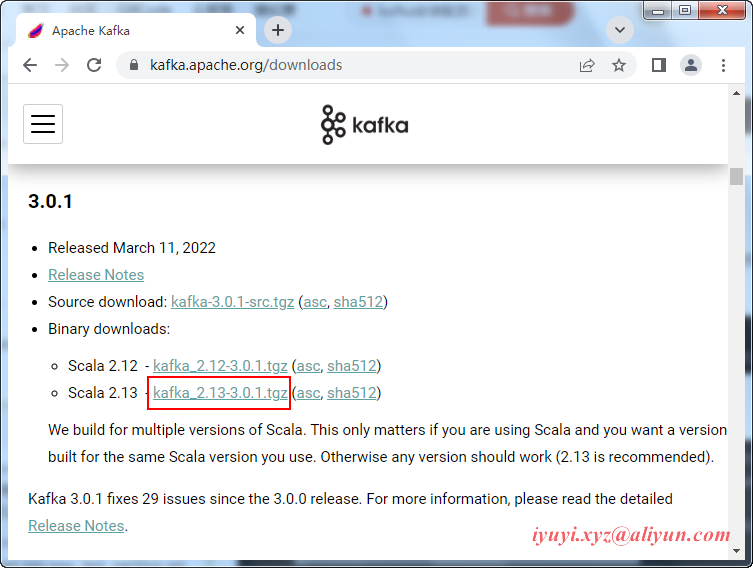
1 进入Apache官网 http://kafka.apache.org/downloads.html 选择Binary downloads,选择版本进行下载。
2 wget下载
wget https://archive.apache.org/dist/kafka/3.0.1/kafka_2.13-3.0.1.tgz3 解压
tar -zxvf /opt/software/kafka_2.13-3.0.1.tgz -C /opt/

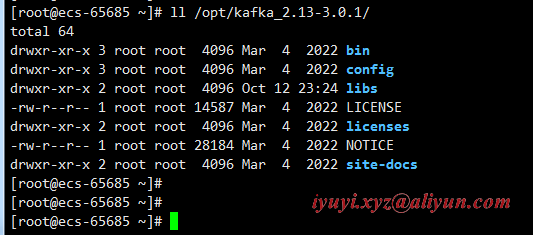
ll /opt/kafka_2.13-3.0.1/
4 进入kafka目录
5 启动kafka之前要确保zookeeper已经启动,如果没有启动,执行以下命令
zkServer.sh start6 修改kafka配置文件中的zookeeper地址,打开配置文件
vim /opt/kafka_2.13-3.0.1/config/server.properties

# The id of the broker. This must be set to a unique integer for each broker.

broker.id=0

############################# Socket Server Settings #############################

# The address the socket server listens on. It will get the value returned from

# java.net.InetAddress.getCanonicalHostName() if not configured.

#   FORMAT:

#     listeners = listener_name://host_name:port

#   EXAMPLE:

#     listeners = PLAINTEXT://your.host.name:9092

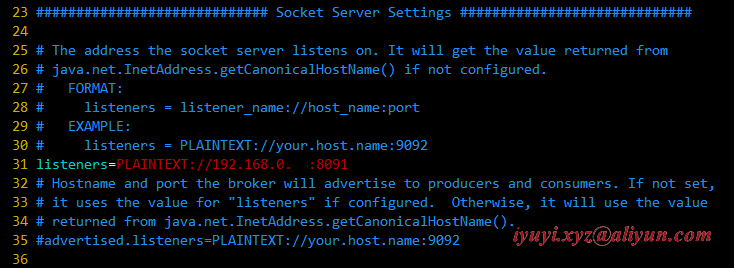
listeners=PLAINTEXT://192.168.0...:8091

# Hostname and port the broker will advertise to producers and consumers. If not set,

# it uses the value for "listeners" if configured.  Otherwise, it will use the value

# returned from java.net.InetAddress.getCanonicalHostName().

#advertised.listeners=PLAINTEXT://your.host.name:9092

# A comma separated list of directories under which to store log files

log.dirs=/opt/kafka_2.13-3.0.1/logs

############################# Zookeeper #############################

# Zookeeper connection string (see zookeeper docs for details).

# This is a comma separated host:port pairs, each corresponding to a zk

# server. e.g. "127.0.0.1:3000,127.0.0.1:3001,127.0.0.1:3002".

# You can also append an optional chroot string to the urls to specify the

# root directory for all kafka znodes.

zookeeper.connect=192.168.0.98:2181

# Timeout in ms for connecting to zookeeper

zookeeper.connection.timeout.ms=18000
7 新建日志储存路径
mkdir /opt/kafka_2.13-3.0.1/logs8 启动kafka
./bin/kafka-server-start.sh config/server.properties

# 后台启动

./bin/kafka-server-start.sh -daemon config/server.properties
四、设置开机自动启动
1 切换到/lib/systemd/system/目录,创建自启动文件
vim /lib/systemd/system/kafka.service

[Unit]

Description=kafkaservice

After=network.target

[Service]

WorkingDirectory=/opt/kafka_2.13-3.0.1

ExecStart=/opt/kafka_2.13-3.0.1/bin/kafka-server-start.sh /opt/kafka_2.13-3.0.1/config/server.properties

ExecStop=/opt/kafka_2.13-3.0.1/bin/kafka-server-stop.sh

User=root

Group=root

Restart=always

RestartSec=10

[Install]

WantedBy=multi-user.target
2 设置自启动
systemctl enable kafka.service3 立即启动服务
systemctl start kafka.service4 查看启动状态
systemctl status kafka.service五、Kafka命令测试
1 创建topic
./bin/kafka-topics.sh --bootstrap-server 192.168.0.98:8091 --create --topic iyuyixyz --partitions 2 --replication-factor 12 列出所有topic
./bin/kafka-topics.sh --bootstrap-server 192.168.0.98:8091 --list3 列出所有topic的信息
./bin/kafka-topics.sh --bootstrap-server 192.168.0.98:8091 --describe4 列出指定topic的信息
./bin/kafka-topics.sh --bootstrap-server 192.168.0.98:8091 --describe --topic iyuyixyz5 生产者(消息发送程序)
./bin/kafka-console-producer.sh --broker-list 192.168.0.98:8091 --topic iyuyixyz6 消费者(消息接收程序)
./bin/kafka-console-consumer.sh --bootstrap-server 192.168.0.98:8091 --topic iyuyixyz六、配置系统环境变量
vim /etc/profile

export PATH=$PATH:/opt/kafka_2.13-3.0.1/bin

# 使配置生效

source /etc/profile
七、报错
1 zookeeper is not a recognized option
新版已不支持zookeeper参数,需要换成bootstrap-server参数。
./bin/kafka-topics.sh --create --zookeeper 192.168.0.98:2181 --replication-factor 1 --partitions 1 --topic iyuyixyz原来新版本的kafka,已经不需要依赖zookeeper来创建topic,新版的kafka创建topic指令为下
./bin/kafka-topics.sh --bootstrap-server 192.168.0.98:8091 --create --topic iyuyixyz --partitions 2 --replication-factor 1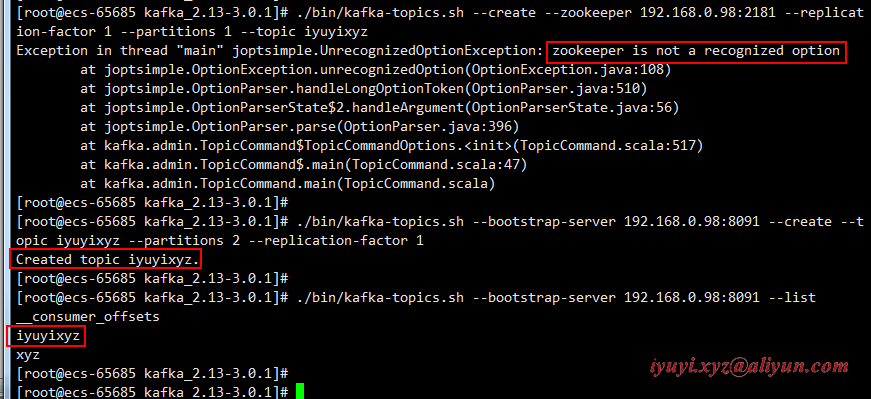
2 节点响应超时(请求超时)
[2022-10-13 01:11:34,670] WARN [AdminClient clientId=adminclient-1] Connection to node -1 (/192.168.0.92:8092) could not be established. Broker may not be available. (org.apache.kafka.clients.NetworkClient)

[2022-10-13 01:11:37,676] WARN [AdminClient clientId=adminclient-1] Connection to node -1 (/192.168.0.92:8092) could not be established. Broker may not be available. (org.apache.kafka.clients.NetworkClient)

[2022-10-13 01:11:40,682] WARN [AdminClient clientId=adminclient-1] Connection to node -1 (/192.168.0.92:8092) could not be established. Broker may not be available. (org.apache.kafka.clients.NetworkClient)

Error while executing topic command : Timed out waiting for a node assignment. Call: createTopics

[2022-10-13 01:11:43,600] ERROR org.apache.kafka.common.errors.TimeoutException: Timed out waiting for a node assignment. Call: createTopics

 (kafka.admin.TopicCommand$)
该错误是由于没有用对应版本的命令,访问了错的主机名(或IP)和端口,所以请求失败导致超时。
其中的createTopics、listTopics等都会出现该错误。如果没配置server.properties文件的listeners值,也会报以上错误。
listeners值默认是PLAINTEXT://:9092,要改为PLAINTEXT://localhost:9092或PLAINTEXT://IP:9092等
CentOS 7.9 安装 kafka_2.13的更多相关文章
- CentOS 7 下安装 teamviewer 13
CentOS 版本:centos-release-7-4.1708.el7.centos.x86_64(通过 rpm -q centos-release 查询) teamviewer 版本:teamv ...
- 阿里云CentOS服务器下安装Golang1.13并配置代理
注:root账户或添加sudo命令运行. 下载到/usr/local位置并解压 cd /usr/local wget https://studygolang.com/dl/golang/go1.13. ...
- centos使用Yum安装postgresql 13
rpm源安装 yum install -y https://download.postgresql.org/pub/repos/yum/reporpms/EL-7-x86_64/pgdg-redhat ...
- CentOS 6.9安装Python2.7.13
查看当前系统中的 Python 版本 python --version 返回 Python 2.6.6 为正常. 检查 CentOS 版本 cat /etc/redhat-release 返回 Cen ...
- 在Centos 7上安装配置 Apche Kafka 分布式消息系统集群
Apache Kafka是一种颇受欢迎的分布式消息代理系统,旨在有效地处理大量的实时数据.Kafka集群不仅具有高度可扩展性和容错性,而且与其他消息代理(如ActiveMQ和RabbitMQ)相比,还 ...
- Centos 使用YUM安装MariaDB
1.在 /etc/yum.repos.d/ 下建立 MariaDB.repo,内容如下: [azureuser@mono etc]$ cd /etc/yum.repos.d [azureuser@mo ...
- 如何在CentOS 7上安装Percona服务器
在这篇文章中我们将了解关于 Percona 服务器,一个开源的MySQL,MariaDB的替代品.InnoDB的数据库引擎使得Percona 服务器非常有吸引力,如果你需要的高性能,高可靠性和高性价比 ...
- centos下编译安装mysql5.5/5.6
2013年11月16日 19:39:13 centos 6 mysql 5.5.28 我只说些我出错的地方: cmake后删除的方法是 xargs rm < install_manifest.t ...
- CentOS 5.X安装LAMP最高版本环境
#------------CentOS 5.X安装LAMP最高版本环境------------------#! /bin/sh #安装Apacheyum install httpd -y#1.关闭se ...
随机推荐
- Jmix- 业务系统高效开发的新方式
企业在数字化转型的过程中,都面临将现有的业务流程进行"软件化"的过程.然而,在我们的印象中,通常会觉得针对业务系统的软件开发不是特别高效.这背后有很多原因,从开发角度看,有一个主要 ...
- .NET 扩展 官方 Logger 实现将日志保存到本地文件
.NET 项目默认情况下 日志是使用的 ILogger 接口,默认提供一下四种日志记录程序: 控制台 调试 EventSource EventLog 这四种记录程序都是默认包含在 .NET 运行时库中 ...
- Windows 11上Dev C++ 5.11 提示 Failed to execute xxx Error 0的一种解决方法
问题现象 在Windows 11上用Dev C++ 5.11编译运行程序,出现如下错误不能运行,且自己的程序没有问题. 可能的原因 Dev C++没有以管理员身份运行? 生成的程序所在的目录受到了访问 ...
- Spring源码 12 IOC refresh方法7
本文章基于 Spring 5.3.15 Spring IOC 的核心是 AbstractApplicationContext 的 refresh 方法. 其中一共有 13 个主要方法,这里分析第 7 ...
- 【Java】学习路径53-InetAdress获取服务器ip
InetAdress如何使用? import java.net.*; public class InetAdress { public static void main(String[] args) ...
- 如何结合整洁架构和MVP模式提升前端开发体验 - 整体架构篇
本文不详细介绍什么是整洁架构以及 MVP 模式,自行查看文章结尾相关链接文章. 整洁架构粗略介绍 下图为整洁架构最原始的结构图: Entities/Models:实体层,官方说法就是封装了企业里最通用 ...
- 简析XDP的重定向机制
GreatSQL社区原创内容未经授权不得随意使用,转载请联系小编并注明来源. GreatSQL是MySQL的国产分支版本,使用上与MySQL一致. 一. XDP Socket示例解析 源码参见:htt ...
- CDH6.2.0 搭建大数据集群
1. 资料准备 现在官网https://www.cloudera.com 需要注册账号,未来可能会收费等问题,十分麻烦,这里有一份我自己百度云的备份 链接: https://pan.baidu.com ...
- 跟羽夏学 Ghidra ——工具
写在前面 此系列是本人一个字一个字码出来的,包括示例和实验截图.本人非计算机专业,可能对本教程涉及的事物没有了解的足够深入,如有错误,欢迎批评指正. 如有好的建议,欢迎反馈.码字不易,如果本篇文章 ...
- Windows优先使用IPv4
当前主流的Windows系统(从Windows 7之后)都会同时使用ipv6和ipv4,并且优先使用ipv6.当你ping另一个服务器的时候就能看到,优先使用的是ipv6进行通信.由于能够在DNS中解 ...