
php 如何实现 git diff
无意间想到这个问题,如何用php来实现git diff,如果实现了这个功能,岂不是能够使用php对在线编辑文件的功能做更进一步的优化和提升?
查了一下还真有这样的库,话不多说,开始执行
composer require --dev sebastian/diff
得到结果
Info from https://repo.packagist.org: #StandWithUkraine

Using version ^5.0 for sebastian/diff

./composer.json has been created

Running composer update sebastian/diff

Loading composer repositories with package information

Updating dependencies

Lock file operations: 1 install, 0 updates, 0 removals

  - Locking sebastian/diff (5.0.1)

Writing lock file

Installing dependencies from lock file (including require-dev)

Package operations: 1 install, 0 updates, 0 removals

  - Downloading sebastian/diff (5.0.1)

  - Installing sebastian/diff (5.0.1): Extracting archive

Generating autoload files

1 package you are using is looking for funding.

Use the `composer fund` command to find out more!
好,安装成功,创建index.php如下
<?php

include("./vendor/autoload.php");

use SebastianBergmann\Diff\Differ;

use SebastianBergmann\Diff\Output\UnifiedDiffOutputBuilder;

$builder = new UnifiedDiffOutputBuilder(

    "--- Original\n+++ New\n", // custom header

    true                      // do not add line numbers to the diff

);

$differ = new Differ($builder);

$before_string = file_get_contents("functions.php");

$after_string = file_get_contents("functions.php-new");

$diff_value = $differ->diff($before_string, $after_string);

echo $diff_value;
好,然后创建两个文件用来代表我们修改过文件的内容,修改之前的文件叫 functions.php 内容是
<?php

function get_rand_id ($id = 0) {

    static $id;

    if ($id) {

        return $id;

    }

    $id = rand(1, 1000);

    $id += 1000;

    return $id;

}
修改之后的文件叫 functions.php-new 内容是
<?php

function get_random_id (int $id = 0) {

    static $id;

    if (!$id) {

        $id = rand(1, 1000);

        $id = $id * $id;

    }

    return $id;

}
执行一下看看
php index.php &> diff.patch
得到结果
--- Original

+++ New

@@ -1,12 +1,11 @@

 <?php

-function get_rand_id ($id = 0) {

+function get_random_id (int $id = 0) {

     static $id;

-    if ($id) {

-        return $id;

+    if (!$id) {

+        $id = rand(1, 1000);

+        $id = $id * $id;

     }

-    $id = rand(1, 1000);

-    $id += 1000;

     return $id;

 }
那这样的结果呢也能作为patch查看,要怎么有更好的查看方式呢?
我们可以在vscode编辑器里面安装一个叫做 Diff Viewer 的插件 点击这里

安装完毕, 打开这个 diff.patch 文件后是这样的
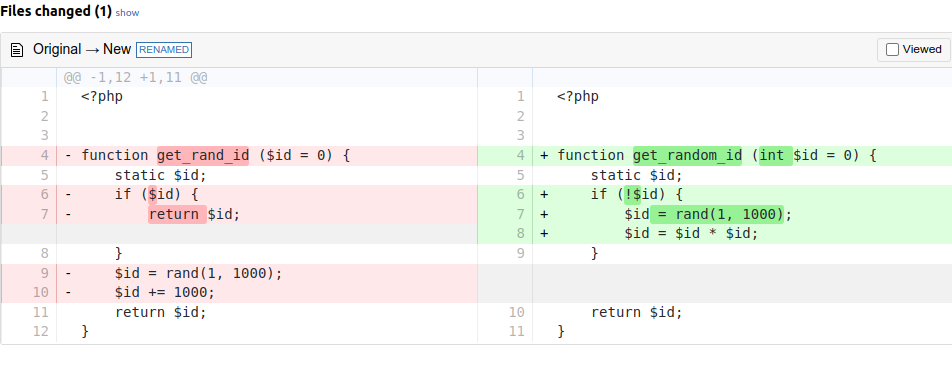
怎么样,是不是很不错,有点像 git 的感觉了,哈哈哈
php 如何实现 git diff的更多相关文章
- git diff 生成patch, git apply patch 打补丁方法说明,以及分支管理的简单操作。
git diff 简易操作说明 先git log 查看commit ID, 记录你想要打的补丁的ID 比如说: git log commit 4ff35d800fa62123a28b7bda2a04e ...
- Saving the entire git diff between two commits in a text file
git diff A10..A1 > my.diff 转自: http://stackoverflow.com/questions/19067896/saving-the-entire-git- ...
- git diff ^M的消除
这是由于换行符在不同的操作系统上定义的区别造成的. Windows用CR LF来定义换行,Linux用LF. CR全称是Carriage Return ,或者表示为\r, 意思是回车. LF全称是Li ...
- 基于git diff进行的eslint代码检测
缘起 在项目中, 通常都会使用代码检测工具来规范团队的代码风格, 比如eslint.随着代码的不断增加, eslint进行代码检测的时间也越来越久.每次检测的时候, 需要检测的文件和实际检测的文件极度 ...
- git diff提示filemode发生改变(old mode 100644、new mode 10075)
今天clone代码,git status显示修改了大量文件,git diff提示filemode变化,如下: diff --git a/Android.mk b/Android.mkold mode ...
- git diff的用法
在git提交环节,存在三大部分:working tree(工作区), index file(暂存区:stage), commit(分支:master) working tree:就是你所工作在的目录, ...
- git diff
git diff 工作区与暂存区的差别 git diff -cached / git diff -staged 暂存区与版本库的差别 git diff HEAD 工作区与版本库的差别 git d ...
- git diff获取差异文件中文乱码的解决办法
通过git的diff命令对两个commit id的版本进行差异化的对比.中文文件时出现乱码. git diff 6bded8d0c1fe1746c122121217dc0c88667091089 a9 ...
- Git diff 常见用法
Git diff 用于比较两次修改的差异 1.1 比较工作区与暂存区 git diff 比较的是单个仓库的工作区与暂存区的差别,repo diff是对git diff的封装,用来分别显示各个项目 ...
- git diff patch
如何生成patch:修改一个地方,然后git diff > xxx.patch 就会生成一个patch文件,这里的关键似乎是, 源文件的某个模块的版本要和线上发布的最新版本要一致,这样patch ...
随机推荐
- JavaScript Library – Svelte
前言 上一回我介绍了 Alpine.js.作为我开发企业网站 draft 版本的 render engine. 用了一阵子后,我觉得它真的非常不好用.所以打算换一个. 前端有好几个 framework ...
- P1438 无聊的数列 题解
背景 看到题解都是差分,竟然还有建两颗线段树和二阶差分的大佬. 我感到不理解,很不理解. 题目正解 本题正解很明显就是:线段树 是的,你没有看错,就只有线段树. 很显然我们直接按照线段树板题写就可以了 ...
- 自己动手,通过源码找回 Ant-Design-Blaozr 中 Tree 组件的搜索筛选效果
最近更新一个Blazor server的项目,顺带把用到的Ant-Design-Blazor 升级到了最新的 0.14.4,结果发现之前在 0.8.4 版本中 Tree 组件的搜索显示效果变了,从仅显 ...
- /proc/pagetypeinfo
这个文件是将buddyinfo的内容进一步细分: Free pages count per migrate type at order -- 不同order 按照migrate type的空闲page ...
- OpenCL架构
OpenCL提供了一种统一的编程接口,使得程序员可以编写一次代码,然后在多种处理器上运行. 平台模型 OpenCL平台总是包括一个宿主机(host).宿主机与OpenCL程序外部的环境交互,包括I/O ...
- docker安装过程 - 下载mysql
1. 下载必要的包 sudo yum install -y yum-utils device-mapper-persistent-data lvm2 2. 指定虚拟机去哪里安装 docker sudo ...
- 数组 findIndex 方法去重
思路:先使用 findIndex 找到重复元素的下标,然后使用 splice 方法删除 :
- ADO.NET 和 ORM的区别
ADO: 1 大量的Sql语句-业务不同,Sql语句不同 2 需要根据不同的场景编写不同Sql语句-灵活去编写Sql语句-提前优化Sql 语句-提供高性能的Sql语句 3 不适合快速开发 4 可编程性 ...
- 什么是数据库连接池druid
每次数据库连接都要断开重连浪费时间,性能 [ 底层需要 tcp 连接 ] 资源复用 : 提升系统响应速度 : 避免数据库连接遗漏 :[ 长时间不操作会强制断开 ] 使用: 初始连接数:连接的个数 pa ...
- 15 Transformer 框架概述
博客配套视频链接: https://space.bilibili.com/383551518?spm_id_from=333.1007.0.0 b 站直接看 配套 github 链接:https:// ...