
安卓Gallery配合ImageSwitcher不显示图片
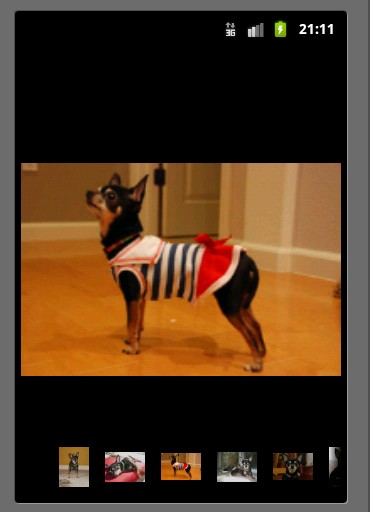
Gallary装的是缩略图(thumb),ImageSwitcher装的是大图。
不显示图片的一个可能原因是gallery没设置代理器,另一个原因是没使用相对布局。
GalleryActivity.java:
 public class GalleryActivity extends Activity implements OnItemSelectedListener, ViewFactory {

     /** Called when the activity is first created. */

     private ImageSwitcher is;

     private Gallery gallery;

     @Override

     public void onCreate(Bundle savedInstanceState) {

         super.onCreate(savedInstanceState);

         requestWindowFeature(Window.FEATURE_NO_TITLE);

         setContentView(R.layout.main);

         is = (ImageSwitcher)findViewById(R.id.imageSwitcher1);

         is.setFactory(this);

         gallery = (Gallery)findViewById(R.id.gallery1);

         gallery.setAdapter(new ImageAdapter(this));

         gallery.setOnItemSelectedListener(this);

     }

     @Override

     public void onItemSelected(AdapterView<?> arg0, View arg1, int arg2,

             long arg3) {

         // TODO Auto-generated method stub

         is.setImageResource(mImageIds[arg2]);

     }

     @Override

     public View makeView() {

         // TODO Auto-generated method stub

         ImageView iv = new ImageView(this);

         iv.setBackgroundColor(0xFF000000);

         iv.setScaleType(ImageView.ScaleType.FIT_CENTER);

         iv.setLayoutParams(new ImageSwitcher.LayoutParams(LayoutParams.FILL_PARENT, LayoutParams.FILL_PARENT));

         return iv;

     }

     @Override

     public void onNothingSelected(AdapterView<?> arg0) {

         // TODO Auto-generated method stub

     }

     class ImageAdapter extends BaseAdapter {

         private Context ctx;

         public ImageAdapter(Context ctx) {

             this.ctx = ctx;

         }

         @Override

         public int getCount() {

             // TODO Auto-generated method stub

             return mThumbIds.length-1;

         }

         @Override

         public Object getItem(int position) {

             // TODO Auto-generated method stub

             return mThumbIds[position];

         }

         @Override

         public long getItemId(int position) {

             // TODO Auto-generated method stub

             return position;

         }

         @Override

         public View getView(int position, View convertView, ViewGroup parent) {

             // TODO Auto-generated method stub

             ImageView iv = new ImageView(ctx);

             iv.setBackgroundColor(0x000000);

             iv.setImageResource(mThumbIds[position]);

             iv.setLayoutParams(new Gallery.LayoutParams(LayoutParams.WRAP_CONTENT, LayoutParams.WRAP_CONTENT));

             iv.setBackgroundResource(R.drawable.picture_frame);

             return iv;

         }

     }

     private int[] mThumbIds = {

             R.drawable.sample_thumb_0,

             R.drawable.sample_thumb_1,

             R.drawable.sample_thumb_2,

             R.drawable.sample_thumb_3,

             R.drawable.sample_thumb_4,

             R.drawable.sample_thumb_5,

             R.drawable.sample_thumb_6,

             R.drawable.sample_thumb_7,

     };

     private int[] mImageIds = {

             R.drawable.sample_0,

             R.drawable.sample_1,

             R.drawable.sample_2,

             R.drawable.sample_3,

             R.drawable.sample_4,

             R.drawable.sample_5,

             R.drawable.sample_6

     };

 }
main.xml(layout):
 <?xml version="1.0" encoding="utf-8"?>

 <RelativeLayout

        xmlns:android="http://schemas.android.com/apk/res/android"

        android:layout_width="fill_parent"

        android:layout_height="fill_parent">

        <ImageSwitcher

        android:id="@+id/imageSwitcher1"

               android:layout_width="fill_parent"

               android:layout_height="fill_parent"

               android:layout_alignParentTop="true"

               android:layout_alignParentLeft="true" />

        <Gallery android:id="@+id/gallery1"

        android:background="#55000000"

               android:layout_width="fill_parent"

               android:layout_height="60dp"

               android:layout_alignParentBottom="true"

               android:layout_alignParentLeft="true"

               android:gravity="center_vertical"

               android:spacing="16dp" />

 </RelativeLayout>
安卓Gallery配合ImageSwitcher不显示图片的更多相关文章
- 用ImageSwitcher实现显示图片(更改图片时有动画效果)
ImageView和ImageSwitcher都是用来显示图片的.只不过后者在更新显示的图片的时候可以有动画效果. 注意点: 1.ImageSwitcher初始化需要定义一个ViewFactory,该 ...
- 解决微信小程序安卓手机访问不到图片,无法显示图片
关于微信小程序不显示图片 通病可能有以下几个可能性: 非本地图片:确定图片资源存在,copy 图片url再浏览器打开,确定图片资源存在且能正常访问 本地图片:确定相对路径或者绝对路径正确 微信小程序图 ...
- ImageSwitcher (图像切换器,显示图片)
ImageSwitcher继承了ViewSwitcher,主要在切换图片时加入动画效果 使用方法: 1.为ImageSwitcher提供一个ViewFactory,该ViewFactory生成的Vie ...
- ImageLoader配合ImageSwitcher的使用
先在MyApplication中初始化ImageLoader initImageLoader(getApplicationContext()); /** * 初始化ImageLoader * 如果你经 ...
- Android训练课程(Android Training) - 高效的显示图片
高效的显示图片(Displaying BitmapsEfficiently) 了解如何使用通用的技术来处理和读取位图对象,让您的用户界面(UI)组件是可响应的,并避免超过你的应用程序内存限制的方式.如 ...
- Android Gallery和ImageSwitcher同步自动(滚动)播放图片库
本文主要内容是如何让Gallery和ImageSwitcher控件能够同步自动播放图片集 ,看起来较难,然而,实现的方法非常简单, 请跟我慢慢来.总的来说,本文要实现的效果如下图:(截图效果不怎么好) ...
- Android中Gallery和ImageSwitcher同步自动(滚动)播放图片库
本文主要内容是如何让Gallery和ImageSwitcher控件能够同步自动播放图片集 ,看起来较难,然而,实现的方法非常简单, 请跟我慢慢来.总的来说,本文要实现的效果如下图:(截图效果不怎么好) ...
- 使用图片视频展示插件blueimp Gallery改造网站的视频图片展示
在很多情况下,我们网站可能会展示我们的产品图片.以及教程视频等内容,结合一个比较好的图片.视频展示插件,能够使得我们的站点更加方便使用,也更加酷炫,在Github上有很多相关的处理插件可以找来使用,有 ...
- 如何使用SOIL在VS2012的 C++环境下显示图片
先看下效果. 这是一个很无聊的功能....首先说下,我做这个功能的初衷并不是为了实现在控制台中显示图片...(这貌似很无聊) 而是因为自己想做用C做一个游戏:http://q.cnblogs.com/ ...
随机推荐
- CF 287(div 2) B Amr and Pins
解题思路:一开始自己想的是找出每一次旋转所得到的圆心轨迹,将想要旋转到的点代入该圆心轨迹的方程,如果相等,则跳出循环,如果不相等,则接着进行下一次旋转.后来看了题解,发现,它的旋转可以是任意角度的,所 ...
- nginx的location 匹配的规则问题
正则解释: ~ #匹配一个正则匹配,区分大小写~* #匹配一个正则,不区分大小写^~ #普通字符匹配,如果该选择匹配不匹配别的选项,一般用来匹配目录= #精确匹配 匹配案例:location = / ...
- BZOJ 4199: [Noi2015]品酒大会 后缀自动机_逆序更新
一道裸题,可以考虑自底向上去更新方案数与最大值. 没啥难的 细节........ Code: #include <cstdio> #include <algorithm> #i ...
- h5实现 微信的授权登录
本文重点 判断是不是微信环境 localstorage设置一个值 微信授权登录 获取一个时间戳 new Date().getTime() const wx = (function () { retur ...
- HDU-5025 Saving Tang Monk 广度搜索 状态压缩
题目链接:https://cn.vjudge.net/problem/HDU-5025 题意 救唐僧,路上有m(<=9)把钥匙,最多5条蛇和一个唐僧. 目标是前往唐僧的地方,用全部钥匙打开全部的 ...
- [codevs3657]括号序列
题目大意:有一列只有'(',')','[',']'构成的括号序列,求在序列中至少加上多少括号,能使该序列合法. 解题思路:区间dp. 我们以$f[i][j]$表示把区间$[i,j]$添成合法括号所需的 ...
- 【BZOJ 1208】[HNOI2004]宠物收养所
[链接] 我是链接,点我呀:) [题意] 在这里输入题意 [题解] 用set搞. (因为规定了不会有相同特点值的东西. 所以可以不用multiset. 那么每次用lower_bound找离它最近的配对 ...
- Java 二进制,八进制,十进制,十六进制转换
A.十进制转换其他 十进制转成二进制 Integer.toBinaryString(int i) 十进制转成八进制 Integer.toOctalString(int i) 十进制转成十六进制: ...
- moble 设备多指手势识别 (tap , double_tap , pinch)
function(){ elem.addEventListener('touchstart', start , false) elem.addEventListener('touchend', end ...
- sass04 嵌套、继承、占位符
demo1.scss body{ //选择器嵌套 background-color:lightgray; header{ background-color:lightgreen; } footer{ ...