
Searching with regular sentences will only get you so far – if you need to find something a bit tricky turn to these advanced yet simple methods--转
原文地址:http://www.theguardian.com/technology/2016/jan/15/how-to-use-search-like-a-pro-10-tips-and-tricks-for-google-and-beyond
Search engines are pretty good at finding what you’re looking for these days, but sometimes they still come up short. For those occasions there are a few little known tricks which come in handy.
So here are some tips for better googling (as it’s the most popular search engine) but many will work on other search engines too.
1. Exact phrase
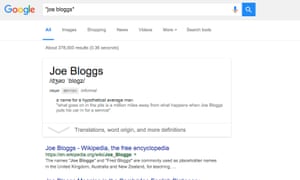
Exact search Photograph: Samuel Gibbs for the Guardian
The simplest and most effective way to search for something specific is to use quote marks around a phrase or name to search for those exact words in that exact order.
For instance, searching for Joe Bloggs will show results with both Joe and Bloggs but not necessarily placed sequentially. Searching for “Joe Bloggs” will surface only those that specifically have the name Joe Bloggs somewhere on the page.
The exact or explicit phrase search is very useful for excluding more common but less relevant results.
2. Exclude terms
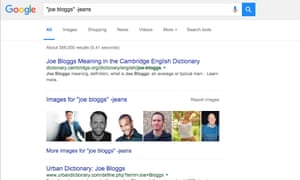
“Joe Bloggs” -jeans Photograph: Samuel Gibbs for the Guardian
If exact phrase doesn’t get you what you need, you can specifically exclude certain words using the minus symbol.
A search for “Joe Bloggs” -jeans will find results for Joe Bloggs, but it will exclude those results for the Joe Bloggs brand of jeans.
3. Either OR
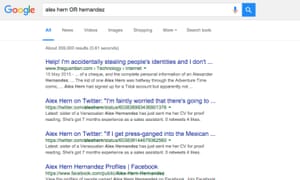
OR search for things that could be one thing or another, but you don’t need both terms to exist on a single page. Photograph: Samuel Gibbs for the Guardian
Default text searches find results with all the words of the query. By using the OR term you can search for one or another term, not just all the terms. OR searches can be useful for finding things that you’re not sure which term will be used from a known list.
4. Synonym search
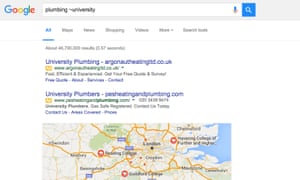
Searching using synonyms helps cover all bases. Photograph: Samuel Gibbs for the Guardian
Sometimes it’s useful to search for a less specific term. If you’re not sure which term will be used you can use synonym search.
Searching for plumbing ~university will bring up results for plumbing from colleges as well as universities, for example.
5. Search within a site
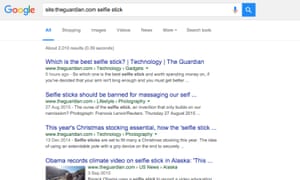
Use Google to search a particular site. Photograph: Samuel Gibbs for the Guardian
The search engines of most websites are poor. You can search using Googleinstead by using the site or domain limiter.
Searching with site:theguardian.com followed by a search term, will find results from only theguardian.com. Combining with explicit search terms makes it even more powerful.
6. The power of the asterisk
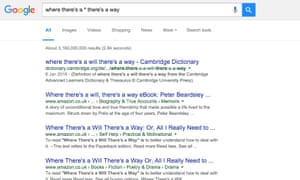
Asterisks work as wildcards within search either to replace a word or letters. Photograph: Samuel Gibbs for the Guardian
Like the blank tile in Scrabble, the asterisk works as a wild card within searches. It can be used in place of a missing word or part of a word, which is useful for completing phrases, but also when you’re trying to search for a less definite article.
A search for architect* will search for architect, but also architectural, architecture, architected, architecting and any other word which starts with architect.
7. Searching between two values
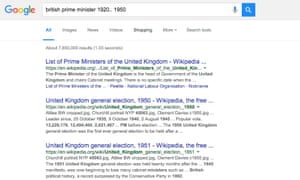
British prime minister 1920.. 1950 Photograph: Samuel Gibbs for the Guardian
Searching for something with a qualifier between two ranges is a good way of answering questions. For instance, if you’re looking for the who were the British prime ministers between 1920 and 1950 a search using british prime minister 1920.. 1950 will bring up results with dates ranging between 1920 and 1950.
That’s your search term followed by two full stops and a space.
8. Search for word in the body, title or URL of a page
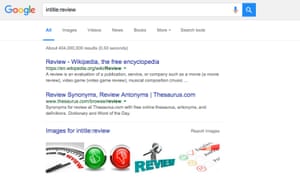
intitle: search Photograph: Samuel Gibbs for the Guardian
Sometimes you only want to find text either within the URL, body or title of a page. Using the qualifier inurl: will search just within the url. The qualifier intext:will search within the body, while intitle: will search only within a page title.
For example, intitle:review will bring up all the articles with “review” in the page title.
9. Search for related sites
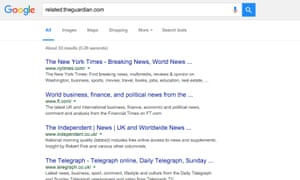


Related search. Photograph: Samuel Gibbs for the Guardian
The related qualifier is useful for finding similar sites. Searching forrelated:theguardian.com for instance, will bring up the websites of other news organisations that Google deems the most similar to the Guardian.
10. Combine them
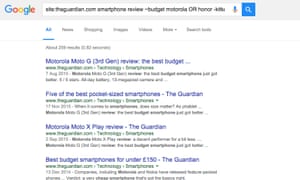
Combine the terms and modifiers for powerful searches. Photograph: Samuel Gibbs for the Guardian
All these search tools can be combined to narrow down or expand searches. While some of them may be used only rarely, some such as explicit phrase searches are useful in almost all cases.
As Google and other search engines improve their understanding of the way people naturally type or say search queries, these power tools will likely become less and less useful – at least that’s the goal that search engines are working towards – but that’s certainly not the case at the moment.
Searching with regular sentences will only get you so far – if you need to find something a bit tricky turn to these advanced yet simple methods--转的更多相关文章
- Regular Expressions --正则表达式官方教程
http://docs.oracle.com/javase/tutorial/essential/regex/index.html This lesson explains how to use th ...
- Total Commander 8.52 Beta 1
Total Commander 8.52 Beta 1http://www.ghisler.com/852_b1.php 10.08.15 Release Total Commander 8.52 b ...
- Nginx中文手册
Nginx 常见应用技术指南[Nginx Tips] 第二版 作者:NetSeek http://www.linuxtone.org (IT运维专家网|集群架构|性能调优) 目 录 一. Nginx ...
- Nginx之location 匹配规则详解
有些童鞋的误区 1. location 的匹配顺序是“先匹配正则,再匹配普通”. 矫正: location 的匹配顺序其实是“先匹配普通,再匹配正则”.我这么说,大家一定会反驳我,因为按“先匹配普通, ...
- nginx location匹配规则
谢谢作者的分享精神,原文地址:http://www.nginx.cn/115.html location匹配命令 ~ #波浪线表示执行一个正则匹配,区分大小写~* #表示执行一个正则匹 ...
- Standford CoreNLP
Stanford CoreNLP Stanford CoreNLP提供一组自然语言处理的工具.这些工具可以把原始英语文本作为输入,输出词的基本形式,词的词性标记,判断词是否是公司名.人名等,规格化日期 ...
- Nginx的配置文件(nginx.conf)解析和领读官网
步骤一:vi nginx.conf配置文件,参考本博文的最下面总结,自行去设置 最后nginx.conf内容为 步骤二:每次修改了nginx.conf配置文件后,都要reload下. index.ht ...
- 转:nginx location匹配规则
location匹配命令 ~ #波浪线表示执行一个正则匹配,区分大小写~* #表示执行一个正则匹配,不区分大小写^~ #^~表示普通字符匹配,如果该选项匹配,只匹配该选项,不匹配 ...
- nginx location的管理以及查找
关于nginx代码解析,我师兄雕梁的博客(http://simohayha.javaeye.com)有一系列的文章可以阅读.我这里将只介绍他博客里没有关注到的或者讲述不详细的,但是我个人又认为是ngi ...
随机推荐
- Boolean operations between triangle meshes
Boolean operations between triangle meshes eryar@163.com Abstract. Boolean operations is one of basi ...
- jquery源码10-提交的数据和ajax()
{ var r20 = /%20/g, //全部空格 rbracket = /\[\]$/, //结尾位置匹配中括号 rCRLF = /\r?\n/g, rsubmitterTypes = /^(?: ...
- thinkphp中 Illegal offset type异常
thinkphp中 Illegal offset type异常 一.错误提示 二.解决思路 1.看出错提示中的函数为assign函数,那说明是我们在从控制器assign数据到页面的部分出现了错误 2. ...
- 57.C++处理转义字符
#include <iostream> #include <string> #include <cstdlib> using namespace std; void ...
- POJ 1989 贪心
题意: 思路: 从前到后扫一遍 如果k个数都出现过了 ans++ 从当前接着判断 最后答案就是ans+1 //By SiriusRen #include <cstdio> using na ...
- string StartsWith 方法 Https
public ActionResult Index() { string url = "Https://www.baodu.com"; ...
- OpenCV —— 视频播放控制
创建滚动条,实现滚动条随视频播放移动. #include "cv.h" #include "highgui.h" CvCapture* capture=NULL ...
- tcp为什么要三次握手
作者:大闲人柴毛毛链接:https://www.zhihu.com/question/24853633/answer/254224088来源:知乎著作权归作者所有.商业转载请联系作者获得授权,非商业转 ...
- js刷新页面有哪几种方法
js刷新页面有哪几种方法 一.总结 一句话总结:location属性的reload方法即可:document.location.reload() 1.页面刷新有哪常见的8种方法? 1,history. ...
- 1.3 Quick Start中 Step 5: Start a consumer官网剖析(博主推荐)
不多说,直接上干货! 一切来源于官网 http://kafka.apache.org/documentation/ Step 5: Start a consumer Step : 消费消息 Kafka ...