
QT中的各种对话框
大家可以参见QT中各种MessageBox的使用的这篇文章
界面效果图如下,大家可以用代码自己操作
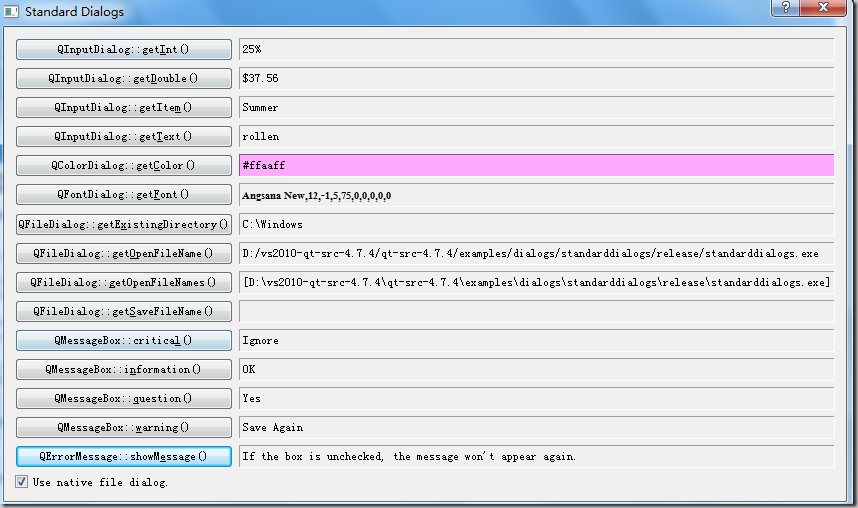
diglog.h
#ifndef DIALOG_H

#define DIALOG_H

#include <QDialog>

QT_BEGIN_NAMESPACE

class QCheckBox;

class QLabel;

class QErrorMessage;

QT_END_NAMESPACE

class Dialog : public QDialog

{

    Q_OBJECT

public:

    Dialog(QWidget *parent = 0);

private slots:

    void setInteger();

    void setDouble();

    void setItem();

    void setText();

    void setColor();

    void setFont();

    void setExistingDirectory();

    void setOpenFileName();

    void setOpenFileNames();

    void setSaveFileName();

    void criticalMessage();

    void informationMessage();

    void questionMessage();

    void warningMessage();

    void errorMessage();

private:

    QCheckBox *native;

    QLabel *integerLabel;

    QLabel *doubleLabel;

    QLabel *itemLabel;

    QLabel *textLabel;

    QLabel *colorLabel;

    QLabel *fontLabel;

    QLabel *directoryLabel;

    QLabel *openFileNameLabel;

    QLabel *openFileNamesLabel;

    QLabel *saveFileNameLabel;

    QLabel *criticalLabel;

    QLabel *informationLabel;

    QLabel *questionLabel;

    QLabel *warningLabel;

    QLabel *errorLabel;

    QErrorMessage *errorMessageDialog;

    QString openFilesPath;

};

#endif
dialog.cpp
#include <QtGui>

#include "dialog.h"

#define MESSAGE \

    Dialog::tr("<p>Message boxes have a caption, a text, " \

               "and any number of buttons, each with standard or custom texts." \

               "<p>Click a button to close the message box. Pressing the Esc button " \

               "will activate the detected escape button (if any).")

Dialog::Dialog(QWidget *parent)

    : QDialog(parent)

{

    errorMessageDialog = new QErrorMessage(this);

    int frameStyle = QFrame::Sunken | QFrame::Panel;

    integerLabel = new QLabel;

    integerLabel->setFrameStyle(frameStyle);

    QPushButton *integerButton =

            new QPushButton(tr("QInputDialog::get&Int()"));

    doubleLabel = new QLabel;

    doubleLabel->setFrameStyle(frameStyle);

    QPushButton *doubleButton =

            new QPushButton(tr("QInputDialog::get&Double()"));

    itemLabel = new QLabel;

    itemLabel->setFrameStyle(frameStyle);

    QPushButton *itemButton = new QPushButton(tr("QInputDialog::getIte&m()"));

    textLabel = new QLabel;

    textLabel->setFrameStyle(frameStyle);

    QPushButton *textButton = new QPushButton(tr("QInputDialog::get&Text()"));

    colorLabel = new QLabel;

    colorLabel->setFrameStyle(frameStyle);

    QPushButton *colorButton = new QPushButton(tr("QColorDialog::get&Color()"));

    fontLabel = new QLabel;

    fontLabel->setFrameStyle(frameStyle);

    QPushButton *fontButton = new QPushButton(tr("QFontDialog::get&Font()"));

    directoryLabel = new QLabel;

    directoryLabel->setFrameStyle(frameStyle);

    QPushButton *directoryButton =

            new QPushButton(tr("QFileDialog::getE&xistingDirectory()"));

    openFileNameLabel = new QLabel;

    openFileNameLabel->setFrameStyle(frameStyle);

    QPushButton *openFileNameButton =

            new QPushButton(tr("QFileDialog::get&OpenFileName()"));

    openFileNamesLabel = new QLabel;

    openFileNamesLabel->setFrameStyle(frameStyle);

    QPushButton *openFileNamesButton =

            new QPushButton(tr("QFileDialog::&getOpenFileNames()"));

    saveFileNameLabel = new QLabel;

    saveFileNameLabel->setFrameStyle(frameStyle);

    QPushButton *saveFileNameButton =

            new QPushButton(tr("QFileDialog::get&SaveFileName()"));

    criticalLabel = new QLabel;

    criticalLabel->setFrameStyle(frameStyle);

    QPushButton *criticalButton =

            new QPushButton(tr("QMessageBox::critica&l()"));

    informationLabel = new QLabel;

    informationLabel->setFrameStyle(frameStyle);

    QPushButton *informationButton =

            new QPushButton(tr("QMessageBox::i&nformation()"));

    questionLabel = new QLabel;

    questionLabel->setFrameStyle(frameStyle);

    QPushButton *questionButton =

            new QPushButton(tr("QMessageBox::&question()"));

    warningLabel = new QLabel;

    warningLabel->setFrameStyle(frameStyle);

    QPushButton *warningButton = new QPushButton(tr("QMessageBox::&warning()"));

    errorLabel = new QLabel;

    errorLabel->setFrameStyle(frameStyle);

    QPushButton *errorButton =

            new QPushButton(tr("QErrorMessage::showM&essage()"));

    connect(integerButton, SIGNAL(clicked()), this, SLOT(setInteger()));

    connect(doubleButton, SIGNAL(clicked()), this, SLOT(setDouble()));

    connect(itemButton, SIGNAL(clicked()), this, SLOT(setItem()));

    connect(textButton, SIGNAL(clicked()), this, SLOT(setText()));

    connect(colorButton, SIGNAL(clicked()), this, SLOT(setColor()));

    connect(fontButton, SIGNAL(clicked()), this, SLOT(setFont()));

    connect(directoryButton, SIGNAL(clicked()),

            this, SLOT(setExistingDirectory()));

    connect(openFileNameButton, SIGNAL(clicked()),

            this, SLOT(setOpenFileName()));

    connect(openFileNamesButton, SIGNAL(clicked()),

            this, SLOT(setOpenFileNames()));

    connect(saveFileNameButton, SIGNAL(clicked()),

            this, SLOT(setSaveFileName()));

    connect(criticalButton, SIGNAL(clicked()), this, SLOT(criticalMessage()));

    connect(informationButton, SIGNAL(clicked()),

            this, SLOT(informationMessage()));

    connect(questionButton, SIGNAL(clicked()), this, SLOT(questionMessage()));

    connect(warningButton, SIGNAL(clicked()), this, SLOT(warningMessage()));

    connect(errorButton, SIGNAL(clicked()), this, SLOT(errorMessage()));

    native = new QCheckBox(this);

    native->setText("Use native file dialog.");

    native->setChecked(true);

    QGridLayout *layout = new QGridLayout;

    layout->setColumnStretch(1, 1);

    layout->setColumnMinimumWidth(1, 250);

    layout->addWidget(integerButton, 0, 0);

    layout->addWidget(integerLabel, 0, 1);

    layout->addWidget(doubleButton, 1, 0);

    layout->addWidget(doubleLabel, 1, 1);

    layout->addWidget(itemButton, 2, 0);

    layout->addWidget(itemLabel, 2, 1);

    layout->addWidget(textButton, 3, 0);

    layout->addWidget(textLabel, 3, 1);

    layout->addWidget(colorButton, 4, 0);

    layout->addWidget(colorLabel, 4, 1);

    layout->addWidget(fontButton, 5, 0);

    layout->addWidget(fontLabel, 5, 1);

    layout->addWidget(directoryButton, 6, 0);

    layout->addWidget(directoryLabel, 6, 1);

    layout->addWidget(openFileNameButton, 7, 0);

    layout->addWidget(openFileNameLabel, 7, 1);

    layout->addWidget(openFileNamesButton, 8, 0);

    layout->addWidget(openFileNamesLabel, 8, 1);

    layout->addWidget(saveFileNameButton, 9, 0);

    layout->addWidget(saveFileNameLabel, 9, 1);

    layout->addWidget(criticalButton, 10, 0);

    layout->addWidget(criticalLabel, 10, 1);

    layout->addWidget(informationButton, 11, 0);

    layout->addWidget(informationLabel, 11, 1);

    layout->addWidget(questionButton, 12, 0);

    layout->addWidget(questionLabel, 12, 1);

    layout->addWidget(warningButton, 13, 0);

    layout->addWidget(warningLabel, 13, 1);

    layout->addWidget(errorButton, 14, 0);

    layout->addWidget(errorLabel, 14, 1);

    layout->addWidget(native, 15, 0);

    setLayout(layout);

    setWindowTitle(tr("Standard Dialogs"));

}

void Dialog::setInteger()

{

//! [0]

    bool ok;

    int i = QInputDialog::getInt(this, tr("QInputDialog::getInteger()"),

                                 tr("Percentage:"), 25, 0, 100, 1, &ok);

    if (ok)

        integerLabel->setText(tr("%1%").arg(i));

//! [0]

}

void Dialog::setDouble()

{

//! [1]

    bool ok;

    double d = QInputDialog::getDouble(this, tr("QInputDialog::getDouble()"),

                                       tr("Amount:"), 37.56, -10000, 10000, 2, &ok);

    if (ok)

        doubleLabel->setText(QString("$%1").arg(d));

//! [1]

}

void Dialog::setItem()

{

//! [2]

    QStringList items;

    items << tr("Spring") << tr("Summer") << tr("Fall") << tr("Winter");

    bool ok;

    QString item = QInputDialog::getItem(this, tr("QInputDialog::getItem()"),

                                         tr("Season:"), items, 0, false, &ok);

    if (ok && !item.isEmpty())

        itemLabel->setText(item);

//! [2]

}

void Dialog::setText()

{

//! [3]

    bool ok;

    QString text = QInputDialog::getText(this, tr("QInputDialog::getText()"),

                                         tr("User name:"), QLineEdit::Normal,

                                         QDir::home().dirName(), &ok);

    if (ok && !text.isEmpty())

        textLabel->setText(text);

//! [3]

}

void Dialog::setColor()

{

    QColor color;

    if (native->isChecked())

        color = QColorDialog::getColor(Qt::green, this);

    else

        color = QColorDialog::getColor(Qt::green, this, "Select Color", QColorDialog::DontUseNativeDialog);

    if (color.isValid()) {

        colorLabel->setText(color.name());

        colorLabel->setPalette(QPalette(color));

        colorLabel->setAutoFillBackground(true);

    }

}

void Dialog::setFont()

{

    bool ok;

    QFont font = QFontDialog::getFont(&ok, QFont(fontLabel->text()), this);

    if (ok) {

        fontLabel->setText(font.key());

        fontLabel->setFont(font);

    }

}

void Dialog::setExistingDirectory()

{

    QFileDialog::Options options = QFileDialog::DontResolveSymlinks | QFileDialog::ShowDirsOnly;

    if (!native->isChecked())

        options |= QFileDialog::DontUseNativeDialog;

    QString directory = QFileDialog::getExistingDirectory(this,

                                tr("QFileDialog::getExistingDirectory()"),

                                directoryLabel->text(),

                                options);

    if (!directory.isEmpty())

        directoryLabel->setText(directory);

}

void Dialog::setOpenFileName()

{

    QFileDialog::Options options;

    if (!native->isChecked())

        options |= QFileDialog::DontUseNativeDialog;

    QString selectedFilter;

    QString fileName = QFileDialog::getOpenFileName(this,

                                tr("QFileDialog::getOpenFileName()"),

                                openFileNameLabel->text(),

                                tr("All Files (*);;Text Files (*.txt)"),

                                &selectedFilter,

                                options);

    if (!fileName.isEmpty())

        openFileNameLabel->setText(fileName);

}

void Dialog::setOpenFileNames()

{

    QFileDialog::Options options;

    if (!native->isChecked())

        options |= QFileDialog::DontUseNativeDialog;

    QString selectedFilter;

    QStringList files = QFileDialog::getOpenFileNames(

                                this, tr("QFileDialog::getOpenFileNames()"),

                                openFilesPath,

                                tr("All Files (*);;Text Files (*.txt)"),

                                &selectedFilter,

                                options);

    if (files.count()) {

        openFilesPath = files[0];

        openFileNamesLabel->setText(QString("[%1]").arg(files.join(", ")));

    }

}

void Dialog::setSaveFileName()

{

    QFileDialog::Options options;

    if (!native->isChecked())

        options |= QFileDialog::DontUseNativeDialog;

    QString selectedFilter;

    QString fileName = QFileDialog::getSaveFileName(this,

                                tr("QFileDialog::getSaveFileName()"),

                                saveFileNameLabel->text(),

                                tr("All Files (*);;Text Files (*.txt)"),

                                &selectedFilter,

                                options);

    if (!fileName.isEmpty())

        saveFileNameLabel->setText(fileName);

}

void Dialog::criticalMessage()

{

    QMessageBox::StandardButton reply;

    reply = QMessageBox::critical(this, tr("QMessageBox::critical()"),

                                    MESSAGE,

                                    QMessageBox::Abort | QMessageBox::Retry | QMessageBox::Ignore);

    if (reply == QMessageBox::Abort)

        criticalLabel->setText(tr("Abort"));

    else if (reply == QMessageBox::Retry)

        criticalLabel->setText(tr("Retry"));

    else

        criticalLabel->setText(tr("Ignore"));

}

void Dialog::informationMessage()

{

    QMessageBox::StandardButton reply;

    reply = QMessageBox::information(this, tr("QMessageBox::information()"), MESSAGE);

    if (reply == QMessageBox::Ok)

        informationLabel->setText(tr("OK"));

    else

        informationLabel->setText(tr("Escape"));

}

void Dialog::questionMessage()

{

    QMessageBox::StandardButton reply;

    reply = QMessageBox::question(this, tr("QMessageBox::question()"),

                                    MESSAGE,

                                    QMessageBox::Yes | QMessageBox::No | QMessageBox::Cancel);

    if (reply == QMessageBox::Yes)

        questionLabel->setText(tr("Yes"));

    else if (reply == QMessageBox::No)

        questionLabel->setText(tr("No"));

    else

        questionLabel->setText(tr("Cancel"));

}

void Dialog::warningMessage()

{

    QMessageBox msgBox(QMessageBox::Warning, tr("QMessageBox::warning()"),

                       MESSAGE, 0, this);

    msgBox.addButton(tr("Save &Again"), QMessageBox::AcceptRole);

    msgBox.addButton(tr("&Continue"), QMessageBox::RejectRole);

    if (msgBox.exec() == QMessageBox::AcceptRole)

        warningLabel->setText(tr("Save Again"));

    else

        warningLabel->setText(tr("Continue"));

}

void Dialog::errorMessage()

{

    errorMessageDialog->showMessage(

            tr("This dialog shows and remembers error messages. "

               "If the checkbox is checked (as it is by default), "

               "the shown message will be shown again, "

               "but if the user unchecks the box the message "

               "will not appear again if QErrorMessage::showMessage() "

               "is called with the same message."));

    errorLabel->setText(tr("If the box is unchecked, the message "

                           "won't appear again."));

}
main.cpp
#include <QApplication>

#include <QTranslator>

#include <QLocale>

#include <QLibraryInfo>

#include "dialog.h"

int main(int argc, char *argv[])

{

    QApplication app(argc, argv);

    QString translatorFileName = QLatin1String("qt_");

    translatorFileName += QLocale::system().name();

    QTranslator *translator = new QTranslator(&app);

    if (translator->load(translatorFileName, QLibraryInfo::location(QLibraryInfo::TranslationsPath)))

        app.installTranslator(translator);

    Dialog dialog;

    return dialog.exec();

}
http://www.cnblogs.com/rollenholt/archive/2012/04/14/2446819.html
QT中的各种对话框的更多相关文章
- Qt中的标准对话框之QMessageBox
1. Qt标准对话框 Qt为开发者提供了一些可复用的对话框类型 Qt提供的可复用对话框全部继承自QDialog类 Qt中的对话框的使用方式和QDialog完全一致 2. 标准对话框的使用步骤 ①定义对 ...
- Qt中的标准对话框
1. Qt为开发者提供了一些可复用的对话框类型,如QMessageBox,QFileDialog,QPrintDialog, QColorDialog, QInputDialog, QProgress ...
- Qt 中的消息对话框
1. QMessagebox 类的几个静态成员函数,可以直接调用创建对话框 StandardButton critical(QWidget * parent, const QString & ...
- QT笔记之模态对话框及非模态对话框
模态对话框(Modal Dialog)与非模态对话框(Modeless Dialog)的概念不是Qt所独有的,在各种不同的平台下都存在.又有叫法是称为模式对话框,无模式对话框等.所谓模态对话框就是在其 ...
- 第38课 Qt中的事件处理(上)
1. GUI程序原理回顾 (1)图形界面应用程序的消息处理模型 (2)思考:操作系统发送的消息如何转变为Qt信号 2. Qt中的事件处理 (1)Qt平台将系统产生的消息转换为Qt事件 ①Qt事件是一个 ...
- QT中静态库的生成与使用
一. 静态库的生成 1. 测试目录: lib 2. 源码文件名: mywindow.h, mywindow.cpp, 类MyWindow继承于QPushButton, 并将文字设置为&qu ...
- QT中QWidget、QDialog QMainWindow
继承关系:在Qt中所有的类都有一个共同的基类QObject ,QWidget直接继承与QPaintDevice类,QDialog.QMainWindow.QFrame直接继承QWidget 类. QW ...
- Qt中QObject中的parent参数
今天写了一个小程序,验证了带参的构造函数中参数parent的作用. 在MainWindow中声明一个QDialog类型的指针,在MainWindow中对它进行初始化.我采用了两种初始化方式,一种是带参 ...
- 【转】QT中QWidget、QDialog及QMainWindow的区别
QWidget类是所有用户界面对象的基类. 窗口部件是用户界面的一个基本单元:它从窗口系统接收鼠标.键盘和其它事件,并且在屏幕上绘制自己.每一个窗口部件都是矩形的,并且它们按Z轴顺序排列.一个窗口部件 ...
随机推荐
- [UWP]使用Acrylic(亚克力)
原文:[UWP]使用Acrylic(亚克力) 1. 前言 在 如何使用Fluent Design System 这篇文章里已经简单介绍过Reveal的用法,这篇再详细介绍其它内容. 自Windows ...
- Linux 在主要的搜索命令和视图的信息
查找命令和硬件信息查看的日常系统管理.最常见的维护操作. 继 Linux 基本查找命令做一个简单的比较.并列出了一些硬件信息经常使用的视图命令. man 经常使用选项 -k 知道功能.不知道名称 -f ...
- 单点登录原理与简单实现--good
一.单系统登录机制 1.http无状态协议 web应用采用browser/server架构,http作为通信协议.http是无状态协议,浏览器的每一次请求,服务器会独立处理,不与之前或之后的请求产生关 ...
- Linode跨节点迁移:从Tokyo到Fremont
背景 上一篇博客交代了如何在 Linode 上搭建邮件服务器,并配置好各种协议.记录来投入实际使用. 由于实践过程中,曾经尝试使用明文协议与服务器交流数据,可能泄露了账号.密码信息,造成之后被攻击发送 ...
- Linux 下的任务管理 —— ps、top
ps:report a snapshot of the current processes. ps 命令支持三种使用的语法格式 UNIX 风格,选项可以组合在一起,并且选项前必须有"-&qu ...
- .net命名空间和程序集详解
命名空间是一种用于将逻辑上相似的类按层次结构分组的机制.这种机制防止了命名冲突.在这种结构化采用被点号"."分隔的单词来实现.通常最顶层的命名空间是System,例如System; ...
- java中判断字符串中是否有中文字符
package com.meritit.test; public class TestChart { public static void main(String[] args) throws Exc ...
- Solid-state storage management
Solid-state storage management for a system, the management including establishing, externally to a ...
- twemproxy接收流程探索——剖析twemproxy代码正编
本文旨在帮助大家探索出twemproxy接收流程的代码逻辑框架,有些具体的实现需要我们在未来抽空去探索或者大家自行探索.在这篇文章开始前,大家要做好一个小小的心理准备,由于twemproxy代码是一份 ...
- Codeforces #264 (Div. 2) D. Gargari and Permutations
Gargari got bored to play with the bishops and now, after solving the problem about them, he is tryi ...