
舍弃Nunit拥抱Xunit
前言
今天与同事在讨论.Net下测试框架的时候,说到NUnit等大多数测试框架的SetUp以及TearDown方法并不是显得那么完美,所以在公司内部的项目中采用了Xunit框架。那么究竟是什么样的原因,让我们放弃了大多数框架都在用的Nunit或MSTest框架呢?
1. Xunit简介
首先奉上马丁大叔2006年对XUnit介绍的文章,http://www.martinfowler.com/bliki/Xunit.html。
Xunit其实是JUnit的衍生版,最开始是应用在Smalltalk中,其目的是支持持续集成,关于单元测试等相关内容可以参考我之前TDD系列文章,这里不做过多的介绍,只是介绍Why we choose Xunit。
GitHub地址:https://github.com/xunit/xunit
2. Xunit简单Demo
如此简单:
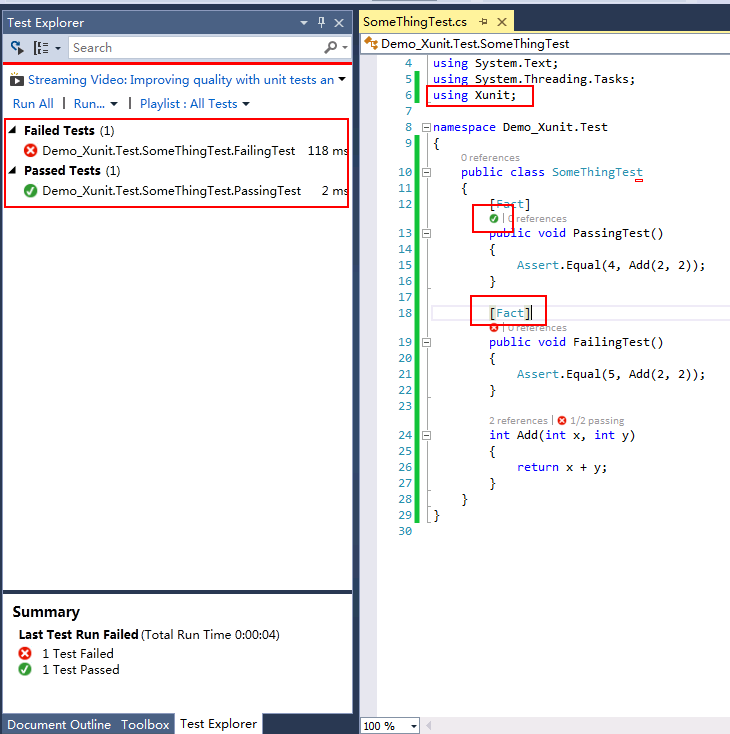
提示:需要通过NuGet下载xunit.net和xunit.visualstudio这两个安装包,然后启动“Test Explorer”运行测试,详情请参考这里。
3. Xunit对比Nunit的优点
这部分内容参考了官方文章以及一些自己对测试框架的场景的理解,如有错误之处,还请指出。
3.1 每个测试单一实例的讨论,SetUp以及TestFixtureSetUp
请参考马丁大师对单一实例的论述:http://martinfowler.com/bliki/JunitNewInstance.html,文章指出:对于测试缓存或每次测试之前重新实例化对象,这种做法是值得商榷的。虽然其有利于对象的调用,而且基本不用考虑对象回收的问题(仅当在TearDown中回收了资源),但这样仍然不符合绝对意义上的“对象隔离”原则。而且有些变量是只需全局实例化一次(在Nunit框架中要使用TestFeature创建),虽然这样也能满足需求,但是程序中还是有很多这种框架的特性需要熟悉,相比没有这些框架(指没有SetUp和TestFixtureSetUp)的语法来讲跟不方便一些,当然这些仅仅是一些思考。
同时,James Newkrik也在文章中提到,与其在SetUp中初始化更多的参数,破坏单一职责的原则,另外加上每回测试都要回顾SetUp和TearDown方法所执行的内容,倒不如将其放在Test内部,去掉SetUp和TearDown来增强测试的的表达性以及隔离性。
3.2 Xunit没有ExpectException
不采用Attribute的方式来捕捉异常有两方面的好处:
1. 在代码中直接断言(Assert)能捕捉到更多种类的异常。
2. 遵守Arrange-Act-Assert(or "3A") 模式:即测试命名上“范围-作用-断言”规范。
public class TestClass1

    {

        [ Fact ]

         public void testException()

        {

             Assert .Throws< InvalidOperationException >(() => operation());

        }

         void operation()

        {

             throw new InvalidOperationException ();

        }

    }
3.3 Xunit更像面向切面的语言
Xunit中使用Fact、Theory、XxxData、Fact(Timeout=n)等标签来组织测试,从功能上讲更像切面编程。 请参考下一节。
3.4 Xunit去除了更多的Attribute
保留很少一部分标签有利于简化测试框架,加快熟悉测试框架的时间,使框架更为简洁、实用。
| NUnit 2.2 | MSTest | xUnit.net | Comments |
|---|---|---|---|
| [Test] | [TestMethod] | [Fact] | Marks a test method. |
| [TestFixture] | [TestClass] | n/a | xUnit.net does not require an attribute for a test class; it looks for all test methods in all public (exported) classes in the assembly. |
| [ExpectedException] | [ExpectedException] | Assert.Throws orRecord.Exception | xUnit.net has done away with the ExpectedException attribute in favor of Assert.Throws. SeeNote 1. |
| [SetUp] | [TestInitialize] | Constructor | We believe that use of [SetUp]is generally bad. However, you can implement a parameterless constructor as a direct replacement. See Note 2. |
| [TearDown] | [TestCleanup] | IDisposable.Dispose | We believe that use of[TearDown] is generally bad. However, you can implementIDisposable.Dispose as a direct replacement. See Note 2. |
| [TestFixtureSetUp] | [ClassInitialize] | IUseFixture<T> | To get per-fixture setup, implement IUseFixture<T> on your test class. See Note 3 |
| [TestFixtureTearDown] | [ClassCleanup] | IUseFixture<T> | To get per-fixture teardown, implement IUseFixture<T> on your test class. See Note 3 |
| [Ignore] | [Ignore] | [Fact(Skip="reason")] | Set the Skip parameter on the[Fact] attribute to temporarily skip a test. |
| n/a | [Timeout] | [Fact(Timeout=n)] | Set the Timeout parameter on the [Fact] attribute to cause a test to fail if it takes too long to run. Note that the timeout value for xUnit.net is in milliseconds. |
| [Property] | [TestProperty] | [Trait] | Set arbitrary metadata on a test |
| n/a | [DataSource] | [Theory], [XxxData] | Theory (data-driven test). SeeNote 4 |
3.4 Xunit使用IDisposable和IUseFixture<T>接口来代替显示声明SetUp和TestFixtureSetUp
首先,创建一个支持IDisposable对象:
using System;

using System.Configuration;

using System.Data.SqlClient;

public class DatabaseFixture : IDisposable

{

    SqlConnection connection;

    int fooUserID;

    public DatabaseFixture()

    {

        string connectionString = ConfigurationManager.ConnectionStrings["DatabaseFixture"].ConnectionString;

        connection = new SqlConnection(connectionString);

        connection.Open();

        string sql = @"INSERT INTO Users VALUES ('foo', 'bar'); SELECT SCOPE_IDENTITY();";

        using (SqlCommand cmd = new SqlCommand(sql, connection))

            fooUserID = Convert.ToInt32(cmd.ExecuteScalar());

    }

    public SqlConnection Connection

    {

        get { return connection; }

    }

    public int FooUserID

    {

        get { return fooUserID; }

    }

    public void Dispose()

    {

        string sql = @"DELETE FROM Users WHERE ID = @id;";

        using (SqlCommand cmd = new SqlCommand(sql, connection))

        {

            cmd.Parameters.AddWithValue("@id", fooUserID);

            cmd.ExecuteNonQuery();

        }

        connection.Close();

    }

}
最后增加测试,并实现IClassFixture<DatabaseFixture>接口:
using System;

using System.Configuration;

using System.Data.SqlClient;

using Xunit;

public class ClassFixtureTests : IClassFixture<DatabaseFixture>

{

    DatabaseFixture database;

    public ClassFixtureTests(DatabaseFixture data)

    {

        database = data;

    }

    [Fact]

    public void ConnectionIsEstablished()

    {

        Assert.NotNull(database.Connection);

    }

    [Fact]

    public void FooUserWasInserted()

    {

        string sql = "SELECT COUNT(*) FROM Users WHERE ID = @id;";

        using (SqlCommand cmd = new SqlCommand(sql, database.Connection))

        {

            cmd.Parameters.AddWithValue("@id", database.FooUserID);

            int rowCount = Convert.ToInt32(cmd.ExecuteScalar());

            Assert.Equal(, rowCount);

        }

    }

}
从这里读者可能体会到,Xunit更多的利用了C#本身的一些特性,而非使用一些特殊的Attribute或者方法(例如SetUp),在设计哲学上更多的考虑了对象自动实现自我管理的机制,而非人为去管理,从某种意义上来讲,解除了部分依赖性,将部分功能交给程序C#本身处理,减少工作量。
4. 文章引用
Martin Flower介绍Xunit: http://www.martinfowler.com/bliki/Xunit.html
Xunit Github地址:https://github.com/xunit/xunit
Nunit 官方地址:http://www.nunit.org/
周公介绍Xunit:http://zhoufoxcn.blog.51cto.com/792419/1172320/
舍弃Nunit拥抱Xunit的更多相关文章
- MSTest、NUnit、xUnit.net 属性和断言对照表
MSTest.NUnit.xUnit.net 属性对照表 MSTest NUnit xUnit.net Comments [TestMethod] [Test] [Fact] Marks a test ...
- Nunit与Xunit介绍
Nunit安装 首先说下,nunit2.X与3.X版本需要安装不同的vs扩展. nunit2.x安装 安装如上3个,辅助创建nunit测试项目与在vs中运行单元测试用例 . 1.Nunit2 Test ...
- Xunit和Nunit的区别
https://www.cnblogs.com/Leo_wl/p/5727712.html 舍弃Nunit拥抱Xunit 前言 今天与同事在讨论.Net下测试框架的时候,说到NUnit等大多数测试 ...
- Xunit
Attributes Note: This table was written back when xUnit.net 1.0 has shipped, and needs to be updated ...
- .NET Core系列 :4 测试
2016.6.27 微软已经正式发布了.NET Core 1.0 RTM,但是工具链还是预览版,同样的大量的开源测试库也都是至少发布了Alpha测试版支持.NET Core, 这篇文章 The Sta ...
- 单元测试与Nunit的基本使用
一.单元测试是什么 单元测试(unit testing),是指对软件中的最小可测试单元进行检查和验证.对于单元测试中单元的含义,一般来说,要根据实际情况去判定其具体含义,如C语言中单元指一个函数,C# ...
- [小北De编程手记] : Lesson 01 玩转 xUnit.Net 之 概述
谈到单元测试,任何一个开发或是测试人员都不会觉得陌生.我想大多数的同学也都是接触过各种单元测试框架.关于单元测试的重要性,应该不会有太多的质疑.这个系列,我向大家介绍一下xUnit.Net的使用.就让 ...
- VS2013单元测试及代码覆盖率分析--Xunit
1,Javaweb中有jmeter.jacoco.ant.badboy等集成测试代码覆盖率的方式,C#代码的覆盖率怎么测试呢?VS2013的IDE上本身并未集成测试的工具,以下讲解VS2013中C#代 ...
- [转载]单元测试之道(使用NUnit)
首先来看下面几个场景你是否熟悉 1.你正在开发一个系统,你不断地编码-编译-调试-编码-编译-调试……终于,你负责的功能模块从上到下全部完成且编译通过!你长出一口气,怀着激动而又忐忑的心情点击界面上的 ...
随机推荐
- ASP.NET_各个币种之间的汇率转换(实时)使用Yahoo汇率。
近期开发支付平台的时候有运用到各国的实时汇率之间的转换问题,于是在往上找了很多相关资料,以下就是一些参考网址: 1.提供API接口的网站:https://www.showapi.com:这个网站有提供 ...
- ASP.NET Aries 入门开发教程3:开发一个列表页面及操控查询区
前言: Aries框架毕竟是开发框架,所以重点还是要写代码的,这样开发人员才不会失业,哈. 步骤1:新建html 建一个Html,主要有三步: 1:引入Aries.Loader.js 2:弄一个tab ...
- python自动化测试(2)-自动化基本技术原理
python自动化测试(2) 自动化基本技术原理 1 概述 在之前的文章里面提到过:做自动化的首要本领就是要会 透过现象看本质 ,落实到实际的IT工作中就是 透过界面看数据. 掌握上面的这样的本领 ...
- 前端开发:面向对象与javascript中的面向对象实现(二)构造函数与原型
前端开发:面向对象与javascript中的面向对象实现(二)构造函数与原型 前言(题外话): 有人说拖延症是一个绝症,哎呀治不好了.先不说这是一个每个人都多多少少会有的,也不管它究竟对生活有多么大的 ...
- php 基础代码大全(不断完善中)
下面是基础的PHP的代码,不断完善中~ //语法错误(syntax error)在语法分析阶段,源代码并未被执行,故不会有任何输出. /* [命名规则] */ 常量名 类常量建议全大写,单词间用下划线 ...
- html中返回上一页的各种写法【转】
超链接返回上一页代码: <a href="#" onClick="javascript :history.back(-1);">返回上一页</ ...
- 简单酷炫的canvas动画
作为一个新人怀着激动而紧张的心情写了第一篇帖子还请大家多多支持,小弟在次拜谢. 驯鹿拉圣诞老人动画效果图如下 html如下: <div style="width:400px;heigh ...
- i++、++i 、i--、--i
总结: i++ 先用后加, ++i先加后用: i--先用后减, --i先减后用: //int i = 1; //Console.WriteLine(i);//1 //Console.WriteLine ...
- XSS 前端防火墙 —— 无懈可击的钩子
昨天尝试了一系列的可疑模块拦截试验,尽管最终的方案还存在着一些兼容性问题,但大体思路已经明确了: 静态模块:使用 MutationObserver 扫描. 动态模块:通过 API 钩子来拦截路径属性. ...
- Debian下安装mono
从mono的官网上查,debian的步骤写得太乱了.其实总结起来,就是这么几步: apt-key adv --keyserver hkp://keyserver.ubuntu.com:80 --rec ...