
舍弃Nunit拥抱Xunit
前言
今天与同事在讨论.Net下测试框架的时候,说到NUnit等大多数测试框架的SetUp以及TearDown方法并不是显得那么完美,所以在公司内部的项目中采用了Xunit框架。那么究竟是什么样的原因,让我们放弃了大多数框架都在用的Nunit或MSTest框架呢?
1. Xunit简介
首先奉上马丁大叔2006年对XUnit介绍的文章,http://www.martinfowler.com/bliki/Xunit.html。
Xunit其实是JUnit的衍生版,最开始是应用在Smalltalk中,其目的是支持持续集成,关于单元测试等相关内容可以参考我之前TDD系列文章,这里不做过多的介绍,只是介绍Why we choose Xunit。
GitHub地址:https://github.com/xunit/xunit
2. Xunit简单Demo
如此简单:
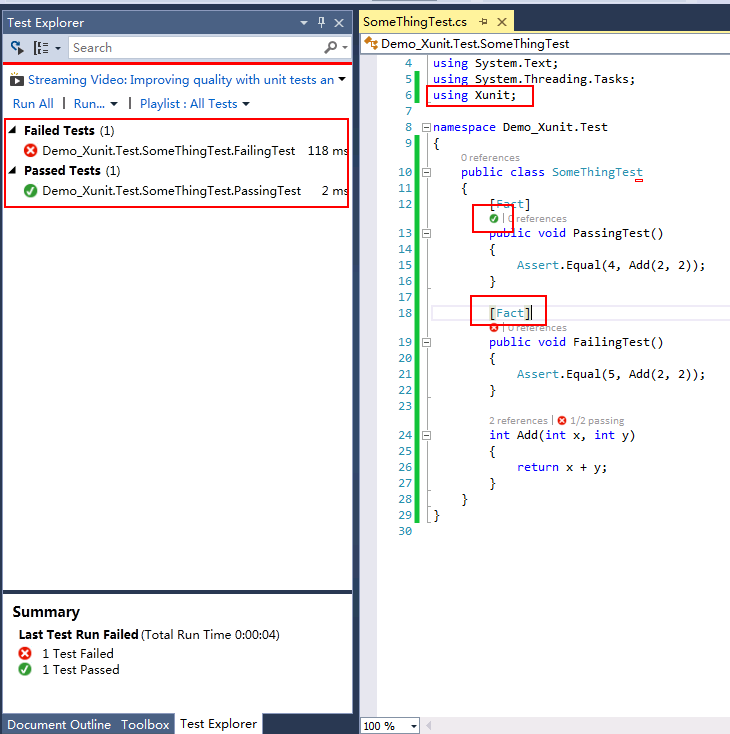
提示:需要通过NuGet下载xunit.net和xunit.visualstudio这两个安装包,然后启动“Test Explorer”运行测试,详情请参考这里。
3. Xunit对比Nunit的优点
这部分内容参考了官方文章以及一些自己对测试框架的场景的理解,如有错误之处,还请指出。
3.1 每个测试单一实例的讨论,SetUp以及TestFixtureSetUp
请参考马丁大师对单一实例的论述:http://martinfowler.com/bliki/JunitNewInstance.html,文章指出:对于测试缓存或每次测试之前重新实例化对象,这种做法是值得商榷的。虽然其有利于对象的调用,而且基本不用考虑对象回收的问题(仅当在TearDown中回收了资源),但这样仍然不符合绝对意义上的“对象隔离”原则。而且有些变量是只需全局实例化一次(在Nunit框架中要使用TestFeature创建),虽然这样也能满足需求,但是程序中还是有很多这种框架的特性需要熟悉,相比没有这些框架(指没有SetUp和TestFixtureSetUp)的语法来讲跟不方便一些,当然这些仅仅是一些思考。
同时,James Newkrik也在文章中提到,与其在SetUp中初始化更多的参数,破坏单一职责的原则,另外加上每回测试都要回顾SetUp和TearDown方法所执行的内容,倒不如将其放在Test内部,去掉SetUp和TearDown来增强测试的的表达性以及隔离性。
3.2 Xunit没有ExpectException
不采用Attribute的方式来捕捉异常有两方面的好处:
1. 在代码中直接断言(Assert)能捕捉到更多种类的异常。
2. 遵守Arrange-Act-Assert(or "3A") 模式:即测试命名上“范围-作用-断言”规范。
public class TestClass1

    {

        [ Fact ]

         public void testException()

        {

             Assert .Throws< InvalidOperationException >(() => operation());

        }

         void operation()

        {

             throw new InvalidOperationException ();

        }

    }
3.3 Xunit更像面向切面的语言
Xunit中使用Fact、Theory、XxxData、Fact(Timeout=n)等标签来组织测试,从功能上讲更像切面编程。 请参考下一节。
3.4 Xunit去除了更多的Attribute
保留很少一部分标签有利于简化测试框架,加快熟悉测试框架的时间,使框架更为简洁、实用。
| NUnit 2.2 | MSTest | xUnit.net | Comments |
|---|---|---|---|
| [Test] | [TestMethod] | [Fact] | Marks a test method. |
| [TestFixture] | [TestClass] | n/a | xUnit.net does not require an attribute for a test class; it looks for all test methods in all public (exported) classes in the assembly. |
| [ExpectedException] | [ExpectedException] | Assert.Throws orRecord.Exception | xUnit.net has done away with the ExpectedException attribute in favor of Assert.Throws. SeeNote 1. |
| [SetUp] | [TestInitialize] | Constructor | We believe that use of [SetUp]is generally bad. However, you can implement a parameterless constructor as a direct replacement. See Note 2. |
| [TearDown] | [TestCleanup] | IDisposable.Dispose | We believe that use of[TearDown] is generally bad. However, you can implementIDisposable.Dispose as a direct replacement. See Note 2. |
| [TestFixtureSetUp] | [ClassInitialize] | IUseFixture<T> | To get per-fixture setup, implement IUseFixture<T> on your test class. See Note 3 |
| [TestFixtureTearDown] | [ClassCleanup] | IUseFixture<T> | To get per-fixture teardown, implement IUseFixture<T> on your test class. See Note 3 |
| [Ignore] | [Ignore] | [Fact(Skip="reason")] | Set the Skip parameter on the[Fact] attribute to temporarily skip a test. |
| n/a | [Timeout] | [Fact(Timeout=n)] | Set the Timeout parameter on the [Fact] attribute to cause a test to fail if it takes too long to run. Note that the timeout value for xUnit.net is in milliseconds. |
| [Property] | [TestProperty] | [Trait] | Set arbitrary metadata on a test |
| n/a | [DataSource] | [Theory], [XxxData] | Theory (data-driven test). SeeNote 4 |
3.4 Xunit使用IDisposable和IUseFixture<T>接口来代替显示声明SetUp和TestFixtureSetUp
首先,创建一个支持IDisposable对象:
using System;

using System.Configuration;

using System.Data.SqlClient;

public class DatabaseFixture : IDisposable

{

    SqlConnection connection;

    int fooUserID;

    public DatabaseFixture()

    {

        string connectionString = ConfigurationManager.ConnectionStrings["DatabaseFixture"].ConnectionString;

        connection = new SqlConnection(connectionString);

        connection.Open();

        string sql = @"INSERT INTO Users VALUES ('foo', 'bar'); SELECT SCOPE_IDENTITY();";

        using (SqlCommand cmd = new SqlCommand(sql, connection))

            fooUserID = Convert.ToInt32(cmd.ExecuteScalar());

    }

    public SqlConnection Connection

    {

        get { return connection; }

    }

    public int FooUserID

    {

        get { return fooUserID; }

    }

    public void Dispose()

    {

        string sql = @"DELETE FROM Users WHERE ID = @id;";

        using (SqlCommand cmd = new SqlCommand(sql, connection))

        {

            cmd.Parameters.AddWithValue("@id", fooUserID);

            cmd.ExecuteNonQuery();

        }

        connection.Close();

    }

}
最后增加测试,并实现IClassFixture<DatabaseFixture>接口:
using System;

using System.Configuration;

using System.Data.SqlClient;

using Xunit;

public class ClassFixtureTests : IClassFixture<DatabaseFixture>

{

    DatabaseFixture database;

    public ClassFixtureTests(DatabaseFixture data)

    {

        database = data;

    }

    [Fact]

    public void ConnectionIsEstablished()

    {

        Assert.NotNull(database.Connection);

    }

    [Fact]

    public void FooUserWasInserted()

    {

        string sql = "SELECT COUNT(*) FROM Users WHERE ID = @id;";

        using (SqlCommand cmd = new SqlCommand(sql, database.Connection))

        {

            cmd.Parameters.AddWithValue("@id", database.FooUserID);

            int rowCount = Convert.ToInt32(cmd.ExecuteScalar());

            Assert.Equal(, rowCount);

        }

    }

}
从这里读者可能体会到,Xunit更多的利用了C#本身的一些特性,而非使用一些特殊的Attribute或者方法(例如SetUp),在设计哲学上更多的考虑了对象自动实现自我管理的机制,而非人为去管理,从某种意义上来讲,解除了部分依赖性,将部分功能交给程序C#本身处理,减少工作量。
4. 文章引用
Martin Flower介绍Xunit: http://www.martinfowler.com/bliki/Xunit.html
Xunit Github地址:https://github.com/xunit/xunit
Nunit 官方地址:http://www.nunit.org/
周公介绍Xunit:http://zhoufoxcn.blog.51cto.com/792419/1172320/
舍弃Nunit拥抱Xunit的更多相关文章
- MSTest、NUnit、xUnit.net 属性和断言对照表
MSTest.NUnit.xUnit.net 属性对照表 MSTest NUnit xUnit.net Comments [TestMethod] [Test] [Fact] Marks a test ...
- Nunit与Xunit介绍
Nunit安装 首先说下,nunit2.X与3.X版本需要安装不同的vs扩展. nunit2.x安装 安装如上3个,辅助创建nunit测试项目与在vs中运行单元测试用例 . 1.Nunit2 Test ...
- Xunit和Nunit的区别
https://www.cnblogs.com/Leo_wl/p/5727712.html 舍弃Nunit拥抱Xunit 前言 今天与同事在讨论.Net下测试框架的时候,说到NUnit等大多数测试 ...
- Xunit
Attributes Note: This table was written back when xUnit.net 1.0 has shipped, and needs to be updated ...
- .NET Core系列 :4 测试
2016.6.27 微软已经正式发布了.NET Core 1.0 RTM,但是工具链还是预览版,同样的大量的开源测试库也都是至少发布了Alpha测试版支持.NET Core, 这篇文章 The Sta ...
- 单元测试与Nunit的基本使用
一.单元测试是什么 单元测试(unit testing),是指对软件中的最小可测试单元进行检查和验证.对于单元测试中单元的含义,一般来说,要根据实际情况去判定其具体含义,如C语言中单元指一个函数,C# ...
- [小北De编程手记] : Lesson 01 玩转 xUnit.Net 之 概述
谈到单元测试,任何一个开发或是测试人员都不会觉得陌生.我想大多数的同学也都是接触过各种单元测试框架.关于单元测试的重要性,应该不会有太多的质疑.这个系列,我向大家介绍一下xUnit.Net的使用.就让 ...
- VS2013单元测试及代码覆盖率分析--Xunit
1,Javaweb中有jmeter.jacoco.ant.badboy等集成测试代码覆盖率的方式,C#代码的覆盖率怎么测试呢?VS2013的IDE上本身并未集成测试的工具,以下讲解VS2013中C#代 ...
- [转载]单元测试之道(使用NUnit)
首先来看下面几个场景你是否熟悉 1.你正在开发一个系统,你不断地编码-编译-调试-编码-编译-调试……终于,你负责的功能模块从上到下全部完成且编译通过!你长出一口气,怀着激动而又忐忑的心情点击界面上的 ...
随机推荐
- 关于.NET异常处理的思考
年关将至,对于大部分程序员来说,马上就可以闲下来一段时间了,然而在这个闲暇的时间里,唯有争论哪门语言更好可以消磨时光,估计最近会有很多关于java与.net的博文出现,我表示要作为一个吃瓜群众,静静的 ...
- 【.net 深呼吸】细说CodeDom(3):命名空间
在上一篇文章中,老周介绍了表达式和语句,尽管老周没有把所有的内容都讲一遍,但相信大伙至少已经掌握基本用法.在本文中,咱们继续探讨 CodeDom 方面的奥秘,这一次咱们聊聊命名空间. 在开始之前,老周 ...
- ASP.NET Core MVC/WebAPi 模型绑定探索
前言 相信一直关注我的园友都知道,我写的博文都没有特别枯燥理论性的东西,主要是当每开启一门新的技术之旅时,刚开始就直接去看底层实现原理,第一会感觉索然无味,第二也不明白到底为何要这样做,所以只有当你用 ...
- 如何在高并发环境下设计出无锁的数据库操作(Java版本)
一个在线2k的游戏,每秒钟并发都吓死人.传统的hibernate直接插库基本上是不可行的.我就一步步推导出一个无锁的数据库操作. 1. 并发中如何无锁. 一个很简单的思路,把并发转化成为单线程.Jav ...
- 小白解决CENTOS7错误:Cannot find a valid baseurl for repo: base/7/x86_6
刚入手的MacBook想着学点东西,本汪还是决定玩玩CentOS服务器,安装好了VirtualBox + CentOS. 打开一看,懵逼了!命令行! 行吧,先装个图形界面: $sudo yum gro ...
- RIFF和WAVE音频文件格式
RIFF file format RIFF全称为资源互换文件格式(Resources Interchange File Format),是Windows下大部分多媒体文件遵循的一种文件结构.RIFF文 ...
- JavaScript基础知识总结(四)
JavaScript语法 八.函数 函数就是完成某个功能的一组语句,函数由关键字function + 函数名 + 加一组参数定义: 函数在定义后可以被重复调用,通常将常用的功能写成一个函数,利用函数可 ...
- BPM配置故事之案例2-文本默认值
Boss感觉方便了很多,然而采购部采购员阿海却还是有点意见,他跑来找小明. 阿海:现在申请都是我在提交,申请人和申请部门能不能不要每次都要填写啊,好麻烦的. 小明:没问题,这个简单. 小明在表单中把申 ...
- mysql join 和left join 对于索引的问题
今天遇到一个left join优化的问题,搞了一下午,中间查了不少资料,对MySQL的查询计划还有查询优化有了更进一步的了解,做一个简单的记录: select c.* from hotel_info_ ...
- Windows 上安装 Jekyll.
Jekyll是一个静态网站生成工具.它允许用户使用HTML.Markdown或Textile来建立静态页面,然后通过模板引擎Liquid(Liquid Templating Engine)来运行. 原 ...