
OkHttp学习总结
This paper mainly includes the following contents
- okhttp ordinary operation.
- okhttp interceptors.
Recipes
We’ve written some recipes that demonstrate how to solve common problems with OkHttp. Read through them to learn about how everything works together. Cut-and-paste these examples freely; that’s what they’re for.
Synchronous Get
Download a file, print its headers, and print its response body as a string.
The string() method on response body is convenient and efficient for small documents. But if the response body is large (greater than 1 MiB), avoid string() because it will load the entire document into memory. In that case, prefer to process the body as a stream.
  private final OkHttpClient client = new OkHttpClient();

  public void run() throws Exception {

    Request request = new Request.Builder()

        .url("http://publicobject.com/helloworld.txt")

        .build();

    Response response = client.newCall(request).execute();

    if (!response.isSuccessful()) throw new IOException("Unexpected code " + response);

    Headers responseHeaders = response.headers();

    for (int i = 0; i < responseHeaders.size(); i++) {

      System.out.println(responseHeaders.name(i) + ": " + responseHeaders.value(i));

    }

    System.out.println(response.body().string());

  }
Asynchronous Get
Download a file on a worker thread, and get called back when the response is readable. The callback is made after the response headers are ready. Reading the response body may still block. OkHttp doesn’t currently offer asynchronous APIs to receive a response body in parts.
  private final OkHttpClient client = new OkHttpClient();

  public void run() throws Exception {

    Request request = new Request.Builder()

        .url("http://publicobject.com/helloworld.txt")

        .build();

    client.newCall(request).enqueue(new Callback() {

      @Override public void onFailure(Call call, IOException e) {

        e.printStackTrace();

      }

      @Override public void onResponse(Call call, Response response) throws IOException {

        if (!response.isSuccessful()) throw new IOException("Unexpected code " + response);

        Headers responseHeaders = response.headers();

        for (int i = 0, size = responseHeaders.size(); i < size; i++) {

          System.out.println(responseHeaders.name(i) + ": " + responseHeaders.value(i));

        }

        System.out.println(response.body().string());

      }

    });

  }
Accessing Headers
Typically HTTP headers work like a Map
  private final OkHttpClient client = new OkHttpClient();

  public void run() throws Exception {

    Request request = new Request.Builder()

        .url("https://api.github.com/repos/square/okhttp/issues")

        .header("User-Agent", "OkHttp Headers.java")

        .addHeader("Accept", "application/json; q=0.5")

        .addHeader("Accept", "application/vnd.github.v3+json")

        .build();

    Response response = client.newCall(request).execute();

    if (!response.isSuccessful()) throw new IOException("Unexpected code " + response);

    System.out.println("Server: " + response.header("Server"));

    System.out.println("Date: " + response.header("Date"));

    System.out.println("Vary: " + response.headers("Vary"));

  }
Posting a String
Use an HTTP POST to send a request body to a service. This example posts a markdown document to a web service that renders markdown as HTML. Because the entire request body is in memory simultaneously, avoid posting large (greater than 1 MiB) documents using this API.
  public static final MediaType MEDIA_TYPE_MARKDOWN

      = MediaType.parse("text/x-markdown; charset=utf-8");

  private final OkHttpClient client = new OkHttpClient();

  public void run() throws Exception {

    String postBody = ""

        + "Releases\n"

        + "--------\n"

        + "\n"

        + " * _1.0_ May 6, 2013\n"

        + " * _1.1_ June 15, 2013\n"

        + " * _1.2_ August 11, 2013\n";

    Request request = new Request.Builder()

        .url("https://api.github.com/markdown/raw")

        .post(RequestBody.create(MEDIA_TYPE_MARKDOWN, postBody))

        .build();

    Response response = client.newCall(request).execute();

    if (!response.isSuccessful()) throw new IOException("Unexpected code " + response);

    System.out.println(response.body().string());

  }
Post Streaming
Here we POST a request body as a stream. The content of this request body is being generated as it’s being written. This example streams directly into the Okio buffered sink. Your programs may prefer an OutputStream, which you can get from BufferedSink.outputStream().
  public static final MediaType MEDIA_TYPE_MARKDOWN

      = MediaType.parse("text/x-markdown; charset=utf-8");

  private final OkHttpClient client = new OkHttpClient();

  public void run() throws Exception {

    RequestBody requestBody = new RequestBody() {

      @Override public MediaType contentType() {

        return MEDIA_TYPE_MARKDOWN;

      }

      @Override public void writeTo(BufferedSink sink) throws IOException {

        sink.writeUtf8("Numbers\n");

        sink.writeUtf8("-------\n");

        for (int i = 2; i <= 997; i++) {

          sink.writeUtf8(String.format(" * %s = %s\n", i, factor(i)));

        }

      }

      private String factor(int n) {

        for (int i = 2; i < n; i++) {

          int x = n / i;

          if (x * i == n) return factor(x) + " × " + i;

        }

        return Integer.toString(n);

      }

    };

    Request request = new Request.Builder()

        .url("https://api.github.com/markdown/raw")

        .post(requestBody)

        .build();

    Response response = client.newCall(request).execute();

    if (!response.isSuccessful()) throw new IOException("Unexpected code " + response);

    System.out.println(response.body().string());

  }
Posting a File
It’s easy to use a file as a request body.
  public static final MediaType MEDIA_TYPE_MARKDOWN

      = MediaType.parse("text/x-markdown; charset=utf-8");

  private final OkHttpClient client = new OkHttpClient();

  public void run() throws Exception {

    File file = new File("README.md");

    Request request = new Request.Builder()

        .url("https://api.github.com/markdown/raw")

        .post(RequestBody.create(MEDIA_TYPE_MARKDOWN, file))

        .build();

    Response response = client.newCall(request).execute();

    if (!response.isSuccessful()) throw new IOException("Unexpected code " + response);

    System.out.println(response.body().string());

  }
Posting form parameters
Use FormBody.Builder to build a request body that works like an HTML tag. Names and values will be encoded using an HTML-compatible form URL encoding.
  private final OkHttpClient client = new OkHttpClient();

  public void run() throws Exception {

    RequestBody formBody = new FormBody.Builder()

        .add("search", "Jurassic Park")

        .build();

    Request request = new Request.Builder()

        .url("https://en.wikipedia.org/w/index.php")

        .post(formBody)

        .build();

    Response response = client.newCall(request).execute();

    if (!response.isSuccessful()) throw new IOException("Unexpected code " + response);

    System.out.println(response.body().string());

  }
Posting a multipart request
MultipartBody.Builder can build sophisticated request bodies compatible with HTML file upload forms. Each part of a multipart request body is itself a request body, and can define its own headers. If present, these headers should describe the part body, such as its Content-Disposition. The Content-Length and Content-Type headers are added automatically if they’re available.
  private static final String IMGUR_CLIENT_ID = "...";

  private static final MediaType MEDIA_TYPE_PNG = MediaType.parse("image/png");

  private final OkHttpClient client = new OkHttpClient();

  public void run() throws Exception {

    // Use the imgur image upload API as documented at https://api.imgur.com/endpoints/image

    RequestBody requestBody = new MultipartBody.Builder()

        .setType(MultipartBody.FORM)

        .addFormDataPart("title", "Square Logo")

        .addFormDataPart("image", "logo-square.png",

            RequestBody.create(MEDIA_TYPE_PNG, new File("website/static/logo-square.png")))

        .build();

    Request request = new Request.Builder()

        .header("Authorization", "Client-ID " + IMGUR_CLIENT_ID)

        .url("https://api.imgur.com/3/image")

        .post(requestBody)

        .build();

    Response response = client.newCall(request).execute();

    if (!response.isSuccessful()) throw new IOException("Unexpected code " + response);

    System.out.println(response.body().string());

  }
Parse a JSON Response With Gson
Gson is a handy API for converting between JSON and Java objects. Here we’re using it to decode a JSON response from a GitHub API.
Note that ResponseBody.charStream() uses the Content-Type response header to select which charset to use when decoding the response body. It defaults to UTF-8 if no charset is specified.
  private final OkHttpClient client = new OkHttpClient();

  private final Gson gson = new Gson();

  public void run() throws Exception {

    Request request = new Request.Builder()

        .url("https://api.github.com/gists/c2a7c39532239ff261be")

        .build();

    Response response = client.newCall(request).execute();

    if (!response.isSuccessful()) throw new IOException("Unexpected code " + response);

    Gist gist = gson.fromJson(response.body().charStream(), Gist.class);

    for (Map.Entry<String, GistFile> entry : gist.files.entrySet()) {

      System.out.println(entry.getKey());

      System.out.println(entry.getValue().content);

    }

  }

  static class Gist {

    Map<String, GistFile> files;

  }

  static class GistFile {

    String content;

  }
Interceptors
Interceptors are a powerful mechanism that can monitor, rewrite, and retry calls. Here’s a simple interceptor that logs the outgoing request and the incoming response.
class LoggingInterceptor implements Interceptor {

  @Override public Response intercept(Interceptor.Chain chain) throws IOException {

    Request request = chain.request();

    long t1 = System.nanoTime();

    logger.info(String.format("Sending request %s on %s%n%s",

        request.url(), chain.connection(), request.headers()));

    Response response = chain.proceed(request);

    long t2 = System.nanoTime();

    logger.info(String.format("Received response for %s in %.1fms%n%s",

        response.request().url(), (t2 - t1) / 1e6d, response.headers()));

    return response;

  }

}
A call to chain.proceed(request) is a critical part of each interceptor’s implementation. This simple-looking method is where all the HTTP work happens, producing a response to satisfy the request.
Interceptors can be chained. Suppose you have both a compressing interceptor and a checksumming interceptor: you’ll need to decide whether data is compressed and then checksummed, or checksummed and then compressed. OkHttp uses lists to track interceptors, and interceptors are called in order.
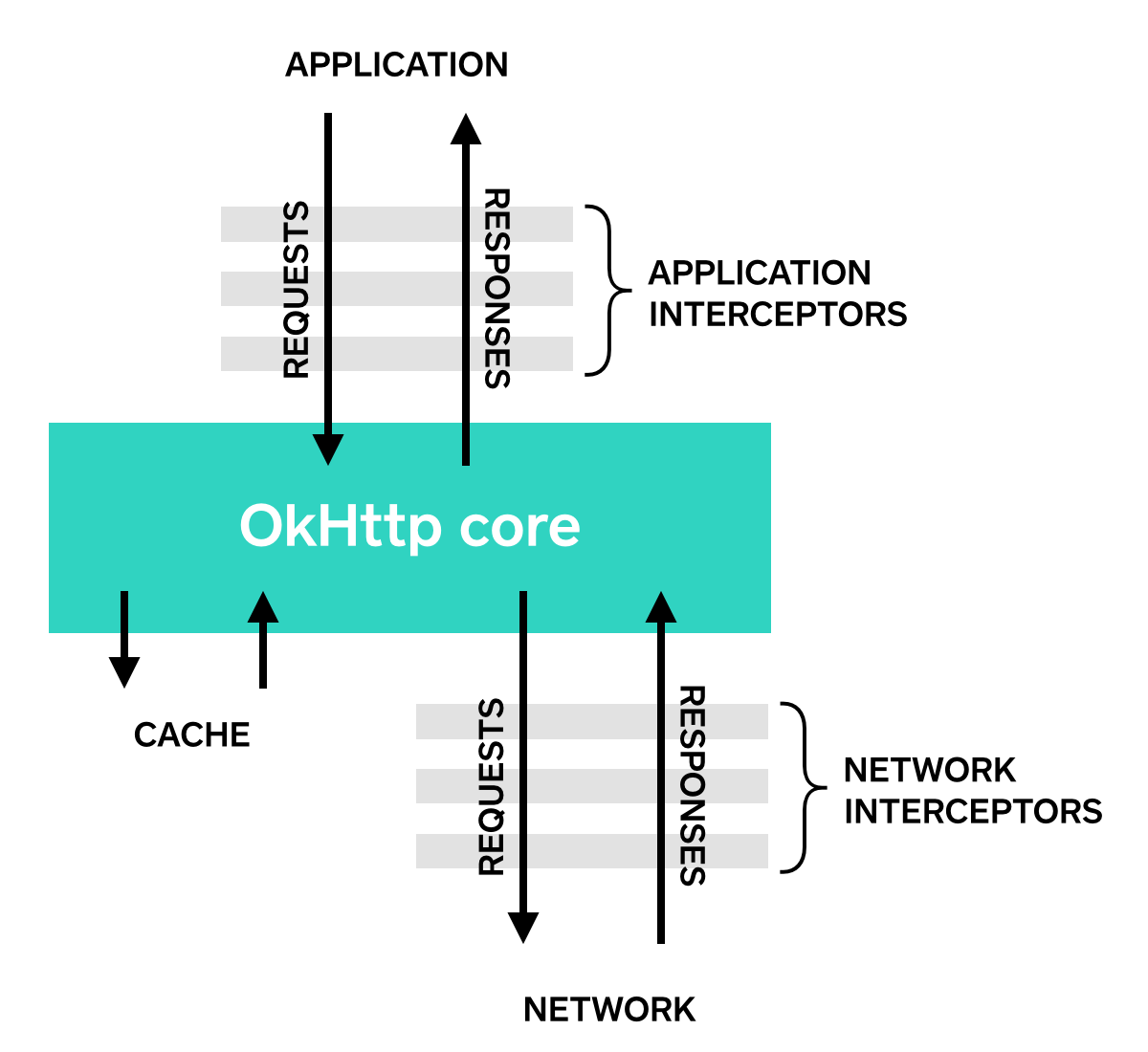
Application Interceptors
Interceptors are registered as either application or network interceptors. We’ll use the LoggingInterceptor defined above to show the difference.
Register an application interceptor by calling addInterceptor() on OkHttpClient.Builder:
OkHttpClient client = new OkHttpClient.Builder()

    .addInterceptor(new LoggingInterceptor())

    .build();

Request request = new Request.Builder()

    .url("http://www.publicobject.com/helloworld.txt")

    .header("User-Agent", "OkHttp Example")

    .build();

Response response = client.newCall(request).execute();

response.body().close();
The URL http://www.publicobject.com/helloworld.txt redirects to https://publicobject.com/helloworld.txt, and OkHttp follows this redirect automatically. Our application interceptor is called once and the response returned from chain.proceed() has the redirected response:
INFO: Sending request http://www.publicobject.com/helloworld.txt on null

User-Agent: OkHttp Example

INFO: Received response for https://publicobject.com/helloworld.txt in 1179.7ms

Server: nginx/1.4.6 (Ubuntu)

Content-Type: text/plain

Content-Length: 1759

Connection: keep-alive

We can see that we were redirected because response.request().url() is different from request.url(). The two log statements log two different URLs.
Network Interceptors
Registering a network interceptor is quite similar. Call addNetworkInterceptor() instead of addInterceptor():
OkHttpClient client = new OkHttpClient.Builder()

    .addNetworkInterceptor(new LoggingInterceptor())

    .build();

Request request = new Request.Builder()

    .url("http://www.publicobject.com/helloworld.txt")

    .header("User-Agent", "OkHttp Example")

    .build();

Response response = client.newCall(request).execute();

response.body().close();
When we run this code, the interceptor runs twice. Once for the initial request to http://www.publicobject.com/helloworld.txt, and another for the redirect to https://publicobject.com/helloworld.txt.
INFO: Sending request http://www.publicobject.com/helloworld.txt on Connection{www.publicobject.com:80, proxy=DIRECT hostAddress=54.187.32.157 cipherSuite=none protocol=http/1.1}

User-Agent: OkHttp Example

Host: www.publicobject.com

Connection: Keep-Alive

Accept-Encoding: gzip

INFO: Received response for http://www.publicobject.com/helloworld.txt in 115.6ms

Server: nginx/1.4.6 (Ubuntu)

Content-Type: text/html

Content-Length: 193

Connection: keep-alive

Location: https://publicobject.com/helloworld.txt

INFO: Sending request https://publicobject.com/helloworld.txt on Connection{publicobject.com:443, proxy=DIRECT hostAddress=54.187.32.157 cipherSuite=TLS_ECDHE_RSA_WITH_AES_256_CBC_SHA protocol=http/1.1}

User-Agent: OkHttp Example

Host: publicobject.com

Connection: Keep-Alive

Accept-Encoding: gzip

INFO: Received response for https://publicobject.com/helloworld.txt in 80.9ms

Server: nginx/1.4.6 (Ubuntu)

Content-Type: text/plain

Content-Length: 1759

Connection: keep-alive

The network requests also contain more data, such as the Accept-Encoding: gzip header added by OkHttp to advertise support for response compression. The network interceptor's Chain has a non-null Connection that can be used to interrogate the IP address and TLS configuration that were used to connect to the webserver.
Choosing between application and network interceptors
Each interceptor chain has relative merits.
Application interceptors
- Don’t need to worry about intermediate responses like redirects and retries.
- Are always invoked once, even if the HTTP response is served from the cache.
- Observe the application’s original intent. Unconcerned with OkHttp-injected headers like If-None-Match.
- Permitted to short-circuit and not call Chain.proceed().
- Permitted to retry and make multiple calls to Chain.proceed().
Network Interceptors
- Able to operate on intermediate responses like redirects and retries.
- Not invoked for cached responses that short-circuit the network.
- Observe the data just as it will be transmitted over the network.
- Access to the Connection that carries the request.
Rewriting Requests
Interceptors can add, remove, or replace request headers. They can also transform the body of those requests that have one. For example, you can use an application interceptor to add request body compression if you’re connecting to a webserver known to support it.
/** This interceptor compresses the HTTP request body. Many webservers can't handle this! */

final class GzipRequestInterceptor implements Interceptor {

  @Override public Response intercept(Interceptor.Chain chain) throws IOException {

    Request originalRequest = chain.request();

    if (originalRequest.body() == null || originalRequest.header("Content-Encoding") != null) {

      return chain.proceed(originalRequest);

    }

    Request compressedRequest = originalRequest.newBuilder()

        .header("Content-Encoding", "gzip")

        .method(originalRequest.method(), gzip(originalRequest.body()))

        .build();

    return chain.proceed(compressedRequest);

  }

  private RequestBody gzip(final RequestBody body) {

    return new RequestBody() {

      @Override public MediaType contentType() {

        return body.contentType();

      }

      @Override public long contentLength() {

        return -1; // We don't know the compressed length in advance!

      }

      @Override public void writeTo(BufferedSink sink) throws IOException {

        BufferedSink gzipSink = Okio.buffer(new GzipSink(sink));

        body.writeTo(gzipSink);

        gzipSink.close();

      }

    };

  }

}
Rewriting Responses
Symmetrically, interceptors can rewrite response headers and transform the response body. This is generally more dangerous than rewriting request headers because it may violate the webserver’s expectations!
If you’re in a tricky situation and prepared to deal with the consequences, rewriting response headers is a powerful way to work around problems. For example, you can fix a server’s misconfigured Cache-Control response header to enable better response caching:
/** Dangerous interceptor that rewrites the server's cache-control header. */

private static final Interceptor REWRITE_CACHE_CONTROL_INTERCEPTOR = new Interceptor() {

  @Override public Response intercept(Interceptor.Chain chain) throws IOException {

    Response originalResponse = chain.proceed(chain.request());

    return originalResponse.newBuilder()

        .header("Cache-Control", "max-age=60")

        .build();

  }

};
Typically this approach works best when it complements a corresponding fix on the webserver!
Availability
OkHttp’s interceptors require OkHttp 2.2 or better. Unfortunately, interceptors do not work with OkUrlFactory, or the libraries that build on it, including Retrofit ≤ 1.8 and Picasso ≤ 2.4.
References
OkHttp学习总结的更多相关文章
- 安卓网络请求之——OkHttp学习
之前做安卓项目的时候,HTTP请求用的是android api中的HttpURLConnection和HttpClient,编码比较繁琐,自己封装的也不好.后来知道有很多网络请求的第三方框架,可以方便 ...
- Alpha 冲刺10
队名:日不落战队 安琪(队长) 今天完成的任务 整理项目. okhttp学习第四弹. 明天的计划 okhttp学习第五弹. 阶段反思. 睡觉. 还剩下的任务 个人信息数据get. 遇到的困难 困难:好 ...
- Alpha 冲刺9
队名:日不落战队 安琪(队长) 今天完成的任务 协助开发手写涂鸦demo. okhttp学习第三弹. 明天的计划 协助开发语音存储demo. 还剩下的任务 个人信息数据get. 遇到的困难 困难:整理 ...
- Alpha 冲刺8
队名:日不落战队 安琪(队长) 今天完成的任务 登录的数据post. okhttp学习第二弹. 明天的计划 okhttp学习第三弹. 个人信息界面数据get. 还剩下的任务 个人信息数据get. 遇到 ...
- Android 框架学习之 第一天 okhttp & Retrofit
最近面试,一直被问道新技术新框架,这块是短板,慢慢补吧. 关于框架的学习,分几个步骤 I.框架的使用 II.框架主流使用的版本和Android对应的版本 III.框架的衍生使用比如okhttp就会有R ...
- OKHttp源码学习同步请求和异步请求(二)
OKHttp get private void doGet(String method, String s) throws IOException { String url = urlAddress ...
- 学习RxJava+Retrofit+OkHttp+MVP的网络请求使用
公司的大佬用的是这一套,那我这个菜鸟肯定要学习使用了. 我在网上找了很多文章,写的都很详细,比如 https://www.jianshu.com/u/5fd2523645da https://www. ...
- 安卓学习----使用okHttp(get方式)---下载图片
一首先下载Jar包 https://github.com/square/okhttp 如果使用android studio只需要加入依赖 compile 'com.squareup.okhttp3:o ...
- 学习okhttp wiki--HTTPS
HTTPS OkHttp尝试平衡两个相互竞争的要素: 连通性(Connectivity):连接到尽可能多的服务器.这包括运行最新版本 boringssl 的服务器和不太过时的老版本 OpenSSL 的 ...
随机推荐
- iOS跳转到另一个程序
我这里只是写了部分东西,如果想看更加详细的,请点击原文链接. 原文链接:http://blog.csdn.net/likendsl/article/details/7553605 原则上iOS的沙 ...
- cocos2d智能指针 转自:http://blog.csdn.net/nxshow/article/details/44699409
智能指针在C++11的标准中已经存在了, 分别是unique_ptr,shared_ptr,weak_ptr, 其中最常用的应该是share_ptr, 它采用引用计数的方式管理内存, 当引用计数为0的 ...
- cocos2dx 做test遇到一个问题,记录下来
我新建了一个group,然后再group里面创建一个文件A.h,再A.h中#include group同一级的文件CBaseTest.h,方法是: #include "../BaseTest ...
- [KOJ6023]合并果子·改
[COJ6023]合并果子·改 试题描述 在一个果园里,多多已经将所有的果子打了下来,而且按果子的不同种类分成了不同的堆.多多把这些果子堆排成一排,然后所有的果子合成一堆. 每一次合并,多多可以 ...
- 怎样删除一键GHOST 文件件名为~1的备份文件?
早些时候备份过系统,但是后来觉的该备份系统不够完美,想删除.可是备份文件被保护,无法删除.(1)在网上查看了一下: start X:\~1 attrib -s -h -r X:\~1\C_PAN.GH ...
- gulp学习笔记2-安装
安装nodejs -> 全局安装gulp -> 项目安装gulp以及gulp插件 -> 配置gulpfile.js -> 运行任务 1.去nodejs官网安装nodejs 2. ...
- JAVA 回调机制(callback)
序言 最近学习java,接触到了回调机制(CallBack).初识时感觉比较混乱,而且在网上搜索到的相关的讲解,要么一言带过,要么说的比较单纯的像是给CallBack做了一个定义.当然了,我在理解了回 ...
- python thread的join方法解释
python的Thread类中提供了join()方法,使得一个线程可以等待另一个线程执行结束后再继续运行.这个方法还可以设定一个timeout参数,避免无休止的等待.因为两个线程顺序完成,看起来象一个 ...
- Minimum Height Trees
For a undirected graph with tree characteristics, we can choose any node as the root. The result gra ...
- Codeforces 55D
基本的数位DP,注意记录那些状态可以用最小的空间判断出整除性. #include <cstdio> #include <cstring> using namespace std ...