
Android其它新控件 (转)
原文出处:http://blog.csdn.net/lavor_zl/article/details/51312715
Android其它新控件是指非Android大版本更新时提出的新控件,也非谷歌IO大会提出的新控件,而是谷歌发现市场上某种功能的控件被大量使用,而不定期推出实现该功能的官方控件。Android其它新控件常用的有下面两种。 
1. Drawerlayout(抽屉布局)
抽屉布局的使用比较简单,一般在DrawerLayout下面定义两个视图,第一个视图作为主界面,第二个视图作为抽屉,注意第二个视图要设置android:layout_gravity属性,否则不会作为抽屉,而且我们打开关闭抽屉还和此属性相关。
在xml中定义DrawerLayout
<android.support.v4.widget.DrawerLayout

    xmlns:android="http://schemas.android.com/apk/res/android"

    xmlns:app="http://schemas.android.com/apk/res-auto"

    xmlns:tools="http://schemas.android.com/tools"

    android:id="@+id/drawer_layout"

    android:layout_width="match_parent"

    android:layout_height="match_parent"

    tools:context=".MainActivity">

    <android.support.v4.widget.SwipeRefreshLayout

        android:id="@+id/refresh"

        android:layout_width="match_parent"

        android:layout_height="match_parent">

        <Button

            android:layout_width="wrap_content"

            android:layout_height="wrap_content"

            android:text="sads" />

    </android.support.v4.widget.SwipeRefreshLayout>

    <LinearLayout

        android:layout_gravity="start"

        android:layout_width="match_parent"

        android:layout_height="match_parent"

        >

        <TextView

            android:ems="1"

            android:layout_width="wrap_content"

            android:layout_height="wrap_content"

            android:text="我是抽屉布局的抽屉部分" />

    </LinearLayout>

</android.support.v4.widget.DrawerLayout>
在java文件中怎么打开,关闭抽屉
        //打开Gravity.START位置的抽屉

        drawerlayout.openDrawer(Gravity.START);

        //关闭Gravity.START位置的抽屉

        drawerlayout.closeDrawer(Gravity.START);
抽屉关闭状态时: 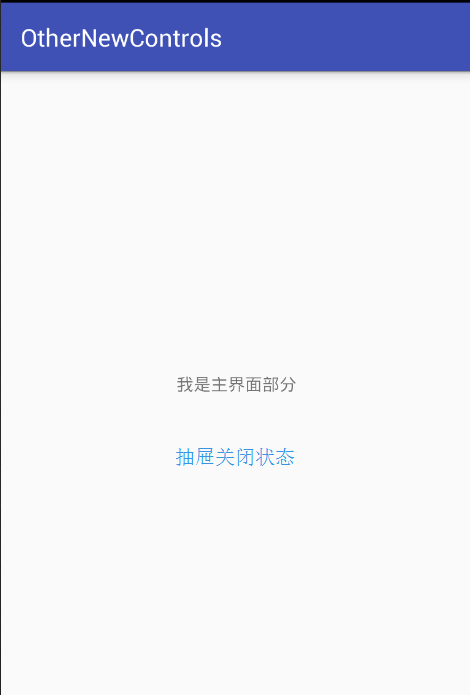
抽屉打开状态时: 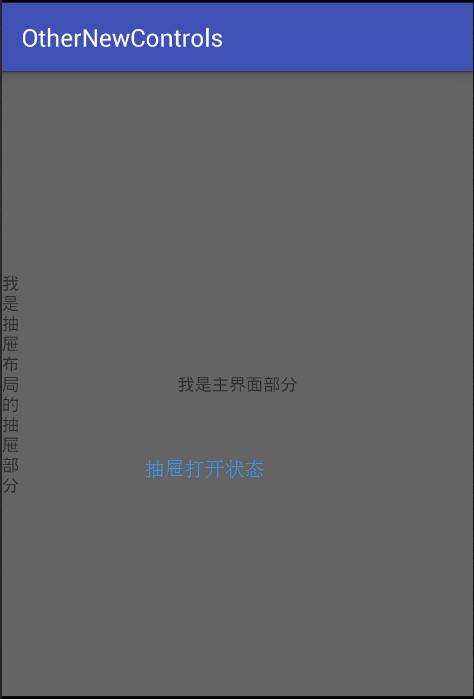
2. SwipeRefreshLayout(滑动刷新布局)
SwipeRefreshLayout使用户可以通过垂直滑动手势刷新视图的内容。
在xml中定义SwipeRefreshLayout
 <android.support.v4.widget.SwipeRefreshLayout

        android:id="@+id/refresh"

        android:layout_width="match_parent"

        android:layout_height="match_parent">

        <TextView

            android:gravity="center"

            android:layout_width="match_parent"

            android:layout_height="wrap_content"

            android:text="我是主界面部分" />

 </android.support.v4.widget.SwipeRefreshLayout>
在java中操作SwipeRefreshLayout
        this.refresh = (SwipeRefreshLayout) findViewById(R.id.refresh);

        refresh.setOnRefreshListener(new SwipeRefreshLayout.OnRefreshListener() {

            @Overridepublic void onRefresh() {

                Log.i("SwipeRefreshLayout","下拉刷新");

                //do something,刷新视图内容

                refresh.setRefreshing(false);//设置刷新结束

                Log.i("SwipeRefreshLayout","刷新完毕");

            }

}); 本程序源代码下载:Android其它新控件
Android其它新控件 (转)的更多相关文章
- 【转】Android M新控件之AppBarLayout,NavigationView,CoordinatorLayout,CollapsingToolbarLayout的使用
Android M新控件之AppBarLayout,NavigationView,CoordinatorLayout,CollapsingToolbarLayout的使用 分类: Android UI ...
- 【转】Android M新控件之FloatingActionButton,TextInputLayout,Snackbar,TabLayout的使用
Android M新控件之FloatingActionButton,TextInputLayout,Snackbar,TabLayout的使用 分类: Android UI2015-06-15 16: ...
- android design 新控件
转载请标明出处: http://blog.csdn.net/forezp/article/details/51873137 本文出自方志朋的博客 最近在研究android 开发的新控件,包括drawe ...
- [转 载] android 谷歌 新控件(约束控件 )ConstraintLayout 扁平化布局
序 在Google IO大会中不仅仅带来了Android Studio 2.2预览版,同时带给我们一个依赖约束的库. 简单来说,她是相对布局的升级版本,但是区别与相对布局更加强调约束.何为约束,即控件 ...
- Android L新控件RecyclerView简介
Android L是android进化史上的里程碑,尽管还没有正式发布4.5或者5.0,但预览版也同样精彩. 这篇文章只是另外一篇博客的总结性翻译,能够读懂原文的,可以点开这个链接去阅读精彩的原文:h ...
- android L 新控件侧滑菜单DrawerLayout 使用教程
介绍 drawerLayout是Support Library包中实现了侧滑菜单效果的控件,可以说drawerLayout是因为第三方控件如MenuDrawer等的出现之后,google借鉴而出现的产 ...
- android L新控件RecyclerView详解与DeMo[转]
http://blog.csdn.net/codebob/article/details/37813801 在谷歌的官网我们可以看到它是这样介绍的: RecyclerView is a more a ...
- android L新控件RecyclerView具体解释DeMo
简介 在谷歌的官方网站上,我们可以看到,它是此演示文稿:RecyclerView is a more advanced and flexible version of ListView. This w ...
- 【Android】Anroid5.0+新控件---酷炫标题栏的简单学习
Android5.0+推出的新控件感觉特别酷,最近想模仿大神做个看图App出来,所以先把这些新控件用熟悉了. 新控件的介绍.使用等等网上相应的文章已经特别多了,题主也没那能力去写篇详解出来,本篇随笔记 ...
随机推荐
- .Net程序员之Python基础教程学习----判断条件与循环[Fourth Day]
今天学习Python的判断条件与循环操作. 一. 布尔变量: 在学习判断条件之前必须的了解bool变量,在Python中bool变量与C语言比较类似,与.net差别比较大,其中下面集中情况需要 ...
- OpenXml入门---word里面插入图片
下面介绍如何在word里面插入图片,顺便小弟发现MSDN官网有完整的OpenXML教程,虽然是全英文的不过还是很有帮助的. Tips,原来摘抄代码里面没有模板,在copy过来发现插入word中的图片大 ...
- 【HTML5】使用多媒体
HTML5 支持直接在浏览器中播放音频和视频文件,不需要使用Abode Flash这样的插件. 1. 使用 video 元素 可以用video 元素在网页里嵌入视频内容. 其基本用法如下: <! ...
- 第18章 图元文件_18.2 增强型图元文件(emf)(1)
18.2 增强型图元文件(emf) 18.2.1 创建并显示增强型图元文件的步骤 (1)创建:hdcEMF = CreateEnhMetaFile(hdcRef,szFilename,lpRect,l ...
- 今天在看UWP蓝牙的例子
private async void InitializeRfcommServer() { ListenButton.IsEnabled = false; DisconnectButton.IsEna ...
- Dubbo架构设计详解
from:http://shiyanjun.cn/archives/325.html Dubbo是Alibaba开源的分布式服务框架,它最大的特点是按照分层的方式来架构,使用这种方式可以使各个层之间解 ...
- C# socket UDPの异步链接
基于C#的UDP异步连接,在本机上通过测试
- 【转】Sql Server参数化查询之where in和like实现详解
转载至:http://www.cnblogs.com/lzrabbit/archive/2012/04/22/2465313.html 文章导读 拼SQL实现where in查询 使用CHARINDE ...
- jinja模版
实现不同机器的差异化配置 把apache监听的端口统一改为8080 把配置文件files/httpd.conf 文件做成模版 修改lamp.sl ...
- Dell 服务器做Raid
Dell 服务器做Raid DELL R720 服务器 RAID阵列卡配置介绍 (H310) 关于 RAID 5 与热备份(Hot Spare) 在不同RAID组间使用热备盘——Global Hot ...