
Android其它新控件 (转)
原文出处:http://blog.csdn.net/lavor_zl/article/details/51312715
Android其它新控件是指非Android大版本更新时提出的新控件,也非谷歌IO大会提出的新控件,而是谷歌发现市场上某种功能的控件被大量使用,而不定期推出实现该功能的官方控件。Android其它新控件常用的有下面两种。 
1. Drawerlayout(抽屉布局)
抽屉布局的使用比较简单,一般在DrawerLayout下面定义两个视图,第一个视图作为主界面,第二个视图作为抽屉,注意第二个视图要设置android:layout_gravity属性,否则不会作为抽屉,而且我们打开关闭抽屉还和此属性相关。
在xml中定义DrawerLayout
<android.support.v4.widget.DrawerLayout

    xmlns:android="http://schemas.android.com/apk/res/android"

    xmlns:app="http://schemas.android.com/apk/res-auto"

    xmlns:tools="http://schemas.android.com/tools"

    android:id="@+id/drawer_layout"

    android:layout_width="match_parent"

    android:layout_height="match_parent"

    tools:context=".MainActivity">

    <android.support.v4.widget.SwipeRefreshLayout

        android:id="@+id/refresh"

        android:layout_width="match_parent"

        android:layout_height="match_parent">

        <Button

            android:layout_width="wrap_content"

            android:layout_height="wrap_content"

            android:text="sads" />

    </android.support.v4.widget.SwipeRefreshLayout>

    <LinearLayout

        android:layout_gravity="start"

        android:layout_width="match_parent"

        android:layout_height="match_parent"

        >

        <TextView

            android:ems="1"

            android:layout_width="wrap_content"

            android:layout_height="wrap_content"

            android:text="我是抽屉布局的抽屉部分" />

    </LinearLayout>

</android.support.v4.widget.DrawerLayout>
在java文件中怎么打开,关闭抽屉
        //打开Gravity.START位置的抽屉

        drawerlayout.openDrawer(Gravity.START);

        //关闭Gravity.START位置的抽屉

        drawerlayout.closeDrawer(Gravity.START);
抽屉关闭状态时: 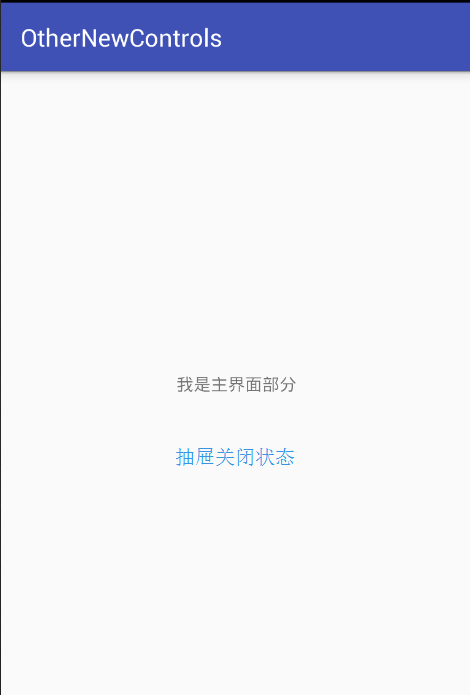
抽屉打开状态时: 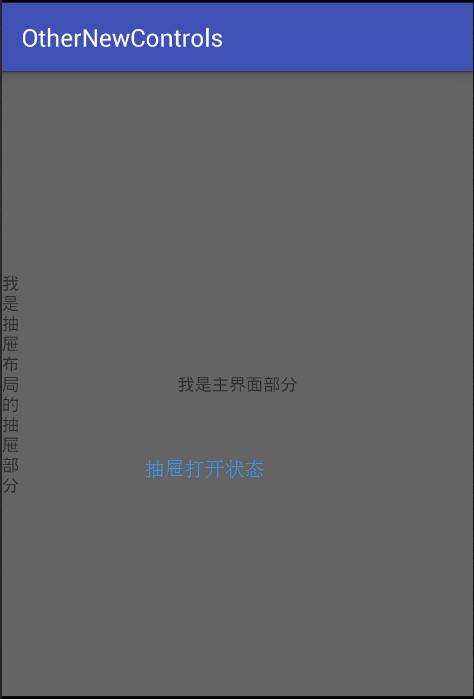
2. SwipeRefreshLayout(滑动刷新布局)
SwipeRefreshLayout使用户可以通过垂直滑动手势刷新视图的内容。
在xml中定义SwipeRefreshLayout
 <android.support.v4.widget.SwipeRefreshLayout

        android:id="@+id/refresh"

        android:layout_width="match_parent"

        android:layout_height="match_parent">

        <TextView

            android:gravity="center"

            android:layout_width="match_parent"

            android:layout_height="wrap_content"

            android:text="我是主界面部分" />

 </android.support.v4.widget.SwipeRefreshLayout>
在java中操作SwipeRefreshLayout
        this.refresh = (SwipeRefreshLayout) findViewById(R.id.refresh);

        refresh.setOnRefreshListener(new SwipeRefreshLayout.OnRefreshListener() {

            @Overridepublic void onRefresh() {

                Log.i("SwipeRefreshLayout","下拉刷新");

                //do something,刷新视图内容

                refresh.setRefreshing(false);//设置刷新结束

                Log.i("SwipeRefreshLayout","刷新完毕");

            }

}); 本程序源代码下载:Android其它新控件
Android其它新控件 (转)的更多相关文章
- 【转】Android M新控件之AppBarLayout,NavigationView,CoordinatorLayout,CollapsingToolbarLayout的使用
Android M新控件之AppBarLayout,NavigationView,CoordinatorLayout,CollapsingToolbarLayout的使用 分类: Android UI ...
- 【转】Android M新控件之FloatingActionButton,TextInputLayout,Snackbar,TabLayout的使用
Android M新控件之FloatingActionButton,TextInputLayout,Snackbar,TabLayout的使用 分类: Android UI2015-06-15 16: ...
- android design 新控件
转载请标明出处: http://blog.csdn.net/forezp/article/details/51873137 本文出自方志朋的博客 最近在研究android 开发的新控件,包括drawe ...
- [转 载] android 谷歌 新控件(约束控件 )ConstraintLayout 扁平化布局
序 在Google IO大会中不仅仅带来了Android Studio 2.2预览版,同时带给我们一个依赖约束的库. 简单来说,她是相对布局的升级版本,但是区别与相对布局更加强调约束.何为约束,即控件 ...
- Android L新控件RecyclerView简介
Android L是android进化史上的里程碑,尽管还没有正式发布4.5或者5.0,但预览版也同样精彩. 这篇文章只是另外一篇博客的总结性翻译,能够读懂原文的,可以点开这个链接去阅读精彩的原文:h ...
- android L 新控件侧滑菜单DrawerLayout 使用教程
介绍 drawerLayout是Support Library包中实现了侧滑菜单效果的控件,可以说drawerLayout是因为第三方控件如MenuDrawer等的出现之后,google借鉴而出现的产 ...
- android L新控件RecyclerView详解与DeMo[转]
http://blog.csdn.net/codebob/article/details/37813801 在谷歌的官网我们可以看到它是这样介绍的: RecyclerView is a more a ...
- android L新控件RecyclerView具体解释DeMo
简介 在谷歌的官方网站上,我们可以看到,它是此演示文稿:RecyclerView is a more advanced and flexible version of ListView. This w ...
- 【Android】Anroid5.0+新控件---酷炫标题栏的简单学习
Android5.0+推出的新控件感觉特别酷,最近想模仿大神做个看图App出来,所以先把这些新控件用熟悉了. 新控件的介绍.使用等等网上相应的文章已经特别多了,题主也没那能力去写篇详解出来,本篇随笔记 ...
随机推荐
- 浅析Java中的访问权限控制
浅析Java中的访问权限控制 今天我们来一起了解一下Java语言中的访问权限控制.在讨论访问权限控制之前,先来讨论一下为何需要访问权限控制.考虑两个场景: 场景1:工程师A编写了一个类ClassA,但 ...
- POJ 2653 Pick-up sticks【线段相交】
题意:n根木棍随意摆放在一个平面上,问放在最上面的木棍是哪些. 思路:线段相交,因为题目说最多有1000根在最上面.所以从后往前处理,直到木棍没了或者最上面的木棍的总数大于1000. #include ...
- poj2531 Network Saboteur
Network Saboteur Time Limit: 2000MS Memory Limit: 65536K Total Submissions: 11122 Accepted: 5372 ...
- 实现gridview空白处的点击事件
今天做了一个girdview,要求长按item出现删除按钮,点击空白处取消,长按出现按钮可以,但是点击空白处有问题,如果点击到书籍的空白处 可以用适配器的布局点击事件处理,但是空白区域不是item,不 ...
- Memcached和Memcache安装(64位win7)
一.Memcached和Memcache的区别: 网上关于Memcached和Memcache的区别的理解众说纷纭,我个人的理解是: Memcached是一个内存缓存系统,而Memcache是php的 ...
- Web APP开发技巧总结
http://www.admin10000.com/document/6304.html 1. 当网站添加到主屏幕后再点击进行启动时,可隐藏地址栏(从浏览器跳转或输入链接进入并没有此效果) <m ...
- PAT 1027. 打印沙漏(20)
本题要求你写个程序把给定的符号打印成沙漏的形状.例如给定17个"*",要求按下列格式打印 ***** *** * *** ***** 所谓"沙漏形状",是指每行 ...
- Java中HashSet,HashMap和HashTable的区别
HashMap.HashSet.HashTable之间的区别是Java程序员的一个常见面试题目,在此仅以此博客记录,并深入源代码进行分析: 在分析之前,先将其区别列于下面 1:HashSet底层采用的 ...
- BZOJ 1026 【SCOI2009】 windy数
Description windy定义了一种windy数.不含前导零且相邻两个数字之差至少为2的正整数被称为windy数. windy想知道, 在A和B之间,包括A和B,总共有多少个windy数? I ...
- SQL Server DB Type and CLR Type
这段时间学习SQL Server CLR编程,但是SQL CLR编程,里面所使用的数据类型为CLE TYPE,它多少与 Db TYPE有些区别,在网上找到一个列表http://geekswithblo ...