
ivy,ivyde插件-eclipse
官方共享更新磁盘下载
http://www.apache.org/dist/ant/ivyde/updatesite/
http://ant.apache.org/ivy/download.cgi
简述:
在eclipse配置Ivy外加lib管理工具 , 用来导入项目需要的lib包
这个工具可以指定需要那个lib,定义在xml里之后,ivy就会自动帮你添加外部包
很方便!
eclipse直接更新
步骤:
1. 下载资源 (可能出问题,多google 、多百度 无非就是缺了feature对应的plugin)
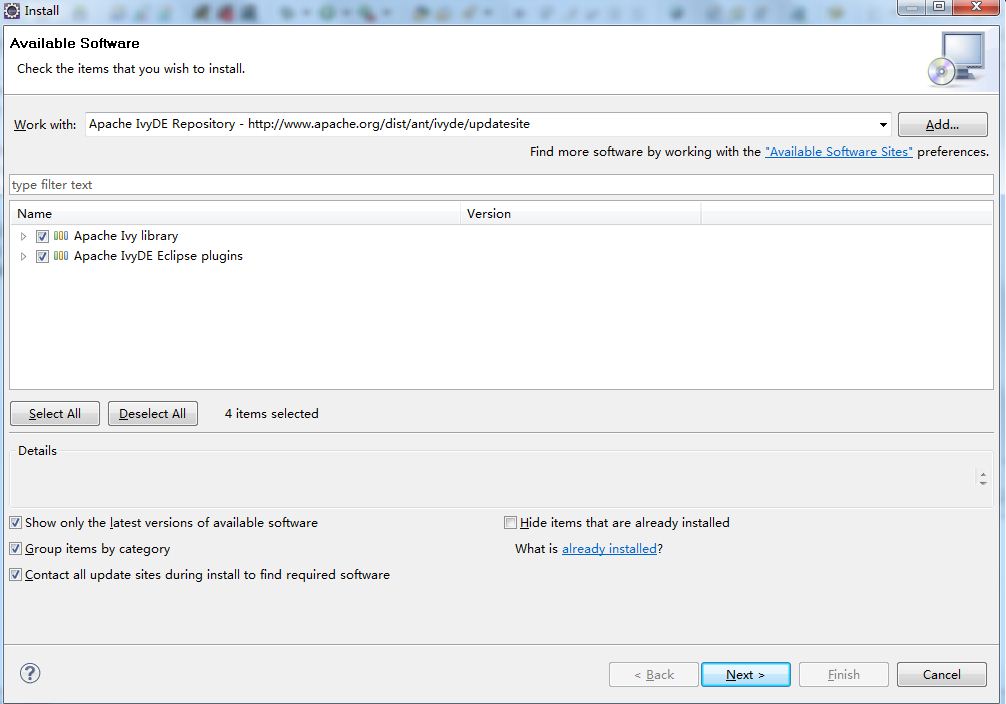
eclipse在install new software
输入: http://www.apache.org/dist/ant/ivyde/updatesite
下载(全部下载,有问题无视之..) 如果还是不行就到网站手动下载,填充相应的plugins和features到eclipse下的对应文件
这里的不行是指在window => preference 里没有出现ivy这一项
2.右击某个项目, 新建一个ivy
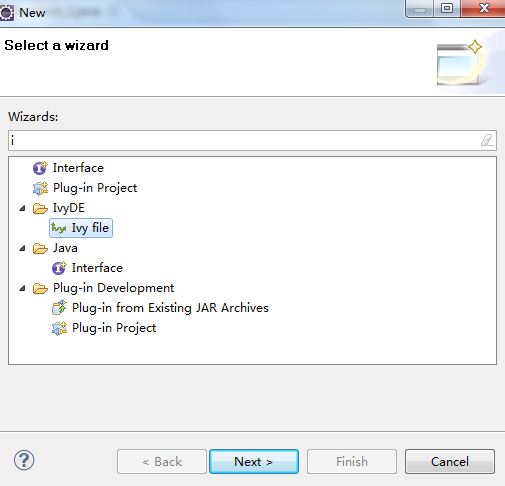
3. next下去,这里我选的项目叫JavaTest

4.文件配置
这步是关键:
需要文件两个
ivy.xml (上面创建出来的)
我想实现的是修改ivy配置文件之后让他帮我导入一个gson 1.7.1的外部包
ivy.xml代码如下
<?xml version="1.0" encoding="ISO-8859-1"?>

<!--

   Licensed to the Apache Software Foundation (ASF) under one

   or more contributor license agreements.  See the NOTICE file

   distributed with this work for additional information

   regarding copyright ownership.  The ASF licenses this file

   to you under the Apache License, Version 2.0 (the

   "License"); you may not use this file except in compliance

   with the License.  You may obtain a copy of the License at

     http://www.apache.org/licenses/LICENSE-2.0

   Unless required by applicable law or agreed to in writing,

   software distributed under the License is distributed on an

   "AS IS" BASIS, WITHOUT WARRANTIES OR CONDITIONS OF ANY

   KIND, either express or implied.  See the License for the

   specific language governing permissions and limitations

   under the License.

-->

<ivy-module version="2.2" xmlns:xsi="http://www.w3.org/2001/XMLSchema-instance"

       xsi:noNamespaceSchemaLocation="http://ant.apache.org/ivy/schemas/ivy.xsd">

    <info

        organisation=""

        module="JavaTest"

        status="integration">

    </info>

    <dependencies>

        <dependency org="com.google.code.gson" name="gson" rev="1.7.1" />

    </dependencies>

</ivy-module>
其中dependency就是我google之后查到的ivy的dependency的路径吧
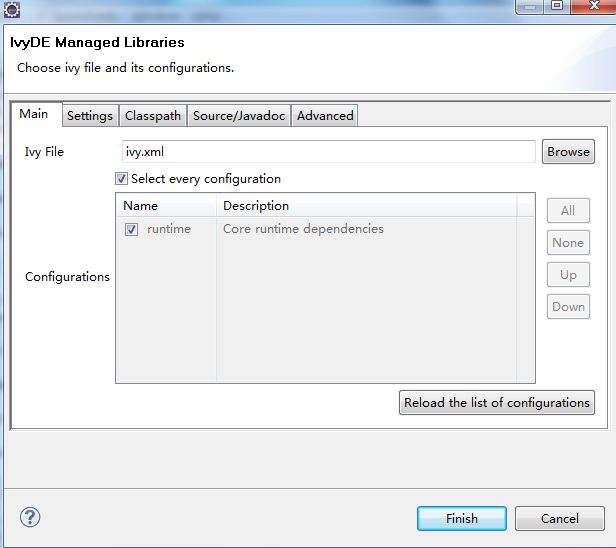
5. 右击ivy.xml
Add Ivy Library
点击finish之后
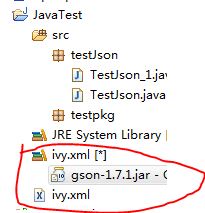
6. 于是,就多了一个ivy.xml[*]里面有刚才ivy.xml里加入的dependency
ivy,ivyde插件-eclipse的更多相关文章
- Eclipse中安装可以新建html文件的插件(Eclipse HTML Editor)
最近在eclipse中开发android项目,用到了jquery mobile框架,则会涉及到新建html文件,发现eclipse不自带新建html文件的插件,必须得新建一个其他形式的文件,譬如xml ...
- Eclipse颜色主题插件-Eclipse Color Theme
Eclipse颜色主题插件-Eclipse Color Theme 由于看烦了eclipse自带的的配色方案,自己动手配置又太麻烦,无意间在 http://eclipsecolorthemes.org ...
- Eclipse Oxygen(4.7.0)安装插件Eclipse Class Decompiler反编译JAR文件
引用自官方内容 Eclipse Class Decompiler是一款Eclipse插件,整合了多种反编译器,和Eclipse Class Viewer无缝集成,能够很方便的使用插件查看类库源码,进行 ...
- Atitit.ide代码块折叠插件 eclipse
Atitit.ide代码块折叠插件 eclipse 1. User Defined Regions #region ... #endregion 插件com.cb.eclipse.foldin ...
- Eclipse常用插件 + Eclipse快捷键
J2EE开发IDE,常用的有Eclipse.Myeclipse.Intellij IDEA 版本(Luna):http://www.eclipse.org/downloads/ 版本(2015 ...
- Eclipse4.4 安装java反编译插件Eclipse Class Decompiler
一.在线安装方式: Eclipse Class Decompiler整合了眼下最好的2个Java反编译工具Jad和JD-Core,而且和Eclipse Class Viewer无缝集成.可以非常方便的 ...
- eclipse 的代码着色插件 --Eclipse Color Theme
Eclipse Color ThemeEclipse自带的背景颜色是白色的,很伤眼睛,故而安装一个颜色和主题插件,来改变代码区域的背景颜色以及关键字的颜色. 网址:http://eclipsecolo ...
- [Eclipse插件] Eclipse中如何安装和使用GrepCode插件
Java是开源的世界,如何快速的搜索到你需要的Java源码呢?2009年7月17日,GrepCode团队发布了一个有趣的 Java源码搜索引擎-GrepCode .与现有的各种搜索引擎相比,Java源 ...
- eclipse添加删除插件-eclipse marketplace
源文地址:http://jingyan.baidu.com/article/cdddd41c5c883353cb00e19e.html 在有些版本的eclips上并没有eclipse marketpl ...
随机推荐
- Google类VR设备知识
前言 本文所指的google类vr设备是指: 谷歌的Cardboard.三星Gear VR.暴风魔镜等这样的手机VR盒子,而并不是HTC Vive这类. 人眼立体感知能力 人的左右眼看到的东西是有差别 ...
- Sass关于颜色函数的乐趣
阅读目录 1. 了解RGB和HSL颜色标准 2. RGB函数 3. HSL函数 4. Opacity函数 5. 其他颜色函数 6. 一个简单的应用 在Sass中,定义了很多现成的函数,可供我们使用.在 ...
- HQL基础查询语句
HQL基础查询语句 1.使用hql语句检索出Student表中的所有列 //核心代码 @Test public void oneTest() { Query query=session.createQ ...
- Java—Servlet开发
Servlet API中有4个java包: javax.servlet:包含定义Servlet与Servlet容器之间契约的类与接口. javax.servlet.http:包含定义HTTPServl ...
- mysql下mysqladmin日常管理命令总结
mysqladmin 工具的使用格式:mysqladmin [option] command [command option] command ......参数选项:-c number 自动运行次数统 ...
- 产品经理技能之MRD的笔记之一
原文:http://www.woshipm.com/pmd/131946.html/comment-page-1 产品经理技能之MRD 一.MRD与BRD的不同之处 BRD:这么做有什么好处,并说明好 ...
- QQ浏览器X5内核问题汇总
原文:http://itindex.net/detail/53391-qq-浏览器-x5 常常被人问及微信中使用的X5内核的问题,其实我也不是很清楚,只知道它是基于android 4.2的webkit ...
- 放松跑、间歇跑、节奏跑和LSD
放松跑(easy run),顾名思义,是没有负担的跑步,通常用于高强度训练之间,让机能得到恢复. 间歇跑(intervals),又叫变速跑,通常是用高于实际比赛速配速的速度进行反复短距离的快跑,当中配 ...
- 1002. A+B for Polynomials
1002. A+B for Polynomials (25) This time, you are supposed to find A+B where A and B are two polynom ...
- iptables案例手册
Linux防火墙Iptable如何设置只允许某个ip访问80端口,只允许特定ip访问某端口 iptables常用实例备查(更新中) 9个常用iptables配置实例 案例: http://www.cn ...