
MVC4中重复使用JQuery Mobile Dialog的做法实践.
第一步:建立mobile项目类型
第二步:添加针对对话框的的DialogController.cs:
建立这个Controller的目的是此Dlg可以反复使用,把它做成一个固定界面,其他的Controller也可以调用。
 using System;

 using System.Collections.Generic;

 using System.Linq;

 using System.Web;

 using System.Web.Mvc;

 namespace MvcDlgTest.Controllers

 {

     public class DialogController : Controller

     {

         //

         // GET: /Dialog/

         public ActionResult Index(string OKAction,string CancelAction,string CtrlName,string Message)

         {

             if (string.IsNullOrWhiteSpace(CtrlName))

                 CtrlName = "Home";

             ViewBag.CtrlName = CtrlName;

             ViewBag.Message = Message;

             ViewBag.OKAction = OKAction;

             ViewBag.CancelAction = CancelAction;

             return View();

         }

     }

 }
针对上述的Index的View为:
Index.cshtml:
@{

    ViewBag.Title = "温馨提示";

    Layout = "~/Views/Shared/_DlgLayout.cshtml";

}

<h2>@ViewBag.Message</h2>

<div data-inline="true">

@Html.ActionLink("取消", (string)ViewBag.CancelAction, (string)ViewBag.CtrlName, null, new { @data_role = "button", @data_inline = "true" })

@Html.ActionLink("确定", (string)ViewBag.OKAction, (string)ViewBag.CtrlName, null, new { @data_role = "button", @data_inline = "true" })

</div>
给上方的View做一个专用母版.复制默认模板_Layout.cshtml,,改名为: _DlgLayout.cshtml,内容如下:
<!DOCTYPE html>

<html lang="en">

    <head>

        <meta charset="utf-8" />

        <title>@ViewBag.Title</title>

        <meta name="viewport" content="width=device-width" />

        <link href="~/favicon.ico" rel="shortcut icon" type="image/x-icon" />

        @Styles.Render("~/Content/mobileCss", "~/Content/css")

        @Scripts.Render("~/bundles/modernizr")

    </head>

    <body>

        <div data-role="page" data-theme="b">

            <div data-role="header">

             <h1>@ViewBag.Title</h1>

           </div>

             <div data-role="content">

                @RenderBody()

            </div>

        </div>

        @Scripts.Render("~/bundles/jquery", "~/bundles/jquerymobile")

        @RenderSection("scripts", required: false)

    </body>

</html>
修改Home/index.cshtml:
@{

    ViewBag.Title = "Home Page";

}

   <h2>@Html.ActionLink("访问关于1", "Index", "Dialog", new {OKAction ="About", CancelAction="Index",CtrlName="Home",Message = "打算访问关于吗?" }, new{@data_rel="dialog",@data_transition="pop"})</h2>

   <h2>@Html.ActionLink("访问联系方式", "Index", "Dialog", new { OKAction = "Contact", CancelAction = "Other", CtrlName="Home",Message = "打算访问联系方式吗?" }, new { @data_rel = "dialog", @data_transition = "pop" })</h2>

 <h2> <a href="@Url.Action("Index", "Dialog",new { OKAction = "About", CancelAction = "Index", CtrlName = "Home", Message = "打算访问关于吗?"})" data-rel = "dialog", data-transition = "pop" > 访问关于2</a></h2>
在HomeController.cs文件中,增加一个Other Action以及相应的View Other,增加测试变化。
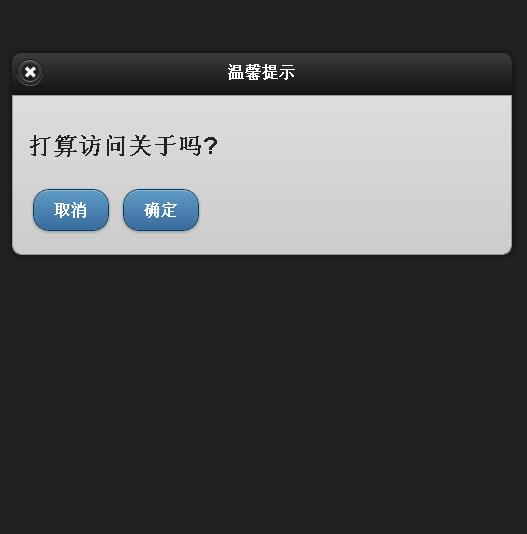
演示效果图:
MVC4中重复使用JQuery Mobile Dialog的做法实践.的更多相关文章
- [转]Jquery Mobile dialog的生命周期
本文转自:http://www.cnblogs.com/jackhuclan/archive/2012/04/05/2432972.html JQuery Mobile对htm5的移动开发绝对是个好用 ...
- 主攻ASP.NET MVC4.0之重生:Jquery Mobile 列表
代码: <!DOCTYPE html> <html> <head> <meta charset="utf-8"> <title ...
- 主攻ASP.NET MVC4.0之重生:Jquery Mobile 表单元素
相关代码: <!DOCTYPE html> <html> <head> <meta charset="utf-8"> <tit ...
- 主攻ASP.NET MVC4.0之重生:Jquery Mobile 按钮+对话框使用
<!DOCTYPE html> <html> <head> <meta charset="utf-8"> <title> ...
- 主攻ASP.NET MVC4.0之重生:Jquery Mobile 面板
左滑动面板效果: 右滑动面板效果: @{ ViewBag.Title = "JQuery Mobile Web Page"; } <!DOCTYPE html> < ...
- jQuery Mobile 中创建按钮
在 jQuery Mobile 中创建按钮 jQuery Mobile 中的按钮可通过三种方法创建: 使用 <button> 元素 使用 <input> 元素 使用 data- ...
- jQuery Mobile Api
jQuery Mobile提供了使用Javascript与框架(html5)通信以及进行内容管理的API.下面介绍具体事件. 文档事件 mobileinit事件会在jQuery Mob ...
- JQuery Mobile - 解决动态更新页面内容,CSS失效问题!
今天编写JQuery Mobile程序,需要对数组数据动态创建,并且每条数据对应一个复选框,于是我很顺利写了一个Demo,当我运行时候发现,和我期望的不一样!复选框确实创建出来了,但是却没有CSS效果 ...
- jquery mobile转场时加载js失效(转)
jquery mobile拦截了所有的http请求,并使用ajax请求取代传统的http.请求发出后,框架会将请求的内容插入到页面中data- role="page"的部分,取代原 ...
随机推荐
- CF 335B. Palindrome(DP)
题目链接 挺好玩的一个题,1Y... #include <cstdio> #include <cstring> #include <iostream> using ...
- 升级到EF6 两个注意事项
1.依据MSDN的官方描述: In previous versions of EF the code was split between core libraries (primarily Syste ...
- linux修改系统编码
Windows的默认编码为GBK,Linux的默认编码为UTF-8.在Windows下编辑的中文,在Linux下显示为乱码.一种方法是在windows进行转码,比如使用ue工具在文件-->转换 ...
- 基于SVG的JS地图插件
一:D3(Data-Driven Documents) 官网地址:http://d3js.org/ 功能非常强大(不支持IE8) D3 是最流行的可视化库之一,它被很多其他的表格插件所使用.它允许绑定 ...
- OBject copy 和retain区别
@interface Person : NSObject //retian : release 旧值,retain 新值 @property(nonatomic,retain) Book *book; ...
- webdriver中PDF控件无法显示的问题(IE兼容性)
公司的的系统只能运行在32位的IE上,开始从http://selenium-release.storage.googleapis.com/index.html?path=2.48/ 这个路径下去下载了 ...
- dataTransfer.getData()在dragover,dragenter,dragleave中无法获取数据的问题
做拖拽相关效果时,想在ondragover时给被拖拽元素添加一些样式,于是在dragover事件的函数中通过dataTransfer.getData()获取在dragstart中设置的数据,然而发现d ...
- 通过jquery获取ul中第一个li的属性
当加载列表时,默认希望选中第一条.top_menu 为ul的ID 通过 $("#top_menu li:first") 就可以获取到 ul下第一个li标签.然后就可以利用 例如 修 ...
- springMVC搭建
springMVC搭建 1.Spring特点: 方便耦合,简化开发,提升性能 AOP面向切面的编程 声明式事务支持 方便程序的调试 方便集成各大优秀的框架 Java源代码学习的典范 2.Java的面向 ...
- ServletConfig对象和它在开发中的应用场
package cn.itcast; import java.io.IOException; import java.io.PrintWriter; import java.util.Enumerat ...